By Hank Tolman
With the release of AMD’s Kaveri APU and the realization of their heterogeneous compute vision, the A10-7850K has the potential to make a lot of changes in the way we use the processing power available to us. The A10-7850K can harness the full power of both its CPU and GPU cores equally, something that can benefit us, the end users, greatly. The problem is, that vision doesn’t fully come to life until developers start writing for it.
 The Mantle API goes a long way toward helping developers efficiently take advantage of the capabilities offered by Kaveri and HSA. The current drivers available for Kaveri, 13.12 at the time of publishing, don’t support all of the features of Mantle. Don’t give up on Kaveri yet, however.
Catalyst 14.1 Beta was released, but wasn’t quite ready for prime time. Catalyst 14.2 Beta is better. You can download the Beta drivers from AMD’s website now and I’m going to tell you why you should. I’ve tested the Catalyst 14.2 Beta drivers and the performance increase across the board is amazing. Here are the results.
 Test System
- Motherboards: ASUS A88X Pro
- Processor: AMD A10-7850K
- System Memory: 8GB AMD Radeon DDR3 2400MHz
- Disk Drive: Seagate 1TB SSHD ST1000LM014
- PSU: Corsair CMPSU-850TX 850W 80-Plus Certified
- Operating System: Windows 7 Professional 64-bit
Compute Benchmarks
- AIDA 64
- SiSoftware Sandra 2014
- PCMark 8
DirectX-11 Benchmark Applications
Synthetic Benchmarks
- 3DMark
- Firestrike, Cloudgate, Ice Storm
- 3DMark11
- “Performance” settings (1280×720)
- ComputeMark 2.1
- Normal Presets, 1920×1080
- Unigine Heaven Benchmark 4.0
- Tesselation, Low Settings
Gaming Benchmarks
- Tomb Raider
- Normal Settings
- Bioshock Infinite
- Low Settings
- Battlefield 4
- Normal Settings
AIDA64 is a full 64-bit benchmark and test suite utilizing MMX, 3DNow! and SSE instruction set extensions, and will scale up to 32 processor cores. An enhanced 64-bit System Stability Test module is also available to stress the whole system to its limits. For legacy processors all benchmarks and the System Stability Test are available in 32-bit versions as well.
 In the highly compute centric Queen tests we barely register a difference with the new drivers, but the Photoworxx test gives us a 5% uptick, definitely outside the margin of error.
 There isn’t much change in the encryption tests either, with just very slight increases due to the driver update.
 Once again, the floating point tests don’t give us much of a reason to upgrade to the beta drivers. The CPU-centric tests seem not to benefit too greatly from the new drivers, although there is a slight overall increase. Let’s look at Sandra.
SiSoftware Sandra is a 32- and 64-bit client/server Windows system analyzer that includes benchmarking, testing and listing modules. It tries to go beyond other utilities to show you more of what is really going on under the hood so you draw comparisons at both a high and low-level in a single product. You can get information about the CPU, GPGPU, chipset, video adapter (GPU), ports, printers, sound card, memory, network, Windows internals even .NET and Java.
 The first Sandra tests show a little bit of a different story here. The new 14.2 Beta drivers improve the aggregate score by nearly 10%, the Cryptography score by over 8%, and the memory bandwidth by over 6%.
 The arithmetic and multi-media scores are nearly identical between the driver versions, but the GP Processing scores shows huge improvement with a score nearly 65% better. I think we found the sweet spot for the 14.2 Beta drivers, and it doesn’t have much to do with the CPU.
CINEBENCH is a cross-platform testing suite that measures hardware performance and is the de facto standard benchmarking tool for leading companies and trade journals for conducting real-world hardware performance tests. With the new Release 15, systems with up to 256 threads can be tested. CINEBENCH is available for both Windows and OS X and is used by almost all hardware manufacturers and trade journals for comparing CPUs and graphics cards. The Cinebench tests show similar results to the Sandra tests. The CPU benchmarks show slight improvement, but the OpenGL score improves by almost 20%.
The new 3DMark includes everything you need to benchmark your hardware. With three all new tests you can bench everything from smartphones and tablets, to notebooks and home PCs, to the latest high-end, multi-GPU gaming desktops. And it’s not just for Windows. With 3DMark you can compare your scores with Android and iOS devices too. It’s the most powerful and flexible 3DMark we’ve ever created.
 Kicking off the DX11 Benchmarks, both 3DMark FireStrike and Cloud Gate get big gains with the 14.2 Beta drivers. FireStrike improves by a little over 10% and Cloud Gate by over 8%.
 Ice Storm rounds out the 3DMark graphics tests and experience a 9% increase in performance
3DMark 11 is a DirectX 11 video card benchmark test for Windows that is designed to measure your PC’s gaming performance. 3DMark 11 makes extensive use of DirectX 11 features including tessellation, compute shaders and multi-threading. Trusted by gamers worldwide to give accurate and unbiased results, 3DMark 11 is the best way to consistently and reliably test DirectX 11 under game-like loads. 3DMark 11 experiences a 10% increase in performance.
 Only about 6% in ComputeMark
Heaven Benchmark is a DirectX 11 GPU benchmark based on advanced Unigine engine from Unigine Corp. It reveals the enchanting magic of floating islands with a tiny village hidden in the cloudy skies. There is a gain of a little over 3 FPS in the Heaven Benchmark, but that amounts to over 17%. Let’s see what kind of performance gains we can get in actual games.The Tomb Raider game includes a benchmark in it that highlights the TressFX features used in the game. TressFX is specifically a hair quality physics feature that aids in realistic looking hair in games. Each strand of hair is given dozens of connections in a chain-like fashion. Each strand can be affected by gravity, wind, and head movements. The hair is also given collision, so that the overlapping hairs don’t merge together and they don’t penetrate solid surfaces like the character’s head.
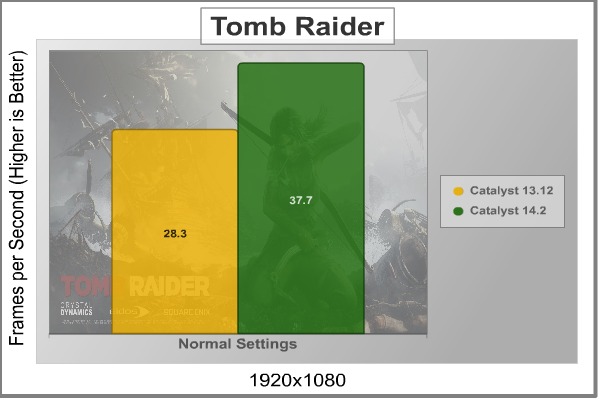 Performance in Tomb Raider was increased by over 33%, taking the game from barely playable to quite playable with just the update of a driver.Bioshock Infinite, by Irrational Games, was one of the most highly anticipated games of its time. According the vast majority of reviews on the game, it didn’t disappoint. Having played it, I can tell you that the story line grabs you and doesn’t let go. The moral and ethical quandries and twisting plot will keep you in front of your screen for hours on end. The graphics are nothing to shake a stick at either. That being said, Bioshock Infinite was built on the aging (although still widely used) Unreal Engine 3. That same engine has been in use since DX9 and was designed to take full advantage of shader hardware. In Bioshock Infinite, of course, the engine uses DX11 features to make the graphics that much more realistic.
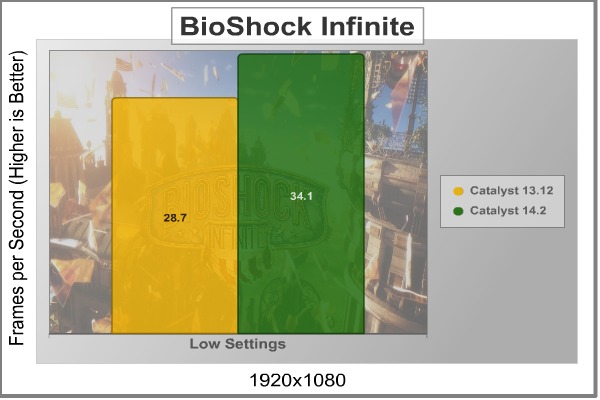 Bioshock only gains about 20% performance, but it still makes all the difference, putting it above the 30FPS threshold.The graphics engine behind Battlefield 4 is called Frostbite 3, which offers more realistic environments with higher resolution textures and next-generation particle effects. A first-time ‘networked water’ fluid system allows players in the game to see the same wave at the same time. Tessellation has also been improved since Frostbite 2 in BF3.
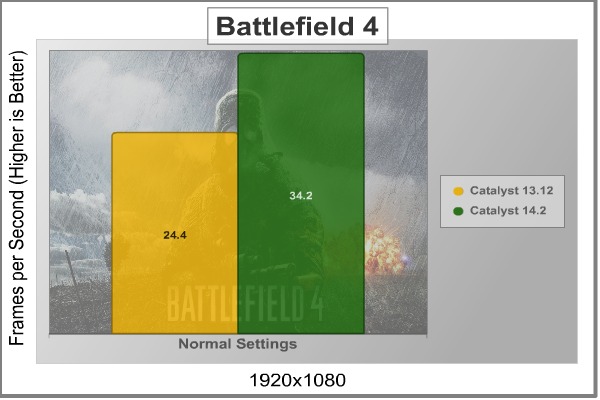 Battlefield 4 performance is increased by nearly 40% when updating to the Catalyst 14.2 Beta drivers. This makes the game easily playable at normal settings.When Kaveri was released in January 2014, AMD made a huge deal about it and the new era of heterogeneous compute Kaveri was ushering in. When I first got my hands on Kaveri, I was very impressed by all the information about how much better HSA was going to make the world. When it came down to the actual testing, though, there just wasn’t all that much to get excited about. While Kaveri definitely put up some performance gains when compared with last generation’s APUs, but with all the hype, I was expecting something truly revolutionary.
 When AMD released Catalyst 14.1 drivers, I quickly updated to see what kind of improvements had been made. Updated drivers always help with optimizing performance. Unfortunately, 14.1 had a lot of issues. There were performance gains because of the integration of the Mantle API, but there is a reason that Beta drivers are Beta. Catalyst 14.2 was released not too long ago and I was finally able to see the gains I was waiting for.
From the tests, we can see that 14.2 doesn’t do a ton for CPU tasks, but in the GPU arena, the new Beta drivers really shine. Even in games and GPU synthetic benchmarks that don’t use the Mantle API, 14.2 brought significant performance gains, much more on par with what I was hoping to see. In Battlefield 4, using the Mantle API, 14.2 resulted in a performance increase of over 40%.
Beta drivers are in Beta release for a reason, they usually aren’t fully ready for prime time. That was certainly the case with the Catalyst 14.1 Beta release. 14.2 is different, however. It isn’t without its flaws. I am still having trouble running 14.2 on the Gigabyte G1.Sniper A88X motherboard. It runs great on the ASRock F2A88X Extreme6+ and the ASUS A88X-Pro. If you do update the Catalyst 14.2 Beta, make sure you update your BIOS first to the latest version.
The bottom line is this: If you have upgraded to Kaveri, you need Catalyst 14.2 Beta. I would also update to 14.2 if you use an R5, R7, or R9 GPU, especially if you play Battlefield 4.


