By Jason Vaught
Manufacturer: GAMDIAS Technology Co, Ltd
Product Name: GAMDIAS Hephaestus Multi-Sensorial Gaming Headset
Model Number: GHS2000
UPC: 848475000824 EAN: 4710728309458
Price As Tested: $99.99 ( Amazon | NewEgg )
Full Disclosure: The product sample used in this article has been provided by GAMDIAS.
GAMDIAS is a Taiwan based company that specializes in gaming keyboards, mice, and headsets. They’ve branched out recently to include mouse pads and gaming accessories as well. Their products offer a vast array of features that are not commonly found together in this price bracket.
The GAMDIAS Hephaestus GHS2000 Multi-Sensorial Gaming Headset is a feature packed headset promising big sound in a big package. The Hephaestus sports virtual 7.1 surround, built-in cooling, and a unique feature called the blast source identifier. The headset also sports leather ear pads and headband, allowing for a very comfortable gaming experience during long sessions.

The GHS2000’s main attraction, the blast source identifier, is what sets it apart from the rest. GAMDIAS claims that the headset sends out shock waves which can vary by ear depending on what side of your player the blast came from, helping you pinpoint which direction the enemy combatant is located. This will be the main part of our testing, as well as sound quality, microphone quality, and overall durability of the headset.
Features
- Virtual 7.1 Channel Effect – Delivery faithful and reverberating simulated 7.1 channel sound effect.
- Microphone Sound Change – Exclusive EOS controlled microphone sound changer, allowing easy high/low pitch tuning.
- Ergonomic Comfort – Leather headband and ear pads for comfort during prolonged gameplay
- Noise Cancelling Mic – Active noise cancellation microphone filters out unwanted noise signal to clear messages to team
- Environment Sound Effect Simulation – Carefully tuned professional gaming acoustic simulator, letting user choose their favorite acoustic environment through simple settings by EOS.
- Blast Source Identifier – Shock waves vary by ear to help pinpoint blast source
- Cooler System – Built-in aluminum heat sink for optimum temperature
- Flexible Mic Arm – Microphone arm can bend in any direction for personalized usage
Specifications
| Cable Length | 2.5meters |
| Dimensions (LxWxH) | 232 x 100 x 216 mm |
| Frequency Range | 20 ~ 20KHz |
| Plug Type | Gold-plated USB |
| Sensitivity | 117dB +/- 4 dB at 1kHz |
| Impedance | 32 Ohms |
| Driver Diameter | 40mm |
| Driver Magnets | NdFeB |
| Microphone Size | 6.0 * 5.0mm |
| Microphone Sensitivity | -46dB +/- 3dB |
| Maximum Input Power | 100mW |
| Microphone Frequency | 100 ~ 10KHz |
| Microphone Impedance | 2.2 K Ohms |
| Vibration Frequency | 20 ~ 200Hz |
| Vibration Sensitivity | 82dB +/- 4dB |
| Vibration Impedance | 8 Ohms |
| Vibration Max Input | 1W |
Now let’s take a quick look at the un-boxing of the Hephaestus and what comes with it. I’ll also touch on a couple of the features of the Hephaestus.

GAMDIAS decided to go the glamour route with the boxing of the Hephaestus, utilizing half cardboard box, half plastic shell, in order to give the end user some eye candy before opening their prize.

Here is a shot of the opposite side of the packaging, an alternate shot of the “candy” side, and a quick shot of how it appears once the plastic shell is removed. From this step, getting the Hephaestus out of it’s final box was a slight jigsaw puzzle, but generally straightforward nonetheless.

What you see here is what you get in the package, the headset, a small users manual and some sticker swag with the GAMDIAS logo on it. It is worthy to note that you do not, however, get any software in the actual package. No software with the actual product has quickly become the industry norm as it saves money, and helps ensure that end users get the latest version of the software regardless of the time of purchase.
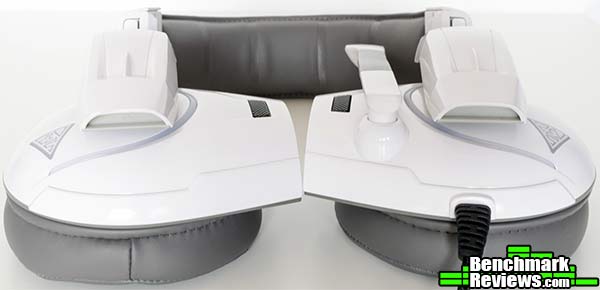
After un-boxing the Hephaestus, you’ll notice right away that you can simply fold the ear cups flat before laying it on a surface, this keeps you from damaging or bending the non-removable USB cord coming from the left ear cup.
Now we’ll take a closer look at some of the detailed feature that the Hephaestus has to offer! Now for the eye candy!

The Hephaestus’s microphone comes on a flexible boom that also allows you to rotate and store the microphone upright and out of the way when not in use. The flexibility was nominal and did not shift the headset during adjustment. The microphone stayed right where it was put during each gaming session. Some headsets develop a problem with the microphone staying put, usually heavy use results in this problem so only time will tell with the Hephaestus.

Here you can see exactly how the headset looks plugged in and not in use. Fold flat ear cups make for convenient flat surface storage. The microphone boom arm is folded up and stays in this position when not in use. The lights are bright and cannot be turned off, for many this may be a deal breaker.

The aluminum ear cup heatsinks, designed to keep your ears cool did just that. Although I’m not sure how much can be attributed to the heatsinks doing the work vs ambient temperature of the room. There is no fan behind these heatsinks, so it has passive cooling at best. The photo also shows a nice shot of the leather ear cups. The leather ear cups are soft and plush and provide a very comfortable fit for the user.

The generously padded leather headband proved to be one of this headsets greatest features. It was very comfortable on my head and I didn’t notice any sweating after long gaming sessions. Of course, ambient temperature would play a huge role in sweat production, so keep that in mind.

The in-line remote, I found, proved to be quite nice. It allows volume control, microphone mute, and the option to enable/disable the “Blast Source Identifier” or what I’ll refer to as enhanced bass. The bass control (small slider switch on opposite side of the remote) has three options, off, low, high. When enabling the bass you hear a distinctive vibration-ish sound through the ear cups. While some people may view in-line remotes as bothersome or unnecessary, I actually like having the control clipped to my shirt. For those of you who game shirtless, well, let’s just say it won’t be as comfortable for you.
GAMDIAS offer some optional software for the Hephaestus on their website called EOS (but the actual link on the page first states it’s called HERA). The software appears to be a customized version of generic sound card software, not proprietary to GAMDIAS. The software, at least in my opinion, is not very useful, but it does allow you to do some interesting things.
 Here on the Main Settings tab, you can set what channel output the headset receives, engaging the software driven 7.1 virtual surround and the analog output mode options. Again, these settings already exist in windows, with the exception of XEar which I found to have little to no effect on sound.
 The only real benefit, or should I say feature, of the mixer tab’s options is the quick access option to enable monitoring of the microphone. By enabling the monitoring (the second button under the Microphone slider) you have the option to hear the sound effects found in the Karaoke/Magic Voice Tab (see below) as you speak into the microphone. I caught myself chuckling quite a bit while listening to the munchkin voice setting!
 Here under the effect tab, there are a plethora of environment options as well as an equalizer to fine tune your listening experience. The environment size options are pretty useless for headphones/headsets and would only be suited for actual speakers.
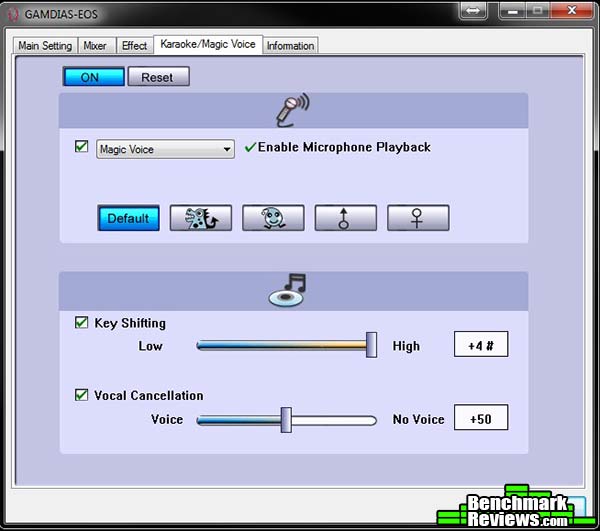 The Karaoke/Magic Voice tab! By far the only real fun in the entire software, specifically the magic voice, allows you to swap your regular voice for one of the 4 other voice options. The dragon icon changes the pitch to make your voice deeper, while the water drop looking icon makes your pitch higher, giving you a sort of munchkin voice! The Male and Female options only change the pitch slightly resulting in only a mild alteration to your normal voice.

And no software would be complete without the Information tab. This tab is self explanatory, but I thought I throw it in for totality purposes so that you would know what information each tab contains.
The GAMDIAS Hephaestus was tested with a variety of games, and music. Since sound perception is very subjective, for my testing I decided to focus mainly on perceived sound quality as well as the functionality of the features listed on GAMDIAS’s website for this headset. The headset was tested with Battlefield 4, World of Tanks, Titanfall, Borderlands 2, and Payday 2 for 40+ hours respectively.
-
Motherboard: ASUS Sabertooth Z87
-
System Memory: Corsair XMS3 4GB x 4
-
Processor: Intel i7-4770K Haswell @ 3.5 Ghz
-
Audio: N/A (As this is a USB Headset)
-
Video: XFX Double Dissipation R9-290X (4GB)
-
PSU: Corsair HX Series 1000HX
-
Monitor: Dell UltraSharp U2412M IPS 24? x 3 @ 5760×1200
-
Operating System: Windows 7 Ultimate (64-bit)
Virtual 7.1ch Effect: While this effect of course cannot rival that of a true 7.1 surround system with individual speakers, it should have more depth than a stereo headset. Unfortunately, the depth of this headset was virtually non-existent. I was not able to accurately identify where a sound came from with this effect, so maybe we’ll refer to it as “enhanced stereo”.
Microphone Sound Change: This feature will allow you to change the sound of your voice, but it only has 5 presets. This is purely for fun as it serves no purpose to enhance your gaming experience, unless you like saying “follow the yellow brick road” to your teammates in a munchkin voice while fragging an enemy combatant.
Ergonomic Comfort: This feature, I’m happy to say, is absolutely 100% accurate! The leather headband and ear pads are very soft, plush and durable. I used this headset on 5 separate 8+ hour gaming sessions and noticed no discomfort whatsoever.
Noise Cancelling Mic: This feature is highlighted as filtering out unwanted noise through “active noise cancellation”. But after extensive testing and multiple attempts to fine tune the quality, the mic turned out to be just a little too sensitive to ambient noise. Some of my teammates reported that I sounded like I was far away, or in a tunnel. I found that having the mic closer to your mouth helped eliminate the tunneling effect, but also made it easy for the mic to pick up on your breathing.
Environment Sound Effect Simulation: Advertised as a “carefully tuned professional gaming acoustic simulator, letting the user choose their favorite acoustic environment”. While the feature does work, as is fun to play with in between sessions, it serves no real purpose to help with gaming whatsoever. With environments such as bathroom, concert hall, under water, music pub, and a whole bundle of other options, this feature is basically an equalizer with a large assortment of presets. Being able to fine tune your listening experience with the equalizer is very convenient and definitely a feature, but the odd, aforementioned presets are a little peculiar to say the least.
Blast Source Identifier: This feature was, for me, the most anticipated effect that I wanted to try out. But, to my dismay, there are ZERO settings for this via the EOS software suite. At first attempt to feel the shock waves, I felt none, only to discover later that the sound has to be turned up all the way on the headset (the PC itself) in order to feel the “shock waves”. The “effect” has proven to be, essentially, just bass. Your game would need to support multi-channel audio output for you to take full benefit from this feature. This was interesting to feel a tank exploding next to you in battlefield 4, helping getting you really engrossed in the game you’re playing. I found this feature, overall, to be quite enjoyable. It is worthy to note that when this “bass” is enabled via the in-line remote switch (see Detailed Features), it does not distort the sound quality.
Cooler System: Another interesting innovation by GAMDIAS, put an aluminum heat sink right on the ear cups. I do have to say it works well, I noticed no discernible heat on my ears or the surrounding area while gaming. The aluminum keeps the unit very light on your head and doesn’t add too much bulk to the appearance of the Hephaestus.
Flexible Mic Arm: It works, and it does so very well. Simple as that.
Sound quality, as mentioned before, is very subjective. My perceived impression of the Hephaestus was that it did well with the Lows, barely noticeable Highs, and a somewhat muddy mid-range. The vocals did come over very well, as did the instruments. Clarity was better than some, but not as good as others. For the price and considering that it is a headset and not headphones, it did well. See Final Thoughts for more of my opinion on headsets.
In general, headsets have never performed as well as a good pair of headphones. Most manufacturers try to keep the cost down because they’re not going after the audiophile in terms of sound quality. The Hephaestus is no different in this aspect. While it is an exceptional headset to say the least, there is always room to improve on the sound quality and microphone clarity. But at what cost are we talking about here? To get some truly high performance headphones and a separate microphone that performs equally as well, you’re looking at $300 to $500 or more depending on what type of sound you like and what aspects are important to you.
As for the Hephaestus specifically, I like it. It is a good headset, it performs mostly as advertised, and is a real value at $99. I think most would be hard pressed to find another headset that packs this many features into a $99 price tag. The blast source identifier (or Bass) for gaming is immersive, but I would have liked to have seen some software options to fine tune the effect and make it truly impressive. Once you have everything configured for this headset, it truly performs well. Though it can be a little tedious to configure with your chat client and the mic can be a little finicky in placement as well, once you have it honed in, it truly performs well.

When trying to gauge the performance of a headset it will come down to 2 things, perceived sound quality and features. The sound quality performs well for a headset and the features blow past the competitors. It did most of what it advertised to do, including an immersive experience.
The clean lines and sheer mass of this headset makes it appearance one of distinction, which I’m sure is what GAMDIAS was going for. There will be no mistake that you’re wearing a Hephaestus when you’re at a Lan party. That being said, it would be nice if the lights on the ear cups had the option to be turned off.
In terms of construction, I noticed no declination in quality there either. They are sturdy, seem to be well made, but only time will tell if they hold up to the abuse that gamers commonly give their equipment. I do no foresee any problems down the road related to construction of this headset, although it would have been nice to have a detachable USB cord.
In terms of functionality, the Hephaestus falls a bit short, mainly due to the lack of options for the “Blast Source Identifier” and for the software itself. The microphone’s performance was very lacking and did not provide enough quality for me to be heard clearly in both Mumble and Teamspeak 3. Unfortunately, I could not get past the tunnel effect of this microphone in order to give it a higher rating.
The value packed into this $99.99 (Amazon | NewEgg) package is matched by no one else in terms of cost vs benefit. The only cheaper headset that comes to mind that performs decent is the Razer Kraken Pro, but it contains nowhere near the amount of features and extras that the Hephaestus does.
So the Hephaestus is in fact, a nice headset. If you’re a gamer, maybe on the newer side, looking for a decent headset at a very good price, then the Hephaestus should be high up on you list of options. On the other hand, if you’re a seasoned veteran, and demand the very best, then this is not the headset for you. But you would be hard pressed to find a similarly priced headset that packs all these features.
+ Lightweight construction
+ Tons of features packed into a single headset
+ Fold-flat design making for easy transport
+ Good sound quality in all aspects
+ In-line remote
+ Flexible Mic
+ Leather ear pads and headband
+ Price
– Non-detachable cord
– Microphone too sensitive and has a “tunnel” effect
– In-line remote (some view this is as a con)
– Somewhat muddy mid-range
– Lighting on ear cups cannot be turned off and is very bright
– Blast source identifier lacks software options and customization
– Software is non-customized specific to the Hephaestus’s feature set (Generic sound card options)
-
Performance: 8.50
-
Appearance: 9.00
-
Construction: 9.25
-
Functionality: 8.75
-
Value: 8.50
Quality Recognition: Benchmark Reviews Silver Tachometer Award.
COMMENT QUESTION: ?


