By Meng Vang
Manufacturer: AZZA (USA) Technologies, Inc.
Product Name: Z
Model Number: CSAZ-103
EAN: 6905680114594
Price As Tested: $59.99 (Newegg | Amazon)
Full Disclosure: The product sample used in this article has been provided by AZZA.
Building a gaming computer with a small computer case is known to be a challenge for some PC gamers. It is hard to find the right case that can properly house high end components while at the same time maintaining proper airflow in such a small form factor. Luckily, AZZA has released their new CSAZ-103 mini-ITX case, also known as the “Z”. The AZZA Z is capable of housing graphics cards up to 11 inches, a regular PS2 ATX power supply unit, two 120mm water cooling radiators, and much more. Finishing it off is a black and green exterior with bright green power LED’s and a green 120mm side fan. In such a small form factor case, the AZZA Z can also be used for building a Steambox or for building a generic media center PC. Using the provided vertical stand that comes in the box, the AZZA Z stands vertically just like a normal desktop computer to save desk space for your other personal equipment.

Although it may not be suitable for housing a full-fledged custom water cooling system or multi-GPU configurations, the AZZA Z still provides flexible expand abilities for large graphics cards and two 120mm radiators for water cooling. Most users with a basic system will find themselves very satisfied with this case, but just remember that using a tall CPU cooler is not ideal as the Z only supports CPU coolers of up to 100mm tall. Let’s go over the features and specifications AZZA has to offer about the CSAZ-103 mini-ITX case.
| Model Name | Z |
| Model Number | CSAZ-103 |
Specs
| Type | Mini-ITX Gaming Case |
| Color | Black/Black(inside chassis) |
| Material | 0.6mm SECC |
| Side Panel Window | Yes |
| With Power Supply | No |
| Motherboard Compatibility | Mini ITX |
| Power Location | Front Bottom |
| Expansion |
| External 5.25″ Drive Bay | 1 |
| External 3.5″ Drive Bays | 2 |
| Expansion Slots | 2 |
| Front Ports | 1x USB 3.0, 2xUSB 2.0, HD Audio |
| Cooling System |
| 120mm Fan | 1x120mm LED fan on side |
| Physical Spec |
| Dimensions (HxWxD) | 13.5″x4.4″x17.3″ (342mmx112mmx440mm HxWxD) |
| Weight | 8lbs |
Features
| Exceptional Cooling System | 1x120mm LED fan on the side, intake the cool air in. |
| Support ATX power supply | Support Regular ATX power supply. No need to use special kind TFX or 1U power supply. |
| Maximum Capacity water cooler | Support up to 2x120mm water cooling radiators. |
| Support longest VGA card | Accommodate VGA card up to 11″ |
| USB 3.0 Ready | 1xUSB 3.0, 2xUSB 2.0 |
| Easy install CPU cooler | A cut-off hole is prepared for installing CPU cooler with ease, eliminating the need for prior removal of the motherboard. |
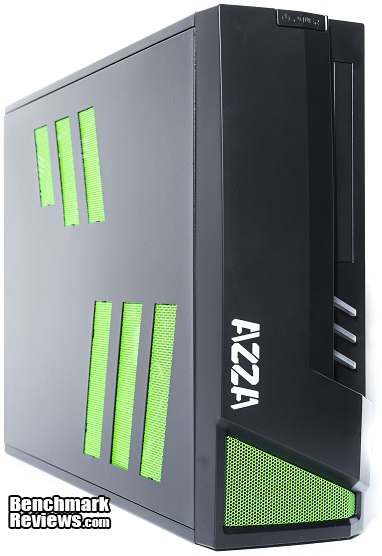
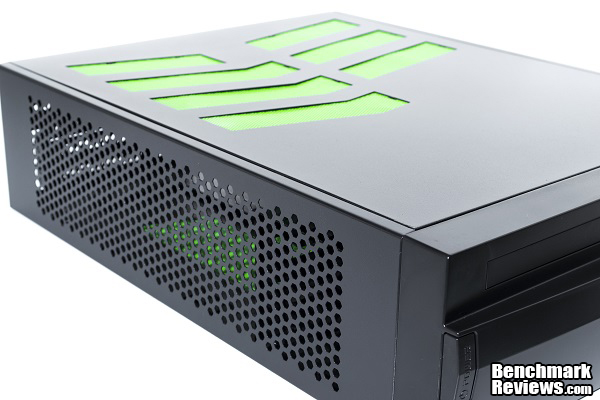
Let’s begin by looking at the AZZA Z as well as some of its accessories that comes in the box. Taking a quick look at the case itself, it is built mostly out of aluminum with a plastic front bezel. The front bezel has a ventilation hole at the bottom to allow the power supply unit to exhaust warm air. There is also an expansion bay for slim DVD burners. The side consists of many small ventilation holes to allow air to pass through the system. Because this is a small form factor case, it will not trap that much warm air inside itself compared to a traditional micro, mid, or full-tower ATX chassis.
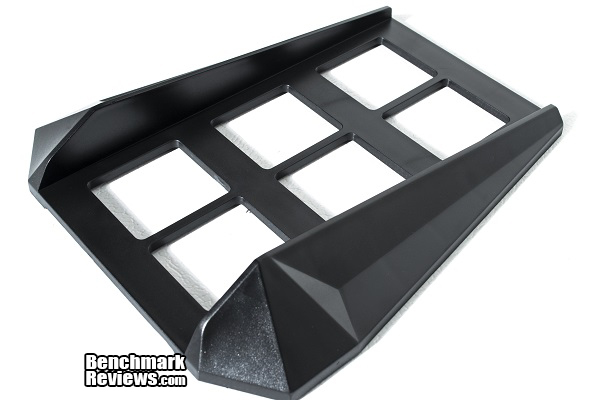
Inside the accessory packaging are generic screws for mounting the motherboard onto the motherboard tray and installing a graphics card or other expansion devices into the expansion slots. This vertical stand is also included so you may place the tower in a vertical position to save more space. Using the vertical stand will be the most ideal solution for air ventilation as the AZZA Z constantly passes air from one side of the case to the other.
Also included in the accessory package is a PCI-Express x16 riser. This riser will bend 90 degrees so it can make contact with your graphics card when it is installed in the case. If you choose not to use a dedicated graphics card in your build, you may ignore the PCI-Express riser.

Now that we have seen a little bit of the exterior of the AZZA Z and the accessories that comes in the box, let’s dive deeper into more details about the exterior.
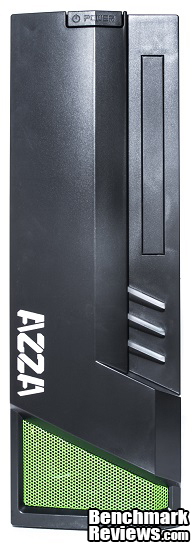
The front of the AZZA Z has an elegant and modern style. Although the front bezel is mainly made of plastic, it is still sturdy enough to withstand a few light knocks. Starting at the top is a power button. Coming down to the right is an optional bay for a slim DVD burner. Moving farther down are the three LED stripes and a green ventilation vent at the very bottom.
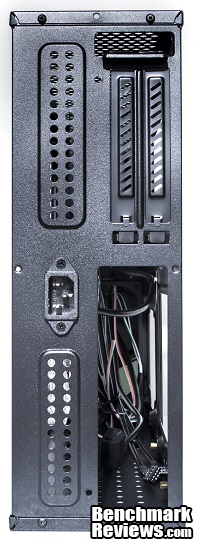
Taking a look at the back starting from the top, there are two expansion slots for a dual slot graphics card. Below the expansion slots is the back panel for the motherboard. To the left of that is the power plug. The power supply is actually mounted inside the case and can be hooked up to the power plug you see here.
On the top of the AZZA Z is a lot of ventilation holes. If you are building a high powered system and have a high power graphics card, the top ventilation holes will exhaust the hot air out of the case almost immediately. By the side panel is a single 120mm green LED fan. This fan will intake cool air from the outside of the case and blow it directly over the motherboard components. It also helps exhaust hot air out of the vents around the case.
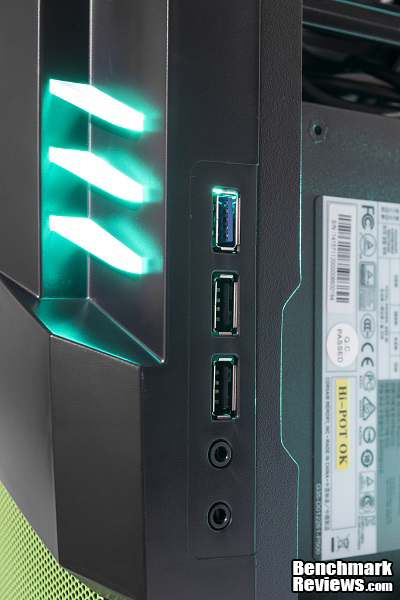
In terms of front panel I/O ports, we see the basic ports included with most computer cases. This includes one USB 3.0 port, two USB 2.0 ports, and a 3.5mm headphone and microphone jack. The power LED’s are made of three bright LED strips that glows green when the system powers on.
Now we have seen the exterior, let’s go into the interior and see what the AZZA Z has to offer.
Taking off the side panel reveals the interior design of the AZZA Z. The interior is fairly well designed and should not be too difficult to work with for an experienced builder. Here we can see the 120mm fan along with several cutouts on the motherboard tray.

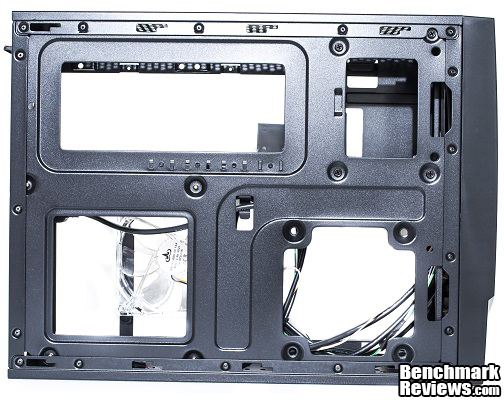
On the other side, we can have a better look at the cutouts for the motherboard, graphics card, hard drive cage, and power supply. I am very happy to see these large cutouts especially for the motherboard. This gives easy access to replacing the CPU cooler without the need to take out the entire motherboard. There are also no tie-down points for cable management. This is because when the side panel is on the case, there is no room for cables to run between the side panel and the motherboard tray. Cables must be routed within the case itself but they would not be noticed as the side panel has no windows.
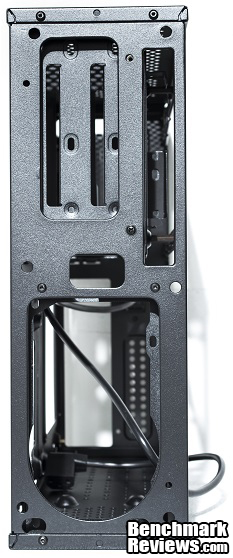
Taking off the front bezel gives us access to installing the power supply. There is a small cutout for the power plug wire to come through and connect to the power supply. Even though you would expect to have a fan at the front of the case, the AZZA Z just does not have room for one. This was expected already since the Z is only an ITX case.
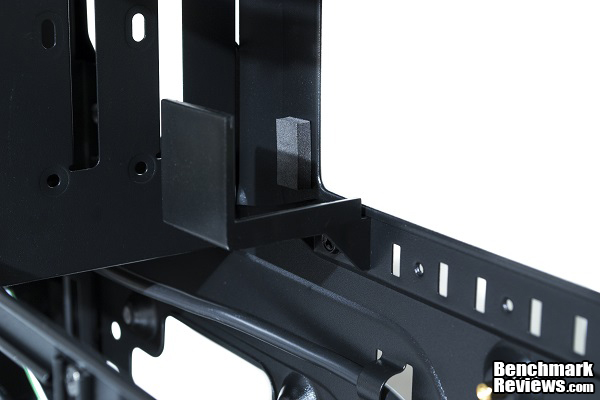
Using the PCI-Express x16 riser to support a large graphics card will not be the best idea. Inside the case is a small graphics card supporter. This helps hold the graphics card in place and can also adjust back and forth depending on the length of the graphics card installed.
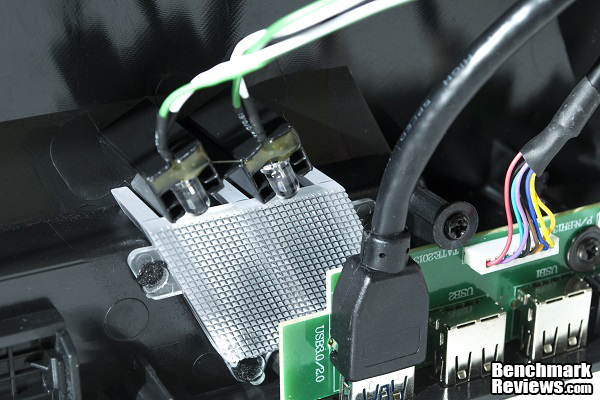
Powering the three LED strips at the front of the AZZA Z are two green LED’s. These LED’s are very bright and also provides an elegant gamer-like look when the system is powered on. The two LED’s are powered through a 4-pin molex connector and connects to the power supply. Some people may not be in favor of having to pull out another power cable just to power the front LED’s especially when space is limited in terms of cable management.
Now that we are more familiar with the exterior and interior of the case, we can start building and testing with the AZZA Z.
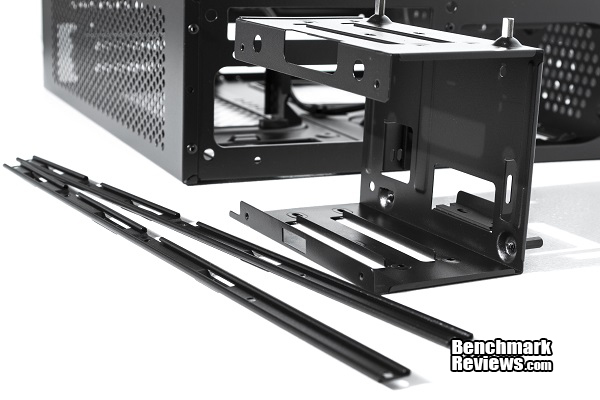
Building with the AZZA Z requires a few steps to note before throwing everything into the system all at once. Before you install your motherboard and power supply inside, you must remove the hard drive cage and install the necessary storage drives before installing anything else. Removing the hard drive cage requires the removal of the 120mm green LED fan and the two main medal frames that run across the side of the case.
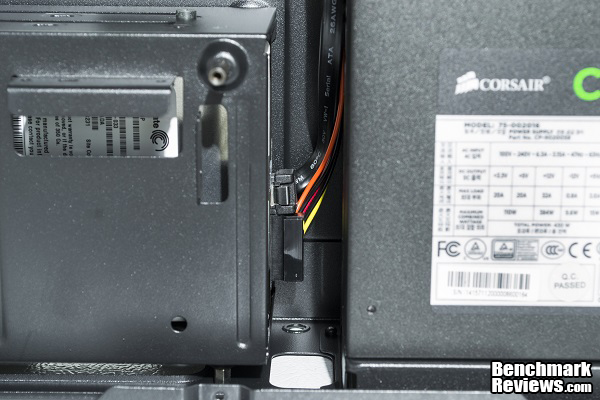
Here you can see why you must install the storage drives and replace the hard drive cage before anything else. As you can see, the power supply unit comes within under an inch of the hard drive cage. Connecting the SATA power and data wires to the storage device will be very difficult if the power supply is installed before the hard drive cage. It is recommended to use 90 degree cables to connect to your storage device(s) to prevent damage to the cables and the components around.
To see just how much space there is for a graphics card, I used a Gigabyte R9 270X Windforce edition graphics card to demonstrate just how much space is in the AZZA Z. Measuring at 11.5 inches or 292mm, the Gigabyte R9 270X exceeds the maximum graphics card length by 0.5 inches or 12.7mm. Amazingly, the AZZA Z just barely manages to fit this graphics card with just a couple millimeters of space to spare before hitting the hard drive cage.
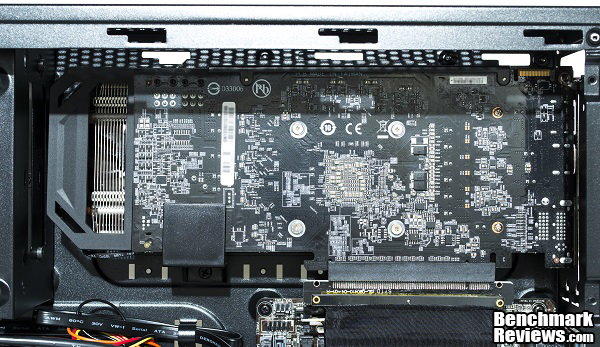
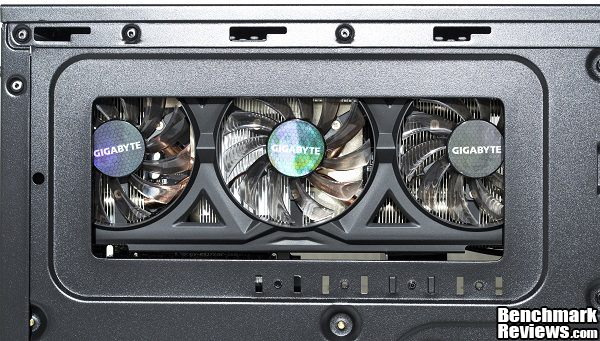
Looking at the other side of the case, we can see the cutout of the case that provides airflow to the graphics card. One thing that I did find out to be troublesome is the fan closest to the right will not spin as it comes into contact with the side of the case. There are removable rubber paddings on the other side of the motherboard tray to use as support to prevent the fans from coming into contact with the case and getting stuck.
Because this is an ITX case, it is important to make a plan and decide on what to install first before installing another component. We are done with this section, now let’s go into the actual build of the AZZA Z.
The AZZA Z makes a perfect chassis for a basic computer but can also be used to build a high-end gaming PC. In the previous section, we looked at the clearance between the hard drive cage to the power supply and used an R9 270X as a demonstration how big of a graphics card we can fit into the case. We found out the hard drive cage should be installed before installing the power supply. We also found out that one of the fans to our R9 270X did not spin as it hits the motherboard tray. In this test, I will build this computer for the purpose of office use with the AMD Sempron 3850 APU.
-
Motherboard: AsRock AM1H-ITX
-
System Memory: 4GB Kingston Fury 1600MHz DDR3
-
Processor: AMD Sempron 3850 1.3GHz
-
Audio: Realtek ALC662
-
Video: AMD Radeon R3 graphics
-
Disk Drive: Seagate Barracuda 250GB SATA HDD
-
Enclosure: AZZA CSAZ-103
-
PSU: Corsair 430W Modular
-
Monitor: HP w17e
-
Operating System: Microsoft Windows 7 Professional 64-Bit

Taking a look at the finished build, I managed to keep most of the cable clutter out of the way from the case and CPU fan. Because the power LED’s require a single 4-pin molex connector, I had to pull out the 4-pin molex cable to my Corsair 430W Modular power supply. I did not like having to do this since space was limited in the case already. I was still able to connect to the power LED’s by having the cables tied very tightly near the power supply.

The option to remove the case fan is available if the system is using very large RAM modules or a tall CPU cooler. But removing the case fan will stop all airflow inside the case resulting in much higher temperatures. This is because it is the only fan drawing air into the system and over the motherboard area. I decided to keep the case fan as there was enough clearance under the CPU cooler and RAM module.

As for the back of the system, expansion bays are located at the top while the motherboard ports are on the bottom. Because the power supply is not mounted on the back but inside the AZZA Z itself, this allows for a smaller form factor and a simpler back panel. One thing I noticed was I could no longer switch on or off my power supply. Before closing the case and calling it a build, remember to switch on the power supply or else you will be left in some frustration.
Powering on the case, the front power LED’s and the case fan lights up making the overall appearance very appealing to the eyes. The green LED’s on the case fan is extremely bright and easily illuminates everything within the case. Temperatures to the AMD Sempron 3850 run nice and cool because of the air flowing directly on top of it from the case fan. The power supply has access to clean air through the ventilation on the other side of the AZZA Z and the same goes to the graphics card if you have one installed.

I would have assumed the system was going to be somewhat loud because of the many ventilation holes. To my surprise, the system remained very quiet overall and was barely noticeable especially when hidden under a desk, but then again the noise does depend on the sound of the components inside.
The AZZA Z makes a great case for an office computer and even a small gaming PC. I had a lot of fun building with the Z even though I had to take a couple alternative ways to make something work. The many ventilation holes around the body of the case gives it a lot of room to breathe. The front bezel has a complete set of IO ports including USB 3.0, USB 2.0, microphone and headphone jacks. All of this in a tightly compact case with green accents and LED’s that will make it suitable and adequate for small gaming PCs. Using the included vertical stand will keep the case standing vertically which saves a great amount of desk space. There is not a lot to say about the AZZA Z only that it is an excellent mini-ITX case for what it has to offer.
In terms of cooling performance, the AZZA Z comes with one 120mm Green LED case fan to intake air into the system. Temperatures do stay reasonably low overall. The option to add water cooling into this case is also available as it supports two 120mm water cooling radiators, one for the CPU and the other for the GPU. Do not expect to house a full-fledged custom water cooling system as room is limited. But then again, the AZZA Z is a mini-ITX case so it is completely understandable.
The AZZA Z is most pleasing to the eyes with its black aluminum body with green accents from the vents. The elegant curves and edges around the front bezel and vertical stand gives it a modern look and feel all around. Turning on the system reveals the bright green LED’s at the front panel and the bright LED’s from the 120mm case fan. I did find the LED’s to be a little too bright for my taste, but the option to remove and replace the preinstalled 120mm fan is available. The overall look will be most appealing to the younger generation because of the shiny lights and LED’s, but it would not be suitable for an office or professional environment.
The build quality is impressive considering the affordable price. The aluminum body construction is sturdy enough to withstand a few knocks, but it is obviously not the strongest or most durable material either. I would also like to see a larger motherboard tray cutout for the graphics card. The cutout does not like the design of the Gigabyte R9 270X Windforce edition as one of the fans comes into contact with the motherboard tray. Large graphics cards with the same design may experience the same problem. This may not apply to smaller graphics cards.
Building with the AZZA Z was pretty straight forward for the most part. I would not recommend this case to a first time builder since managing cables and the limited space makes it suitable for more advanced system builders. A first time system builder would most likely run into problems with mounting the hard drive cage before the power supply and routing the back power cable to the power supply. Cable management will be the most challenging especially without a modular power supply. The last thing a system builder wants is having cables completely stop the rotation of a fan.
The AZZA Z does provide a lot of bang for your buck. As of October 2014, the AZZA CSAZ-103 sells online for $59.99 (Newegg | Amazon). The many ventilation vents, internal power supply mount, large CPU cutout on the motherboard tray, bright LED’s on the case fan and power LED’s, and modern exterior aesthetics makes the AZZA Z a competitive mini-ITX case. In addition to the support for graphics cards up to 11 inches, the AZZA Z makes the perfect case for gaming compared to other mini-ITX cases in its price category.
+Supports graphics cards up to 11 inches
+Small form factor great for space saving
+Ventilation holes all around the chassis
+Large CPU cutout on motherboard tray
+Basic water cooling capabilities
+Internal PSU mount
+Looks great with black and green accents
-Limited cable managing
-Under an inch of clearance space between HDD cage and PSU
-Little clearance between case fan and CPU cooler
-Must install HDD cage before PSU
-Large graphics cards will have problems with fan touching the motherboard tray
-
Performance: 9.25
-
Appearance: 9.00
-
Construction: 8.25
-
Functionality: 8.0
-
Value: 9.00


