By David Ramsey
Manufacturer: Cooler Master, Inc.
Product Name: NovaTouch TKL
Model Number: SGK-5000-GKCT1
UPC: 884102026195 EAN: 4719512047200
Price As Tested: $199 (MSRP)
Full Disclosure: Cooler Master provided the product sample used in this article.
Premium mechanical keyboards have surged in popularity in the last few years as gamers and even casual users rediscover the joys of using a keyboard with the precision and feel afforded by mechanical key switches. The Cooler Master NovaTouch TKL uses a new type of mechanical switch based on capacitance detection rather than metal contacts. Benchmark Reviews checks out this minimalist typing machine to see how it compares to other mechanical keyboards.
Most mechanical keyboards use “MX” switches from the German company Cherry. Many different types of Cherry switches are available; the color of the key stem identifies the key type. Cherry MX Blue switches have a light touch and a distinct “click” noise, while Cherry MX Black switches have a heavier touch but no click noise. There are also red and brown variations, as well as new green, clear, and orange versions as well. Each type of Cherry MX switch has a different combination of actuation force, feel, and “clickiness”.
A less common alternative is the mechanical capacitive key switch developed by the Japanese company Topre. These have been around for some years but have not achieved the popularity of the Cherry switches, possibly because keyboards using these switches are significantly more expensive than those using Cherry switches.
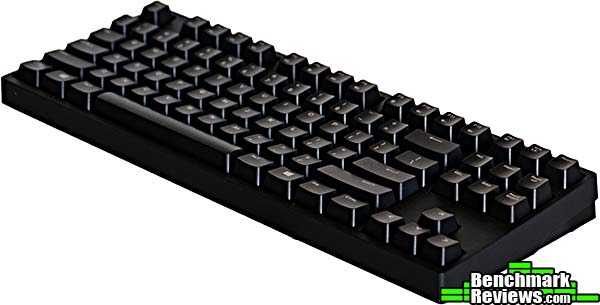
Cooler Master uses a custom version of this switch developed in conjunction with Topre. Let’s see how it fares.
- Uniformly-weighted 45g switches
- Compatible with Cherry MX key caps
- Tenkeyless design allows for more comfortable positioning of the keyboard and mouse
- N-key rollover with anti-ghosting
- Adjustable repeat rate
- Multimedia shortcuts + Windows key lockout
- Detachable, angled micro-USB cable
| Key switch | Hybrid capacitive |
| Key rollover | NKRO (Windows only) |
| Polling Rate | 1000Hz/1ms |
| Interface | Micro-USB 2.0 |
| Windows key lock | Yes |
| Media keys | Yes, via FN-key combo |
| USB cable | 1.8M, braided, 18K gold plated connectors |
| Dimensions | 35.9(L) x 13.8(W) x 3.9(H) cm |
| Weight | 895g/1.97 pounds |
Let’s take a look at this keyboard in the next section.
This is, to put it plainly, a very basic keyboard.

There’s no numeric pad; no backlighting, no macros, no USB or audio passthrough ports. This keyboard is so bare-bones there aren’t even any indicator lights for Caps Lock or Scroll Lock. If you find yourself having trouble typing passwords, you may have accidentally pressed the Caps Lock key…
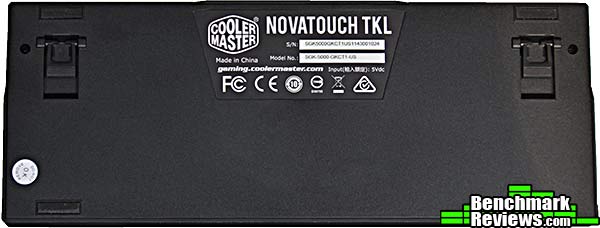
The back of the keyboard has a label with a serial number, and two fold-out feet to change the angle of the keyboard.

The rear of the keyboard is featureless except for this micro-USB port and a subtle “CM Storm” label.
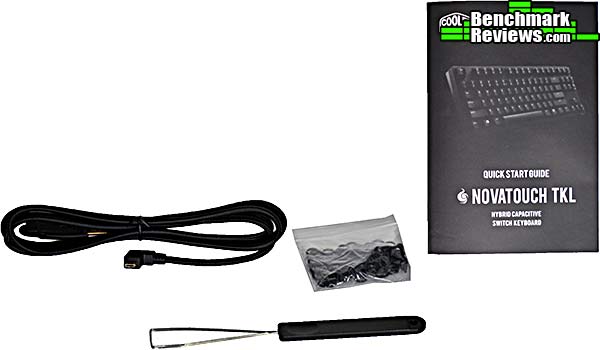
Accessories comprise a braided USB cable with a right-angle connector on the keyboard side, a bag of O-rings, a key cap puller, and a two-page manual. Some other mechanical keyboards include O-rings; the idea is that you slip them around the key stem to mute the “clack” sound when the key bottoms out. However, the NovaTouch TKL is already a very quiet keyboard and installing the O-rings on several keys made no perceptible difference in the sound or feel of the keys.
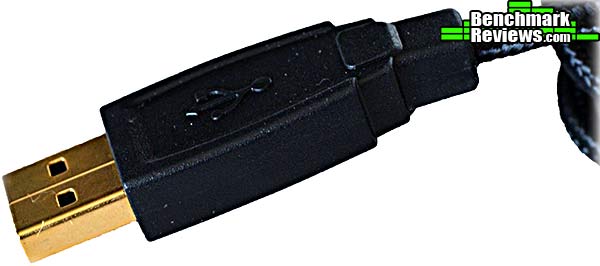
The included USB cable is braided, with 18K gold-plated connectors.
Let’s take a closer look at this keyboard in the next section.
This is a very basic keyboard with a single dedicated non-standard key: the “FN” key by the right control key:

This key is used in conjunction with the function keys F1-F12 to implement other features. Used with the F1 through F4 keys, it changes the rate of character repetition when a key is held down.

F5 through F8 do double duty as multimedia control keys.

FN-F9 locks out the Windows key, while FN-F10 through FN-F12 control audio volume.

None of these functions require any driver software or special configuration and will work out of the box on both Mac and Windows machines.
Let’s take a look at the switch technology behind what Cooler Master calls the “hybrid capacitive switch” in the next section.
This section will be rather keyboard-geeky, so I apologize in advance. But the key switches are what this keyboard is all about.
Most mass-market keyboards use “rubber dome over membrane” technology. The keys’ spring action is provided by a rubber dome under the key, and at the bottom of the stroke, the key stem presses together two thin membranes with electrical contacts on their inside surfaces, registering the key stroke. Some variations on this design use a conductive dot on the inside top of the rubber dome which makes contact with traces on a circuit board when the key is pressed. The rubber dome provides the “spring” action that pushes the key back up after you release it.
There is nothing inherently wrong with rubber-dome keyboards, but since it’s the least expensive way to make a keyboard, many are built down to a price, and use low-quality components and construction. This leads to variations in key effort, squeaks and key binding, and key registration problems. Their saving grace is that a basic rubber-dome keyboard can easily be found for less than $20.00.
Here’s an image of the rubber-dome sheet from a Corsair Raptor K40, a high quality rubber dome keyboard available for about $80.00 (Newegg):

The Raptor K40 keyboard sports adjustable backlighting with full RGB LEDs, 6 dedicated macro keys with onboard profile storage, and dedicated media keys. The key feel in my opinion is quite good for a rubber-dome keyboard.
Mechanical key switches are separate mechanisms, with two contacts soldered to a PC board and the key switch itself typically snapped into a metal base plate. Many enthusiasts have come to prefer the feel of mechanical key switches, which in most cases means “Cherry MX switches”. These switches are available in a variety of “feels” and some companies offer the same keyboard design with the user’s choice of which Cherry MX switch is used. Cherry keys are distinguished by the color of their key stems: for example, Cherry MX Red keys have a light actuation force, and a linear action with no click, while MX Blue keys have a very distinct (you can feel and hear it) “click” as they’re pressed. Other variations include black, brown, green, and clear. Internally, Cherry switches use a design wherein pressing the key brings together two small gold contacts in a “cross bar” configuration. These switches use a metal spring to return the key and most Cherry MX switches are rated for 50 million strokes. The animated GIF below shows the operation of an MX Blue switch.

Topre capacitive switches use a “hybrid” construction wherein the key return force is provided both by a rubber dome (labeled “Electrostatic layer” in the diagram below) and a spring. There is no direct electrical contact as with other switch types; rather, the keyboard circuitry senses a change in capacitance as the key is pressed. No mechanical contacts means no “key bounce” problems and no worries about contact wear or corrosion.

Cooler Master’s Topre switches have a significant advantage over the Topre switches used on other keyboards, though: they’re a special design that can accept Cherry MX key caps. As the picture below shows, they NovaTouch TKL keyboard’s switches have the same cross-shaped plunger (left) as Cherry MX switches (right). Since many vendors offer custom key caps for MX switches, this is a real advantage for the enthusiast.

If you only replace a few key caps, though, you’ll want to ensure that they match the height of the existing caps. This images shows a cap pulled from a keyboard using MX Blue switches. Although the cap fits perfectly, it’s significantly lower than the other keys:
 I’ll present my final thoughts and conclusion about this keyboard in the next section.
The Cooler Master NovaTouch TKL keyboard is very, very basic: it’s for typing, and nothing else. There are no features on the keyboard that are not directly related to this task. Consequently there are no macros, no dedicated media or other key types, no pass-through ports of any kind, and no backlighting or even indicator lights for Caps Lock. The 1984-vintage IBM Model M keyboard I normally use has more features than this keyboard does.

What it all boils down to is key feel. And that’s something that’s really hard to describe quantitatively in a review like this, but I’ll try. The keys have a light 45 gram actuation force– the same as a Cherry MX Red switch– and a distinct tactile feel when the rubber dome collapses, although the keyboard is very quiet and there’s no “click” sound. Actuation occurs well before the key bottoms out, so experienced users may train themselves to use shorter key presses. If you’ve used Cherry-based keyboards, the feel of the NovaTouch TKL is most similar to a Cherry MX Brown switch, although the Cherry switch has a significantly heavier actuation.
Personally, I like the feel of the NovaTouch TKL enough so that I’m currently using it as my day to day keyboard. However, to be honest, the difference in key feel between the NovaTouch and a high quality rubber dome keyboard is minimal: only a real keyboard geek would notice it, and I think most people wouldn’t. My wife, a retired programmer with no strong preferences in keyboards although she types a lot even these days, expressed no preference for the typing feel of this keyboard as compared to a Dell rubber-dome keyboard that sells for $19.99.
Granted, she’s not the intended audience, but the point is that that subtlety makes the $200 price a very tough sell, especially given the minimalist nature of the keyboard. Sure, the Topre switches will doubtless provide much longer service and better reliability than even a really good rubber dome keyboard, and the price is competitive with the price of other Topre-based keyboards, but is this enough to justify the extra expense? The only reason to buy this keyboard is that you really, really love the feel of Topre key switches, and even then it would be hard to justify over other less expensive Cherry MX-based mechanical keyboards.
Keyboard feel is something that’s virtually impossible to accurately represent in a review: you have to type on the keyboard yourself. And keyboard feel is this product’s only reason for existing, given its lack of even basic features like a Caps Lock indicator light. So the best I can do is tell you that I liked it a lot, and that I’ve a closet full of keyboards to compare it against. That said, I’m still not really sure if I’d spend my own money on it.
Cooler Master is staking out a minuscule portion of the computer accessory market: those with a desire for a very specific type of key feel who are willing to pay a high price for it. The NovaTouch TKL is a high quality piece of work, but the price-performance ratio is very skewed.
The performance of the keyboard was exceptional– I can probably type faster on this keyboard than any other keyboard I’ve ever used. It’s a slight but noticeable difference.
As a black keyboard with no special features and no lights and no ten-key pad, it’s impossible for it to look any plainer. Aside from a small CM Storm label on the back of the keyboard, there is no external branding. Unlike the backlit, military-themed keyboards popular with gamers, the NovaTouch TKL will never attract a second glance.
The keyboard housing is plastic, although a heavy metal base plate makes it very rigid and gives it a substantive feel. The high-quality braided USB cable is detachable at the keyboard side, which is a plus.
Functionally, you can type characters on this keyboard, and it has a few multimedia control and volume functions, and that’s it. The lack of a numeric pad will be a downside for some.
The value proposition here is a tricky one. At an MSRP of $199, this keyboard is playing in very rarefied territory– only purpose-designed industrial and ergonomic keyboards will cost more, and there are literally dozens of less expensive, high quality mechanical keyboards with many more features. Topre switches are generally rated at 60 million strokes, although Cooler Master doesn’t quote this figure, but the real-world difference between these switches and Cherry switches rated at 50 million strokes is probably nonexistent.
There are Topre key switch fans who refuse to type on anything less, and for them this keyboard comes in at a price competitive with other keyboards, the support of a major vendor, and the ability to use Cherry MX key caps. For everyone else, well, you’ll just have to try it and see.
+ Most reliable key switch available
+ Unique key feel
+ Accepts Cherry MX key caps
+ “I admire its purity.”
– Missing features common to other keyboards in this price class
– Very expensive enthusiast product
-
Performance: 9.75
-
Appearance: 8.00
-
Construction: 9.50
-
Functionality: 7.75
-
Value: 7.50
Recommended: Benchmark Reviews Seal of Approval.
COMMENT QUESTION: What do you demand most from a gaming keyboard?



2 thoughts on “Cooler Master NovaTouch TKL Keyboard Review”
I genuinely think this keyboard has the best stems currently available on the market. MX stems are the most common, but Topre and PFU make some really nice key caps too.
I messed up a bit. I meant that this board has the best sliders found on Topre boards.
Comments are closed.