By Greg Schepers
Manufacturer: Corsair Components, Inc.
Product Name: Corsair Gaming H2100 Wireless Dolby 7.1 Gaming Headset
Model Number: CA-9011127-NA
UPC: 843591052146
Price As Tested: $94.99 (Amazon / Newegg)
Full Disclosure: The product sample used in this article has been provided by Corsair.
Corsair is an organization that, in all reality, needs no introduction. Most of us have had a power supply, memory, liquid CPU cooler, etc. that has been adorned with the Corsair label. And, Corsair has not limited its prowess to internal components; it also has a proven track record when it comes to developing top-shelf gaming peripherals.
If you’ve owned any Corsair Gaming mouse, keyboard, or headset, it is likely you have been more than satisfied with it. One of the latest devices added to its stable, the Corsair H2100 Wireless Dolby 7.1 Gaming Headset, boasts the features that, on paper, make it stand out as one that should be on your short list if you are in the market for a wireless gaming headset. Today at Benchmark Reviews, we will take a closer look at the Corsair H2100 Wireless Dolby 7.1 Gaming Headset and share with you our thoughts.

- 2.4GHz wireless freedom up to 40ft + 10 hours of uninterrupted gaming
- Dolby 7.1 surround delivers lethally accurate positional audio
- Oversized 50mm neodymium drivers
- comfortable microfiber-wrapped memory foam ear pads
- advanced unidirectional noise-cancelling microphone
- Warranty – 2 Years
- Headphones
- Frequency Response: 20Hz to 20kHz
- Impedance: 32 Ohms @ 1kHz
- Sensitivity: 105dB (+/-3dB)
- Drivers: 50mm
- USB power consumption: 500mA
- Connector: USB Type A
- Wireless range: up to 40 feet (12m)
- Battery life: Up to 10 hours
- Microphone
- Type: Unidirectional noise-cancelling condenser with adjustable, rotating boom
- Impedance: 2.2k Ohms
- Frequency Response: 100Hz to 10kHz
- Sensitivity: -37dB (+/-3dB)
The debate regarding which type of gaming headset renders superior audio performance, stereo or 7.1 virtual surround, is ongoing. It seems as if some of you audiophiles out there tend to lean more towards a setup that includes a very high-end stereo headset (which is not branded as a “gaming” headset) and a separate microphone. However, that is a very expensive route to take. For the rest of us that appreciate great audio quality and performance at a reasonable price, there are plenty of headsets on the market for us. Our decision boils down to a handful of factors, a couple examples of which include stereo versus 7.1 surround and wired versus wireless. Now, let’s take a closer look at the Corsair H2100 Wireless Dolby 7.1 Gaming Headset, which as you can see from the title, is both wireless and renders 7.1 virtual surround.

The packaging that houses the Corsair H2100 Wireless Dolby 7.1 Gaming Headset is attractive, descriptive, and adequately provides protection for the headset. The new Corsair Gaming logo, which is visible in the upper left-hand corner of the box’s front, is quite appealing. It also doesn’t hurt to slap an eye-catching sticker on the box that displays a bold statement (see upper right-hand corner of the front of the box in the above image).
 The contents of the box has in it what you see above, which includes the Corsair H2100 Wireless Dolby 7.1 Gaming Headset, the wireless USB dongle, a 1.5m USB extension cable, a 1.5m USB charging cable, and a quick start guide and warranty card (both of the latter are not pictured).
 The profile of the the Corsair H2100 Wireless Dolby 7.1 Gaming Headset’s left-side contains the dimpled on/off button, the status indicator light, the rotary volume control button, and the microphone, which has about 140° of rotation. It also provides a perspective of how wide the headband is. Remember, those are over-sized 50mm neodymium drivers in those ear cups.

The wireless USB dongle can be placed into the 1.5m USB extension cable in order to ensure that the dongle can be positioned in a convenient spot nearest the headset. Even though Corsair Gaming claims that the H2100 Wireless Dolby 7.1 Gaming Headset has a wireless range of up to 40 feet, it doesn’t hurt to keep the headset and the dongle close together.
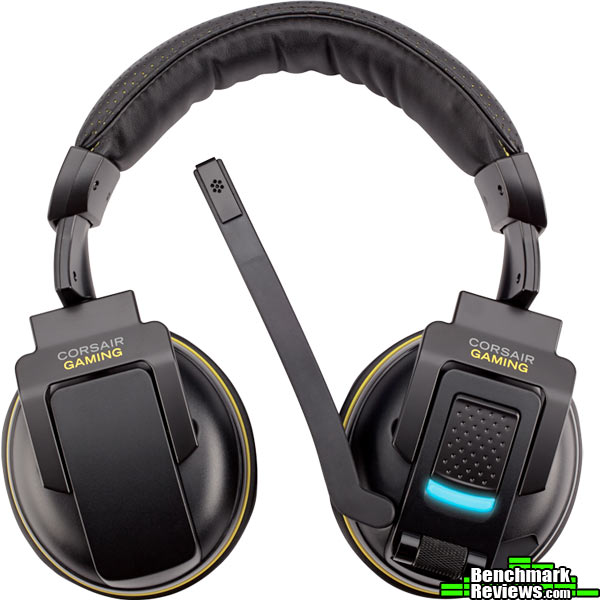
This splayed-out view of the Corsair H2100 Wireless Dolby 7.1 Gaming Headset displays the exterior of both ear-cups. Having the ability to rotate in both directions, each ear-cup is able to laterally adjust to the shape of anyone’s head. The rotation to the front is about 30° and the rotation to the rear is about 90°. If my math is correct, that’s ~120° of lateral ear-cup rotation.
Some will sacrifice a bit in terms of audio rendering in order to add wireless convenience to our gaming lives. Some will not make this concession. The ideal situation is if we can have access to the best of both worlds; quality audio delivered sans wires. Does the Corsair H2100 Wireless Dolby 7.1 Gaming Headset fit the bill?

Oh, how I dislike having to feel for an on-cable remote in order to adjust volume. Some on-cable remotes can be positioned smartly for quick access, yet, its still not the ideal setup. Obviously, an on-cable option is not possible on the Corsair H2100 Wireless Dolby 7.1 Gaming Headset, yet having the controls on the ear-cup makes them easier to locate and manipulate; well, at least in my opinion. The rotary volume control, pictured above, is how volume control should be on any headset. It is easy to find and easy to manipulate. The diamond-patterned texture contributes to the aforementioned.
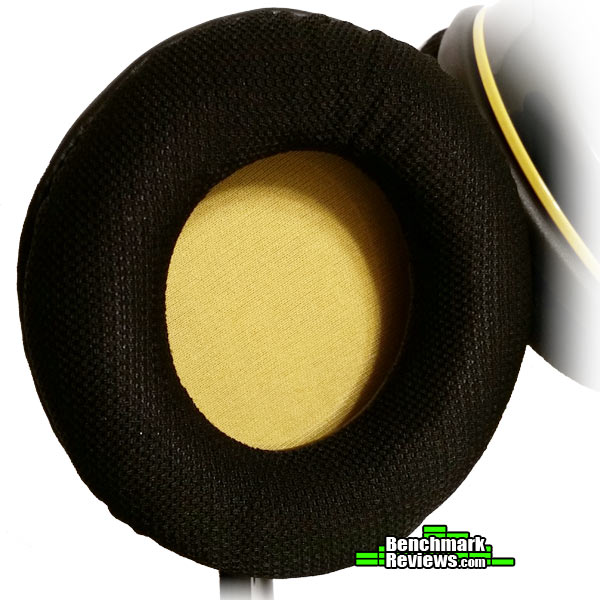
Corsair decided to go with microfiber-wrapped memory foam ear pads on the H2100 Wireless Dolby 7.1 Gaming Headset. The microfiber is relatively soft. The padding has a little more stiffness than I had anticipated. My hope is that these will break-in a bit so as to establish the ideal fit and feel. In other words, the Corsair H2100 Wireless Dolby 7.1 Gaming Headset is not the most comfortable headset right out-of-the-box. I’m not saying it is uncomfortable, just that I’ve put others on that provided a higher level of initial comfortable.

The padding on the business end of the headband is much softer than that of the ear pads, however, it could be thicker. In fact, the padding on the top of the headband is as thick as the padding that rests on the top of the head, which doesn’t make much sense to me. Anyway, the material wrapped around the padding appears to be faux leather.

Each side of the headband has some marks that help in terms of aiding in the fitting process. It would be beneficial if the Corsair H2100 Wireless Dolby 7.1 Gaming Headset was able to extend a few more sizes. It will fit most people out there, but those with big ol’ craniums might find these a tad snug.

I really like the software that can be downloaded from the Corsair website for the Corsair H2100 Wireless Dolby 7.1 Gaming Headset. It is simple, but this GUI really helps to tailor the audio. The source type can be changed from 7.1 surround to 5.1 surround or 2.0 stereo. Also, there are preset profiles to choose from or you can adjust the equalizer and save your profiles.
Now, let’s get to the nuts and bolts of the review. Please keep in mind that the below findings are based on my opinion of the Corsair H2100 Wireless Dolby 7.1 Gaming Headset’s performance. In other words, the results are subjective, yet they are based on several hours of utilizing a number of different applications. Much of this testing phase was conducted while gaming, but both listening to audio and judging the audio quality while watching video was also part of the process.
Most of the gaming results are based on playing Battlefield 4, yet other games, such as Tom Clancy’s Splinter Cell Blacklist, Company of Heroes, and Sleeping Dogs were played as well so that an overall judgement could be made in terms of the quality of audio delivered under gaming conditions. In addition, I listened to plenty of music from a number of different genres. A similar process was used in order to determine the quality of audio rendered while watching video files.
- Motherboard: Gigabyte GA-990FXA-UD3
- System Memory: 16GB (2 x 8GB) DDR3 1333 G.Skill Ripjaws X Series
- Processor: AMD FX-6100 Zambezi 3.3 GHz Six-Core Processor
- Audio: ASUS XONAR DG PCI 5.1 Audio Card
- Video: HIS Radeon HD 7950 IceQ Boost Clock 3GB GDDR5 PCI-E Graphics Card
- PSU: Corsair HX Series HX750 750W GOLD Certified Modular Active PFC Power Supply
- Monitor: AOC e2752Vh (27?) & Samsung SyncMaster PX2370 (24?)
- Operating System: Windows 7 Ultimate

Corsair claims that the H2100 “delivers lethally accurate positional audio.” Is that true? Let’s cut to the chase; yes, it does. During Battlefield 4 gaming sessions, I have been able to avoid being knifed from behind on a number of separate occasions due to the fact that I could hear footsteps approaching. Also, being able to identify from where the faint, yet distinct sound of a little bird approaching from off in the distance allowed me to find cover so that I could prevent being cut down by the time it was on top of me. In other words, the positional audio is as effective as Corsair claims.
As we now know, the Corsair H2100 Wireless Dolby 7.1 Gaming Headset has been outfitted with 50mm neodymium drivers which are said to “greatly reduce the overloading and distortion that can occur with gaming headsets that use smaller drivers.” During gaming sessions, while listening to music, and while watching videos, these drivers more than delivered. Overloading and distortion is not something that will surface, regardless of the medium.
Out of the box, it was apparent that this headset was designed for gaming in terms of the audio quality. In order to make the Corsair H2100 Wireless Dolby 7.1 Gaming Headset capable of delivering an enjoyable experience while listening to music and watching movies, some tweaking of the equalizer was necessary. As good as it performed while gaming, it sounded flat when listening to other audio. However, providing the GUI was a smart decision. It only takes a few minutes to customize the audio to suit the listener. All you have to do at that point is save that profile. Once I found the ideal setting for me, I had highs and mids that sounded fantastic, and the bass, while not overpowering, was deep and rich without a hint of distortion.
Corsair also claims that, in terms of comfort, the H2100 will allow you to “embark on marathon gaming sessions.” While it is comfortable, it did leave the top of my head feeling a little tender after an hour or so of use. I would recommend more padding on the business-end of the headband. On the other hand, the ear pads, while a bit stiff, are pretty comfortable and it is likely that they will soften up over time. Overall, the Corsair H2100 Wireless Dolby 7.1 Gaming Headset is a comfortable headset, but not the most comfortable I have had.
The noise-cancelling microphone was another item that Corsair considered an asset on this headset. Clearly, we want to ensure that our squad mates can hear us loud and clear without ambient noise showing up at the party uninvited. This microphone performed as stated, making you “loud and clear, and screen[ing] out extraneous noise from outside your game.” While gaming, I intentionally had some ambient noise going on around me, and the only feedback I received from my squad mates was, and I paraphrase, I came in loud and crystal clear.
The Corsair H2100 Wireless Dolby 7.1 Gaming Headset lives up to the company’s claim that it “accurately reproduces multi-channel gaming audio for precise situational awareness.” It is also a strong performer when listening to music or watching movies, that is, after the GUI is manipulated. Out of the box, it is neither the most comfortable nor is it the best sounding headset I have used. However, the audio can be customized through the GUI so that the output will suit just about anyone’s tastes. The comfort level is sure to improve over time, since the memory-foam ear pads will likely break-in. The headband, however, is likely to result in some soreness on the top of the head after long sessions. As soft as the padding feels, either it needs a bit more padding in order to fully protect you from the headband’s hard plastic component, or the overall weight of the headset needs to be reduced. Another solution could be to flatten the padding more so as to evenly distribute the weight.
Something absent on the Corsair H2100 Wireless Dolby 7.1 Gaming Headset was a mute button. To me, this is not a deal-breaker, but having the ability to mute both incoming and outgoing audio by either providing a button near the rotary volume dial or by allowing for muting through the rotary volume dial itself would be a nice touch.

It is time to judge the Corsair H2100 Wireless Dolby 7.1 Gaming Headset based on a variety of categories. These categories include appearance, performance, construction, functionality, and value. As stated earlier, this review is based on my unbiased opinion. The experience that others have had and will have with this headset is likely to vary from person to person.
Corsair is one of the premier organizations in the computer component and gaming peripheral industries, which is evident in the effort it places into the aesthetic quality of its devices. The Corsair H2100 Wireless Dolby 7.1 Gaming Headset looks the part. The combination of black matte and black gloss finishes looks fantastic when paired with the yellow trim.
It is clear that Corsair’s focus when developing the H2100 was to ensure that it performed as a top-tier gaming headset should. The claims Corsair made in terms of the accuracy and quality of the directional audio were realized. So, is acquiring the Corsair H2100 Wireless Dolby 7.1 Gaming Headset truly an “upgrade to unfair,” as Corsair suggests? Yes… yes it is. Pinpointing where events were happening on the battlefield saved my virtual life on multiple occasions. Also, the audio quality while listening to music can be tailored to suit just about anyone’s tastes. It may not be the best performer out of the box, but the GUI allows you to dial it in. Finally, the range is on par with the 40 ft claim. With the headset on, I could get about 32 feet away from the USB dongle before running into a wall. From that distance, there were no drop-offs whatsoever. However, once a wall was introduced and impeded the line-of-sight, the connection was compromised. Even from about 10 feet with an obstruction, there was static. So, 40 feet is plausible, as long as line-of-sight is maintained.
The other part of the performance rating is the level of comfort that the headset provides. Out of the box, it is comfortable, but it seems as if it will gradually become even more comfortable; well, the ear pads, anyway. They are constructed of microfiber on memory-foam padding, which are a bit stiff when brand new, but still comfortable. On the other hand, the headband is lacking the padding necessary to provide a high-level of comfort over long periods of time. A little more padding or a little less overall headset weight is in order.
One of the first things I noticed when I busted the Corsair H2100 Wireless Dolby 7.1 Gaming Headset out of the box was the quality of the headband. It is faux leather, but it looks lavish with its holes that reveal the gold material underneath. The gold stitching tops off the rich look, but it also gives it a well-crafted feel. Everything else follows suit. Even though it is primarily plastic, it is clearly well built. I could not find any seams in the plastic, nor the little plastic excesses that are found on cheaply made items.
It terms of functionality, the Corsair H2100 Wireless Dolby 7.1 Gaming Headset gets high marks. The GUI, which has an equalizer, allows you to find the perfect settings regardless of the medium. The microphone lives up to the claim of providing clear communications while blocking out ambient noise. Finally, the rotary volume dial on the left ear cup is just what the doctor ordered. The only feature absent is a mute button.
As of November 2014, the Corsair H2100 Wireless Dolby 7.1 Gaming Headset can be purchased online for $94.99 (Amazon / Newegg). Considering the high-level of performance that it delivers and that it is a wireless headset, it is a bargain at that price point.
+ great range
+ appealing design
+ great directional gaming audio
+ wireless
+ noise-cancelling mic
+ GUI
+ value for a wireless headset
+ rotary volume on ear cup
– considering its weight, padding on headband not adequate
– needs a mute button
– GUI audio presets are flat
-
Performance: 8.00
-
Appearance: 9.50
-
Construction: 9.50
-
Functionality: 8.50
-
Value: 9.50
Excellence Achievement: Benchmark Reviews Golden Tachometer Award.
COMMENT QUESTION: Do you prefer a wireless gaming headset over a wired one?


6 thoughts on “Corsair H2100 Wireless 7.1 Gaming Headset Review”
I own this headset and something I wanted to point out is it does indeed have a mute. When the mic boom is raised all the way upright the mic automatically mutes until you lower it again. Cheers.
Thanks for the information! I looked through all of the documentation provided with the product and I also checked the products page on the Corsair site… I could not find anything that shared that information. Anyway, now I know why my teammates can’t hear me at times. I like to position my microphone boom at about nose level rather than right in front of my mouth. What I need to determine is at what boom position does the mute function switch on/off? I’ll figure it out and share my findings. Thanks once again!
*Reporting back regarding the boom position that triggers the mute function:
Utilizing the Corsair Gaming Headset Control Panel’s microphone check function, I discovered that the microphone cuts off at about eye level on me. So, considering the microphone boom has about 120° of swing in it, I would estimate that the mute function engages at ~60°.
Thanks again Nonprophet!
The audio for me is perfect, the only thing i have a problem with is the mic…. But apperently it’s ONLY me that has a problem. It’s really low no matter what, pc and ps3.
I can’t find anything about it.
My set broke after three months of regular use.
Sorry to hear that Deno. What broke on the headset? I used mine almost daily for at least six months with no issues. I still use it occasionally, but I’ve tested and used many other headsets in the past several months, so it doesn’t get the same amount of use.
Comments are closed.