By Greg Schepers
Manufacturer: ROCCAT GmbH
Product Name: ROCCAT Apuri Active USB Hub with Mouse Bungee
Model Number: ROC-15-315-AM
UPC: 4250288153158
Price As Tested: $35.11 (Amazon | Newegg)
Full Disclosure: The product sample used in this article has been provided by ROCCAT.
As if we did not already have enough to appreciate in terms of the number of quality gaming peripherals that ROCCAT has been making available to us recently, we can be thankful that this organization has also been placing focus on providing us with accessories to complement the aforementioned gaming peripherals. One of the more intriguing of these accessories, the ROCCAT Apuri Active USB Hub with Mouse Bungee, is in the Benchmark Reviews spotlight today. ROCCAT calls the Apuri the, “first component of the ROCCAT Smart Desktop Management System (SDMS) offer[ing] you the perfect combination of style of functionality right there on your desktop.” That certainly sounds like a compelling piece of gaming equipment. I invite you to read on in order to get our thoughts on this device.

Most gaming accessories are there in order to serve as a complement to our more valuable gaming assets. Considering the features and specifications of the ROCCAT Apuri, there is no doubt that it not only serves in the complementary capacity, but an argument can be made that it also can serve as more than just a sidekick, a sidekick plus one if you will… and a cool looking sidekick at that! If we are basing sidekicks on appearances, Batman can have Robin; I’ll take my Apuri that looks like a glowing scorpion on steroids that is ready to strike. Check out the features and specs below:
- ACTIVE USB HUB INCLUDING
AC adapter and 4 fully powered ports - ZERO-DRAG MOUSE BUNGEE
guarantees unrestricted movement - YOUR DESKTOP ASSISTANT
for device and cable management - DIRECT PORT ACCESS
connect any USB device so it’s within reach - PASSIVE USE POSSIBLE
thanks to the supplied USB cable - SECURE + STABLE STAND
with ROCCAT-style blue glow - PART OF SDMS
organize your desktop
- 4 high-speed USB 2.0 ports
- Output power active (using AC adapter): 2A
- Output power passive (using USB cable): 500mA
- Length of USB cable: 1.5m
- Length of power cable: 1.5m
- Detachable Mouse bungee
- 3 LEDs (top) + underlighting
- Stable tripod design
The ROCCAT Apuri is truly a unique device. Think about it. Many of us have more USB devices than available USB ports, so we run out and get a USB hub. We have also become disenchanted with the way in which our mice cords get hung up while in use, so we get one of those as well. Now, we have two separate accessories/devices on our desk, which just adds to the clutter that is already there. The ROCCAT Apuri eliminates this problem.

Here is what you are going to pull out of the box once you purchase the ROCCAT Apuri; the Apuri (of course), an AC adapter that is 1.5m in length, a USB cable that is also 1.5m in length, and the Quick Installation Guide.

This top-down view (above) of the ROCCAT Apuri shows the channel on the mouse bungee portion of the device. The mouse bungee is made of rubber, which is quite pliable. I can’t image a mouse cord that will not be accepted by the channel on the Apuri’s mouse bungee. In fact, I inserted the thicker, rubber cord of the ROCCAT Kave XTD Stereo Headset into the channel with no issues whatsoever.

If you have ever read any of my reviews that have featured ROCCAT products, you know that I’m a big fan of this organization’s efforts in terms of branding and design. The Apuri has done nothing to sway my opinion. The ROCCAT logo on the bottom lights up and produces a subtle glow on a desk’s surface.
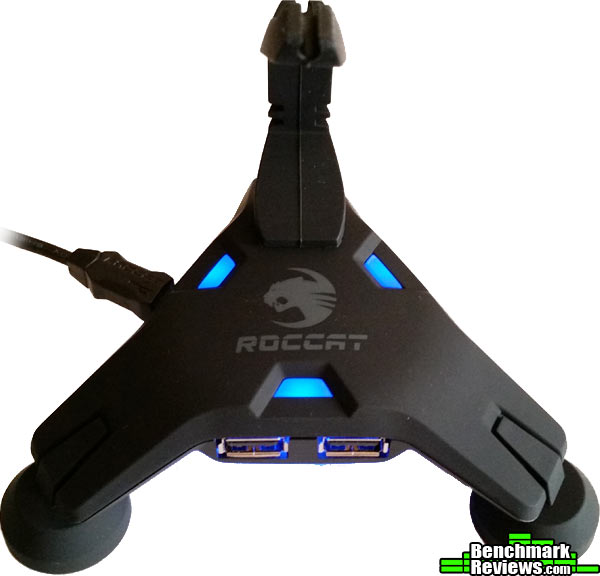
On the top of the USB hub portion of the ROCCAT Apuri, there are three blue lights that have a subtle blue glow as well as the ROCCAT logo in grey. There is no option to turn these lights off, nor is there an option to change the color of the lighting. This doesn’t bother me at all, but from some of the feedback I have read, it is an issue for others.

The blue glow from the ROCCAT Apuri even emanates from the two USB ports on the front and from the two USB ports on the right side of the device. As I mentioned earlier, the blue glow can be visible on the surface directly below the Apuri.
For those of you out there who have not yet used a mouse bungee, you may want to consider acquiring one. Once you put one into action, you’ll know just what you’ve been missing. What is great about the ROCCAT Apuri is that, as we have already discovered, it is not only a mouse bungee, but it it also a four-port USB hub. Below, you will find more detailed information regarding what is a very useful device.

I know that you have been shown a few different images of the front of the ROCCAT Apuri. The above image is at desk level. The intention here was to give you a perspective of its stance. What is beneficial about this design is that the mouse cord is elevated off of the surface of the desk, which prevents it from dragging on the surface and catching, say, the edge of a mouse pad. Also, if your mouse cord is braided, it won’t be fraying anytime soon, since the aforementioned desk drag is no long an issue.

On the right-side of the ROCCAT Apuri, you will find two additional USB ports. This is another image that was taken at desk level and shows off the aggressive-looking stance of the Apuri.

On the left-side of the Apuri is where ROCCAT positioned the port for the AC adapter and the mini USB port. I would have liked to have seen more branding on this side of the device. Maybe slapping “Apuri” on this side of the mouse bungee to match that of the other side.

The three feet on the ROCCAT Apuri provide it with plenty of stability. The pads on the bottom of each foot, while protecting the desk’s surface, really do not do a whole lot to prevent slipping. That may have something to do with the weight of the Apuri, but maybe some softer rubber would grab a bit better. In any case, if you position the mouse cord properly in the bungee, you won’t have any issues.

This top-down view (above) of the Apuri shows the channel of the mouse bungee once again, but from a different angle. Being constructed of soft rubber, the mouse bungee is able to easily flex to accommodate your mouse movements.
Testing the ROCCAT Apuri consisted of using the device extensively for about 10 days. The results of this phase will be based on how it performed in its role as an accessory. In other words, was it a benefit in its role as a mouse bungee? And, how did it perform as a USB hub? We will answer these and many other questions regarding the ROCCAT Apuri as we move forward.
Keep in mind that the results will consist of my opinions regarding the ROCCAT Apuri. Other individuals may have had different experiences while using this device. This is a component of the ROCCAT Smart Desktop Management System (SDMS), and even though this device may have worked well on my desk, it may not have worked as well on the desk of another individual. Anyway, my goal is to provide you with unbiased, accurate feedback.
- Motherboard: Gigabyte GA-990FXA-UD3
- System Memory: 16GB (2 x 8GB) DDR3 1333 G.Skill Ripjaws X Series
- Processor: AMD FX-6100 Zambezi 3.3 GHz Six-Core Processor
- Audio: ASUS XONAR DG PCI 5.1 Audio Card
- Video: HIS Radeon HD 7950 IceQ Boost Clock 3GB GDDR5 PCI-E Graphics Card
- PSU: Corsair HX Series HX750 750W GOLD Certified Modular Active PFC Power Supply
- Monitor: AOC e2752Vh (27?) & Samsung SyncMaster PX2370 (24?)
- Operating System: Windows 7 Ultimate

There are a number of different qualities that ROCCAT claims the Apuri possesses. One of these qualities is that “USB ports always within reach.” Yes, there are four USB 2.0 ports that are at the user’s immediate disposal. However, two of those ports are in the front of the device. Think about that. Are you going to plug in a wired device into the front of the Apuri? Probably not. The front of the device is where your mouse belongs, not cable obstructions. It is probably best to utilize the front ports for light duty, such as transferring files via a flash drive. The USB ports on the right side will probably be utilized for “permanent” use, such as plugging in a mouse, headset, and/or keyboard.
Now, ROCCAT provides an AC adapter with the Apuri and I would recommend using it if you are planning on charging devices through it. Without the AC adapter, I plugged my smartphone into the Apuri and, even though the battery charging indicator came up on the phone, it was only momentarily. Yes, I checked to make sure it was plugged into a powered USB port, and I also tried different ports. With the AC adapter on the job, no charging issues. Other than that, the ROCCAT Apuri met my expectations in terms of living up to its role as a USB hub.
“Smooth Gaming” is another claim that ROCCAT makes on behalf of the Apuri. The company is confident that it will eliminate any catching, grabbing, or pulling that can take place when a bungee is not in the picture. Considering that it is outfitted with a flexible rubber mouse bungee, it seems as if this is a plausible claim. After putting it into action, the claim is confirmed. The mouse bungee basically follows your movements and does not even come close to impeding them. Also, the mouse cord is elevated around 4-5″ off of the surface of the desk. What this does is prevent the cord from catching on anything or dragging on the desk surface. There are other mouse bungees that elevate the cord, but I haven’t used one that incorporated a flexible design.
The final test was regarding the claim that the ROCCAT Apuri provided a, “Secure + Stable Stand.” The tripod design does provide all the stability required. It will not tip over; it won’t even list to one side. What it has the potential to do is slide. It is not a very heavy device, so if you don’t get your mouse cord situated in there correctly, slippage is a possibility. However, if it does slide, you know that you need to provide a little more slack.
A mouse bungee is a great way to manage your mouse cord. It does a great job eliminating the annoying grabbing, catching on the edge of a mouse pad, and so on. There a plenty of mouse bungees out there from which to choose, but how many double as an active USB hub? The answer is one. The ROCCAT Apuri. ROCCAT is known for innovation, and the Apuri is certainly innovative. Integrating a USB hub and mouse bungee seems obvious now, but actually developing a device with these two features that functions effectively is something else. Oh, and by the way; it’s a looker.
As great as this concept is, there are ways to make it even better. For example, if the blue glowing lights could be turned off or if the actual color could be manipulated, that would probably broaden its appeal. That would probably escalate the cost, since drivers would likely be needed, but how about a version two? Also, the pads on the feet could consist of softer rubber or another material that would provide a bit more grab.

Now, it is time to conclude this review by breaking it up into categories. In other words, the following paragraphs will contain feedback on the ROCCAT Apuri’s appearance, performance, construction, functionality, and overall value. As mentioned earlier in the review, the following results are subjective and will likely vary depending upon each individual’s experience with this device.
Throughout the review, I had given away my affinity for the design of the ROCCAT Apuri. This device has a very aggressive stance, looking like a scorpion that is ready to strike. ROCCAT decided to let the stance do the talking; the branding is subtle, yet attractive. Why ruin a good thing by making it resemble a NASCAR quarter panel? The glowing blue lighting on both the top and bottom of the hub portion of the device is a nice touch.
As a mouse bungee, the ROCCAT Apuri performed brilliantly. The secret is the flexible rubber portion of the device. The bungee doesn’t just provide a place for a mouse cord, it follows a mouse’s movements making transitions smooth and seamless. As a USB hub, the Apuri performed as anticipated. With the AC cord attached, it charges your devices that are running low on power.
Not only does the ROCCAT Apuri look strong, it is built that way. It is made primarily of plastic and rubber, but again, it is well made. Some USB hubs feel as if they will fall apart if you drop them. Not this one. There is no doubt that this device will give you years of service.
From a functionality standpoint, the ROCCAT Apuri is really in a class of its own. I am unaware of any other devices that are both a USB hub and mouse bungee. And, it wasn’t thrown together in a rush; plenty of time was obviously spent on developing this device to ensure that it ended up being a huge benefit to consumers and not just a novelty item.
As of October 2014, the ROCCAT Apuri Active USB Hub with Mouse Bungee was available online for $35.11 (Amazon | Newegg). You will likely find a mouse bungee for less, but you won’t find one that doubles as a USB hub. Even if your focus is on just purchasing a mouse bungee, the Apuri is one of the best designs out there. It plays both roles very well, looks great on your desk, and eliminates desk clutter. This is a no-brainer. Get one, period.
+ performance as a mouse bungee
+ looks fantastic
+ long cords provides for versatile positioning
+ two devices in one / desktop management
+ four USB 2.0 ports
+ it’s an active USB hub
+ current price makes it a tremendous value
– limited lighting options
– needs better pads on the bottom of the feet
– USB 3.0 would be better
-
Performance: 9.00
-
Appearance: 9.75
-
Construction: 9.00
-
Functionality: 9.00
-
Value: 10.00
Excellence Achievement: Benchmark Reviews Golden Tachometer Award.
COMMENT QUESTION: What do you consider the benefits of using a mouse bungee?


2 thoughts on “ROCCAT Apuri Active USB Hub Review”
I’ve never been one for gimmicks and when I first clapped eyes on this thing that is exactly what I thought it was until I took a closer look at one during a computer show, this was at least 5 years ago and decided I’ll buy one because it wasn’t expensive then and it intrigued me. Needless to say I still use it to this day and love it.
I have to agree with two points the reviewer stated, it does need better grip on the surface it stands on because it indeed slips about although I solved that problem soon after I got it with double sided tape and secondly it desperately needs updating to the USB 3.0 standard, something I can do nothing about.
Ditto to Wayne’s thoughts on the 2 missing elements to make this perfect
I thank you for the simile like a scorpion. I do not think i would have made the connection-but that is exactly the critter in form , at least
I believe your review made a customer out of me. I really like the concept and do not do much looking anymore for usb hubs. have a mess of them-but not like this
Thanks again
John
Comments are closed.