By David Ramsey
Manufacturer: Advanced Micro Devices, Inc.
Product Name: AMD FX-8320E
Model Number: FD832EWMHKBOX
UPC: 730143305297
Price As Tested: $139.99 (Amazon | Newegg)
Full Disclosure: Advanced Micro Devices supplied the product sample used in this article.
AMD released a slew of new FX-series CPUs in September, 2014, including the FX-8370, FX-8370E, and the subject of our review, the FX-8320E. This is the low end of AMD’s eight-core FX series of enthusiast CPUs, and the “E” suffix marks it as a low-power variant; nonetheless, AMD touts it as a viable CPU for a gaming system. Benchmark Reviews will run this CPU through our gauntlet of tests to see how true this is.
AMD’s FX-series CPUs were introduced with some fanfare back in October of 2011, and after being feted at AMD’s Austin, Texas facility (since sold), we tested the then-new FX-8150. As the first consumer eight-core CPU (something Intel has only just introduced with the Core i7-5960 Haswell-E processor), the 8150 was an impressive piece of engineering, although its per-core performance wasn’t anywhere near Intel’s best, or even near Intel’s lower end. You can read our evaluation of this processor here.
At the time, AMD outlined their master plan: the then-current generation of FX processors was code-named Bulldozer. The improved, follow-on generation was called Piledriver, and we tested the Piledriver-based FX-8350 CPU here. The third generation was supposed to be Steamroller, but as AMD relied increasingly on their low-power and mobile APU architecture code-named Vishera, the Steamroller plan faded away, and AMD announced that the FX series would not be upgraded to Steamroller. Benchmark Reviews tested the latest high-end FX CPU, the FX-9590, here.

Rather than trying to compete with Intel on pure performance, AMD is aggressively tackling the market with a bang-for-the-buck strategy, especially in the mobile market. And it’s working well for them, although it might leave desktop AMD fans a little unsatisfied.
AMD’s current 8-core FX processor lineup comprises 11 different CPUs, differentiated by base and turbo frequencies, officially supported memory speed, and TDP (Thermal Design Power, or maximum power usage in watts), with lower power CPUs such as this review’s FX-8320E coming in at 95 watts, higher end CPUs such as the FX-8370 drawing up to 125 watts, with the top-end parts like the FX-9590 drawing a staggering 220 watts! AMD is a “fabless” company that depends on a separate entity, GlobalFoundries, to produce their designs. Currently GlobalFoundries still uses a 32nm process, which produces significantly larger and more power-hungry devices than the 22nm process Intel uses for its Haswell CPUs.
Here are some representative specs from AMD’s current FX CPU lineup:
| Model | Cores | TDP | Base Freq | Turbo Freq | DDR3 Speed |
| FX-9590 | 8 | 220 watts | 4.7gHz | 5.0gHz | DDR3-2133 |
| FX-9370 | 8 | 220 watts | 4.4gHz | 4.7gHz | DDR3-2133 |
| FX-8370 | 8 | 125 watts | 4.0gHz | 4.3gHz | DDR3-1866 |
| FX-8370E | 8 | 95 watts | 3.3gHz | 4.3gHz | DDR3-1866 |
| FX-8320 | 8 | 125 watts | 3.5gHz | 4.0gHz | DDR3-1866 |
| FX-8320E | 8 | 95 watts | 3.2gHz | 4.0gHz | DDR3-1866 |
Two things are obvious from this table: one, AMD seems to achieve the lower TDPs of the “E” series CPUs by lowering the base clocks, and two, that the FX-8320E we’re testing today represents the bottom of AMD’s eight-core FX lineup. I’ll test this CPU to see how it fares as the basis of a gaming system, comparing it with the FX-9590 as well as a comparably-priced Intel CPU, the Intel Core i3-4360.
It’s actually pretty rare that vendors send us anything other than their top-end or near-top-end CPUs, and I’ll admit I was intrigued when AMD asked if we wanted to review this CPU. It came installed in an MSI 970 Gaming motherboard, which was also interesting since the 970 chipset is the bottom of AMD’s 9-series chipsets. In fact, the 970 chipset only supports one PCI-E x16 slot, and specifically is not certified for either AMD’s CrossFireX or NVIDIA SLI. Nonetheless, MSI claims that this motherboard can handle both multi-card protocols, supporting two GPUs at PCI-E 2.0 x8 each. (Look for a separate review of this motherboard soon).
Given these interesting products, I decided to review this CPU as the basis for a budget gaming system, so instead of just testing CPU performance, I also tested gaming and graphics performance. Although 1440p and 4K setups are becoming more common, 1080p (1920×1080) is still by far the most common monitor resolution, so that’s what I tested at. All graphics tests were run with DX11, both with minimal and maximum settings– that is, most graphics benchmarks were run twice: once with all the settings configured as low as possible, and once with all the settings configured as high as possible.
Representing the Intel camp is a Core i3-4360 CPU. Fabricated on a 22nm process, this two-core CPU has Hyper-Threading (and thus appears to have four cores to most software), a base clock of 3.7gHz, and a maximum turbo clock of…well, since this CPU lacks Intel Turbo Boost technology, that’s as high as it goes. And since it’s not a “-K” part, it can’t be overclocked.
This might not seem fair– comparing an overclockable, 8-core CPU against a non-overclockable, 2-core CPU. But Intel CPUs historically perform much better on a per-core basis than do AMD CPUs, and both CPUs have an MSRP of $149.99, so they’re both aiming at the same market segment. To keep things as fair as possible, the same memory and video cards were used in both the AMD and Intel test systems.
- AMD Test System
- CPU: AMD FX-8320E / AMD FX-9590
- Motherboard: MSI 970 Gaming
- Intel Test System
- CPU: Intel Core i3-4360
- Motherboard: ASUS Sabertooth Z97 Mark 1
- Video: 2x NVIDIA GTX580 reference
- RAM: 2x4GB Kingston HyperX Genesis DDR3-2133
- Operating System: Windows 7 Home Premium x64
Although the MSI 970 Gaming motherboard uses AMD’s low-end 970 chipset, MSI claims their board fully supports SLI and CrossFireX. If you’re saving money on a CPU and motherboard, you have more to spend on GPUs, so I equipped the test system is equipped with two NVIDIA GTX580s in SLI.
I tested the FX-8320E at its stock clocks, overclocked with the OC Genie feature of the MSI 970 Gaming motherboard, and with the best manual overclock I was able to achieve. I’m using enthusiast-grade DDR3-2133 memory in all tests, except for the OC Genie test, because enabling OC Genie disabled the memory’s XMP profile.
OK, let’s see how this system performs, and how it compares to the high-end FX-9590 and an Intel CPU in the same price range.
AIDA64 is FinalWire’s full 64-bit benchmark and test suite utilizing MMX, 3DNow! and SSE instruction set extensions, and will scale up to 32 processor cores. An enhanced 64-bit System Stability Test module is also available to stress the whole system to its limits. For legacy processors all benchmarks and the System Stability Test are available in 32-bit versions as well.
All of the benchmarks used in this test- Queen, Photoworxx, ZLib, and hash- rely on basic x86 instructions, and consume very little system memory while also being aware of Hyper-Threading, multi-processors, and multi-core processors. Of all the tests in this review, AIDA64 is the one that best isolates the processor’s performance from the rest of the system. While this is useful in that it more directly compares processor performance, readers should remember that virtually no “real world” programs will mirror these results.

The Queen test loves multiple cores and clock speed, so we see a nice scaling as we crank up the gigaHertz wit the FX-8320E. Note that at its highest overclock, the 8320E actually outperforms the FX-9590, a situation we’ll see repeatedly in these benchmarks (I’ll go into the reasons why in the Overclocking section). The two-core Intel i3-4360 comes in last, but even so it’s very close to the performance of the stock-clocked 8-core 8320E.
The Photoworxx test lives and dies by memory bandwidth, and doesn’t seem to care about too much else. This is why the score drops for the OC Genie run, since that overclocking setting disables the memory’s XMP profile. Interestingly the Intel CPU really pulls ahead here.

With the ZLIB and Hash benchmarks we again see scaling with clock speed with the FX CPUs. The FX-9590 is the winner here, while the Intel CPU isn’t really even in the running, posting scores just over half those of the stock-clocked 8320E.
Let’s see how this CPU does in the (somewhat) more real-world environment of PCMark 8 in the next section.
Futuremark’s PCMark 8 Professional is predicated on “real-world relevance”. While the professional version offers users the freedom to construct any test scenario they want, a series of pre-configured test setups is included. AMD suggested that the Home test would show their product to advantage, so it’s the one I ran.
The Home test runs scripts for web browsing, writing, photo editing, video chat, and “casual gaming”. Each test is run three times and the results averaged. Although the tests don’t seem particularly heinous, this single benchmark is the reason my manual overclock limit on the FX-8320E CPU was 4.5gHz: because while the CPU would pass every other benchmark at 4.6gHz, it would always crash or freeze during the PCMark 8 Home test.
So there’s that.
After running all the tests, PCMark 8 generates a “score” representing the performance across all of the tests. However, rather than simply reporting this score, I’m showing all the test results, because some of them are interesting.

In this first set of tests, all the times are reported in seconds (the Writing scores have been divided by 10 to scale to this graph, so for “0.47” read “4.7”), with lower scores denoting better performance. The Intel CPU’s only win is in the Writing test; and the manually overclocked FX-8320E beats the top-tier FX-9590 in every single test. 
Looking at the next set of scores is a little confusing: for Video Chat #2, lower scores are better, while higher scores are better for the other three results. The Core i3-4360 wins the Casual Gaming score by a huge margin, and this is probably what gives it the overall win as measured by the Combined Score. Still, note that the Intel CPU’s combined score is less than 9% better than the stock-clocked FX-8320E score…and that’s not much.
Let’s look at some more real-world results in the SPEC APC test in the next section.
SPECapc (Application Performance Characterization) tests are fundamentally different from the SPECviewperf tests I’ve used in other performance reviews. While SPECviewperf tests incorporate code from the various test programs directly into the benchmark, the SPECapc tests are separate scripts and datasets that are run against a stand-alone installation of the program being benchmarked. SPECapc group members sponsor applications and work with end-users, user groups, publications and ISVs to select and refine workloads, which consist of data sets and benchmark script files. Workloads are determined by end-users and ISVs, not SPECapc group members. These workloads will evolve over time in conjunction with end-users’ needs and the increasing functionality of PCs and workstations.
For this test, I ran the SPECapc “Lightwave” benchmark against a trial installation of Newtek’s Lightwave 3D product. The benchmark, developed in cooperation with NewTek, provides realistic workloads that simulate a typical LightWave 3D workflow. It contains 11 datasets ranging from 64,000 to 1.75 million polygons and representing such applications as 3D character animation, architectural review, and industrial design. Scores for individual workloads are composited under three categories: interactive, render and multitask.
The benchmark puts special emphasis on processes that benefit from multi-threaded computing, such as animation, OpenGL playback, deformations, and high-end rendering that includes ray tracing, radiosity, complex textures and volumetric lighting. The test reports three scores: Animation (multitasking), Animation (interactive), and Rendering. The numeric scores represent the time it took to complete each section of the benchmark, in seconds, so lower scores are better.

Lightwave rendering is an extremely demanding thing all on its own, but the SPECapc script delves heavily into multitasking, too. Since the renders can often take hours, it makes sense to create a workload that represents what a real Lightwave user would do: work on other parts of the project while a long render is going on.
The manually-overclocked FX-8320E wins every test, and the Intel CPU wins none, although it slightly edges out the stock-clocked FX CPU in the Interactive portion of the test. Again, note that the overclocked FX-8320E wins against the FX-9590 in every single test.
For the last non-gaming test, let’s take a look at CINEBENCH R15’s results.
Maxon CINEBENCH is a real-world test suite that assesses the computer’s performance capabilities. CINEBENCH is based on Maxon’s award-winning animation software, Cinema 4D, which is used extensively by studios and production houses worldwide for 3D content creation. Maxon software has been used in blockbuster movies such as Spider-Man, Star Wars,The Chronicles of Narnia, and many more. CINEBENCH Release 11.5 includes the ability to more accurately test the industry’s latest hardware, including systems with up to 64 processor threads, and the testing environment better reflects the expectations of today’s production demands. A more streamlined interface makes testing systems and reading results incredibly straightforward.
The CINEBENCH R11.5 test scenario comprises three tests: an OpenGL-based test that models a simple car chase (which I didn’t use for this test, since the graphics card performs most of the rendering work, and I’m testing the CPU), and single-core and multi-core versions of a CPU-bound computation using all of a system’s processing power to render a photo-realistic 3D scene, “No Keyframes”, the viral animation by AixSponza. This scene makes use of various algorithms to stress all available processor cores, and all rendering is performed by the CPU: the graphics card is not involved except as a display device. The multi-core version of the rendering benchmark uses as many cores as the processor has, including the “virtual cores” in processors that support Hyper-Threading. The resulting “CineMark” is a dimensionless number only useful for comparisons with results generated from the same version of CINEBENCH.

The first benchmark renders the scene using only a single core. Overclocking the FX-8320E gets us another 10% or so in this test, but the Intel chip is half again as fast simply based on its superior core architecture.
The multi-core rendering test, though, shows that cores count…and they count for a lot. The Core i3-4360 score more than doubles (the result of Hyper-Threading), but it simply can’t compete with the 8 real cores of the AMD FX CPUs.

The OpenGL portion of CineBench produces a surprise: the Intel CPU wins decisively. We see nice result scaling with the overclocking of the AMD FX CPUs, but this is obviously not a test that can make use of multiple cores.
Let’s start the gaming-oriented testing with Unigine Heaven 4.0…
While Heaven 4.0 is a “synthetic” benchmark, it nonetheless gives you a good idea of your total system performance. To score well in Heaven, you must have a beefy graphics system and a CPU that can keep it fed. Heaven follows a camera among the islands of a floating, medieval-style village, rendered with exquisite detail.
Heaven was one of the first benchmarks to exploit tessellation, an algorithmic method of applying surface roughness and detail so that the designer doesn’t have to specify the topology of (for example) each individual stone in a footpath. Tessellation handles details like this automatically, but imposes a serious additional load on the system.
As with the other graphics tests in this review, I ran Heaven with both minimal and maximal settings. There’s one thing you should understand as you read these results: when you run graphics tests with minimal settings, the CPU is generally the gating factor; whereas with maximum settings, the video card(s) become the gating factor.

Our results bear this out: we see substantial gains overclocking the FX-8320E, but even at 4.5gHz, it can’t match the per-core muscle of the i3-4360. Once we crank the settings up, though, we see the results flatten out, since the video cards are the determinant here, and all the test systems use the same GTX 580 SLI system.
In the next section I’ll beat these systems with the very tough 3DMark Firestrike Extreme test.
Futuremark’s graphics tests are legendary for pushing the boundaries of what’s possible with the very latest graphics cards. But gaming’s not all about graphics; physics plays an increasingly important part (as do other things like opponent AI), so it’s not just about the video cards.
Firestrike Extreme comprises two graphics test and one physics test. The graphics tests send the camera through an underground world of smoke and lava, wherein a fell beast of molten rock attacks a priest-like figure who drops their robe to reveal a female opponent seemingly made of an open lattice of glowing wires. The camera struggles to capture their furious attacks and riposts. Last, a physics test tracks a dozen or more floating, tentacled drones.
Firestrike Extreme is the middle tier of three Firestrike versions, bracketed by Firestrike and Firestrike Ultra. Again, this benchmark was recommended by AMD, so here goes:

The surprising degree of uniformity across the scores for the Graphics 1 and Graphics 2 tests suggests that the video cards (two GTX580s in SLI) are the major factor here. Since Firestrike Extreme is specifically designed to stress graphics systems, this is to be expected.
However, substantial difference show in the Physics score, with the Intel processor bringing up the rear. This is a reminder that gaming performance is more than just what your GPUs can do.
Let’s take a look at some actual game benchmarks, starting with the Aliens vs. Predator benchmark in the next section.
Aliens vs. Predator is a science fiction first-person shooter video game, developed by Rebellion, and published by Sega for Microsoft Windows, Sony PlayStation 3, and Microsoft Xbox 360. Aliens vs. Predator utilizes Rebellion’s proprietary Asura game engine, which had previously found its way into Call of Duty: World at War and Rogue Warrior. The self-contained benchmark tool is used for our DirectX-11 tests, which push the Asura game engine to its limit.

This is surprising: there’s virtually no difference between any of the tested systems at either high or low settings. While technically the Intel Core i3-4360 wins each test, the difference between the lowest and highest scores is less than one percent at the high settings, and only about 4% at the low settings.
Maybe Lost Planet will be different. Let’s see…
Lost Planet 2 is the second installment in the saga of the planet E.D.N. III, ten years after the story of Lost Planet: Extreme Condition. The snow has melted and the lush jungle life of the planet has emerged with angry and luscious flora and fauna.
With the new environment comes the addition of DirectX-11 technology to the game. Lost Planet 2 takes advantage of DX11 features including tessellation and displacement mapping on water, level bosses, and player characters. In addition, soft body compute shaders are used on ‘Boss’ characters, and wave simulation is performed using DirectCompute. These cutting edge features make for an excellent benchmark for top-of-the-line consumer GPUs.
The Lost Planet 2 benchmark offers two different tests, which serve different purposes. This article uses benchmark B, which is designed to be a deterministic and effective benchmark tool featuring DirectX 11 elements.

Another interesting result, virtually the opposite of what we saw with AvP: this time, there’s a substantial difference between the processors, with AMD FX performance rising smoothly at both low and high settings as we increase the clock frequency.
The Intel CPU wins the low settings test by a substantial margin, while the AMD FX-9590 smokes the high settings test. This is the only benchmark I ran where the FX-9590 scored substantially better than the overclocked FX-8320E.
Next, the bane of graphics systems everywhere, even today: Metro 2033.
Metro 2033 is an action-oriented video game with a combination of survival horror, and first-person shooter elements. The game is based on the novel “Metro 2033” by Russian author Dmitry Glukhovsky. It was developed by 4A Games in Ukraine and released in March 2010 for Microsoft Windows. Metro 2033 uses the 4A game engine, developed by 4A Games. The 4A Engine supports DirectX-9, 10, and 11, along with NVIDIA PhysX and GeForce 3D Vision.
The 4A engine is multi-threaded in such that only PhysX had a dedicated thread, and uses a task-model without any pre-conditioning or pre/post-synchronizing, allowing tasks to be done in parallel. The 4A game engine can utilize a deferred shading pipeline, and uses tessellation for greater performance, and also has HDR (complete with blue shift), real-time reflections, color correction, film grain and noise, and the engine also supports multi-core rendering.
Metro 2033 featured superior volumetric fog, double PhysX precision, object blur, sub-surface scattering for skin shaders, parallax mapping on all surfaces and greater geometric detail with a less aggressive LODs. Using PhysX, the engine uses many features such as destructible environments, and cloth and water simulations, and particles that can be fully affected by environmental factors.

These results are more in line with what I’ve expected to see: scaling with clock speed at low settings, and pretty even results at high settings. It’s interesting, though, that the Intel CPU didn’t perform better at low settings.
For our last test, let’s take a look and video transcoding with Handbrake 0.96.
I like media encoding benchmarks for several reasons. One, most of them are “real world” benchmarks rather than synthetic benchmarks that are only good for comparison with other scores from the same benchmark. Second, media encoding is one of the very few things that can really use all the threads and horsepower a modern CPU can provide. Unless you’re upgrading from a really old machine, that spiffy new CPU won’t play your games any faster, nor make your web browsing any smoother. But when you’re ripping that DVD to watch on your phone or tablet, then yeah, nobody ever said their transcoding was too fast.
For this test I used Handbrake 0.96 to transcode a standard-definition episode of Family Guy to the “iPhone & iPod Touch” presets, and recorded the total time (in seconds) it took to transcode the video.

Handbrake will spawn a transcoding thread for every CPU core it can find, real or virtual, so this is a best-case test for the FX chips– the Intel CPU is badly outmatched here, soundly trounced by even the stock-clocked FX-8320E. Overclocking the test processor drops transcoding times by about 25%.
OK, at this point I think we’ve a pretty good handle on the strengths and weaknesses of each of these CPUs. I’ll discuss my overclocking methodology in the next section, and follow up with my final thoughts and conclusion.
AMD FX CPUs allow you to change the multiplier on both the base and the turbo clocks. My previous AMD FX experience has been with the FX-8150 and FX-8350; this is my first “E” CPU. Initially I increased the boost multiplier to run to 4.5gHz, but I was getting really odd benchmark results. Watching the clock frequency during the benchmark runs provided the answer: although CPU temps were well within AMD’s specs (the highest temp I saw was 53 degrees Celsius), the processor was throttling very aggressively, dropping as low as 1.4gHz in the middle of benchmarks. Presumably this is to keep the CPU within AMD’s 95 watt power budget.
The solution is to disable turbo boost and increase the multiplier on the base clock. Indeed, this is exactly what MSI’s OC Genie does, setting the base clock to 4gHz (and, oddly, disabling your memory’s XMP profile if it has one. This seems strange, but that’s what it does, so that’s how I tested with it).
I initially made a benchmark pass at 4.7gHz before AMD requested we test with Firestrike Extreme and PCMark 8 Home. The first benchmark would crash at anything over 4.6gHz, while the latter would not complete a run at anything over 4.5gHz, so 4.5gHz base clock is what I tested with, supported with 1.432V of CPU core voltage. Overclocking AMD CPUs really demands a water cooler; I used a Corsair H105 for this.
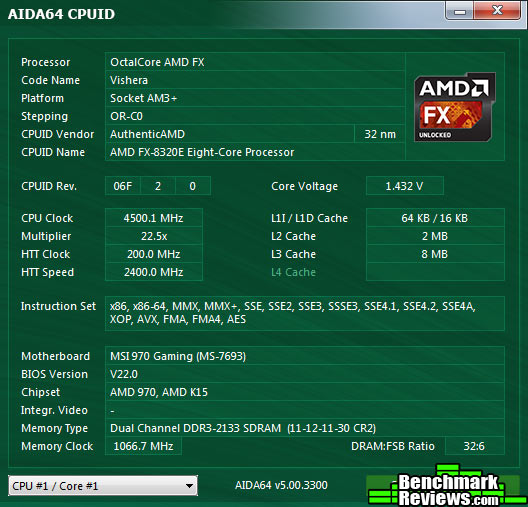
While disabling turbo boost and increasing the base clock might seem crude, it’s the best way to get the most this CPU has to offer. Note that in most of the benchmarks the humble FX-8320E, when overclocked, was able to equal or exceed the performance of the top-dog FX-9590. This is because even with water cooling, the 9590 would throttle itself under heavy loads, to below the 4.5gHz the overclocked 8320E was running at…and this is why you’ll see the “low end” CPU outperform the high end CPU. I suspect this might have been due to the fact that MSI does not certify the 970 Gaming motherboard for use with AMD’s 220-watt CPUs, although AMD says it will work fine.
Let’s take a look at how to overall performance of the FX-8320E compares in the non-graphics benchmarks. The best scores in each test will be in bold. For some tests, lower scores are better; these tests are flagged with an asterisk.
| FX-8320E | [email protected] | FX-9590 | i3-4360 | ||
| AIDA64 Queen | 29025 | 40011 | 39330 | 26482 | |
| AIDA64 Photoworxx | 12393 | 12922 | 12814 | 14894 | |
| AIDA64 ZLIB | 276 | 379 | 399 | 161 | |
| AIDA64 Hash | 3280 | 4583 | 4757 | 1895 | |
| CINEBENCH OpenGL | 88.2 | 102.8 | 109.1 | 128.0 | |
| CINEBENCH Single Core | 94 | 108 | 114 | 147 | |
| CINEBENCH Multi Core | 519 | 719 | 731 | 372 | |
| Handbrake* | 147 | 108 | 07 | 214 | |
| Firestrike Extreme Physics | 6415 | 8832 | 8465 | 5627 | |
| PCMark 8 Web (Jungle)* | 0.33 | 0.32 | 0.32 | 0.30 | |
| PCMark 8 Web (Amazonia)* | 0.13 | 0.13 | 0.13 | 0.12 | |
| PCMark 8 Writing* | 6.25 | 5.22 | 5.26 | 4.77 | |
| PCMark 8 Photo Editing* | 0.66 | 0.54 | 0.54 | 0.62 | |
| PCMark 8 Video Chat 1 | 30 | 30 | 30 | 30 | |
| PCMark 8 Video Chat 2* | 90 | 66 | 66 | 95 | |
| Spec APC Interactive* | 667 | 571 | 691 | 631 | |
| Spec APC Multitask* | 1330 | 1115 | 1150 | 1417 | |
| Spec APC Render* | 800 | 588 | 798 | 1057 |
The takeaway here is that in any test that uses more than a few cores, the AMD CPU will win, often decisively. The Intel CPU’s superior single-core performance gives it the win in tests that don’t spawn lots of threads. Again, note that overall the overclock FX-8320E outperformed the FX-9590.
Now let’s see how the graphics scores compare. All the scores in this table represent frames per second, so higher is better.
| FX-8320E | [email protected] | FX-9590 | i3-4360 | |
| Heaven 4.0 Low | 135 | 175 | 175 | 205 |
| Heaven 4.0 High | 51 | 52 | 51 | 52 |
| AvP Low | 290 | 296 | 293 | 302 |
| AvP High | 96 | 97 | 97 | 98 |
| Lost Planet 2 Low | 72 | 88 | 88 | 101 |
| Lost Planet 2 High | 57 | 67 | 62 | 68 |
| Metro 2033 Low | 110 | 126 | 126 | 111 |
| Metro 2033 High | 49 | 49 | 49 | 51 |
| Firestrike Extreme Graphics 1 | 21 | 21 | 21 | 21 |
| Firestrike Extreme Graphics 2 | 14 | 15 | 15 | 15 |
If you’ve been paying attention, you’ll know that low-quality graphics place more emphasis on CPU core power, whereas high-quality graphics place more emphasis on GPU power. Of the four graphics tests that were configurable, Intel wins 3 at high settings, but by an average of less than two frames per second.
So, what does it all mean? Follow me to the next section to find out…
There is no “fastest processor”. When planning your rig, you’ll need to make a choice between core count and clock speed. Up until now, the argument for choosing more cores has boiled down to whether or not you regularly perform tasks that spawn lots of threads, like video and audio transcoding, or perhaps if you just like to keep a whole lot of programs running at the same time. Few games use more than a couple of cores, so performance at high graphics settings devolves to the graphics cards.
CPUs have become fast enough that per-core performance differences are less important than they ever were. Although my benchmarks show that the Core i3-4360 is faster than the FX-8320E in virtually every test on a per-core basis, you’re probably never going to see this differential unless you spend quite a lot of time in benchmark-land. Benchmark-land is fun, kind of like taking your car to the drag strip to see what it will do. But, like your quarter-mile time, it often doesn’t have that much correlation with real-world performance.
So the gaming performance of these two CPUs is virtually identical at the graphics settings enthusiasts will run. But there’s something to consider: DX12. What? Oh, that’s Microsoft’s next iteration of the DX graphics API, and it will be introduced in a few months with the release of Windows 10. The biggest single change in DX12 over DX11? Multi-threading! AMD has already demonstrated the dramatic advantages multi-threaded graphics layers can bring with their Mantle API, and Microsoft isn’t one to be left behind for long. So the expectation if that multi-core CPUs will offer significant performance advantages in DX12-based gaming.
Of course, at this point the performance advantages are just speculation…
The takeaway here is that if you’re planning for the future…make that the near future…you’re going to want a multi-core CPU. The release of DX-12 could really change the way enthusiasts view AMD CPUs.
AMD is promoting the FX-8320E/MSI 970 Gaming combination as a budget gaming system. At a combined MSRP of less than $250, it’s certainly one of the least expensive platforms you can build on, freeing up money for memory and GPUs that will have more of an effect on your gaming performance than a faster processor. And all those cores are about to become a real competitive advantage any day now…

AMD’s cancellation of the Steamroller CPU disappointed enthusiasts who were hoping for them to close the core-performance gap. But AMD’s doing well in the low end, where their CPUs are popular in tablets and other mobile devices, and their GPUs power things like the Xbox One.
As software evolves, having more cores will become more important than just having fast cores. Of course, having both is even better, and if you have deep pockets, feel free to spend $1500 on a Core i7-5960X and high-end X99 motherboard. It won’t play your games much faster than a CPU/motherboard combination that costs 1/6th as much, but you will have bragging rights.
Intel does have another significant advantage with their support chipsets: although AMD’s 9-series chipsets were the first to go “full SATA 6”, they’ve made no progress since then, and the lack of native USB 3.0, PCI-E 3.0, SATA Express, and the like simply look bad, even if right now there’s little real-world impact (USB 3.0 is supplied via third-party controllers; no GPU is saturating PCI-E 2.0 even now, and SATA Express devices are as common as unicorns).
All that said, I do worry about the future of AMD’s desktop CPU line. For the last couple of years, all we’ve seen has been clock- and power-tweaked releases of the original 2011-era FX architecture. Intel’s gone through three major CPU upgrades in the same time period (Sandy Bridge, Ivy Bridge, and Haswell). AMD’s been driving prices ever downwards with new iterations of the FX line, and that’s good, but I’d hoped for more. If Intel feels threatened enough, all they have to do is drop the prices on their existing quad-core CPUs.
Still, right now, I have to agree with AMD: the combination of the FX-8320E CPU and the MSI 970 Gaming motherboard makes an excellent platform for a budget gaming system. Spending only $139.99 (Amazon | Newegg) to get this kind of multi-core goodness frees up cash for a GPU upgrade and provides performance that punches way about its weight class. And when Windows 10 and DX12 come out? Well…we’ll see.
+ 8 cores for not much cash
+ Overclockabilty
+ Strong performance in heavily threaded workloads
+ Potential performance win with DX12
+ No real reason to spend more for an FX-9590
– Far behind Intel on a per-core basis
– Power-hungry even at stock clock speeds
– Aggressively throttles when overclocked via turbo multiplier
-
Performance: 8.00
-
Overclock: 9.00
-
Construction: 9.50
-
Functionality: 9.50
-
Value: 9.25


9 thoughts on “AMD FX-8320E AM3+ Processor Performance Review”
Gaming performance is changing… I picked up a G3258, Great little CPU with performance greater than say the i5 750(ish) overall. So nothing to sneeze at and if you overclock can easily surpass stock i5s. Problem?
Well, a few of the newest games can’t be run on it (think Dragon Age Inquisition) as they require 4 cores. So what are we left with? On the cheaper side this or say the 860K. Suddenly those cheaper AMD Quads are looking a whole helluva lot more attractive and as you said your not likely to see to much difference. Fast is still fast just not as fast as some. I’ve always maintained though that for “most” your not going to notice much of a difference is most tasks provided other areas are relatively equal.
I’ve never heard of a game that requires four cores; generally, a program just spawns threads and lets the OS and CPU sort out which resources will handle them. Windows has dozens of threads running when you’ve just booted and are sitting there (actually, I just checked, and Task Manager says I have 65 processes going in this case). Most of these threads are low priority, and it could certainly be the case that some modern games would run better with four cores, but they should run, if poorly, with dual cores or even a single core.
So, as you point out, AMD’s lower cost multi-core chips may well be better for some of these games than a “faster” Intel CPU.
Hi David, So sorry for the late reply. I never heard of it either till recently.. Kind of floored me actually since I’ve built a few budget machines for others that will certainly complain if they land up buying that game (one other to.. can’t remember it’s name) Basically what happens is both cores go to 100% and just sit there not allowing you to play.
I would have been more impressed if AMD had die shrunk this CPU to 22nm instead of just reducing the clock speed thus the TDP from 125 to 95 well big whoop AMD as soon as you clock it the same as an FX8320 (3500MHz) it’s using the same 125W
Well, it’s up to GlobalFoundries to get their process size down. It’s a non-trivial thing, you know, which is probably why I don’t know of any company other than Intel that’s managed it.
I agree the “E” thing seems kinda silly.
It took 8 cores to do it but they finally beat an i5 whether that’s good or bad I don’t really know, but hey still cheaper than an Intel processor I’m not complaining I bought one as well.
Hi, I picked up an interesting but odd 8320E , purchased it for 132 CAD , came sealed in an amd box with fan which is a pretty good price, Everywhere I look on websites
the base clock is listed as 3.2 ghz , the unit I have is a base clock of 3.5 , I even looked at the chip again to make sure that the E was present on the processor , which it was ,cpu z reports it as 8320 E, So at stock settings it`s 3.5 and 4.0 turbo , I have a ASrock
970 extreme 3 board so out of curiousity I set the multiplier down to 3.2 and , it didn`t want to go there, still reported 3.5,
Guess I could force it down , so this begs the question , Is it a 8320 misbranded and 125watts or a flukey 8320e thats running 95 watts at 3.5 . I haven`t seen anything on the web from anyone else about this, Any thoughs or info?
That is an excellent question. My first suggestion would be to make sure you’re running the latest BIOS for your ASRock motherboard– the 8320E came out after most 970 motherboards. So update your BIOS if needed and see if that fixes things.
Moreover, upgrading the memory, hard drive or the most
other components of your desktop Pc requires minimal understanding of the way in which the computer works.
8 GB) 1600 MHz – Cost: $124. Even though the Steam sales are over,
you can still get great games for a outrageous price.
Comments are closed.