By Jason Vaught
Manufacturer: Kingston Technology Corporation
Product Name: HyperX Cloud II Pro Gaming Headset
Model Number: KHX-HSCP-RD
UPC: 740617235692
Price As Tested: $99.99 (Amazon | NewEgg)
Release Date: February 2015
Full Disclosure: The product sample used in this article has been provided by Kingston.
The Kingston HyperX Cloud II Pro Gaming Headset is much like it’s predecessor in both features and aesthetics. The HyperX Cloud II features 7.1 channel virtual surround, which is accomplished with an advanced USB audio control box with built-in DSP sound card. The Cloud II still retains the ability to function with other devices that utilize a 3.5mm plug, including cell phones, tablets, and gaming console controllers. In this article, Benchmark Reviews will investigate how well Kingston delivers this revamp to it’s acclaimed HyperX Cloud headset.
With the HyperX Cloud II headset, I’ll be testing how well the virtual surround sound works, how functional the in-line remote is, sound quality, microphone quality, and overall durability of the headset. We won’t be evaluating any software with this USB headset, as it does not require nor have any. The updated Cloud II also features a more responsive microphone, but it loses the ability to use 3.5mm plugs with your PC, unless your PC can utilize a single, tri-band 3.5mm stereo headphone/microphone plug..

- Advanced USB audio control box with built-in DSP sound card
- Hi-Fi capable with 53mm drivers for supreme audio quality
- Hardware-driven virtual 7.1 surround sound
- Comfortable, 100% memory foam on headband and leatherette cushions
- Pro-Gaming optimized with closed cup design for passive noise cancellation
- Compatible – USB connectivity for PC & Mac. Stereo compatible with PS4, Xbox One*, and mobile
*Xbox One requires adapter (sold separately)

Let’s take a brief overview of what the Kingston HyperX Cloud II headset is all about.
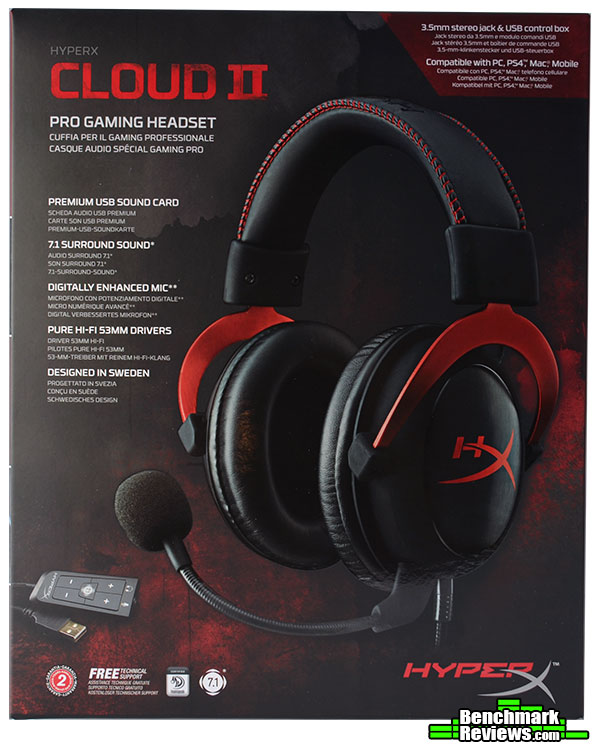
Kingston doesn’t skimp on the packaging, including detailed artwork and all the info you could want. Oddly enough, the actual word Kingston doesn’t appear on the front or sides of the box. It is mentioned at the very bottom of the back side of the packaging. This suggests that Kingston intends for the series “HyperX” to stand on it’s own. Which is not too odd, as HyperX is technically a division of Kingston.

Once we’ve shedded the packaging, we’re presented with a tidily displayed product, showcasing each component and accessory within the molded foam. Included with the headset are an extra set of ear pads that feature a soft, felt like material, the microphone, the in-line remote DSP, and an airplane adapter. Already attached to the cans are the leatherette pads that you’re probably used to. Leatherette, for me at least, never seems to last very long. It could be the product in my hair, sweat, or it could be that the material is just not made to last. Nonetheless, the leatherette material already installed on the cans does seem to be thicker than other’s I’ve previously encountered, only time will tell.

Now that we have the headphones removed from their packaging, you can see that the non-detachable cable is 1 meter long and the control box has it’s own 2 meter braided cable, giving you a total cable length of 3 meters. The shorter cable is especially handy when using the product with a tablet, mobile device, gaming console controller, or on an airplane. The microphone, as you can see above, is of the detachable variety, and utilizes a 3.5mm stereo plug. Upon initial inspection, there seems to be very little difference between the first cloud headset and the HyperX Cloud II, with the exception of the in-line DSP and some color options, read more below.

Here we can see a side shot of the headset, with microphone attached, proudly displaying the HyperX logo on the ear cup. The most noticeable difference in the cloud II and the first cloud headset is that the can arms are now colored. You have a choice of red, gun metal, or pink. The color you pick, changes the color of the HyperX logo, the metal can arms, and the stitch around the headband to the corresponding color.

Along with putting memory foam in the ear pads, Kingston also put memory foam into the generously padded headband. The headband is very comfortable, even for people with larger heads, such as myself. I didn’t notice any sweating after long gaming sessions. Of course, ambient temperature would play a huge role in sweat production, so keep that in mind. It is also stitched with a nice red thread and has the HyperX logo stitched in black on top.

As mentioned earlier, Kingston will also be offering the HyperX Cloud II Headset in gunmetal/black and pink/white, allowing the end user to pick what colors suit them the best. Looks like Kingston is making it easier for you fellas to get your gamer girlfriend something nice for Valentine’s Day!
Now we’ll take a closer look at some of the detailed features that the HyperX Cloud II has to offer.

As mentioned previously, the Kingston HyperX Cloud II Pro Gaming Headset features two connection types, a USB and a tri-band 3.5mm plug. This allows for greater device compatibility, see below.

Included with the box is a quick start guide that gives your a quick visual reference of what various devices the headset is designed to work with. As you can see above, the only special considerations you need to take is that currently you have to use the in-line sound card to use it on a PC and you need a separate adapter to use it with an Xbox One controller. Unfortunately, Kingston did not take into account people who have expensive sound cards or simply don’t prefer USB DSPs (Digital Sound Processors) when choosing what adapters to include with this headset. See Testing and Results for more on this.

The in-line control box DSP (Digital Sound Processing) unit features volume control for the headphones and microphone with the ability to turn the virtual 7.1 surround sound on or off via the middle button labeled “7.1”.

The in-line control box DSP also has a handy microphone mute slider switch located on the left side and a shirt clip on the bottom, allowing you to position the remote comfortably and for easier access.

On the bottom of the left can, there is a plug cover for the microphone. This enables you to keep the port clean while using the headset as just headphones. Honestly though, it might would have been a better idea to have the plug be permanently attached, or to have it be a small sliding cover vs being completely removable. Let’s face it, you’re gonna loose that little plug and never use it again unfortunately.

The felt like alternate ear cups that Kingston so thoughtfully included proved to be a little warm while being worn for longer periods of time, but again, ambient temperature plays a role as always. Nonetheless, some would prefer the softer, warmer material to the leatherette varient that comes already attached to the headset.
The Kingston HyperX Cloud II Pro Gaming Headset was tested with a variety of games, music and movies/TV shows. Since sound perception is very subjective, for my testing I decided to focus primarily on the perceived sound quality as well as the functionality of the features listed on Kingston’s website for this headset. This headset was tested with World of Tanks, Battlefield 4, Titanfall, and Guild Wars 2 for 30+ hours respectively. I also tested the headset with my cell phone (Galaxy Note 4), a Surface Pro 2, and my computer utilizing a 3.5mm female to 2 male headphone and mic splitter adapter.
-
Motherboard: ASUS Sabertooth Z87
-
System Memory: Corsair XMS3 4GB x 4
-
Processor: Intel i7-4770K Haswell @ 3.5 Ghz
-
Audio: Creative X-Fi Titanium Fatal1ty
-
Video: XFX Double Dissipation R9-290X (4GB)
-
PSU: Corsair HX Series 1000HX
-
Monitor: Dell UltraSharp U2412M IPS 24? x 3 @ 5760×1200
-
Operating System: Windows 7 Ultimate (64-bit)
Virtual 7.1ch Effect: While this effect of course cannot rival that of a true 7.1 surround system with individual speakers, it should have more depth than a stereo headset. Unfortunately, just like the GAMDIAS Hephaestus I reviewed back in July, the depth of this headset was virtually non-existent. I was not able to accurately identify where a sound came from with this effect, so maybe we’ll refer to it as “enhanced stereo”.
Digitally enhanced noise-cancelling microphone: Noise cancelling microphones are a must and common on virtually every headset. Is it “digitally enhanced”? In a word, no. It is mainly considered noise cancelling because of the outer housing around the microphone and the wind sock that is on the outside, the phrase “digitally enhanced” is marketing fluff. The microphone does, however, have a better frequency response than it’s predecessor. The mic on the Cloud II has a frequency response of 50Hz-18,000Hz, while the original cloud microphone was only 100Hz-12,000Hz.
Advanced USB audio control box with built-in DSP sound card: This feature works and it works fairly well for sound reproduction. Does it perform better than using the 3.5mm plug? No, not really, at least it was not discernible to my ears. But, for the folks out there using older on-board sound, I’m sure it would be a welcomed upgrade. It is nice, however, having the option and versatility of an in-line USB sound card. Software to fine-tune this feature would have been a welcomed upgrade.
Multi-device support: During testing, I used this headset with my Note 4, where it performed as to be expected, I could hear people easily and they could not discern that I was using a headset. Using the headset with my Surface Pro 2 is where things got very interesting. The Surface Pro 2 has both full-sized USB port AND a 3.5mm heaphone/microphone port. So with the Surface Pro 2 I was able to test both types of connections, 3.5mm and USB. The 3.5mm connection provided very nice sound and voice clarity. But when switching to the USB input during a Hangouts Video call, people reported that my voice became slightly distorted and quite a bit lower in volume. Raising the microphone gain on the in-line DSP made the distortion worse. This could be an issue of the Surface Pro 2, Windows 8.1, or the headset itself. I’m leaning towards it being a Surface Pro 2 problem as my listeners did not experience a similar problem when testing this on my main PC.
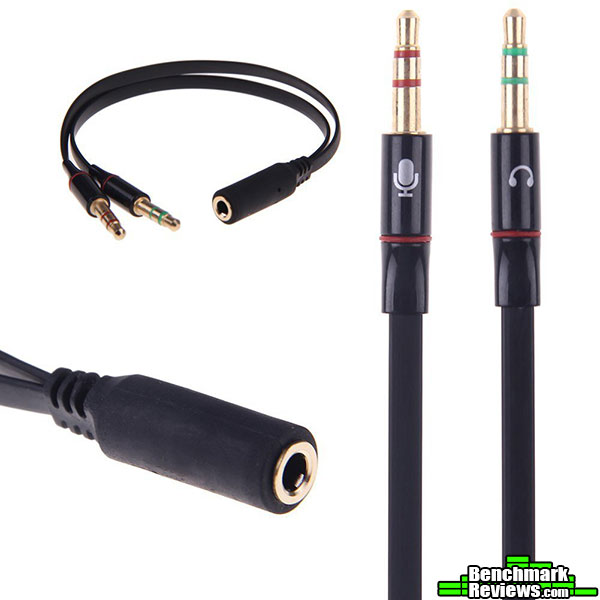
This simple adapter is the key for people who prefer to use their own sound cards on their PC. These run about $6 on Amazon, but their cords are not very long, so if your PC is on the floor and greater than 1 meter away from you, this adapter will prove to be frustrating and you’ll either have to purchase an extension or just use the in-line USB control box DSP. Nonetheless, with this solution you can utilize your very nice sound card and bypass the USB restriction for computer usage.
In general, gaming headsets fall short of actual headphones in terms of sound. The Kingston HyperX Cloud II is no different in that aspect. But as a headset, the HyperX Cloud II performs well, providing good sound clarity and nice features not found in other headsets.
Much like it’s predecessor, the Cloud II performs very well as a stereo headset. It falls very short of other virtual 7.1 surround headsets, such as the Roccat Kave XTD 5.1 Digital Headset, but it is still a very nice and well performing headset. If the virtual 7.1 feature is not that important to you, then you would have no reason not to love this headset. That being said, there is always room to improve sound quality from a headset, but at what cost? Far more than some would consider reasonable. With that in mind, the Kingston HyperX Cloud II is a real value for a PC gaming headset, and an even greater value for usage with your PS4 or Xbox One.
I personally like this headset, it’s a very nice “enhanced stereo” headset that won’t set you back a bundle. Is it a worthy upgrade to the original HyperX Cloud headset? Well that depends on if you need or want a USB headset instead of one that uses 3.5mm plugs. Personally I would say yes, as I like the versatility this headset offers with other devices and the option to use it with USB if the need were to arise. I’m even thinking about ordering a 3.5mm to 2.5mm tri-band adapter, so I can use it at work when I take phone calls! The shorter cord makes it perfect for this, as well as gaming console controllers. If Kingston would throw in just one more adapter, the 3.5mm to dual 3.5mm headphone and mic splitter, then this would truly be a package that could please every gamer.

When trying to gauge and measure the performance of a headset it will come down to sound quality and microphone clarity. The Kingston HyperX Cloud II does both of these very well, matching some of their competitors. The lows, mids, and highs were clear with the in-line DSP, and just as clear when paired with a 3.5mm splitter/adapter and a quality sound card. The multi-device compatibility and adaptability of this headset along with it’s online price of $99.99 (Amazon | NewEgg) is what will put it over the top.
The HyperX Cloud II is a very aesthetically pleasing headset, with metal accents on the cans, a braided cable, and a nicely sewn headband, giving the HyperX Cloud II a nice quality look to it. It looks identical to it’s predecessor with exception to the colored can arms. The introduction of a pink and white version, as well as the gun-metal is a nice option as well, striving to meet every gamer’s tastes no doubt.
The construction of this headset is solid, you get no “plastic” feel to it and there is zero rattle or felt potential of rattle within this headset. The braided cable is always a welcomed feature in headsets, and in my opinion, should be an industry standard.
In terms of functionality, the HyperX Cloud II meets most of the goals the original was designed for. The virtual 7.1 goal, unfortunately, is where the headset starts to fall short. If Kingston would develop some nice software to go with this USB DSP that could allow you to fine tune the sound card and enhance the effects it’s trying to achieve, then maybe this could be a top contender with other virtual 7.1 headsets. Throw in the 3.5mm adapter/splitter I referenced in the Testing portion of this article, and then you will elevate this to a truly completely versatile device that could potentially please everyone.
Available online for $99.99 (MSRP), the Kingston HyperX Cloud II is a good value at a nice price point. It’s predecessor currently sells for $79.99 on Amazon, so for the extra $20 you get the option of an in-line DSP and colored can arms. Would I recommend you buying the older version over the newer to save $20? Well that depends on you, that extra $20 does also get you a little bit nicer microphone and more versatility in terms of what types connections you can utilize. If you intend to use the headset solely as a 3.5mm headset, then of course the answer would be no, get the older version. But if you want greater versatility and a nicer color combo from your headset, then that just might worth the extra $20.
No headset can please everyone, but the HyperX Cloud II does come close. It’s only real shortcoming is that there is no software to fine tune the in-line DSP. To some, they’re perfectly fine not having a bunch of different options with the way their sound is reproduced. But to me, the more options the better! I would recommend the headset for most gamers, especially those who want to be more cost conscious in their purchases.
+ 7.1 Channel Surround
+ Multi-Device Support
+ Braided Cable
+ Detachable Microphone
+ Includes airplane adapter
+ 53mm drivers
+ USB interface for PC
– Need to include an adapter that allows 3.5mm plug usage on a PC
– 7.1 Channel Surround doesn’t have much depth
– Software for controlling and fine tuning the USB DSP would have been preferred.
– USB interface for PC. Yes this was listed in the pros as well, as USB interface is not for everyone.
-
Performance: 8.50
-
Appearance: 9.50
-
Construction: 9.00
-
Functionality: 8.50
-
Value: 9.50


6 thoughts on “Kingston HyperX Cloud II Gaming Headset Review”
Do you know if for sure the usb connection will work on the PS4 to allow for the 7.1 surround? If not, then I am definitely going to go for the first HyperX Cloud.
According to Sony, after patch 1.60, all USB headsets should be supported by the PS4, including 7.1ch surround headsets both wired and wireless.
Some sources have stated the HyperX Cloud 1’s will perform better with a headphone amp and DAC, since the Cloud II’s share the same specs, does the USB DSP plug provide adequate power to move those drivers in the headphones?
Yes, the USB does provide adequate power to the drivers. The headset also performs well via 3.5mm plug on internal sounds card, external DAC, and even pocket headphone amps (altoid amp).
I like this gadget but Kingston should offer it in two variants… 1. As it is now 2. With a longer cable and only with 3.5mm jacks. I would definitely jump at the latter. The USB 7.1 DSP is a deal breaker for me, it’s trash, 7.1 simulated sound is a gimmick and I don’t want it so I wouldn’t pay for it.
If I use a 3.5mm to 2.5mm adapter, will the headset work on my xbox 360 controller?
Comments are closed.