By Julian Duque
Manufacturer: Cooler Master Ltd. Inc.
Product Name: Cooler Master GeminII S524 VER.2
Model Number: RR-G5V2-20PK-R1
UPC: 884102026942
Price As Tested: $42.71 (Newegg l B&H l Amazon)
Full Disclosure: The product sample used in this article has been provided by Cooler Master.
The story of Cooler Master and the DIY-PC industry is strictly linked together back to it’s origins back in 1992. Emerging as an aftermarket company for hardware cooling solutions, Cooler Master has become a symbol of the still growing market of computer hardware products. It is almost impossible for the cooling giant to go a month without a release, hence their evergrowing catalog of products that range from the popular CM storm brand to their Choiix power fort. As usual, they have taken the challenge and sent Benchmark Reviews- a sample of the Cooler Master GeminII S524 Version 2.
The Geminii series from cooler master has a very unique design that allows not only the CPU to be cooled, but also the memory and power delivery components located near the socket of the motherboard. Another key point of the Geminii series is compatibility, the Cooler Master S524 Version 2 borrow from it’s predecessor by keeping ram compatibility with modules up to 47.06 mm in height, as well as with cases that allow for 105.4 mm of height, making the GeminII S524 Version 2 adequate for small cases like the Haf Stacker 915F.

There are several misconceptions when it comes to the ordeal of choosing a cooler for your processor. It is true that Water-Cooling may yield better cooling results, mostly due to water’s higher thermal conductivity when compared to the ethanol and ammonia mixture found in most heat-pipes based coolers. But that does not mean that air coolers should not be considered as an option for enthusiasts. Unlike water-coolers, air-coolers do not need a pump, and can be “Passively Cooled” for quieter operation. Although pumps have become more silent and reliable, they should still be considered as another moving part inside your system that may be subject to failure, as well as being a source of noise. Another important factor to take into consideration when choosing the right CPU cooler is compatibility, Most heatsinks require certain parameters to be met including the CPU cooler height limit of your case, and motherboard clearance compatibility. In contrast, water-coolers only require a place to mount the radiator inside your case, as most CPU blocks are small enough to not interfere with important components near the CPU socket.
Courtesy of Cooler Master
| CPU Socket | Intel LGA 2011-3 / 2011 / 1366 / 1156 / 1155 / 1150 / 775 AMD FM2+ / FM2 / FM1 / AM3+ / AM3 / AM2+ / AM2 |
| Dimensions | 144 x 141 x 105 mm(5.7 x 5.6 x 4.1 inch) |
| Heatsink Dimensions | 136 x 124 x 77 mm (5.4 x 4.9 x 3 inch) |
| Heatsink Material | 5 Continuous Direct Contact Heatpipes / Aluminum fins |
| Heatsink Weight | 392 g (0.9 lb) |
| Heatpipe Dimensions | Ø6 mm |
| Fan Dimensions | 120 x 120 x 25 mm (4.7 x 4.7 x 1 inch) |
| Fan Speed | 800~2000 RPM (PWM) ± 10% |
| Fan Air Flow | 16.5 – 65 CFM (28 – 110.5 m3/h) |
| Fan Air Pressure | 0.48~4.8 mmH2O |
| Fan Life Expectancy | 160,000 hours |
| Noise Level | 6.5~22 dBA |
| Bearing Type | Loop Dynamic Bearing (LDB) |
| Connector | 4-Pin |
| Rated Voltage | 12 VDC |
| Rated Current | 0.08 A |
| Power Consumption | 0.16 A |
| Fan Weight | 0.96 W |
| Weight | 154 g (0.34 lb) |
The packaging of the Cooler Master GeminII S524 VER.2 is far from exciting, mostly made from cardboard which not only protects the heatsink, but keeps the accessories organized. In a measure to keep the review interesting we always omit boring stuff, so without further due lets get into looking at what came inside the box. In this section I will give my first impressions of the S524 Ver. 2 as well as go over the exterior details that Cooler Master has added to this cooler.

Having a lot of accessories included with your cooler is not always a good thing. The Cooler Master GeminII S524 Ver. 2 comes with a back-plate, a warranty information paper, the necessary screws, washers, and nuts to mount the cooler into any of the supported motherboard sockets, a tube of cooler master branded thermal paste, a small wrench tool, and four different pairs of brackets which are not labeled. Having so many accessories can be a symbol of quality, but buyers should take into account that loose pieces have a high risk of getting lost.

The Cooler Master GeminII S524 Ver.2 has a very dense fin array accompanied by five heatpipes that run from the bottom of the cooler across the aluminum fin array, Very similar to other notable Cooler Master products like the Hyper 212, the Geminii series takes those designs and tries to invert them so that the fan blows directly onto the motherboard. This design has several advantages like cooling other motherboard components, and making a lower profile cooler with the same cooling capability of one of it’s taller brothers. The Geminii series in general has a high fin density but less surface area per fin, making each fin smaller but keeping the cooling capacity of the heatsink adequate.
0
I usually rant a lot about not perfectly machined base plates on high-end CPU coolers, after alll the Cooler Master GeminII S524 Ver.2 is not a cheap product. Our sample of the Cooler Master GeminII S524 Ver.2 has no notorious mistakes on it’s overall finish on the flat heatpipes located at the base plate but had notorious gaps between each heat pipe. Having a perfectly machined base plate with no errors should yield better performance as there will be no place for air pockets to form between the TIM and the base of the cooler.

Looking at the sides of the GeminII S524 Ver. 2 we see a new feature added to the version 2 of this cooler. Cooler Master has added a series of vents that guide airflow towards the heatpipes and create vortices from the regular air convection of a case that has an airflow channel consisting of air flowing from the front to the back of the case. Cooler Master claims that this should ultimately reduce CPU temperatures.
Before we inspect each member of our new CPU cooler collection, let’s establish that our tests consist of methods we have determined to be the best for our one singular purpose. Our methodology isn’t written in stone, and could very likely be changed or modified as we receive justification (and feedback from the community). Our scope is limited to stand-alone products only, meaning those products which can be installed and operated without additional critical components needed or kit construction. This is the reason for this first test, in which the mounting system for each cooler is tested. Since this is not an apple to apples comparison, but rather a subjective description of each of the kits available without any form of quantitative data, it does not affect the numerical scores we give to each product. The purpose of this test is to inform our readers on how the mounting system of each processor cooler can affect the buying experience.
As usual, we will mount the cooler in one of our Intel test platforms. This time, we will be using an XFX MB-N780-ISH9 LGA 775 motherboard to test the mounting system included with the Cooler Master GeminII S524 Ver.2, which Scythe lists as one of the supported sockets.

To begin installing the Cooler Master GeminII S524 Ver. 2, finding the appropriate brackets is needed. This would be an easy task, if they were labeled, but Cooler Master included a total of four different types of brackets which are all unlabeled. To install them you have to use a small Phillips screwdriver along with the four included small screws which can be easily lost, and I would have preferred if Cooler Master included an extra one.

It seems Cooler Master has been using the same back plate for all of it’s heatsinks for quite some time now, but I don’t blame them. Having one standard backplate for all sockets is an easy way to save money, but I would prefer the use of screws rather than having to use a bolt and nut method to keep the heatsink in place. This could potentially make the installation easier, and reduce the number of easy-to-lose pieces needed to install the cooler.

Overall I think Cooler Master took a step backwards from what essentially was already a very good mounting system. So many screws, bolts, nuts, and brackets can essentially confuse users who have never installed a CPU cooler before. There is also a tendency for small loose parts to get lost, which is not the case with the mounting system found in other Cooler Master products such as the Hyper 212 evo. Simple things like including extra screws and labeling each bracket can really make the difference without overly increasing the cost of production.
Benchmark Reviews is always looking to improve our testing methodology over the past few years. We have always solicited suggestions from the enthusiast community, and received guidance from the experts in this field. This particular time we will be using a fresh testing methodology. Benchmark Reviews continues to test CPU coolers using the stock included fan and thermal interface material (whenever applicable), and then replace it with a high-output fan and aftermarket TIM.
Manufacturers are not expected to enjoy this sort of comparison, since we level the playing field for all coolers by replacing their included fan and TIM with common units which are then used for every CPU cooler tested. Many manufacturers include fans with their heatsink products, but most ‘stock’ fans are high-RPM units that offer great airflow at the expense of obnoxiously loud noise levels. By using the same model of cooling fan and TIM throughout our second test, we can assure our results are comparable across the board. This is one of the more significant changes we have made to our test methodology, since many of the benchmark tests we have conducted in the past have compared the total package. Ultimately we’re more interested in the discovering the best possible cooler, and we believe that you’ll feel the same way.
-
Motherboard: Asus Gryphon Z87 Motherboard
-
Processor: Intel Core I5 4670k
-
Enclosure: Phanteks Enthoo Mini XL
-
Operating System: Windows 7 Professional.
Testing was conducted in a loosely scientific manner. Ambient room temperature levels were maintained within one degree of fluctuation, and measured at all times throughout testing. The processor received the same amount of thermal paste in every test, which covered the ICH with a thin nearly-transparent layer. The cooler being tested was then laid down flat onto the CPU, and compressed to the motherboard using the supplied retaining mechanism. If the mounting mechanism used only two point of force, they were tightened in alternation; standard clip-style mounting with four securing points were compressed using the cross-over method. Once installed, the system was tested for a baseline reading prior to testing.
At the start of each test, the ambient room temperature was measured to track any fluctuation throughout the testing period using Asus AI Suite and two of the included temperature sensors located at the front intake of our test system. Aida 64 Engineer was utilized to create 100% CPU-core loads and measure each individual processor core temperatures. It’s important to note that software-based temperature reading reflects the thermal output as reported from the CPU to the BIOS. For this reason, it is critically important (for us) to use the exact same software and BIOS versions throughout the entire test cycle, or the results will be incomparable. All of the units compared in our results were tested on the same motherboard using the same BIOS and software, with only the CPU-cooler product changing in each test. These readings are neither absolute nor calibrated, since every BIOS is programmed differently. Nevertheless, all results are still comparable and relative to each products in our test bed (see The Accuracy Myth section below).
All test results utilize Aida 64 Engineer to report core temperature averages (within the statistics panel), which gives us more precise readings. To further compensate for this, our tests were conducted several times after complete power down thermal cycles. Conversely, the ambient room temperature levels were all recorded and accurate to one-tenth of a degree Celsius at the time of data collection.
All modern processors incorporate an internal thermal diode that can be read by the motherboards’ BIOS. While this diode and the motherboard are not calibrated and therefore may not display the actual true temperature, the degree of accuracy is constant. This means that if the diode reports 40°C when it’s actually 43°C, then it will also report 60°C when it’s truly 63°C. Since the design goal of any thermal solution is to keep the CPU core within allowable temperatures, a processor’s internal diode is the most valid means of comparison between different heatsinks, or thermal compounds. The diode and motherboard may be incorrect by a small margin in relation to an actual calibrated temperature sensor, but they will be consistent in their margin of error every time.
Our first CPU Cooler Performance Test takes use of the included TIM and fans included with each CPU cooler. The Cooler Master Gemini II includes only one fan for a push setup and a small bag of Scythe branded TIM which can be reused for one installation. The purpose of this test is NOT to prove which cooler is better, but rather to give our readers an expectation of what to expect from each cooler using the stock fans and TIM.

Courtesy of Cooler Master
| Model number | R4-SFNL-14PK-R1 |
| LED Color | Non-LED |
| Dimensions (LxWxH) | 120(L) x 120(W) x 25(H) mm |
| Speed | 800-1,400 RPM ± 10% |
| Airflow | 16.4-44 CFM ± 10% |
| Air Pressure | 0.47-1.69 mmH2O ± 10% |
| Life Expectancy | 160,000 hrs |
| Noise Level (dBA) | 6.5-14 dBA |
| Bearing Type | Loop Dymanic Bearing (LDB) |
| Connector | 4-Pin (PWM) |
| Rated Voltage | 12 VDC |
| Rated Current | 0.03 A |
| Power Consumption | 0.36 W |
| Weight | 158g |

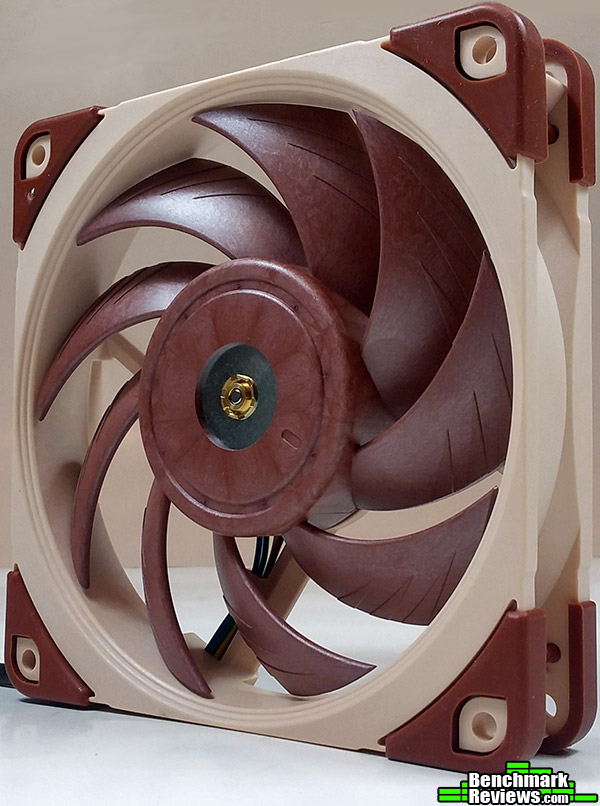
The Cooler Master Silencio 120 mm fans have a measured RPM rating from 800 to 1400, although our sample ran until 1960 rpm while being limited to the Asus AI suite of our gryphon Z87 motherboard to a minimum of 1100 rpm.The Cooler Master GeminII S524 Ver. 2 passes our performance test with flying colors, averaging 54.7 degrees Celsius under load from our Aida 64 run, which is fairly comparable to any load coming from a CPU intensive game.

Raising the CPU core of our I5 4670k to 4.2 GHz requires increasing the core voltage to 1.175 V. In our overclocked test the CM GeminII S524 Ver. 2 still keeps our I5 4670k under control averaging 63.9 degrees Celsius, which is a great score in our test 1. What is even more surprising is how much better the CM Gemini S524 Ver. 2 is when compared to the old Hyper 212 Evo which shows Cooler Master’s efforts over the years.
It’s time for our second and most important test. In this test we look to compare each cooler side by side by eliminating all the variables that may hamper our results. This means using our choice of fans and TIM throughout the entirety of this test. Buyers may benefit from buying custom fans and TIM by gaining performance, as well as by reducing the noise coming from the high RPM fans included with most cooling units. Our choice of TIM is Prolimatech PRO-PK3-5G which is an aluminum based solution that does not require any burn in time to reach peak performance.
Our choice of fans include the Yate-Loon D12SM-12 120 mm and D14SM-12 140 mm fans. Yate-Loons are mostly known for their quiet operation, and very low price. They are also very common among power supply fans, and are frequently found in the market as there are many re branded versions available from different companies.
| Model #: | D12SM-12 | D14SM-12 |
|---|---|---|
| Dimensions: | 120 x 120 x 20 mm | 140 x 140 x 20 mm |
| Air Flow Max.: | 70.5 CFM | 62.0 CFM |
| Noise Level Max.: | 33 dBA | 29 dBA |
| Fan Speed: | 1650 RPM ± 10% | 1400 RPM ± 10% |
| Rated Voltage: | 12 V DC | 12 V DC |
| Input current Max.: | 0.30 Amps | 0.70 Amps |

In part 1 of this test, the output heat generated by our Intel Core I5 4670k at stock settings gives the GeminII S524 no struggles in terms of cooling capabilities. It manages to stay really close to the Silverstone TD03-E, a 120 mm AIO water cooler. Compared to our stock temperatures in test 1 we can see that the included 120 mm Silencion fan is comparable to our Yate Loon 140 mm fan with very similar results in both tests.

Our overclocked temperature measurements with the 140 mm Yate Loon quiet fan are still great, but not impressive, being greatly beaten by other coolers in this category. However the CM GeminII S524 Ver. 2 still manages to beat the Silverstone TD03-E and the Cooler Master Hyper 212 Evo while still maintaining it’s unique design which I will still consider a win, as it is the only cooler of this form we have reviewed this year.
As per request from many members of the enthusiast community, Benchmark Reviews has added noise measurements to our CPU cooler testing methodology. Each test is conducted in a noise isolated room, during the night time to avoid any minor disturbances caused by normal daytime activities near our location. Our base ambient temperature was measured at 15 dB for each of our tests. Noise was measured using a Brüel & Kjær type 2225 sound level meter located at 1 meter from the fan/fans. Fans were placed so that the axis of rotation of the fan is perpendicular to our line of measurement. For our dual fan noise measurements, fans were placed in series (facing each other) with a 10 cm gap between them. All fans were tested at 12 Volts.

The fan Cooler Master provided with our sample of the GeminII S524 Ver. 2 is a Silencio 120 mm PWM fan, which is the newest addition to Cooler Master’s fan line-up. At 26.8 dB it is a clear improvement over the stock fan included with our sample of the Cooler Master Hyper 212 EVO. At the 120 mm level it is still beaten by the Yate Loon variant by more than 5 dB which is an obvious difference. Like it’s name indicates, the Silencio 120 mm PWM fan scores above average in our noise measurement test.
I have always enjoyed Cooler Master releases, not only do they keep their products simple, but they are innovative and have a reputation that has been build with years of providing enthusiasts with cooling solutions. Every product they release, including the Cooler Master GeminII S524 Ver.2, has extensive support online, and shows the expertise engineers at Cooler Master have gained with the many new products they release each month. The GeminII S524 Ver.2 is impressive, as it managed to keep our overclocked i5 4670k with remarkable temperatures and still have a unique semi-low profile design. There is still some room for improvement, specially in regards to the mounting system which should be simplified with less small pieces that can be easily lost.

Although when compared to other coolers released this year the performance of the GeminII S524 Ver.2 is low, we should take into account that the bar has been set high this year from the likes of Raijintek and Scythe. However, Cooler Master is taking a different approach by bringing in the most performance per height in a heatsink, something HTPC and SFF users will find useful.
Unfortunately, it is impossible for us to test the reliability of most of the products we review. However, the Cooler Master GeminII S524 Ver. 2 shows some very positive signs when it comes to it’s overall construction. The mounting mechanism is sturdy and showed no signs of flex. The fins on the heatsink were not easily bent, and are protected by the fan at the top. There were also no flaws on the base plate of our sample, which should result in better performance.
The design of the Cooler Master GeminII S524 Ver. 2 is in very simple terms smart. The low profile ensures that you will have compatibility with most cases, including some of the small SFF ones with more than 105.4 mm of height, the elevated design ensures that you have 47 mm of ram clearance, and it still has no PCI clearance issues. The bracket at the top also allows for 140 mm fans to be installed, however we found that the included Silencio 120 mm PWM fan is a great add-on.
Our last score pertains to the value of the product at hand. The Cooler Master GeminII S524 Ver.2 is priced online for $42.71 (Newegg l B&H l Amazon) at the time of this review which is average for any aftermarket cooler. Although the performance is not incredible, the GeminII S524 Ver. 2 has a very specific target, managing adequate cooling that even allows for a modest overclock with an included fan that is silent and a design that allows for compatibility with most systems.
+ Simple, small design ensures compatibility.
+ 2-Year warranty.
+ Included Silencio 120 mm PWM fan.
– Performance is not impressive..
– Mounting system is over-complicated.
-
Performance: 8.0
-
Appearance: 9.0
-
Construction: 9.5
-
Functionality: 9.0
-
Value: 8.5


3 thoughts on “Cooler Master Geminii S524 VER.2 CPU Cooler Review”
Given the claims of the extra cooling benefits besides the CPU, can you add anything relative to that particular feature ? Given the cost difference, versus performance difference with the Hyper 212, many I don’t think would be willing to spend the extra moola unless there’s some real benefit there.
Of course! Don’t forget that this is not supposed to be a direct replacement of the hyper 212 evo, as it is not even of the same line of CM products. The Geminii Ver. 2 is low profile-ish, which should allow it to be mounted in smaller cases were the 212 evo doesn’t fit like the corsair 250d. You also get support for a 140 mm fan, something that the 212 evo lacks. CM also include a silencio 120 mm fan with the Geminii Ver.2 which is a lot better acoustically when compared to the stock fan of the 212 Evo. Also, remember that the Hyper 212 Evo retailed close to $35 in the USA when launched, meaning the Geminii Ver. 2 is actually just a $7 dollar premium.
You evaluated this device against others, including the 212 Evo, and found it superior. I would like to confirm that this is the cooler to get in comparison to the 212 Evo.
Comments are closed.