Editorial By Tom Jaskulka
As enthusiasts, the “next best thing” is always right around the corner (usually about soonTM months away). Upgrade options are plentiful, so most users end up upgrading on some sort of a cycle (whether incrementally or wholly). With Moore’s Law taking a backseat to physics, the enthusiast market has had to tolerate new platforms with incremental performance advances of 5-10% from generation to generation. This has caused most upgrade cycles to increase from an “every other generation” tempo to “eh…my i5-2600K still churns out 100+ FPS, why upgrade?”
Of course, that’s from the same architecture to a newer version of the same brand’s processor. What about from platform to platform? By now, most enthusiasts are aware of AMD’s IPC deficit when compared to Intel’s Core architecture. While higher clock-speeds are an attempt to close the gap, Intel CPUs are just more efficient per clock than any comparable AMD processor. Now…how much does it matter? More specifically, how much does it matter to gamers? Is more graphics power the only thing that matters, or is your CPU holding you back? To make matters complicated, when it’s time for a computer upgrade where can you get the greatest “bang for your buck”?
In this editorial research article for Benchmark Reviews, I’ll examine two $350 desktop computer systems, two widely different computer upgrade paths, and a data-based approach to attempt to answer the ever-popular question: “what should I upgrade next on my PC?”. Given that $350 and an AMD-based computer, is it worth adding $350-worth of graphics power, or should a gaming enthusiast take that same amount and use it to switch sockets to Intel?
What to do with $350?
It all started with a conversation at work. You know the type.
“Hey Tom. I kinda want to get another GTX 970 – what do you think about SLI?”
[Begin 90-minute conversation]
Me: “And that’s why I think you should do that instead. You know what though? I’ve got two GTX 970s at home right now, and the same platform you have (FX-8350+990FX). Want to test it?”
And so it begins.
I love talking about hardware. Especially since the PC market has so many options, there never seems to be an easy/accurate answer – making the questions themselves much more interesting. Naturally, given all of the options open to us, we tend to distill arguments down to chunks that are easier to test. In some cases, this makes sense – rather than testing every specific configuration, we can break a computer system down into a logical category and make some general conclusions. This is why a GPU-focused testbed should seek to eliminate every other variable, for instance.
However, that doesn’t always tell the most relevant story. For instance, the question at hand – to SLI or switch to Intel? There’s a reason most review sites will use an Intel-based testbed for benchmarking graphics cards, as it’s been shown to be the least restrictive bottleneck (therefore more clearly – accurately – illustrating the differences between GPUs). How does that help someone using an AMD system? They can still choose – based on the data shown – a clear category of performance when it comes to discrete graphics, but their actual system results are going to be a little different. Here’s what I’m getting at: the only relevant test you can perform is with your own desktop computer system. It’s the only way to know exactly what your performance is going to be like during any given benchmark or game.
We still have to answer the question though, so let’s try something a little more specific. I’ve got two desktop computer systems with similarly-priced processors: one with an Intel Core i5-4670K and one with an AMD FX-8350. I also have two GTX 970s. I’ll be testing both CPUs with GTX 970s in SLI, then each platform independently with a single GTX 970 to hopefully answer the following question:
Given ~$350 and an AMD FX-8350-based system with a GTX 970, should a user just buy another GTX 970 or use that money to switch to an Intel-based platform?
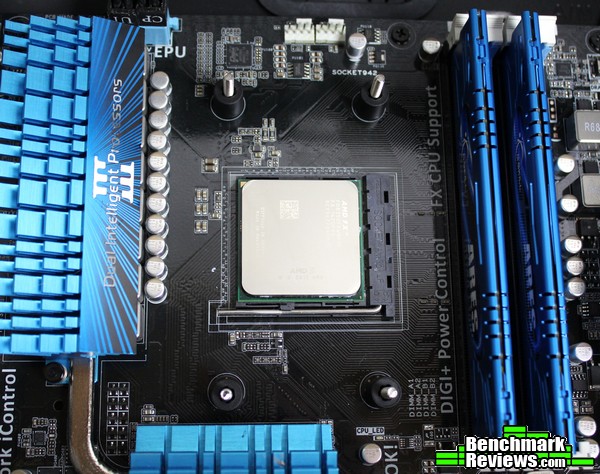
Of course, such a question is useless without a goal – how else are we to measure the results, or know when a desired state is achieved? For this article, the goal would be finding the option that provides the best “gaming experience” for the money. Now, I understand that this means different things to different people, making it a bit tricky. At the risk of a spiraling descent into subjectiveness, I would personally define this goal as achieved if the following conditions are met:
- I feel like I’ve gotten my money’s worth out of that $350 – or, phrased another way, I’ve gotten a $350 increase to my gaming experience (there’s a substantial difference in “feel” to the system). This has a couple pieces to it as well:
- Gaming feels “faster.” The frame rate should improve, as well as consistency of the frames.
- A performance target is met – while I shouldn’t expect to double my FPS on any computer system just by adding a second GPU, I should experience a substantial improvement – given a desktop computer already sitting around the $700 mark, spending what will amount to 30% of the total system budget should provide a 30% improvement in a perfect world. In reality, you tend to pay increasingly more for diminishing returns at the high-end, so I shouldn’t expect to be disappointed if I experience less than this.
- Two GPUs is a lot of graphics power. I don’t want to waste it, or be limited by some other component – otherwise what’s the point in upgrading graphics? Upgrading the component causing the bottleneck would make more sense, right? That’s what we hope to find out.
A few caveats:
- The conclusions reached apply to the specific configuration and platforms discussed – and it’s entirely possible this will be outdated by a something so simple as a driver or other software update. DirectX 12, for example, has the potential to render this entire article pointless.
- This article won’t take into account every possible use of a platform. The PC enthusiast market has a myriad of choices and user preferences – this article came about from a work discussion starting with the typical “I want to upgrade – what should I spend money on next?” This article assumes starting conditions of a typical enthusiast gamer with a general use/gaming PC.
- The best part about building PCs is you get to do what you want (and value). At the risk of spoilers, if you just really like AMD, knock yourself out.
- I’m going to make some assumptions. I’m assuming that enthusiasts will want the “best possible” scenario for each individual platform. I’ll be heavily overclocking the AMD platform, for instance – and I won’t leave the Intel platform alone either. This article isn’t about “Can a 4.8GHz FX-8350 beat a stock Core i5-4670K?” I’m not interested in fudging numbers to prove a result – I honestly want to know if one platform is better for gaming than the other, and if there’s data that can factually inform me that one solution is better, I want to know it.
So why all this talk about platforms and “experience”? Why even bring switching to Intel into the conversation with a user that is perfectly happy with their AMD FX-8350? I think it’s worth spending a little time to tell a bit of a story. About hardware, about history, and about one enthusiast’s quest for truth…
Like most enthusiasts, I enjoy building desktop computer systems – games just became the reason to have more hardware, the excuse to squeeze as much performance out of a platform as possible. Overclocking a processor and squeezing out ten extra FPS is addicting – especially when you go for broke and overclock everything, and it results in enough extra performance to turn the graphics settings from medium to high… I didn’t start out with a pile of money to support my hobby, so high resolutions and all the eye candy were options I didn’t have. Overclocking was a way to get a little extra performance, a way to access those higher settings and play games a little more fluidly. The challenge of taking a limited budget and making a computer perform like something more expensive was one of the most enjoyable ways to spend an evening in my early days of building PCs. Naturally, I gravitated towards an AMD platform in those days, since I had always heard they were the best – say it with me now – “bang for your buck.” Yeah, we’ve all heard it.
By the way, to whoever told us that – at least in the AMD FX/”module” architecture days – you’re wrong. (I feel like I need to make a disclaimer here – I don’t own any stock in any companies mentioned in this article, nor wish to start. I don’t profit from any conclusions made, other than to hopefully share some of my experiences with fellow enthusiasts.) Hopefully by the end of this article you’ll realize why, although this isn’t the question we’ll attempt to answer in this article.
Since those days, I’ve accumulated quite a few different platforms in my quest for performance. I’ve always appreciated that AMD didn’t lock enthusiasts out of overclocking quite so heavily as Intel did, and I’ve spent quite a bit of time tinkering with Phenom IIs and FX CPUs to unlock that hidden performance I felt was lurking just beneath the surface. Of course, in pursuit of performance, there was no way I could ignore Intel’s offerings – over the years, seeing the different platforms perform alongside each other was an experience I wish I could share with more enthusiasts. This article is partly in response to that notion, and in part a response to the countless “my AMD CPU games just as well as any Intel processor” threads on countless forums across the internet.

The Rant
I’ve heard it many times – “My FX-8350/8320/6300 is just as good of a value as that Core i5.” “No better processor for under $200.” “It plays games the same, you can’t tell the difference.” “The FX-6300 is the best CPU at the best price.” You (and I) have probably uttered similar phrases. One only need glance at the top Newegg reviews for the CPUs in question to get a feeling for public opinion. The current top favorable review on Newegg for the FX-8350 boldly exclaims as a title “Best Bang For Your Buck….PERIOD!” While most of the top reviews are from the product’s launch, they echo sentiments expressed by happy enthusiasts throughout the product’s life-cycle.
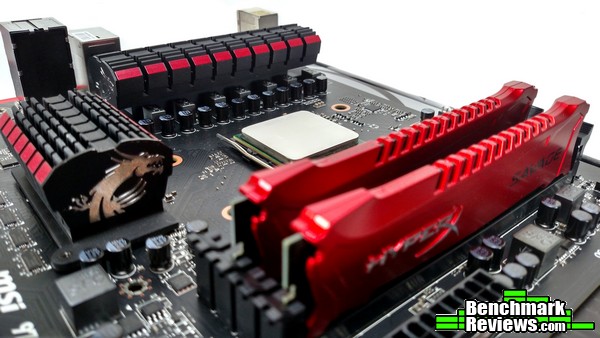
Now let me be clear: I don’t have a problem with AMD CPUs. It has been my experience that they are perfectly adequate for appropriate tasks. My problem is with statements that serve to mislead under-informed buyers – like the current top FX-6300 Newegg review (comparing a stock i7-2700K to an overclocked FX-6300 might be interesting…but what enthusiast would truly make that comparison?? Overclocking is an option available to the i7 as well – what enthusiast would purposefully leave easily-accessible performance on the table with any CPU? The natural comparison would be overclock to overclock…). We make comparative errors like this all the time, but the old “Intel vs. AMD” argument tends to lead more towards political mudslinging (many forums ban this topic outright) than it does objective analysis.
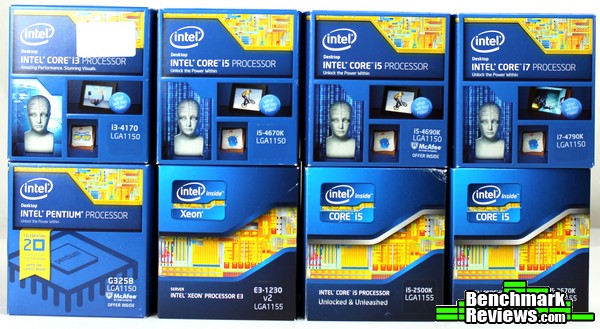
It wasn’t enough for me to settle for statements echoed in reviews across the Internet and on retail sites. I wanted to KNOW. The refrain “best price for performance” in regards to AMD CPUs was oft repeated – but was it true? As a gamer and general PC enthusiast, what WAS my best option for the price? I grew weary of subjective comparisons meant to justify a purchase – so I went and bought ALL of the platforms. That’s right – every i5-K from Sandy to Haswell, a G3258, a Haswell i3 (4170), an i7-4790K, and compared them to an FX-4150, FX-6100, FX-6300, FX-8350 and for good measure an A10-7850K (which replaced an A10-5800K before it). I had to know if I was missing out on a better gaming experience. I had to know if one platform was actually, truly better* than the other (*for my purposes – the real answer to the question “which is better” is always “it depends on what you want to do with it”).
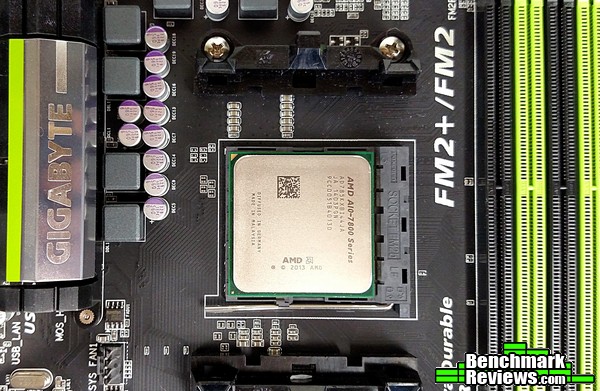
I learned a lot throughout. Playing the same games and performing the same tasks across a variety of computers was a lot of fun and very enlightening. Becoming familiar with each platform’s strengths and weaknesses was an interesting process. I did my best to get the most of out every platform. I wanted to see what they were all capable of. Through it all, I found my answer…
So now when I hear that common refrain “best bang for your buck,” it’s hard for me to hold back. When a coworker asked me about a potential graphics card upgrade, I couldn’t help but steer the conversation towards a bottleneck they may not have considered: their CPU.
So what are we going to cover in the next few pages?
Here’s the specific question I’m going to attempt to answer. Given an AMD FX-based gaming platform, which computer upgrade provides a better gaming experience: an additional GTX970 in SLI, or keeping a single GPU and switching platforms to Intel?
As a bonus, we’ll take a look at what those two GTX 970s could do on both platforms as well. Which one unlocks greater potential?
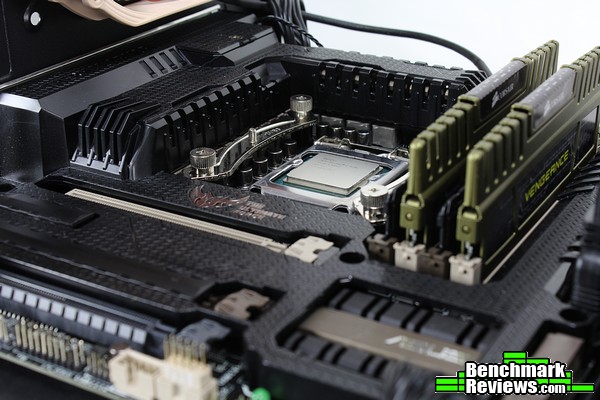
Oof, Intel vs. AMD. Comments about frame times. A run-in with the little asterisk and SLI. This could get ugly. I’d like to start by warning everyone that is currently satisfied with their computer system’s performance to just…turn away. No need to have hard evidence behind your suspicions. Honestly. That’s really all this is about anyway – if you’re getting the performance you want, the experience you want out of your current desktop computer, that’s all that really matters. If you are currently satisfied with your performance, you may not want to continue. For everyone else, searching for truth and gaming bliss as I did through generations of hardware? Here we go…
I’ve mentioned previously the relevance of test computers: the best/most relevant test bed is the one that matches your computer system exactly (and runs the exact same software). Obviously, that isn’t very practical – you have to choose some sort of standard eventually, there are just too many configurations to test otherwise. For this purposes of this article, we’ll focus on two platforms:
- Intel Core i5 + 1x GTX 970
- AMD FX-8350 + 2x GTX 970
While two GTX 970s on both platforms would bring the total system cost within range of each other, we’ll be assuming for the purposes of this article that a user starts with the AMD platform – therefore, the Intel system’s budget is spent on switching sockets rather than adding graphics power. The AMD system will require a bit more cooling and a quality motherboard to reach the higher overclocks, but overall they would be natural competitors.
As a bonus, we’ll break down the results of each platform and analyze the frame times as well. The intent will be to discover which platform enables the best gaming experience. Frame Times, in my opinion, are central to that experience. It is my position that 100 consistent frames per second is preferred over an alternating 120/80 FPS – even on a display capable of displaying 120+ FPS. Why do frame times matter so much? Well, let’s talk about that.
FPS (Frames Per Second) can only tell us so much. I’ll be referring to “Frame Times” throughout this article, and it’s worth spending a little time explaining why. In short, Frame Time refers to – simply enough – the time it takes to render a single frame. Why is this important and why should we care? For the best article I’ve seen written about the subject (and possibly the reason anyone began to care about frame times) a discussion would not be complete without referring to Scott Wasson’s work and article about the subject at techreport.com. I’d highly recommend giving it a read for an even better understanding of the topic.
The problem isn’t frame times necessarily, it’s more a result of a limitation with the FPS measurement. Within a fraction of a second, a lot can happen – especially in a desktop computer system which literally runs at speeds of billions of cycles per second. Knowing what happens inside the second can tell us quite a bit. For example, a typical sequence of 100 frames might take just one full second to render – but each one of those frames was individually rendered during that time, and each one took a varying amount of time to do so. Ideally we could split that measurement and spread it equally across the frames, but we all know this assumption is inaccurate (our 100 FPS figure doesn’t mean 100 frames each took exactly .01 seconds – or 10 ms – to render). It is also quite possible that one of the frames took a full tenth of a second (.1 s) to render, and the rest .00909 seconds (milliseconds are a unit better suited to comparing sections of a second, so that would be 100 ms vs 9.09 ms). Which scenario would provide the better gaming experience?
Perhaps an analogy to illustrate: two cars drive the same distance with the same average speed. Let’s say they are each tasked with driving a 60-mile section of road with a goal to complete the route in one hour. Obviously, the average speed needed to complete that section of road would be 60 miles per hour, right? Let’s propose the two drivers have a different driving style. One drives at 100 MPH for a minute, then slows to 20 MPH, accelerating back to 100 MPH after another minute and so on – while the other driver maintains a steady 60 mph speed, only varying 2-3 mph. Each would finish the section of road in the same amount of time, but which experience is better? If top speed is the only thing that is important you’d clearly pick to ride with the first driver. Most would have to agree – however exhilarating it would be – that the first experience would be much more jarring. Notice it’s the consistency that matters most of all in regards to the experience – if that same driver spent the first half of the trip at 100 MPH, then slowed for the entire second half to 20 MPH, the average speed would again be the same yet the experience much different.
Vision
Why does this matter to gamers – or to anyone, for that matter? We would probably have to discuss human vision as well to completely understand the relevance, but…I’m definitely not a neuroscientist, and I’m not that knowledgeable about the subject in the first place. I do have my own experiences though, and it’s those that I’ll consider in the following theory.
First – what matters to computer gamers? Most would answer something like “smooth gameplay” or “high FPS.” But why? I contend that it’s the link between your hand movements and the action happening on screen that matters the most – FPS being just an aspect of that. In fact, I think it’s the most overrated aspect in that chain. In order for hand-eye coordination and reaction times in the sub-.5 sec range to develop in the first place, it seems like we need something consistent for our brain to “anticipate” – consistent being the key term there. If a single motion happens the exact same way every time, our brain seems to be able to take a “shortcut” – the reaction is expected, therefore less brainpower is needed to perform that action. As soon as an anomaly is detected, the brain now has to compensate, however slightly – this becomes vastly more difficult when the expected behavior varies widely from action to action. Therefore, I personally feel keeping that link between the motion performed by your hands and the action on-screen as consistent as possible – the chain unbroken – is what really matters to gamers. Obviously there are other factors as well – a human watching an image at 100 frames per second still has twice the amount of information to work with – whether they can make use of it or not – than a human watching an image at 50 FPS. Although we don’t really “see” in frames per second (in fact, apparently we don’t even know for sure the exact mechanics – it’s far beyond the scope of this article anyway), it’s the most useful measurement we probably have when referring to desktop computers that generate images as such. Until now, anyway – hence the discussion of Frame Times.
So we begin to arrive at the reason I recommended a computer upgrade to an Intel system first. I’ve begun to notice the frame times are much more consistent with the Intel systems I’ve benchmarked compared to the AMD-based platforms. Note the previous work on frame times was concerned with GPUs – I propose that the greater contribution to a frame time, on most desktop computer systems, lies with the CPU. Obviously, when comparing GPUs, you’d want to compare them on the same computer to eliminate this variable. However, when choosing what to upgrade on an AMD system, this task becomes a little more complicated. The rest of this article will hopefully illustrate in more certain terms how much of a difference there really is between the two platforms, and if it’s worth switching from one to the other.
Note that all of this is pointless if you use VSync on 60 Hz display , since each frame (as long as it’s above 60fps/takes less than 16.6ms to render) won’t even display until the monitor is “ready” (making what happens inside the frame a non-issue). However, without VSync and above/below 60FPS or on higher refresh rate displays it can drastically impact the “experience,” which is what we’re trying to discover.
*NVIDIA SLI
This is where I ran into a roadblock: SLI isn’t as simple as it appears at first glance. I haven’t delved much into dual graphic cards, to be perfectly honest. Sure, I’ve Crossfired a few cards here and there, and that process was relatively simple. Until recently, I didn’t bother with duplicate Nvidia GPUs since I was generally more interested in the capabilities of different categories of GPUs. Hearing that SLI was generally a better experience and seeing the improvement and scaling in game benchmarks finally made me try it out – but in typical “enthusiast” fashion I had to do it the hard way. In order to do the following tests, some shenanigans were necessary. Turns out that NVIDIA isn’t entirely truthful when they say you can SLI any two cards of the same GPU (2x GTX960, 2x GTX970, etc.). They actually need to be identical. Cards that use the same PCB *should* work, but I ran into issues enabling SLI with a Zotac GTX 970 and a reference Nvidia GTX 970.
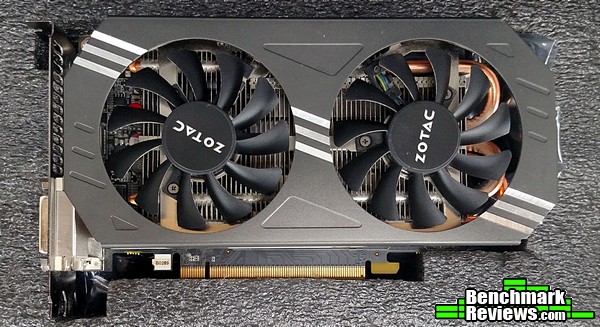
From NVIDIA’s FAQ:
Can I mix and match graphics cards from different manufacturers?
Using 180 or later graphics drivers, NVIDIA graphics cards from different manufacturers can be used together in an SLI configuration. For example, a GeForce XXXGT from manufacturer ABC can be matched with a GeForce XXXGT from manufacturer XYZ.
This was not my experience. As it turns out, I’m not alone. Enter Different SLI [AUTO]. It’s a tool that patches the Nvidia drivers to enable SLI between cards that would not normally allow it, and it’s the only tool that enabled the two GTX 970s I had on hand to work together.
I’d invite anyone with access to an AMD FX/Core i5 system and two identical GTX 970s to attempt to reproduce my results. From what I’ve read, using Different SLI shouldn’t have more than a 1-2 FPS impact on performance, but without having two identical GTX 970s to test that theory, it remains just an anecdote.
While this article isn’t a review on that particular software tool I can confirm that it did work. However, it was a bit of a hassle, and I’m not sure I would rely on it for a “production” / main computer system. Still, it did allow me to run two GTX 970s in SLI, which enabled the results we’ll look at later.
First we’ll introduce the test computers and software used. The overclocks used on both systems have been tested for stability in previous benchmarks, and both computers were monitored for temperatures to make sure throttling didn’t occur. After the SLI tests, one GPU was removed and the benchmarks were repeated to obtain the results on the next page.
In retro-respect, I could have normalized the CPU frequencies between the two desktop computer systems since both easily achieved an overclock of 4.6 (and the Haswell system had some room to go too). However, I wanted to give as much leeway to the AMD system as I could, to get as much of a “best case scenario” there as possible – something I’m assuming an AMD-enthusiast would do with their computer before upgrading anyway.
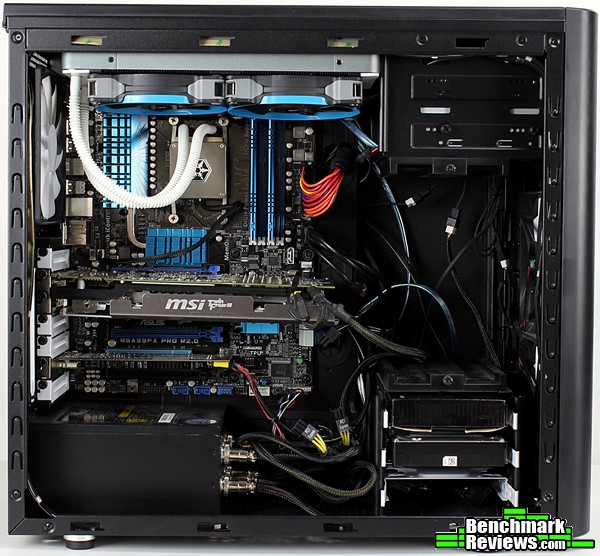
CPU: AMD FX-8350 @ 4.8 GHz/1.44V LLC, 2400 MHz NB
Cooling: SilverStone Tundra TD02
Motherboard: Asus M5A99FX Pro R2.0
RAM: 2x4GB DDR3 GSkill Ares 1866 MHz CAS9
GPU 1: Zotac GTX 970
GPU 2: NVIDIA Reference GTX970
(Pictured GPU is a Radeon 7950, not used for this test)
PSU: Rosewill Lightning 800W Gold
Storage: OCZ Vertex 240GB SSD + 1TB HDD
Display/Resolution: 1920×1080 23″ 120 Hz Acer LCD
Case: Fractal Design Arc Midi R2
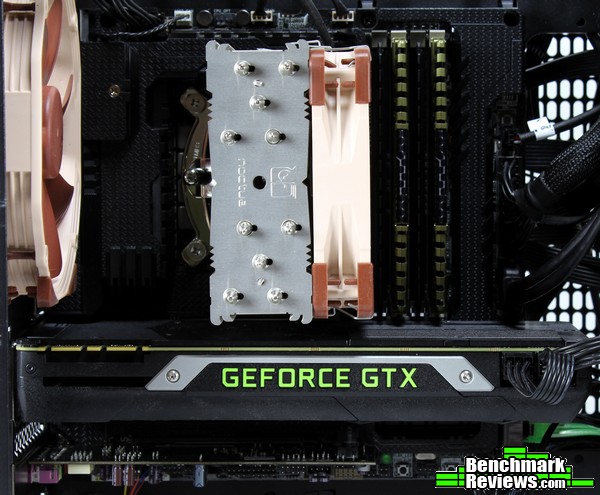
CPU: Intel Core i5-4670K @ 4.6 GHz/1.25V
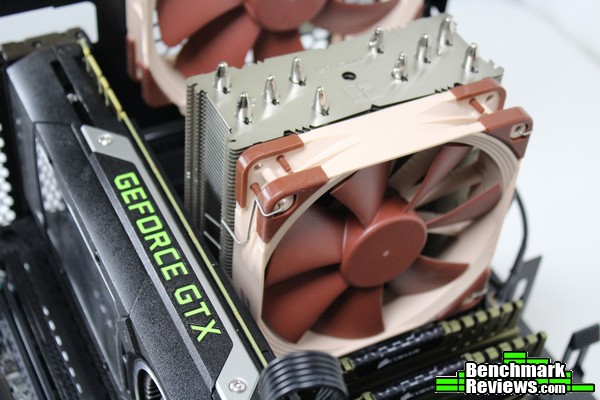
Cooling: Noctua NH-U12S
Motherboard: Asus Gryphon Z87 mATX
RAM: 2x4GB DDR3 Corsair Vengeance 1600 MHz CAS9
GPU 1: Zotac GTX 970
GPU 2: NVIDIA Reference GTX970 (using a Titan cooler)
PSU: Cooler Master V700
Storage: OCZ Vertex 240GB SSD
Display/Resolution: 1920×1080 23″ 120 Hz Acer LCD
Case: Bitfenix Prodigy M
While the below values are an approximation (component prices fluctuate from month to month – not to mention, some of these specific components aren’t even available anymore), the following table will hopefully illustrate how close these two machines are in price. The top section contains those parts specific to each platform, and could really be considered on their own.
The second half of the table lists those component that could be duplicated between the two systems (i.e., there isn’t a difference in price, as literally the same component could be used across both systems).
A quick note: the cooling required to keep the AMD platform running at that overclock was different than what the Intel platform required, so the two cooling solutions are listed as platform specific (as their cost should be factored in to the performance shown in the benchmarks and graphs over the next few pages). Yes, both platforms could be run on the included stock coolers, but I wanted to give the AMD platform as much room to breathe as possible – this is the level of cooling required to do so.
| AMD | Intel | |||
| Component | Approx Cost | Difference | Approx Cost | Component |
| FX-8350 | $180 | $50 | $230 | i5-4670K |
| M5A99FX Pro R2.0 | $120 | $30 | $150 | Gryphon Z87 |
| Silverstone Tundra TD02 | $120 | -$70 | $50 | Noctua NH-U12S |
| Total AMD Specific | $420 | $10 | $430 | Total Intel Specific |
| – | – | – | – | – |
| 8 GB DDR3 | $40 | $40 | 8 GB DDR3 | |
| GTX 970 | $330 | $330 | GTX 970 | |
| Power Supply (SLI Capable) | $100 | $100 | Power Supply (SLI Capable) | |
| Storage | $100 | $100 | Storage | |
| Case | $100 | $100 | Case | |
| OS | $80 | $80 | OS | |
| – | – | – | – | – |
| Total System Cost | $1170 | $10 | $1180 |
Nvidia Driver Ver: 358.50
GPU Clocks: Stock
Different SLI [AUTO] v1.3.1 used to enable SLI
Software:
3DMark Firestrike Extreme Graphics Test 1
3DMark Firestrike Extreme Combined
Crysis 3 – 2 min FRAPS run on “Post Human” level, avg/min/max/frametimes recorded, very high settings
Starcraft 2 – “All In” mission, Extreme settings
ARMA3 – NATO Showcase 2 min FRAPS run – Ultra settings/Standard PIP/2K draw distance/1K object distance
Each computer system ran through a full demo of 3DMark Firestrike Extreme before running the rest of the benchmarks to allow for any temperature related issues to settle (or reveal themselves), as well as any caching to occur. The rest of the benchmarks were run in order, using FRAPS and the FRAFS Bench Viewer tools to capture frametimes and avg/min/max frames in a two-minute run throughout each game (the 3DMark sections were allowed to complete fully).
Crysis 3 and ARMA3, the two games chosen to compare/illustrate differences in each brand’s CPUs, were each run three times (the results shown are the average of all the results).
I chose to do the SLI tests first. After verifying that SLI was indeed enabled, I ran each system through the gauntlet.
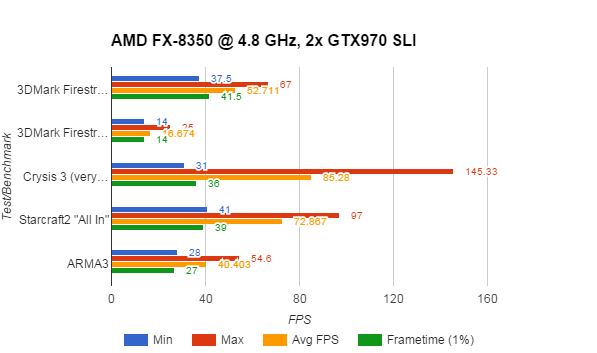
The AMD system is certainly respectable. Two GTX 970s are a lot of graphics horsepower, and this configuration doesn’t exactly struggle with an average frame rate. In fact, when that Bulldozer/Piledriver architecture is allowed to, it can really churn out some frames at those higher clocks. Unfortunately, it all comes crashing down when we look at the 99-percentile frame times: The AMD system can’t keep any sort of consistency between frames.
What exactly does that mean? A percentile is just a comparison between a portion of the data to a group above/below that mark. Essentially, the graph above says the following: 99% of the time, the AMD system will generate frame rates faster than 27 FPS. This has the effect of ignoring outliers that happen less than 1% of the time – generally, those frame times would be safe to ignore due to their rarity. For an excellent write up on frame time percentiles, check out Ian Cantlay’s article Analysing Stutter – Mining More from Percentiles on Nvidia’s developer site.
Here’s an example frame-time capture from both computers (running ARMA3) that illustrates my point:
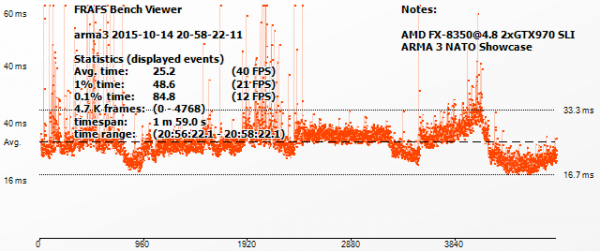 These graphs show the actual frame time of each individual frame for each computer. ARMA3’s engine, with all its AI/objects/complexity, is very CPU-intensive – and it isn’t very friendly to AMD CPUs. The extra graphics horsepower doesn’t really show up here like it may in other engines (like Crysis 3 or Frostbite-based games). An average FPS measurement of 40 isn’t a very good showing for $700-worth of graphics hardware. Now, this is only a single example, and it’s one of the most extreme – many games don’t struggle on AMD machines, but as we’ll see later it seems to reflect the nature of AMD’s “module” based approach.
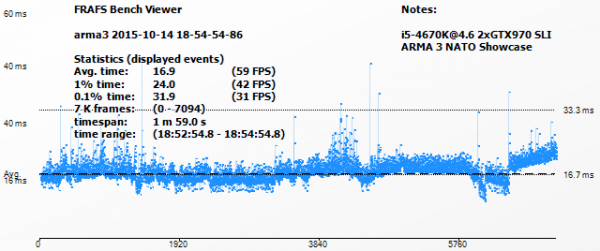
While the average frame rate is different between the two computer systems as well, pay attention to the “tightness” of the line. The less scatter or jitter, the “smoother” (more consistent) the experience appears on-screen. The Intel system generates significantly more consistent frame times, keeping a 20 FPS/50ms advantage over the AMD system. Remember, this is with both computers in SLI – we’ll get to the actual computer comparison/upgrade solution (Intel + 1x 970 vs. AMD vs 2x 970) later.
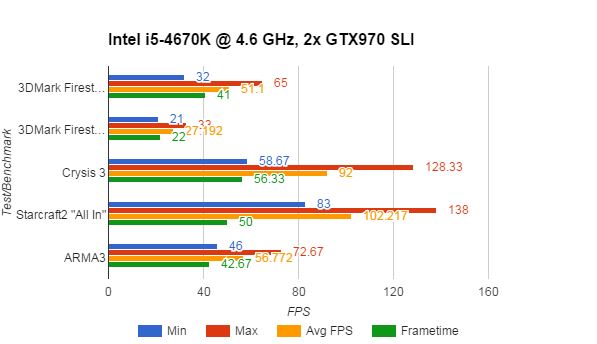
When we see the SLI results from the Intel system, the frame rates follow the same overall pattern. The extra graphics power is realized here as well, especially in the CPU-constrained benchmarks like Starcraft 2 and ARMA3. If we look at this in context of the original question (to SLI or switch to Intel), switching to Intel would ultimately realize a significant gain if a user would then choose to SLI after switching platforms.
Now that we’ve seen how each platform performs with two GTX 970s, let’s remove that variable and spend some time analyzing each platform individually; bringing us closer to answering our original question.
What we really need to do to answer my co-worker’s question is this: given $350, switch to Intel or just SLI on their current AMD platform? Comparing the ultimate end result isn’t as helpful – SLI on both platforms is definitely an option, but it doesn’t really answer the original question. With $350 to spend, we end up with two scenarios – AMD + SLI, or simply the same GTX 970 on a different (Intel) platform. Which one of those provides a better experience?
Well…whew. Remember how I said this can get complicated? The answer to this question is highly dependent on resolution – you might not want to sacrifice the additional graphics power if you’re trying to power a 4K panel at a decent framerate. The experience won’t be that great on any platform if it’s a “smooth 20 FPS,” for example (I’d argue such thing as a smooth 20 FPS doesn’t exist). Given a resolution of 1920×1080 then, can we make a final conclusion?
Let’s just take the two desktop computer systems tested and compare them one more time. This time, the Intel with one GTX 970 to simulate a platform change and the AMD with SLI GTX 970s.
Ready? This is it. No going back after this…
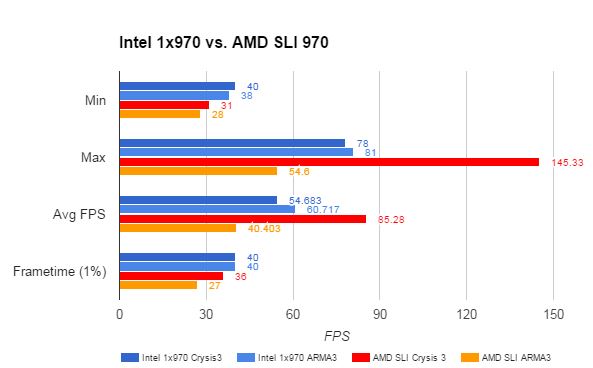
Interestingly enough, each metric tells a different story. Unfortunately, only one is in favor of AMD – and even then, only in one case. Let’s take a look at each one in turn to make a conclusion and finally answer our question.
Minimum frame rates across the two games and two platforms aren’t bad. The AMD platform, even with an additional GTX 970, still takes a 10 FPS framerate hit on average to minimums. Remember, this is the worst case scenario – if only one frame out of the entire benchmark drops, it’ll show here.
The Maximum frame rates reflect the additional graphics horsepower available to the AMD platform. Again, this is a comparison between an Intel Core i5 platform and a single GTX 970 against an AMD platform with two of them. When the application allows for it, AMD’s Bulldozer/module architecture can really stretch its legs. A maximum FPS of almost 150 in Crysis 3 shows an ideal improvement that you’d want when doubling up on graphics power (for reference, a single GTX 970 on the same AMD platform in Crysis 3 showed a maximum of 87 FPS). Adding the second GTX 970, if you only play Crysis 3, seemed to be a worthwhile investment if you want FPS bragging rights. The CPU-intensive ARMA3 didn’t do the AMD platform any favors though, with a MAXIMUM framerate 30 FPS below the Intel platform – yes, I’ll say it again, that’s AMD + SLI vs Intel and a single GPU! If the only game you play is ARMA3, take your $350 and save it (or use it for switching platforms); it’ll be wasted on more graphics power.
It’s the Average FPS metric upon which most enthusiasts would base their purchasing decision. Again, the extra graphics power available to the AMD platform shows an advantage of 30 FPS in Crysis 3 over just switching to Intel. That’s significant on its own. If you already have an AMD system, you’ll gain an additional 25 FPS by adding an additional GTX 970 – right around that 30% improvement for a (probably) 30% portion of the total computer cost. That’s only in Crysis 3 though – ARMA3 will actually lose performance (41 FPS avg with a single GPU vs 40 with two and an AMD CPU)! You’ll have to choose carefully with an AMD system to determine if the specific application you use most would benefit, because it is entirely possible you’ll end up paying a lot of money for WORSE performance.
Finally, we arrive at the Frame Time category. Hopefully you have an understanding of how these numbers can affect your gaming experience, along with the possibility that many won’t perceive the difference anyway. However, the fact remains: simply switching to an Intel platform can make some big gains here, even without the doubled-up GPU power.
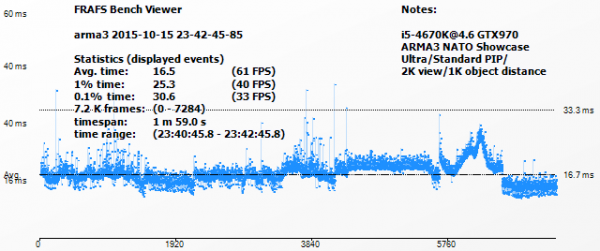
Let’s take one last look at the frame times of the Intel + GTX 970 system in ARMA3…
…vs the AMD system with SLI in the same test. Again, while this is an extreme and cherry-picked example, it’s still a very real result.
To me, even a potential loss in performance is an unacceptable result – especially when dropping more than $300. Besides, it’s not like the Intel platform was a slouch. 54 FPS in the same game (Crysis 3) with less than half the power consumed isn’t anything to shrug off. If you directed your $350 towards a solution based on this metric alone…yeah, you’d get higher frame rates staying with AMD and adding another GTX 970, but unless you’re running a 120 Hz + monitor you’re wasting those frames past 60 FPS anyway – which, by the way, is a target the Intel system essentially achieves on its own across a wider variety of games – with a single GTX 970. If we look at the ARMA3 result, you’ll actually gain 20 FPS by switching to Intel rather than adding another graphics card.
So what have we got? Using those four metrics, and with $350 to spend, it only makes sense to stay with AMD and add graphics power in a single scenario (Crysis 3). Even then, after seeing the frame time capture data, I don’t feel we’ve met our goals for upgrading to the best gaming experience. Even if an AMD user only plays Crysis 3, the fact remains: every other situation benefits by switching to Intel first.
Sure, the AMD platform with enough tweaking and cooling can churn out similar FPS (in a select few scenarios). As we’ve seen the experience is still – ultimately and unfortunately – inferior for gaming.
I’m not sure if we can blame AMD. Some developers seem to have mitigated the issue entirely, switching the bottleneck to outright graphics horsepower regardless of CPU. Perhaps it is the fault of developers, failing to account for the modular nature of AMD’s Bulldozer architecture. Perhaps it’s the foundry or physics’ fault, for not allowing the higher clockspeeds required (or originally anticipated) of the Bulldozer-based CPUs to materialize, removing the IPC-deficit. Hopefully, AMD’s new architecture “Zen” or some software solution (DX12/Vulkan) can shift the current bottleneck present on AMD CPUs back to the graphics card for gaming scenarios.
Regardless, the fact remains – an enthusiast can’t do anything about the above scenarios. They have to choose where to place their cash based on the way each computer performs now. Sure, concessions could be made for future prospects, but given the rapid development of technology it’s generally been easier to replace computers entirely rather than plan for a computer upgrade in a few years. With all that considered we can finally answer the question: given $350 and an AMD system, you’ll ultimately achieve a better gaming experience by addressing the real bottleneck and switching to Intel.



3 thoughts on “Computer Upgrades: A Data-Based Perspective”
So it’s not a data based upgrade discussion, it’s an AMD V’s Intel debate again.
Can we stick to facts and leave bias out of it please!
This article implies “enthusiasts” don’t use AMD platforms!
The true cost of switching platforms should be looked at, there is more than the cost of a Motherboard and Processor for enthusiasts.
I take it you haven’t read the complete article? I felt there was more than enough data to form the conclusion that I made, and I stand behind my results (they should be reproducible for anyone, if you’d like to gather more data of your own). I’m not saying enthusiasts don’t use AMD platforms (they do, and I’m one of them), I’m using benchmarking to attempt to analyze where an enthusiast would get the best performance for their money.
The fact – supported by data – remains: there are games and situations where switching to Intel CPUs will net a greater performance advantage for the same or less money than using an AMD FX CPU. The worst case scenario I’ve stumbled across so far is ARMA3 (see article for examples).
Analyzing the cost of the platforms would have been a little out of the scope of what I was trying to do, but you have a point – perhaps I should include the total cost of the systems in the article (at the time I had purchased them, as the cost will change from month to month).
For purposes of discussion, the Intel system was approximately $1000, the AMD (with one GTX 970) was the same ~$1000 (for the components required to generate the performance result – CPU, cooling, etc. – storage wasn’t included, although it should be added to the cost as well). I could add a cost breakdown to the systems if that would help.
Let me ask this: given that $1000, and the option to buy one of the two platforms shown here to play games on, which one would you buy if you wanted the best gaming experience?
Thank you, Tom, for this very interesting article and for your honest conclusions. I understand that you are not anybody’s “fanboy”, just someone who is tired of empty promises, exaggerated claims, and unproved “truisms” (like AMD is best bang for buck). Someone just looking for the best perceived gaming experience, like the rest of us, (even Mr. Caring 1, although his obvious bias towards AMD clouds his perception). It’s just sad that an honest effort for a real answer still somehow brings out the misguided emotions. I also gave AMD platforms a try for various builds, and my first two video cards were AMD. For a while I thought that all discreet GPUs were more trouble than they’re worth, because mine were constantly crashing my PC, or doing weird things while gaming, now I know why that was happening (AMD drivers were either poorly written or not validated with enough different hardware). Since Sandy Bridge I’ve only built with Intel and nVidia, and you know what? It is a more satisfying experience, and this article helps to explain why.
Comments are closed.