By David Ramsey
Manufacturer: Fnatic PTY Ltd
Product Name: RUSH G1 Backlit Mechanical Gaming Keyboard
Part Number: 1202001-1101
UPC: 7350041088301
Price As Tested: $119.99 (Amazon)Full Disclosure: Fnatic PTY Ltd. provided the product sample used in this article.
The London-based company Fnatic currently offers four products: the Rush keyboard, the Flick mouse, and two types of mouse pad. Today Benchmark Reviews will look at the Fnatic Rush G1 Mechanical Gaming Keyboard equipped with Cherry MX Red switches. Fnatic says that the RUSH keyboard is “…pro-player tested and approved for the highest levels of competitive play.” Let’s take it for a spin and see if they’re right.

- Cherry MX Red mechanical key switches, rated for 50 million keystrokes
- Pro-player designed, tested, and approved for the highest levels of competitive play.
- Designed with a soft-rubber coating and removable wrist support.
- Two accessory USB 2.0 pass-through ports.
- Five player profiles of custom keys, macros, and LED settings.
Let’s take a look at this keyboard in the next section.
Keyboards don’t get much plainer than this, but perhaps we’re meant to think of it as a tool. With a standard 104-key layout, there’s nothing except the “(Fnatic glyph) GEAR” branding at the upper right to draw the eye. There are no dedicated media control keys or gaming keys; an “Fn” key to the right of the space bar is the only non-standard key. The upper surface of the RUSH G1 keyboard has a pleasant rubberized finish.

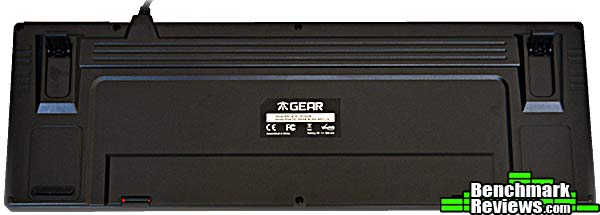
At the back, there’s actually some interesting texture and design going on. Two flip-out feet provide elevation control.
Since there are no dedicated media control or macro keys on RUSH G1, these functions are overloaded onto existing keys, and invoked by holding down the “Fn” key while pressing the desired key. There are three special “sections” of keys: the audio keys:

…the profile selector keys:

…and the lighting control keys on the numeric pad. The lighting modes are not documented but some experimentation reveals that you have four levels of lighting (off, plus three increasing intensities). Pressing Fn-8 when the lighting is already at its brightest switches to a “breathing” mode, where the lighting smoothly dims and brightens.

Let’s take a closer look at the RUSH G1 keyboard in the next section.
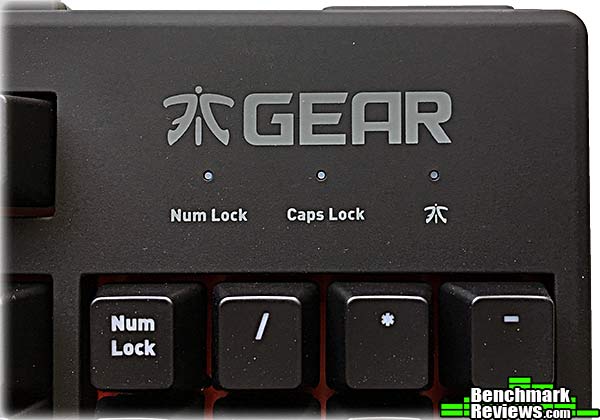
The only branding on the RUSH G1 keyboard is above the numeric pad. I’m guessing the glyph is supposed to represent an “F” and a “G” rather than some pseudo-Japanese thing. But it’s only a guess.
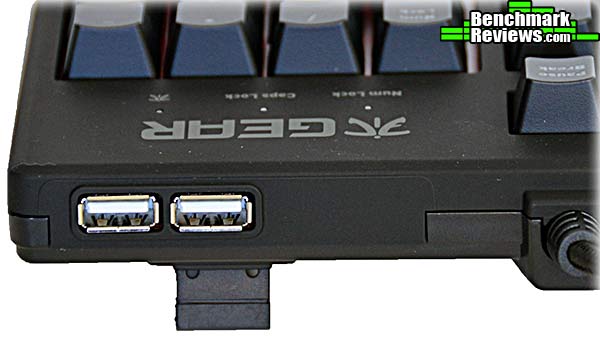
At the rear of the RUSH G1 keyboard are USB 2.0 pass-through ports, and Fnatic must have included a USB hub controller in the keyboard, since a separate USB connection is thankfully not required. Still, I await the glorious day when a keyboard that has USB 3.0 pass-through ports is available.
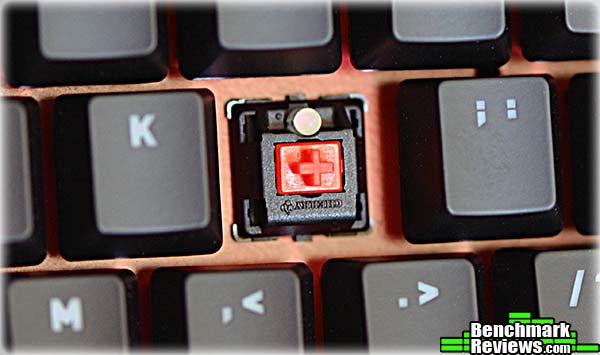
Popping a key cap reveals an LED-equipped Cherry MX Red key switch (the RUSH is also available with MX Blue and MX Brown switches). Note that Fnatic puts the shifted key symbols at the top of the key so they’re evenly backlit. The metal key switch mounting plate is painted red to help disperse the light.
Fnatic includes a nice rubberized wrist rest…

…but it’s attached via these separate, fiddly little latches that must be snapped into both the wrist rest and the keyboard. I really can’t see them lasting through too many insertion/removal cycles.
 In the next section I’ll cover the Fnatic Rush Settings software you’ll need to fully utilize this keyboard.
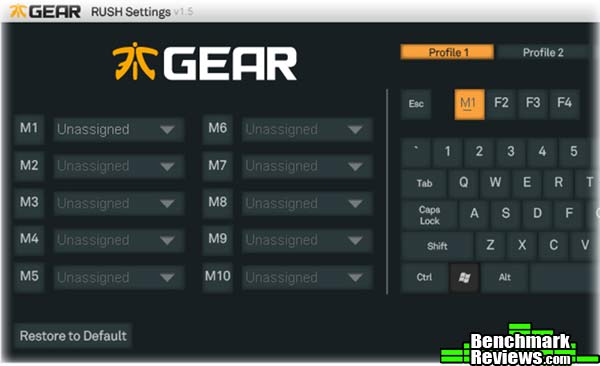
The macro and profile definition features of the Rush keyboard are controlled via the Rush Settings software (there’s no control of the lighting; you’re limited to what’s defined in the keyboard). The main utility screen shows the 10 possible macro definitions to the left, and the keyboard and profile selection keys to the right. Each of the five profiles can have a maximum of 10 macros, which seems limiting. The color scheme– light gray and medium gray on a dark grey background– might give older users some visual problems due to its low contrast.
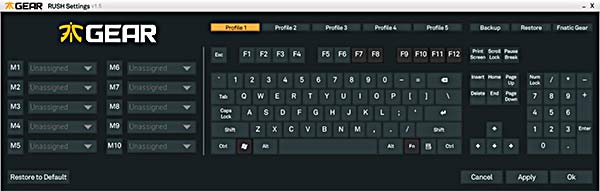
To define a macro, you click the macro definition key to the right, then click the key you want to assign the macro to. The key’s label– F1 in this example– will be replaced with the macro key.
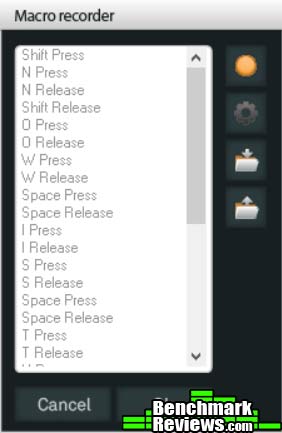
Once you select Macro from the drop-down menu by the macro definition key, the Macro Recorder panel opens. Pressing the (unlabeled) record start button at the upper right of the window starts macro recording. You can only record key strokes (not mouse clicks or movements), and a limit of 52 actions, with each key pressed recorded as two actions (press and release), so you’re limited to 26 key strokes per macro. Clicking the gear icon lets you select whether a macro will play once, repeat as long as the key is held down, or repeat until another key is pressed. There are no editing features– you must delete and re-record a macro to change it– nor can you control the timing between keystrokes (they’re played back with a fixed interval inserted between each action), and as far as I can tell there’s no way to even look at a previously-defined macro to see what’s in it.
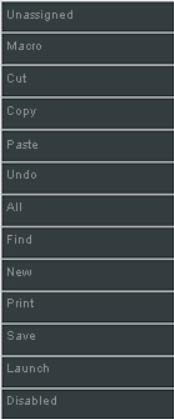
In addition to macros, you can assign other functions to keys: the Rush Settings software provides the standard array of Cut, Copy, Paste, Find, New, Undo, etc.
I’ll present my final thoughts and conclusion about this keyboard in the next section.
If you’ve never heard of Fnatic, well, I hadn’t either. Apparently Fnatic is mainly an eSports team company, with sponsored players, a YouTube channel, and so forth. According to their web site, they’ve been in business 11 years, but as of the time of this review they offer only four products: the RUSH keyboard, the FLICK mouse, and two mouse pads.

Physically, the RUSH G1 keyboard has all the right stuff: robust construction, genuine Cherry MX switches instead of Chinese clones thereof; twin USB pass-through ports, and backlighting. Even the functionally-useless-but-nice-to-have stuff like a braided USB cable with a gold-plated connector is present. And its price is right– this is one of the least expensive, full 104-key Cherry MX keyboards available.
And therein lies the conundrum: if you’re looking specifically for a Cherry-equipped keyboard, the Fnatic RUSH is compelling due to its low price. A Code, WASD, Deck, or Das Keyboard will cost quite a bit more. Looking around the interwebz, the only competition I see with genuine Cherry switches in this price range is the Cooler Master Quickfire series, which has no programmability at all.
But it’s the software that’s the problem here, specifically the RUSH Settings utility’s poor macro implementation. With limited keystrokes, no timing control, no mouse actions, no editing, and not even any way to look at the existing macro definitions, it’s a real weak spot. So if you’re looking for a programmable gaming keyboard, the RUSH is less attractive simply because its software support is so weak. If you’re willing to go with a non-Cherry key switch, competitors like the Tesoro Excalibur Spectrum or Thermaltake Poseidon Z RGB offer full RGB backlighting, per-key lighting effects, and vastly enhanced programmability for less money than the Fnatic RUSH.
The Fnatic Gear RUSH G1 keyboard combines robust construction and genuine Cherry goodness with a poor software package. There’s some hope in that since the problem is software, Fnatic could fix it simply by releasing an updated version of the RUSH Settings utility.
If you’re someone for whom only a real Cherry keyboard will do, it’s worth buying simply for the key switches– don’t consider the software at all. Just drop $119.99 (Amazon), and you’re on your way to typing nirvana with Cherry MX Red, Brown, or Blue switches.
But I think that Cherry partisans is a pretty tiny market sliver to aim at. I’ve been a mechanical keyboard snob for years, and have tested many keyboards with various clones of Cherry switches, and they’ve all felt pretty good to me. Is a Kailh, Gateron, or Greely switch really as good as a Cherry? Will they last 20 million keystrokes? Who knows? But right now it’s hard to argue for a keyboard like the RUSH when functionally superior keyboards are available for the same or less money. At the end of the day this keyboard wins a recommendation simply for its hardware and price; hopefully an improved version of the RUSH Settings utility will eventually arrive.
+ Solid construction
+ Two-port USB 2.0 hub
+ Very good price for a keyboard using Cherry backlit switches
– Fiddly wrist rest retention mechanism
– Poor macro definition and editing capability
– High price relative to competitors using clone switches
-
Performance: 9.00
-
Appearance: 8.25
-
Construction: 9.75
-
Functionality: 7.25
-
Value: 9.25
Recommended: Benchmark Reviews Seal of Approval.
COMMENT QUESTION: What do you demand most from a gaming keyboard?


