By Jason Vaught
Manufacturer: Corsair Components, Inc.
Product Name: K68 Mechanical Gaming Keyboard – Red LED – Cherry MX Red
Model Number: CH-9102020-NA
UPC: 843591094696
Price As Tested: $99.99 (Amazon | NewEgg)Full Disclosure: The product sample used in this article has been provided by Corsair.
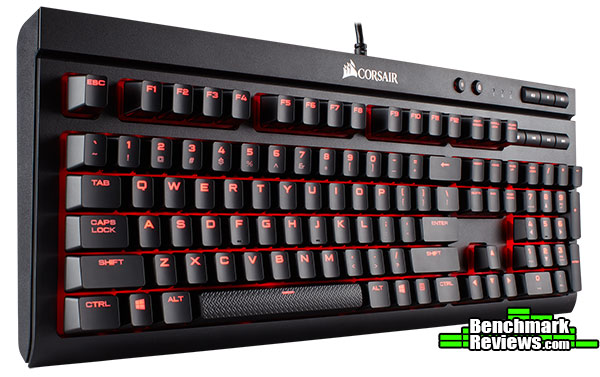
Corsair has released a unique mechanical keyboard, the waterproof (ish) and dust proof (ish) K68 mechanical gaming keyboard. The K68 is a gaming mechanical keyboard featuring 100% cherry reds with red LED illumination and is CUE software compatible. The cherry red switches offer a linear actuation with no tactile feel or audible feedback. The K68 also features rubber dome surrounds on each key to provide an IP32 waterproof and dust proof rating.
What is the main reason to spend money on a “gaming” mechanical keyboard vs a regular keyboard? With membrane based gaming keyboards, your purchase depends mainly on features that you can only utilize during gameplay. But with a gaming mechanical keyboard, your priorities in performance to value are more broad. You’re looking for a long life keyswitch that offers tactile feel and a comfortable typing experience as well. This is what we should all look for in a gaming mechanical keyboard, does the K68 live up to these expectations? We’ll find out in this article for Benchmark Reviews.
| Warranty | Two years | Keyboard Size | Standard |
| Weight | 1.12kg | Media Keys | Dedicated (MUTE, VOL DOWN/UP, STOP, PREV, PLAY/PAUSE, NEXT) |
| Key Switches | Cherry MX Red | Wrist Rest | Yes |
| Keyboard Backlighting | Red LED | CUE Software | Enabled |
| Dimensions | 455mm x 170mm x 39mm | Cable Type | Tangle-free rubber |
| Report Rate | Up to 1ms / 1000Hz | WIN Lock | Yes |
| Matrix | 100% anti-ghosting with full key rollover | Keyboard Layout | NA |
Package contents
- K68 Mechanical Gaming Keyboard
- Detachable full length wrist rest
- Warranty card
- Quick start guide
Compatibility and System Requirements
- PC with USB 2.0 port
- Windows 10, Windows 8, Windows 7
- An internet connection is required to download the Corsair Utlity Engine software
The K68 Mechanical Gaming Keyboard is the first Corsair keyboard to offer an IP32 water and dust rating. The IP32 rating, for the purposes of this keyboard, means that it is protected from water spray less than 15 degrees from vertical. What this rating does not mean, is that you can simply put the keyboard into water and it still work. It also does not mean 100% protection from direct spills on the keyboard. Although, it’s rating is lower than that of regular run of the mill membrane keyboards, but that is the trade off for the superiority of mechanical switches to membrane boards.
The keyboard’s layout is comparable to that of Corsair’s flagship keyboard, the K95 Platinum. However, the K68 lacks dedicated macros and RGB lighting. It also lacks the aluminum frame of the K95 Platinum. Instead of RGB, the K68 features only single color red LED lighting. The lighting is customizable and effects can be applied through the CUE software.
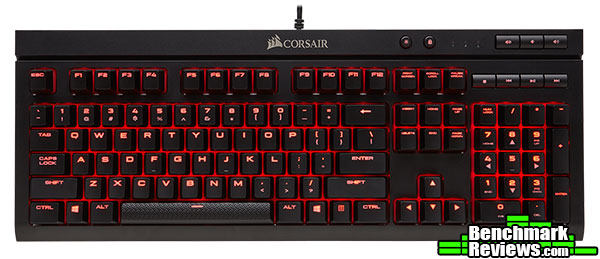
Here we can see a top down view of the keybard, you’ll notice that the keyboard features dedicated media keys, (MUTE, VOL DOWN/UP, STOP, PREV, PLAY/PAUSE, NEXT). The keys have an easily readable font, but they keyboard’s < > ? as well as all of the number keys on the top row have their shift values inverted. Meaning that / is above ? instead of a standard layout. This is how Corsair does all their keyboards, not exactly sure why they do though. 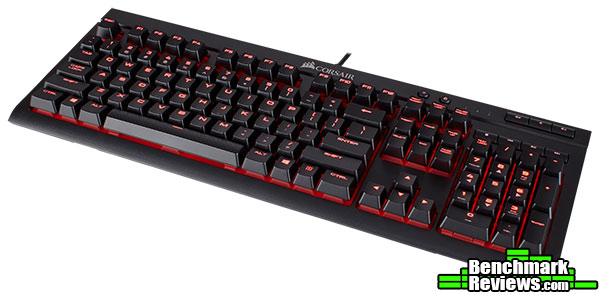
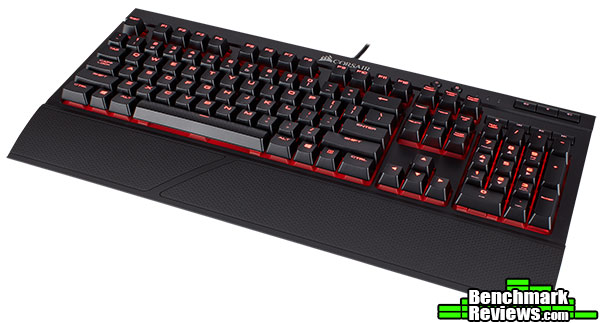
Here we can see the K68 at a different angle, highlighting the lighting and it’s minimalist design that is ubiquitous with Corsair keyboards.
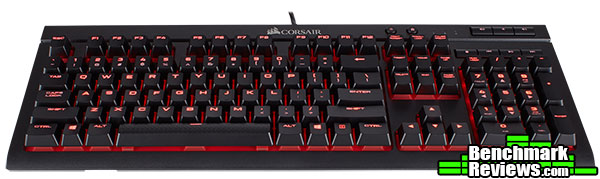
Here we can see an angled view of the keyboard, the angle you’ll most likely view if from day to day. The red LEDs are bright and easy to see and has an edge lighting effect.
The K68 mechanical gaming keyboard excels in two areas, price and IP32 rating. The IP32 rating is accomplished using rubber dome switch covers, while they don’t entirely cover the switches

Here we can see the individual rubber dome protectors that give the K68 it’s IP32 rating. The rubber domes seem to help with sound for hard typists (like me) but they don’t add a mushy, membrane keyboard feel to the experience. This was my primary concern when I first viewed this keyboard.

Of course, it wouldn’t be keyboard without foldable feet, this angles the keyboard’s rear to give it a more natural typing experience depending on your preference and orientation in relation to the keyboard.

The front underside of the keyboard has a cutout for the optional wrist rest to be attached. This keeps the rest from moving around during use.
Here you can see the K68 with the optional (included with purchase) wrist rest attached. It definitely adds some depth to the keyboard, but for some this will be necessary for comfort.
The Corsair K68 integrates with Corsair’s already widely used configuration software called the “Corsair Utility Engine” or CUE. The CUE software helps you fully customize the lighting effects of your keyboard, as well as set up any macros you might need.

The actions section of the CUE software is where you program your macros and customize your lighting and buttons. Macros can be set to record delays, keyboard events, mouse clicks, mouse wheel scroll, and of course, mouse movement.

In the lighting section of the software, you can set key by key illumination, they’re opacity, and intensity. At the time of this writing I could not locate any customized lighting effects, such as a wave or a breath effect, but this can still be done manually of course.

The performance section of the CUE software for the K68 is where you can disable Alt + Tab, Alt + F4, Shift +Tab, and of course, the Windows key itself.
The best way to test a keyboard is to simply use it. The K68 was tested for an overall period of 30 hours with Diablo III, Star Citizen, , Photoshop CS6, and various typing tasks including this review.
Corsair claims to set itself apart when it comes to anti-ghosting and full key rollover. The term “ghosted” refers to the keystrokes that are not detected and then drop off (for example, when someone presses D-C-U and only sees D-C, the U has been ghosted). While anti-ghosting is present in most gaming keyboards, it is often restricted to a certain number of keys or sections of keys. Popular sections of limited anti-ghosting may include the WASD part of the keyboard as it incorporates the keys that are the most common to use for first-person shooter games.
Corsair claims:
“100% anti-ghosting with full key rollover ensures your commands and simultaneous keystrokes always register the way you intended.”
Now we’ll see how accurate that is.
- Motherboard: MSI X99A SLI PLUS LGA 2011-v3 Intel X99
- System Memory: HyperX Savage 64GB (8x8GB)
- Processor: Intel Core i7-5930K Haswell-E 6-Core 3.5 GHz LGA 2011-v3
- Audio: On-board
- Video: EVGA GeForce GTX 1080 Ti FTW3 GAMING
- PSU: Seasonic 1200W Platinum
- Monitor: Dell UltraSharp U2412M IPS 24″ x 3 @ 5760×1200
- Operating System: Windows 10 Pro (64-bit)

As you can see from the results above, Corsair’s claim for full key rollover is accurate, at least as accurate as I can test since I can’t physically press all the keys at the same time, but you get the idea. I can, however, press enough keys to know that you won’t have a large enough combo for the full key rollover to matter.
The K68 is a simple, basic keyboard that boasts mechanical switches and red LED backlighting. While it’s not as flashy as Corsair’s flagship, the K95 Platinum, it does have an attractive price point. In meeting the price point, Corsair had to make some compromises.

The performance of the keyboard was as expected, perfect in terms of a mechanical keyboard. While the switches are not my favorite variant, I was pleased to discover the rubber dome covers didn’t affect the feel of the keystrokes. I was initially worried that the keys impacted the rubber domes and created a mushy experience, luckily they did not.
The K68 has a minimalistic appearance, it lacks the metal that we see in a lot of Corsair’s keyboards. However, this enables the keyboard to be used in a professional environment (no LEDs illuminated of course) without raising a bunch of eyebrows.
The construction of the K68 is where it takes a hit. It’s very light for a Corsair board. No metal frame, no metal backplate, just plastic. Corsair was trying to meet a price point, and to do so had to make some sacrifices in their normally robust construction.
In terms of functionality, well, this is where things get tricky. Does it function perfectly as a keyboard? Yes, yes it does. Does it function well as a mechanical keyboard? Well that depends on your preference. If you like linear switches, then you’re good to go. If you want a tactile feel, then you’re out of luck.
In terms of value, the K68 is a decent buy for $99.99 (Amazon | NewEgg), IF you need or want the IP32 rating and Cherry MX Red switches. Personally, I don’t like Cherry MX Red switches, they remind me too much of a membrane keyboard.
Corsair makes great keyboards, no one will argue that. But, with the K68 they’re breaking new ground and could have applications for an IP32 rated keyboard in an industrial environment. I would not consider the K68 keyboard a “gaming” keyboard. Yes it lights up, but other than that there’s nothing gaming about it. I’m disappointed that Corsair only offers Cherry MX Reds in this keyboard. The linear, non tactile feel of the reds is undesirable, especially when better options exist (such as blues or browns).
+ 100% Cherry MX Switches
+ Comfortable layout
+ LED backlighting
+ IP32 Dust and Liquid protection
– Cherry MX Reds
– No RGB variant
– No USB passthrough
– No aluminum frame
– No profile support
-
Performance: 8.50
-
Appearance: 9.00
-
Construction: 8.50
-
Functionality: 9.00
-
Value: 9.00


