By Jason Maxfield
Manufacturer: Corsair Components, Inc.
Product Name: Void Pro RGB USB
Model Number: CA-9011155-NA
UPC: 843591019507
Price As Tested: MSRP $79.99Full Disclosure: The product sample used in this article has been provided by Corsair.
Corsair has updated it’s Gaming line of headsets with the Void Pro RGB. Featuring Dolby 7.1 surround with the use of Corsair’s CUE (Corsair Utility Engine) software. The Void Pro RGB has a host of improvements, from the 50mm driver, mesh/memory foam earpads, improved microphone, and other features that I will cover in detail later in this article. The Void Pro RGB is only compatible with the PC, unlike the previous Void Surround that was capable of being used with Xbox, Playstation, and mobile phones.
The Corsair Void Pro RGB is a wired version of the new Void Pro RGB Wireless and Wireless SE. The Void Pro RGB ditches the wireless aspect, but maintains all of the features, except for the flip-up muting, which is a feature of the wireless models only.
The Void Pro RGB is the next step up from the base Void Pro, which loses the RGB functionality and USB, in favor of 3.5mm headphone jack, for better compatibility with other devices, just like the Void Surround model from last year.
In this article for Benchmark Reviews, I’ll be putting the Corsair Void Pro RGB to the test. Will Corsair deliver the goods and improve on last years Void Surround? Let’s find out!
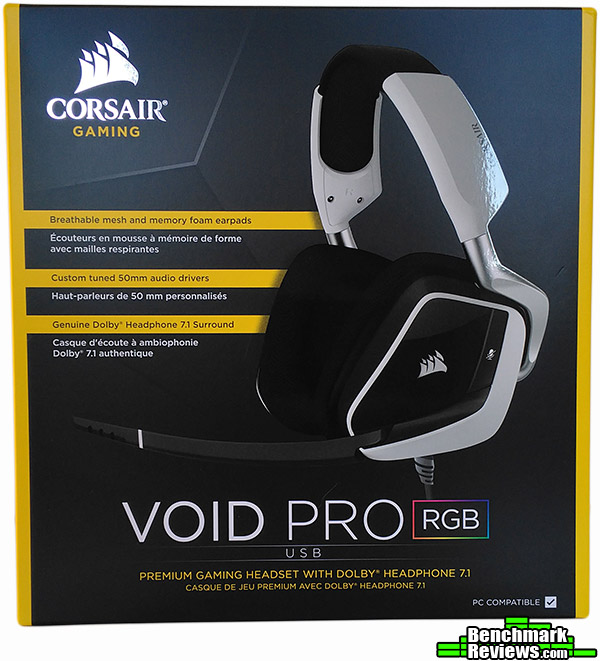
| Type | Wired USB |
| Available Colors | Carbon/White |
| RGB Lighting | Yes |
| Audio | Dolby Headphone 7.1 |
| Driver | 50mm Neodymium |
| Frequency Response | 20Hz – 20kHz |
| Impedance | 32 Ohms @ 1kHz |
| Mic Type | Unidirectional noise cancelling |
| Mic Impedance | 2.0k Ohms |
| Mic Frequency Response | 100Hz – 10kHz |
| Mic Sensitivity | -38 dB (± 3 dB) |
| Dimensions | 228mm(L) x 242mm(W) x 108mm(H) |
| Product Weight | 390 grams |
| Warranty | 2 years |
| MSRP | $79.99 USD |
Product specifications taken from Corsairs product guide. Next we’ll have a look at the Void Pro RGB in the overview of this article.
We’ll start with the usual unboxing image below. There isn’t a whole lot included with the Void Pro RGB. You get a warranty guide, manual, and an included pop filter for the microphone, something that wasn’t included with the previous Void Surround model that I reviewed in February 2016.

Functionally, the Void Pro RGB has the same design as the previous Void Surround headset. The earphones have a slightly different padding than he models from last year making them more comfortable.

The top of the Void Pro RGB is practically identical to last years models, with the Corsair logo being the only change, which is much more subtle than the giant logo on the previous models.
The Void Pro RGB mic swings down as the previous model, but it’s smooth, rather than ratchet-like with the previous model. It’s more stream-line and modern looking, but functions the same as before.
The padding on the top of the headset is now memory foam and feels much softer than the previous models, leading to even more comfort than before.

On the next page I will discuss some of the more detailed features of the Void Pro RGB, and compare them to the older Void Surround headset from last year.
The first major change of the Void Pro RGB is the volume control. On the Void Surround headset you had a simple dial control. The Void Pro RGB uses a rocker-style volume control, that also allows you to switch between stereo and Dolby 7.1 sound, and between EQ settings.
How the rocker works is very simple. You push the rocker up, for higher volume, and down to lower the volume. When changing the volume you get an onscreen display of the volume level and can hold the rocker switch to scroll quickly up or down in volume.
To control the EQ, you simply push the rocker inward with a quick depress and you are greeted with a number of beeps. The amount of beeps indicates 1 of 5 different EQ settings that can be selected. The CUE software already comes with 5 presets, but you can create a custom preset and this will disable one of the factory presets. You can easily drag these EQ settings in the CUE software so you’ll always know which EQ setting you are on. This comes in handy when you are watching a movie and want to change EQ or surround settings without having to open the CUE software to select it.
Pressing and holding the rocker switch will toggle stereo or Dolby 7.1 sound. As with the EQ settings you will be greeted with a sound to signify the change. You will hear a double high pitched beep which means you have engaged Dolby 7.1 mode, and a double low pitched beep for stereo sound.

Below is a close up shot of the mic mute button. The design and shape hasn’t changed from the previous model, but what has changed is an audible beep to signify you are muted or not…

Which leads me into the next image below. Not only do you get an audible beep when you press the mute button, but you get a red LED lit up near the end of the microphone that you can see in your peripheral vision. This is a much better indicator to me, since you can clearly see the red LED lit up or not to instantly tell if you are on mute or not.
Might come in handy if you have to mute your mic and walk away from your PC while raiding and come back and forget to un-mute yourself. I have been done this a few times myself, luckily no one usually notices unless they see you key-up to speak!

Below is a shot of the Corsair logo with the RGB function turned on. There are 6 different patterns to choose from in the CUE software. Color selection is true RGB, although color accuracy is not the best that I have seen before, but at least you can select whatever color you desire.

On the next page I’ll go over the testing results, and compare them to the Void Surround from last year, and cover the use of the CUE software and how it relates to the Void Pro RGB.
While testing the Corsair Void Pro RGB USB Dolby 7.1 Surround headset, I wanted to evaluate as much of it’s functionality as possible. Not only from a sound quality standpoint, but to the fit and comfort of the headset compared to the Void Surround model from last year.
For testing, I used my PC and spent many hours gaming in Ark: Survival Evolved, Skyrim, Diablo 3, Mass Effect: Andromeda, Dark and Light, and Citadel: Forged With Fire. I also spent hours listening to a variety of music, from classic, to metal, to rap, and many other genres of music. I watched plenty of movie content and TV shows while evaluating the Void Pro RGB headset. The CUE software was turned on and off during my testing to evaluate stereo sound as well as Dolby 7.1 sound.
-
Motherboard: MSI 870 G45
-
System Memory: Gskill Ares 1600 8GB (2×4)
-
Processor: AMD Phenom II 965 BE @ 3.8GHz
-
Audio: On-board
-
Video: XFX Radeon R9 390 Ghost Thermal 3.0 Cooling 8GB Vram
-
Disk Drive 1: Samsung 850 Evo 500GB
-
Disk Drive 2: WD Black 750GB
-
Optical Drive: DVD Writer/Reader
-
Enclosure: Thermal Take Core V51
-
PSU: EVGA Supernova 850 Watt Gold
-
Monitor: Acer X223w 1680×1050
-
Operating System: Windows 10 Pro 64bit
First, I want to go over the CUE software in more detail. Below is a screen cap showing the EQ and it’s presets. As you can see in the image below I have set up a custom EQ setting. To add a custom EQ setting you simply push on the ‘+’ button right next to the presets. You can also copy or delete these presets. Adding a custom preset will disable one of the factory presets that come with the CUE software. You can disable or enable as many EQ settings as you want until 5 are active. The other presets remain disabled. You can also drag and drop your presets in any order you wish to make selection via the rocker switch easier to remember.
You also have a mic volume and sidetone slider on the right side of the interface. The mic volume controls the sensitivity of the mic and the sidetone allows you to hear yourself speak. I didn’t care too much for the sidetone function. I usually do not have a problem hearing myself talk while using a headset. Although the Void Pro RGB does diminish outside sound more-so than the previous Void Surround model did.
Below the volume sliders you have a stereo icon, which you can toggle by clicking on it to turn the Dolby 7.1 surround mode on. The icon will change to a Dolby icon in yellow, so there is no confusion as to which mode you are in.

Moving along to the RGB effects you can see a color wheel below. You can click any spot for any color you wish, or you can manually put in RGB values to color match other RGB LEDs you might have in your system. Along the left side of the color wheel is the intensity control. It starts out at the top, and as you move it counter-clockwise the light becomes more dim and will shift all the way to black(off). The Corsair logo in the CUE software will change color with whatever selection you make as an example of what it should look like on the Void Pro RGB.
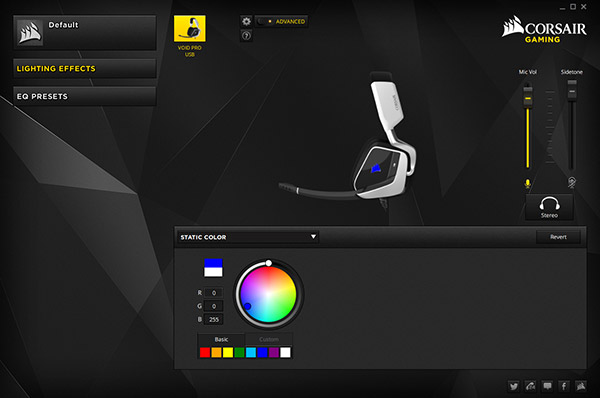
We have a look at the list of various RGB effects that come with the CUE software. There is 6 different effects to choose from:
- Static Color, which is just that, solid color always on.
- Blink, which is a rapid strobe-like blink. Or choose from single blink, double blink, rapid blink, or alternating rapid blink, that blinks between two colors instead of one.
- Breathe, is your typical slow pulsing from black to whatever color is chosen. You have a couple of options here as well: breathe, slow breathe, and slow long breathe, which control how long it takes to fade from black to color.
- Beat, which is kind of like blink, but not as rapid. There is two options here: beat and heartbeat. Heartbeat tries to simulate the pulse of a heart beating, but at a slow pace.
- Rainbow Pulse. This one is simply the colors of the rainbow pulses from color to color. The only option with this one is the speed at which the colors fade from one to the next, controlled by a slider bar, with slow, medium, and fast as the 3 options.
- Rainbow is the last option. Very similar to Rainbow Pulse, with the colors fading, rather than pulsing then changing to the next color. The colors maintain full brightness as they have. As with the Rainbow Pulse setting you have a slider to control the speed.

The CUE software is more useful than my last encounter with it while using the Void Surround headset, which I still use as my daily headset. With the Void Pro RGB it feels more tied into the CUE software. The beep indicators are better and the rocker volume switch makes it much easier to change settings without having to open the CUE software up.
Moving on to the subjective part of the testing results, I want to talk about the comfort of the Void Pro RGB headset. Corsair claimed to have made improvements to the comfort of their Void Pro RGB, and I have to agree with them. The new materials feel softer, without collapsing and becoming worthless. The earpads don’t feel as stiff as the older Void Surround and cup my ears more gently and just adds a lighter touch than before. The head piece is softer than the Void Surround yet sturdy enough to hold in place and not feel like I have a bulky pair of headsets on. The older Void Surround to feel heavier when I wear them, so kudos to Corsair for improving comfort on a headset that I had already found pretty comfortable to wear already.
Now the nitty-gritty, how does the Void Pro RGB sound? Well, I am glad to say they sound even better than the Void Surround headset. In stereo mode the Void Pro RGB has just the slightest bit more clarity of sound. This is in part because of the new drivers having a higher dynamic range. This is the difference between loud and quiet sounds. Using audiocheck.net dynamic range test, I was able to confirm this. The Void Pro RGB was audible to -54dB, while the Void Surround I could only hear down to -42dB. With a wider dynamic range, more detail can be heard between loud and quiet sounds, giving the Void Pro RGB the edge.
Dynamic range isn’t the only measure of how a headset sounds, so I’ll elaborate more about the sound quality. Sound is natural and clear with most genres of music. Metal music can sound a bit muddied when there is a lot of heavily distorted bass. The highs tend to suffer when this happens. Cymbals do not sound as crisp as they do when the bass is not as distorted. Other genres sound cleaner when avoiding heavily distorted content.
TV and movie content sound good with either stereo or Dolby 7.1 mode turned on. Voices are always clear and understandable, even in quiet scenes. That extra dynamic range helps with this as well. The Dolby 7.1 surround mode tends to brighten sound, and increase overall volume quite a bit. This can tend to make you ‘think’ the sound is better. As with the Void Surround headset, I feel that the Dolby 7.1 sound on the Void Pro RGB just widens the sound field, but doesn’t truly give me that feeling of sound coming from behind, above or to the sides, as you expect from a true Dolby surround set up you experience in a theater or your own home theater.
I used a test pattern from audiocheck.net to test the low bass frequencies. Bass extension is good. I could hear down to 25Hz clearly with the Void Pro RGB. Corsair claims 20Hz is the bottom range, but I may not be able to hear that low anymore, so the results could vary dramatically from person to person listening to this test.
As far as the high frequencies go, I could hear clearly til about 15.5kHz to 16kHz. As I’m older, I can’t hear all the way to 20kHz anymore, so again this test is going to depend on each individuals hearing.
Mic quality of the Void Pro RGB was about the same as the Void Surround headset. About the only difference was it sounded a bit more warm and natural and not as tinny. Bass response of the mic is a bit better as well. I have a baritone voice and the mic definitely doesn’t pick up on some of those frequencies, but the Void Pro RGB picked up just a slight be more of the bass in my voice in recording samples I made to test the mics quality.
To wrap this up, my overall impression of the Void Pro RGB is that it is an improved product over the Void surround of last year. They added better functionality, mainly provided by the volume rocker switch, that allows you to change EQ and sound settings on the fly, and just the little touch of the red LED indicator on the mic to show if the mic is muted or not. Every aspect of the headset has improved, from comfort, sound and functionality, you couldn’t ask much more of Corsair.
The only loss I can see here is to the versatility of the Void Surround headset with the 3.5mm jack and USB dongle set-up it uses. This allowed you to use it with mobile phones, Xbox, and PS4, while the Void Pro RGB is USB only and limited to PC use. If this is an issue, there is always the Void Pro with the 3.5mm jack, but you lose the RGB on that model.
What more can be said, the Corsair Void Pro RGB USB 7.1 Dolby Gaming Headset is not a quantum leap ahead of last years offerings, but improvements were made in every aspect. Sound quality, functionality, and comfort are all improved upon with this latest iteration of Void Pro headsets.
Performance of the Void Pro RGB was good. The clarity and quality of sound was improved upon every so slightly from the Void Surround headset.
The Void Pro RGB visually is the same design, yet the color choice looks outstanding. Normally I do not like white products, but Corsair balanced this with just the right amount of white and black, with a touch of silver to make these very appealing to my eye.
As with the Void Surround headset the construction is solid. Nothing is lose or vibrating. The only point of concern I have for durability is the volume rocker switch. With the ability to toggle and push on it, it’s going to see much more use than the volume dial on the previous Void headsets.
Functionality of the Void Pro RGB has improved a lot with the inclusion of the rocker volume switch. I ran the Void Surround headset without the CUE software most of the time because I didn’t want to always have to open it to change settings. The Void Pro RGB fixes this issue and gives me more of a reason to keep the CUE software running in the background.
Corsair has an MSRP of $79.99 at the time of writing this article. I have to say it strikes me as a bit odd of a price because the Void Pro non-RGB has the same MSRP, but loses the RGB functionality. At $79.99 this is also $20 dollars more than the older Void Surround, but considering the improvements, I think this is a decent value. As this is just an MSRP, final pricing will remain to be seen.
If you are in the market for a new gaming headset that is comfortable, stylish, and functional, you would be remiss to not check out the Corsair Void Pro RGB USB 7.1 Dolby Gaming Headset.
+ Quality sound improvements
+ Comfortable for hours of gaming or TV/Movie watching
+ CUE software feels more useful
+ Functionality is improved
+ Microphone quality is improved
– Not compatible with mobile devices or game consoles
– Dolby 7.1 surround still seems flat
-
Performance: 8.5
-
Appearance: 8.25
-
Construction: 9.25
-
Functionality: 8.5
-
Value: 8.0


