By Jason Maxfield
Manufacturer: Corsair Components, Inc.
Product Name: Carbide Series SPEC-OMEGA Mid-Tower Tempered Glass Gaming Case
Model Number: CC-9011119-WW (White), CC-9011120-WW (Red), CC-9011121-WW (Black)
UPC: 843591062138
Price As Tested: $135.99 (Newegg | Amazon)Full Disclosure: The product sample used in this article has been provided by Corsair
The 2018 Consumer Electronics Show (CES) is here, and Corsair has added a new case to their Carbide Series line-up. Let me introduce you to the Corsair Carbide Series Spec-Omega mid-tower case.
The Spec-Omega looks to be an amalgamation of the Spec-Alpha with the tempered glass side panel taken from the Spec-04. The Spec-Omega’s interior is different from either of the previous cases, designed to handle liquid coolers up to 360mm in size, while doing so in a case of roughly the same size as it’s brethren. In this article for Benchmark Reviews, we’ll be putting the Spec-Omega to the test with a complete system build.
With LED lights, the Spec-Omega looks to increase it’s bling factor compared to other Carbide Series cases with a white LED strip that runs down the front of the case, and an included 120mm white LED fan.
The Spec-Omega also comes in a variety of different colors: Black with a red LED, black and red with a red LED, and pictured below, the black and white version with white LED that I’ll be reviewing. Not the largest assortment of colors, but better than having no options.


On the next page we’ll do a quick overview of the Spec-Omega case.
We’ll kick this off with a look at the front and rear of Corsair’s Spec-Omega case, which is available online for $135.99 (Newegg | Amazon).
The front of the case has a sharply curved plastic panel with contrasting white and black pieces split with a white LED between them. While the right part is solid white, the left has clear glass with the Corsair logo displayed at the bottom. You can clearly see inside the case through this glass panel. at the very bottom of the panel is a triangular grill that allows airflow to the front case fans. This grill acts as a filter as well. And in the upper most left corner you have your power button and front inputs.
At the back of the case we have the usual layout. 120mm fan mount that has tracks to allow some variance in mounting height, input/output shield cut-out, 7 expansion slots, and at the bottom the PSU mount.

The tempered glass side of the case shows the inside of the chassis. The glass is lightly tinted so viewing of your hardware isn’t hampered as much as some other cases that use a darker tint.

This side panel that covers the cable management area of the case is flat to keep with the rest of the smooth design. I however would of liked an indent to help with cable management as the interior space offers about half of an inch, which isn’t much depending on your cables and how many of them you require for your build. As you will see below in the build section, I required quite a bit of wires and cables to complete the build with the Spec-Omega case.

The tempered glass on the Spec-Omega is held in place with 4 screws that have an Allen wrench style key. Corsair includes this Allen wrench to remove these screws. I however did find on my sample that one of the mount points was a little off and the screw would go in crooked. Once tightened though it sits almost flush.
While I’m thinking about it, I should mention that I am not a fan of having to use a metal wrench to get these screws off. If you aren’t careful you could scratch the glass or even crack or break it if you get sloppy and hit the wrench against the glass.
I can see why Corsair went with this style of screw to keep the heads profile down as much as possible, but I think thumbscrews would of been acceptable in this application and easier to remove and not require a tool to do so.

Below is a perspective shot that gives you an idea of what the fan is going to look like if left in it’s stock configuration. I didn’t build the case with this fan up front, as you will see later in the build section of this article.

On the next page I’ll go over some of the more detailed features of the Corsair Spec-Omega case.
I’ll start this section off with the manual/guide, and warranty information. Corsair has each of the screws needed for building a system conveniently in separate baggies for ease of access.
I’m glad to see this more and more, as the days of digging through one bag with all the screws jumbled up is a waste of time and annoying. It may not be much, but when you don’t want to waste time looking for the right screw and just get on with your build, this can save you some time.

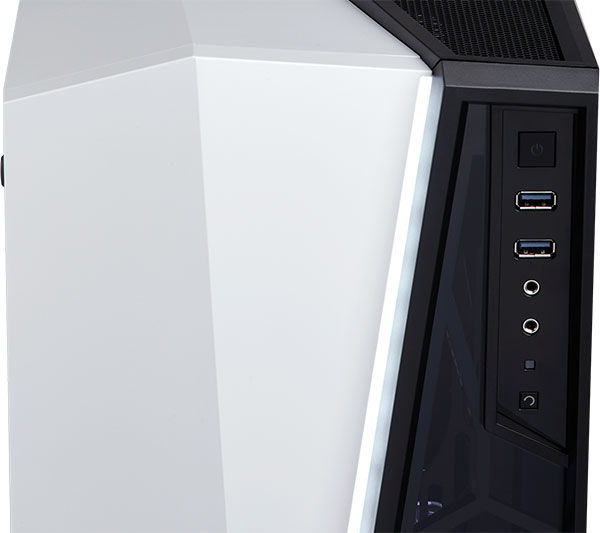
The front panel connectors terminate into a tidy area in the upper left corner of the case. You have a white illuminated power button, two USB 3.0 ports, headphone and mic jacks, HDD drive activity LED, and a reset button at the bottom.
The power button has a bit of a mushy feel, and isn’t ‘clicky’ like most other power switches, but does it’s job all the same.
Pre-installed at the front of the Spec-Omega we have one of the SP120mm fans. This one is a clear plastic, and has white LEDs included.

At the rear of the case is the other pre-installed SP120mm case fan. I would of prefered Corsair to include another white LED fan just for symmetries sake, even if that added another 5 dollars to the cost. It just feels out of place with the plain black fan and clear white LED fan in the same case.

Here is a shot of the only dust filter included with the Spec-Omega case. The PSU dust filter is akin to every other dust filter out there and should do it’s job well.

On the cable management side of the case we can see rubber grommet pass-through for power cables and front panel connectors. There is plenty of tie-down points along the back of the chassis, which will help organize the inevitable mess of wires needed to get a system up and running.
The Corsiar Spec-Omega comes with an SSD drive caddy installed here as well. You can fit up to three 2.5″ SSD drives here. It is also removable via two thumbs screws. For the system build I removed this drive caddy to allow more room for cable management.
You might notice a generous CPU cut-out that should make changing CPU cooler mounting brackets a breeze while the motherboard is installed.

Here is a look at all the connectors that are included with the Corsair Spec-Omega. There is the usual power, reset, power LED, and HDD LED front panel connectors, as well as front panel HD audio, USB 3.0, and a SATA power cable for the front panel LED.

Now we have a look at this front panel. Aesthetically, I find this piece to be good looking. Functionally, I find it very flawed. At the bottom we have a connector to power the LED strip that is concealed in the plastic. This makes removal and installation a bit tedious as you have to unplug/plug it every time you have to remove the panel for any reason.
Also, the glass part of the panel, while nice looking, only impairs performance for any installed front case fans, or radiators. I think Corsair should of gone with the same black grill at the bottom of the case in place of the glass, as it is on the Spec-Alpha case. It does appear that you can remove this glass by removing several screws. This would improve airflow to fans immensely, but without any filter, this could lead to a great deal more dust and larger particles getting into your fans and case interior.
Lastly, this front panel was one of the more painful to remove. It’s just held on with plastic tabs, but the tabs are a bit more flimsy and I almost broke one by removing it to install the radiator into the case. And I’m generally very careful with these pieces, I don’t just yank and pray! I take the time to see exactly how it’s connected to the front of the chassis, so when I still had issues removing this, it became quite frustrating.

Next page I’ll go over the a system build with the Spec-Omega case and detail my experience and discoveries along the way.
Below I put the Spec-Omega to the test by building a complete system inside of this case. In the past I didn’t always build systems into cases. I feel doing a system build is a good way to find issues that you might not think about if you do not build a system in a case.
-
Motherboard: Asus Prime X370-Pro
-
System Memory: Corsair Vengeance DDR4 2400 16GB
-
Processor: AMD R5 1600
- Cooler: Corsair H150i Pro
-
Audio: On-board
-
Video: XFX R9 390
-
Disk Drive 1: Samsung 850 Evo 500GB
-
Disk Drive 2: Western Digital Black 750GB
-
Optical Drive: N/A
-
Enclosure: Corsair Spec-Omega
-
PSU: EVGA SuperNova 850 G2
Building with the Corsair Spec-Omega was a bit of a challenge. Since I am using a 360mm radiator, this dictated the location of the radiator and everything else had to work around this for the installation.
Below is a shot of the case after everything was installed. The white LED fan that was pre-installed needed to be moved to make room for the Corsair H150i Pro radiator.
The white LED strip that runs down the front of the case is very bright, perhaps a bit too bright. During the night if you are in a dimly lit room or turn the lights off to watch a movie on your PC, this light can be a bit distracting. I would of liked a switch added to the front panel to be able to turn this light on or off.

I wanted to get a side-shot of the tempered glass with the hardware installed, but the nature of the reflective glass made that shot impossible with the shooting conditions at my home.

Below is a cropped shot of the top of the case where I moved the pre-installed front 120mm white LED fan. I decided to make this an intake fan, rather than exhaust, to help with some airflow over the VRM section of the motherboard.
As you can see, the mounts are fairly versatile so you have some wiggle room when installing 120mm or 140mm fans. Corsair states that you can fit a 240mm radiator in the top of this case, but doing so with certain boards and RAM might have interference issues. There simply isn’t much room above the motherboard and any radiator and fan combination is going to sit below the top level of your motherboard, and tall VRM heat sinks will undoubtedly cause issues if you mount a radiator in the top of this case.

I wanted to highlight the installation of the EVGA PSU, as it was quite the squeeze. Corsair states that the Spec-Omega can accommodate up to 190mm length of a PSU, and I think that is a bit optimistic considering the EVGA PSU is 180mm in length and the wires barely have any room to breathe.
As it was, I had to remove the HDD drive bay to get the PSU into position, then reinstall the HDD bay. Granted the drive bay can be moved more toward the front of the case, but with the radiator installed, the bay could not be moved.
Also note that if you do not have a 3.5″ HDD you can simply remove this bay all-together and install SSDs on the SSD caddy on the back-side of the case. This would free up a lot of space and help with cable management.

Up in front you can see the radiator takes up all of the space in the Spec-Omega. It appears you could mount fans on the front for a ‘push’ configuration, but I left the radiator in a ‘pull’ set-up based on the H150i Pros manual recommendation.
I had limited time with the case, so I couldn’t test moving the fans from the inside of the case to the front of the panel. This would be ideal to ease some of the space inside the case and allow the HDD drive bay to be moved closer to the front of the chassis for better clearance of the EVGA PSU.
Because of the front panel design the radiator has constricted airflow and is evident by the coolant in the radiator heating up even while the PC is idle. Instead of the clear glass on the front panel, Corsair should have installed a black mesh grill,(again I reference the Spec-Alpha here) as they did with the top case panel.
The PC is fairly quiet when first turned on, but the front radiator fans start to slowly spool up as the coolant temps start to rise from lack of airflow. There isn’t any issues with the included 120mm fans. They are well behaved with them set to 1,000 RPM via BIOS controls and are relatively quiet at that RPM.
I did not test the included fans at full RPM, as I’m sure the fans will do what all fans do, push more air and get much louder. Corsair didn’t include the specs of the fans, but I can guess that max RPM would be in the 1400 to 1600 range based on my 60% power setting to get them to 1K RPM.

Oh boy, my least favorite part of building, cable management. The Spec-Omega has plenty of tie-down points, but the spacing is limited to roughly a half-inch of space between the motherboard tray and side panel door.
As you can see, I tried to keep wires and cables from overlapping to some extent. I do not pretend to be good with cable management so this may not be as big of a deal to others. I can recommend however, that if you do use this case, PSUs with longer cables are going to be a bit rough to manage, and I would say flat cables would be the way to go with the Spec-Omega for the best cable management results.
The thickness of the 24 pin power cable alone presses against the side panel door when closed. There isn’t much recourse to fix this, as the cable has only so much room between the drive bay and PSU. I even uninstalled the SSD caddy to make room for cable management.

From the looks of the case with all the panels on, you think this case is a lot bigger than it actually is. The inside of the chassis is quite short from front to rear since optical drive bay compatibility is not included with this set-up.
At least the cabling inside this area doesn’t look too bad. It’s fairly clean despite how cramped everything looks in the case.
A note about clearance: Corsair specifies GPU clearance up to 370mm, and CPU cooler clearance of 165mm. Of course the PSU clearance is 190mm, but as I mentioned before this is a bit dubious. Just keep in mind without the radiator in the front, the HDD drive tray can be moved closer to the front of the chassis and give more room for PSU clearance.

Next page we come to my final thoughts and conclusions.
The Corsair Spec-Omega is a nice case. But it’s a bit annoying at the same time. While it is classified as a mid-tower case, the internal area feels more cramped than a typical mid-tower. With the removal of space normally taken to accommodate optical drives, this has made the chassis shorter in length to other mid-tower designs I have worked with before.
Ironically, the SilverStone PS11 series is pretty close in dimensions, but makes much better use of the case enclosure. That case can fit two 5.25in optical drives, while the Spec-Omega doesn’t support any. This is an obvious trade-off in design to facilitate large radiator support, while the PS11 case has very limited radiator support.
Quite a bit of the length on the case is due to the huge plastic front panel. There is a large cavity in between the chassis and panel, so you can mount fans in a push, pull, or push-pull configuration. But I feel that Corsair might of taken a bit too much of the internal space away for this configuration.
The components I’m using in this build are pretty typical in size for a gaming rig. It all just feels a bit too cramped. Granted if you were to plan hardware around this case, and weren’t using components already on hand, as I did, buying smaller components is the way to go with the Spec-Omega, if you do not like the cramped feel.
I have pretty mixed feelings about this case, if it wasn’t obvious by now. On one hand I like the sleek design to break up the monotonous rectangle box syndrome that you have with a lot of cases on the market.
Yet some of those design choices hurt performance of the case as well. Choosing to put glass in the front panel instead of a grill causes air flow to enter from the bottom and the top of the case. This definitely causes reduced efficiency with the fans mounted on the front of the case. How much so, that’s debatable, and I do not own the equipment to test such variables.
There could be a possible solution to this problem, considering the front panel looks to be high-jacked from the Spec-Alpha series of cases. The part that has the glass in it, looks to be the same exact part on the Spec-Alpha, only they have a mesh grill installed instead. I think Corsair should have this as an optional part, either included with the case when it ships, or as an accessory you can buy if cooling becomes a serious issue.
Performance is mixed. The Spec-Omega works as Corsair says it would. It did indeed fit a 360mm radiator, and 180mm PSU (just barely). But, with the front panel designed the way it is, it offers little air for the radiator fans up front. I know how this radiator performs because I have been using it for a couple of months now and the coolant temps are definitely higher in the Spec-Omega due to this design choice.
Appearance is always subjective, but I really like the look of this case. The black and white aesthetic is done well, and the angular bits of the panels on the front and top of the case in combination with it’s unique feet design gives enough angles to keep you from realizing underneath it all is a rectangular box.
Construction is pretty solid, with a couple of caveats. One issue I have is with the front panel. It is a pain to get off without feeling like you are going to break one of the plastic tabs. The wire connecting at the bottom for the LED also adds to this annoyance.
The other issue I had with my sample was the bottom rear tempered glass mounting screw goes in slightly crooked. I’m not sure if this was bent during manufacturing or when the screw was mounted to hold the glass in place. The case comes in the box with the glass panel mounted, and I highly doubt it was caused by shipping, as the box the case arrived in was intact and had no holes or crumbled corners.
Functionality of the Spec-Omega is another mixed result for me. As this kind of ties in with performance, it’s the issues with airflow and cramped space. The airflow being the one key functionality of the case that was sacrificed for design aesthetics. This shouldn’t happen with case designs, but we are seeing it more and more lately.
Value at the time of writing this article is hard to judge. At the pre-release time of this writing, I only have the MSRP of $99.00 to go by. The case could retail for less, but I have to go by what price I have in front of me right now. At the current price this case is a bit on the pricey side for what it offers. There are other cases on the market (the Cooler Master MasterBox Lite 5 RGB comes to mind) that offer tempered glass in the mid-tower range with prices in the $60.00 range and up. I do not see anything significantly better with the Corsair Spec-Omega to say this case is a good value when looking at other cases with similar specs as this one.
EDITOR: Spec-Omega is available at launch (8 January 2018) for $135.99 (Newegg | Amazon).
I can only recommend this case to people who really like the design and look of the Spec-Omega. As the design stands now, front cooling performance is hampered with the mostly closed off front panel. The tiny triangular opening at the bottom of the front panel and what air can be pulled from the top of the case isn’t going to cut it for airflow.
This case seems better suited to smaller components. If I was planning a whole new build around this case, I would choose components more wisely as I mentioned in the build section, especially a PSU with flat power cables instead of round ones for easier cable management. But, then again, I discovered the issues with this case while building with it. As it’s designed as a mid-tower case, I certainly expected a bit more room to build in than what was actually supplied by the Spec-Omega case.
+ Small compact design
+ Handles 360mm radiators
+ Aesthetically pleasing design
– Restricted front airflow
– No optical drive bays
– Limited 3.5 HDD capacity
– Front panel is hard to remove
-
Performance: 7.50
-
Appearance: 9.75
-
Construction: 8.50
-
Functionality: 7.50
-
Value: 7.75


