By Jason Maxfield
anufacturer: Noctua
Product Name: NF-A12x25
Model Number: NF-A12x25 PWM
UPC: 841501110399 EAN: 9010018100396
Price As Tested: $29.90 (Amazon | Newegg)Full Disclosure: The product sample used in this article has been provided by Noctua
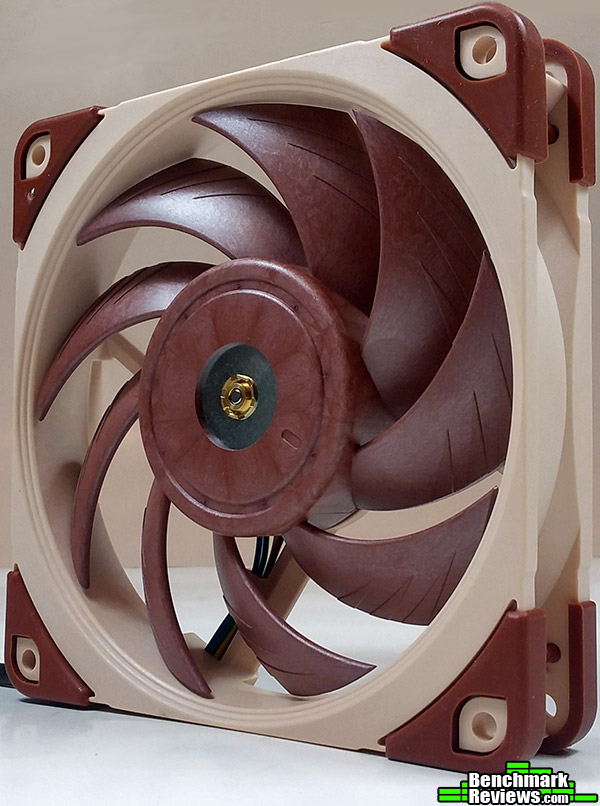
Noctua is a company well known for their PC and server fans and coolers. When any PC enthusiast asks what cooling fans are the best out there, you will hear Noctua being highly recommended by most people. There is a good reason why: Noctua takes fan engineering very seriously. The development team at Noctua spent over 4 years designing the next-generation NF-A 12X25 cooling fan. That’s dedication.
The Noctua NF-A 12X25 has a slew of technologies thrown into it. AAO (Advanced Acoustic Optimization ) frame, Flow Acceleration Channels, and Sterrox liquid-crystal polymer, just to name a few. The later giving the Noctua NF-A 12X25 the tightest clearance of only .5mm from blade tip to the fan frame.
In this article for Benchmark Reviews, I’ll be putting a pair of Noctua NF-A 12X25s against competing AIO fan coolers from SilverStone, Reeven, Corsair, and ID Cooling. How will the NF-A12x25 PWM 120mm cooling fan fair against the competition? Let’s find out!
|
120×25 mm
|
|
ting hole spacing x105 mm
|
|
ector in PWM
|
|
ing 2
|
|
e Geometry eries with Flow Acceleration Channels
|
|
e Technology (Advanced Acoustic Optimisation)
|
|
rial rox® LCP
|
|
tional Speed (+/- 10%) 0 RPM
|
|
tional Speed with L.N.A. (+/- 10%) RPM
|
|
Rotational Speed (PWM, +/-20%) RPM
|
|
low ,1 m³/h
|
|
low with L.N.A. 5 m³/h
|
|
stical Noise dB(A)
|
|
stical Noise with L.N.A. 8 dB(A)
|
|
ic Pressure 4 mm H₂O
|
|
ic Pressure with L.N.A. 5 mm H₂O
|
|
Input Power W
|
|
Input Current 4 A
|
|
age
|
|
age PWM signal
|
|
MTT 000 h
|
|
Sco f delivery
|
|
War y s
|
Product specifications taken from Notua’s website.
Next page we have the overview of the Noctua NF-A 12X25 PWM.
The Noctua NF-A 12X25 PWM fan sells online for $29.90 (Amazon | Newegg). Below I’ll go over some of the basics of the Noctua NF-A 12X25 PWM fan.

Norm ly, package shots aren’t a big deal, but Noctua doesn’t cut edges. There is an inner and back panel, that has detailed information about the Noctua NF-A 12X25. Most of the information is fan specifications, and technology definitions.

Once ou open the box, you have the NF-A 12X25, plus the accessories in a plastic shell.

Noct s instruction manual is brief, but gets the job done.

Noct includes a Y-adapter, extension cable, and low noise cables to meet all your connection needs. Also included, is a set of fan mounting screws, Noctuas rubber anti-vibration mounts, and a radiator anti-vibration gasket for a better seal to your liquid AIO cooler.
Next page I’ll go over some of the finer details of the Noctua NF-A 12X25 PWM fan.
In this section I’ll go over more of the features of the Noctua NF-A 12X25 PWM cooling fan.

Taki a look at back of the fan we have the sticker showing the SSO2 enclosed bearing system. This is the second generation of the SSO bearing with improved design over the previous generation.
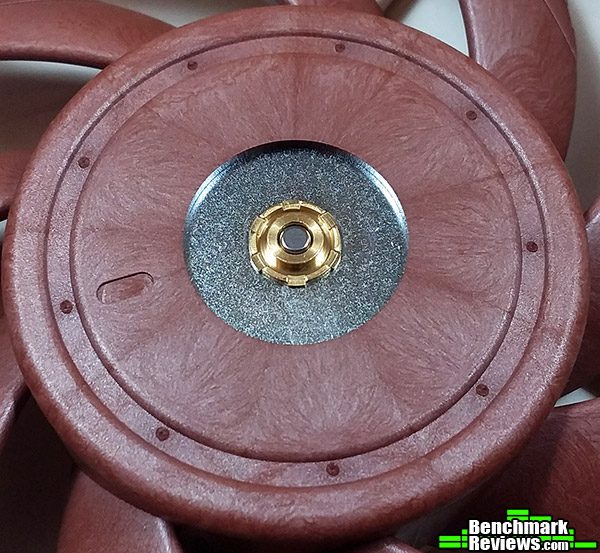
On t flip-side of the NF-A 12X25, you can see the bearing seal. This series of fan does not have a removable bearing. The sealed system keeps dust and other contaminants from getting into the bearings, causing wear, loss of efficiency, and life-span.
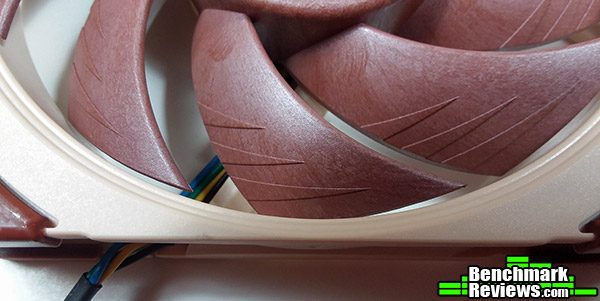
In t picture above you can see the Flow Acceleration Channels, that Noctua claims to help reduce noise, and increases airflow efficiency. With the results in the next section of the this article, I am not disputing these claims.

Noct includes brown anti-vibration pads that help dampen unwanted vibration and noise. Optionally, you can swap these out on one side of the fan for the AIO anti-vibration gasket for further vibration dampening.
On the next page, we have the testing and results of the Noctua NF-A 12X25 PWM.
To keep things as even as possible during testing, I decided to only use 1 AIO liquid cooler, and compare the Noctua NF-A 12X25 PWM to various stock 120mm fans that came with other AIO coolers I have tested before.
I had originally planned on testing all the 240mm AIO coolers and fans, but quickly realized changing out the TIM ( thermal interface material ) and variances in mounting pressure could lead to inconsistent results. In this article I used the ID-Cooling Dashflow 240 AIO liquid cooler.
My choice was simple, because it was the last cooler I reviewed and was already installed in my test system. Also, the Noctua NT-H1 TIM I am using had already settled in. Applying that particular TIM would hamper the results of the other coolers, as the NT-H1 compound gets better results over time.
-
Moth board: Asus Prime X370 Pro
-
Proce or: AMD Ryzen 5 1600 OC 3.9Ghz 1.381vCore
-
Enclo re: Corsair Carbide Spec-Omega
- Fans: Corsair H150i Pro, SilverStone TD-02 Slim, Reeven Nai 240, ID-Cooling Dashflow 240, Noctua NF-A 12X25 PWM
- ID-Cooling Dashflow 240 AIO liquid cooler
For testing purposes the Corsair Carbide Spec-Omega was set up in it’s normal upright position with doors fully closed. The rear case fan was set to a static 85% fan speed, with 3 ThermalTake 120mm case fans taken from my V51 case, and all 3 were set to a static 85% as well during testing.
I also modded the Corsair Carbide Spec-Omega slightly. The front panel glass was removed and I cut a custom foam filter to put in it’s place to help airflow in the front of the case.
CPU RPM was controlled by Asus Fan Xpert 4. The variance on RPM was observed to be about +/- 50 RPM, which keeps the results consistent from fan to fan.
Testing was performed with AIDA64 Engineer software using their stability test application, which generates 100% CPU load during the entire test run. The stability test was run until CPU temperatures had plateaued (which is usually 10 minutes), then I began to record ambient air temperature and CPU temperatures over the next minute. I then shutdown the PC completely and turn it back on after a minute or so and ran the test 3 times in total.
After swapping and running the test 3 times in the exact same way with all fans, I took the results of the CPU temperatures and discarded the highest and lowest temperature results and subtracted that result from the ambient room temperature.
Ambient room temperatures were measured in degrees Celsius using a thermometer with 1/10 decimal point accuracy. Ambient room temps are monitored closely and any variance is no greater than 1C. All testings is performed on the same day to keep results as consistent as possible.
Well the graph below shows the results. The Noctua NF-A 12X25 PWM beat the competition easily!

I te ed all fans at various speeds, since some of the fans ( Corsair and Reeven ) could not attain 2,000 RPM. The 100% RPM results were pretty close for all the other fans, while the NF-A 12X25 was a full 3°C cooler than the next competitor, the ID-Cooling Dashflow fans, and they had a 200 RPM advantage over the NF-A 12X25.
Testing at 1,400 RPM is much more comparable, since all fans were capable of this speed, and gives the best indicator of performance when RPM is level across the board. Interestingly, the NF-A 12X25 had very little loss in performance going from 2,000 to 1,400 RPM, losing only 1.5°C of performance. Other’s such as the SilverStone TD-02 Slim fans fell off by 4.4°C. Although to be fair, the SilverStone fans are only 15mm thick and rely on higher RPM for their cooling performance.
Next page I go over my final thoughts and conclusions.
Noctua has put the time and effort into creating an awesome next generation NF-A series fan. The improvements in material and design shows in my testing.
One of the aspects I haven’t talked about yet is the noise level, and I have to say, I’m not super picky about noise, but the Noctua NF-A 12X25 PWM is a very quiet fan. The other fans tested in this article sound like leaf blowers in comparison, specially at 100% RPM, where-as the NF-A 12X25 is hardly audible at 2,000 RPM.
This is the first pair of Noctua fans I have used personally. I have built systems for friends or customers in the past and recommended them, but I never really paid much attention to performance or sound levels. The NF-A 12X25 fans perform great and they certainly won’t bother your ears.

In conclusion, Noctua has done a fantastic job updating their NF-A 12X25 design. They have gone through the whole design from the ground up to make improvements on all aspects of the fan.
Below, I’ll go over the aspects of how we determine the ratings for the NF-A 12X25, based on performance, appearance, construction, functionality, and value. Some of these values are subjective and come down to personal taste.
Performance is outstanding. There isn’t much else to say about this. The group of fans I had at my disposal for testing is relatively small, but the Noctua NF-A 12X25 PWM beat them all handily.
Appearance is one of those subjective ratings, and I am not a huge fan of the tan and brown color scheme. This above anything else is my biggest disappointment with the new design. I know it’s Noctua’s trademark color scheme, but not having other color options at this point really seems a bit egotistical on Noctua’s part.
I know that last comment may sound harsh, but in reality, the biggest complaint I hear about the Noctua fans is the color of them. If Noctua would give us some options, like they did with their Redux series, I would be much happier about the appearance. Aesthetically, the fans look fine, so I’ll take that into account in my ratings below.
Construction is top-notch. Noctua fans do not feel cheap when you hold them. They are pretty hefty, and I found no flaws in the two samples I have.
Functionality is as close to perfection as you can get. The NF-A 12X25 fans function as they should. Both samples could function at 450 to 2,000 RPM as stated in the spec sheet. The rubber mounts on the corners keep vibration down to a minimum. The radiator gasket works even better with more surface area. The extension and LNA adapter cables work perfectly. Although, the LNA adapter is only needed if you can not control your fans RPM via BIOS or other software.
Value is always a hard subject for me to put a number on, as it’s a subjective topic. Currently priced for $29.90 (Amazon | Newegg), it may seem ridiculously high for a PC fan, while others that appreciate the quality and outstanding 6 year warranty would consider it well worth the price.
I can’t say enough good things about the Noctua NF-A 12X25 PWM fans. They are solid, quiet, and beat the other fans performance in this article easily. If you want some of the best fans money can buy, Noctua is a great option.
+ Qua ty materials and construction
+ Outstanding performance
+ Quiet even at 2,000 RPM
+ 6 year warranty
– Color scheme
-
Perf mance: 10
-
Appea nce: 6.75
-
Const ction: 10
-
Funct nality: 9.75
-
Value 8.5


2 thoughts on “Noctua NF-A12x25 PWM Fan Review”
Is it just me, or does this Noctua fan look a lot like the Scythe Gentle Typhoon? The main differences appear to be that it’s brown instead of gray, it’s PWM, and costs even more than the Scythe.
SSR, I think the Noctua fan has more in common with the older design than the Scythe Gentle Typhoon. I’m not sure which series of fan existed first, but perhaps Scythe took some design queues from Noctua when designing their Gentle Typhoon. Pure speculation on my part without investigating deeper, so take that with a grain of salt.
But, it wouldn’t be the first or last time that we see manufacturers try to emulate something popular from another brand, if that’s the case here.
Comments are closed.