By Greg Schepers
Manufacturer: Microlab Electronics Co., Ltd
Product Name: Bluetooth Powered Speaker
Model Number: SP-H21BK
UPC: 878294032256
Price As Tested: $128.80 (Amazon / Newegg)
Full Disclosure: The product sample used in this article has been provided by Microlab.
For nearly two decades, Microlab has been an industry leader in producing high-quality audio solutions for the latest in cutting-edge technology. One example is its latest development, the Microlab H21 Bluetooth bookshelf speaker, which Benchmark Reviews has recently had an opportunity to put through its paces. Considering that the Microlab H21 is so beautifully constructed, having wooden cabinets wrapped in leather, it is clear that its role is to serve as the primary multi-device audio solution in your home.
What will be one of the primary objectives here is to determine whether or not the Microlab H21 is capable of filling its intended role. Considering that it can be connected to devices via 3.5 mm cable, RCA audio inputs, or Bluetooth, there is little doubt that it can. Virtually any device in your home that could use an audio boost can certainly get it from the Microlab H21.
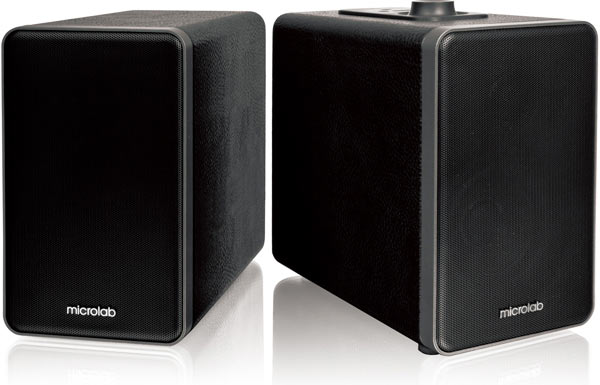
These bookshelf speakers just scream quality right down to the stitching, so you will not be ashamed having the Microlab H21 on display. The ease of connecting it to the desired device and the versatility of the placement of this unit are also huge benefits. However, the main purpose is to deliver in terms of sound quality. The features and specifications below definitely indicate that it can.
- Wireless Bluetooth music entertainment; playback from any Bluetooth devices
- Bookshelf stereo speakers for all room types
- Bluetooth AVRCP and A2DP profiles supported
- Powerful and clear sound
- Treble and bass effects: full range sound spectrum
- Support any digital media player with 3.5mm stereo connection
| Amplifier: | Output power: 36 Watt RMS Power distribution: 18 Watt x 2 Harmonic distortion: < 0.5 % 1 W 1 kHz Frequency response: 50 Hz – 20 kHz Signal/Noise ratio: > 70 dB Separation: > 60 dB |
| Speakers: | Tweeter driver: 1″, 10 Watt 4 ohm Woofer driver: 3.5″, 20 Watt 8 ohm |
| Interfaces: | Output: Terminal binding post Input: 2RCA interface |
| Radio: | Bluetooth Bluetooth 2.1+ EDR (Enhanced Data Rate), A2DP, and AVRCP profiles |
| Power: | Power adapter: Input – AC 100 V – 240 V 50/60 Hz, Output – DC 18 V / 2 A |
| Package Contents: | H21 speakers x 2 pcs Speaker interconnect cable, 3 m AC power adapter 3.5mm stereo to 2RCA cable, 1.8 m User manual |
| Product dimension: Right – 116 x 198 x 202 mm (W x H x D), Left – 116 x 189 x 202 mm (W x H x D) Net weight: 4.7 kg Giftbox dimension: 337 x 239 x 235 mm Giftbox net weight: 5.1 kg Export carton dimension: 492 x 351 x 257 mm Export carton gross weight: 11.6 kg |
Microlab has been busy in recently developing a variety of Bluetooth speakers in order to provide consumers with several options that are sure to meet their needs. Microlab’s ultra-portable MD212 and the feature-rich MD312 fill the need of those individuals on the go. The Microlab H21 is exactly what consumers need to fill the in-home need for a audio system that will accomodate virtually any device and deliver superior sound quality.
The box’s interior does an outstanding job protecting its cargo, while the exterior outlines all of the features that the Microlab H21 has to offer.

The contents include both of the Microlab H21’s speakers, a 3.5 mm to RCA cable, speaker wire, the AC adapter, and the user’s manual.
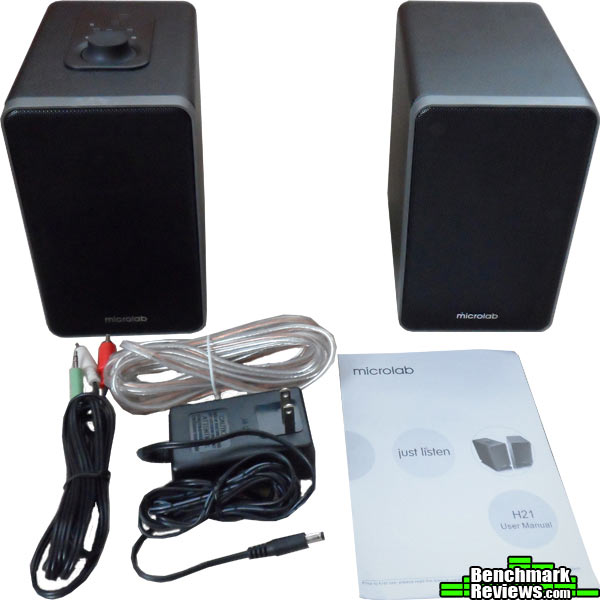
One of the first features on the control panel that caught my eye was that Microlab put a master volume dial on the H21 rather than a volume toggle, which to me is an indication of the quality of this unit. The other items that can be found on the control panel, which is located on the top of the main speaker, include the Bluetooth mode light, the line in mode light, the source selection button, the Bluetooth pairing light, a play/pause button, and a forward/rewind button.

The back of the main speaker is where you will find the functional business end of the Microlab H21. The audio input gives you the opportunity to connect the H21 to non-Bluetooth devices. Further down you will find another great feature, which is the USB port that is capable of charging a mobile device, such as a smartphone or tablet. To the right of the USB port is the terminals for the speaker wire. Towards the bottom, the port for the power adapter and the on/off switch can be found.

The attractive design of the Microlab H21 extends even to the bottom of the unit. Four rubber pads are affixed to the bottom in order to prevent slippage.

With the H21, Microlab has stayed consistent with its recent design tendencies, which is to keep it simple, elegant, and clean. It is also consistent with the audio output that Microlab is known for; outstanding sound. What you get with the Microlab H21 is an attractive, excellent sounding set of speakers that can be placed just about anywhere in the home without the typical wiring mess.
The Microlab H21 was tested for a period of approximately 12 days utilizing a number of different mobile devices. These devices included a Motorola Razr Maxx, a Samsung Galaxy Tab 2, an Asus Memopad HD, and an Apple iPod Touch. A variety of different audio apps, such as Pandora and Tunein, and video apps, such as Netflix, were used to test the quality of audio. Also, several different genres of music were played in order to get a true sense of the audio quality delivered by the H21. Keep in mind that the results are highly subjective.
Pairing the Microlab H21 with all of the aforementioned devices presented absolutely no issues during this testing phase. The pairing process is very simple. First, turn the AC power on and the pairing sequence will begin after 10 seconds. At the point, the Bluetooth light will blink rapidly and alternate between red and blue colors. Once the H21 finds the mobile device, the Bluetooth light will blink once every five seconds or so.
The performance of the Microlab H21 performed perfectly while in auxiliary mode as well. Setting up the H21 for auxiliary mode is equally simple. The 3.5 mm to RCA cable, which is supplied, should be plugged into the back of the main speaker. The 3.5 mm end of the cable goes into the mobile device. After connecting the devices via the cable, then the source button must be depressed, which places the speaker into Line in mode as indicated by the light on the control panel. The volume of playback in auxiliary mode was noticeably louder than the playback in Bluetooth mode. However, the quality of the audio was the same.
One of the features that I really appreciated was the USB port that powers a mobile device. This is another example of the intelligent features that we’ve come to expect from Microlab. Any device that was plugged into this USB port either remained fully charged or was able to regain its fully-charged status.
The Bluetooth range of the Microlab H21 was the best I had personally ever seen. With the H21 centrally-positioned on the second floor of a 3800 sq. ft. home, I experienced no connection issues whatsoever no matter where I took the connected mobile device within the home. Even walking outside the home, the connection was not effected until moving past approximately 30 ft. This is with the exterior door being closed and being separated by an additional wall.
The final phase of testing to mention is the overall audio quality of the Microlab H21. All of the above testing really loses its value if the unit’s sound is underwhelming. However, this is not the case. The H21 has fantastic overall sound regardless of the music genre or the mobile device delivering the audio. Experiencing absolutely no distortion no matter what level of volume was set, the Microlab H21 delivered booming bass as well as clear, crisp mids and highs.
There are many varieties of Bluetooth powered bookshelf speakers on the market today. Some are very affordable, but fall short in terms of features and audio quality. Other bookshelf speakers have desirable audio quality and features, but come with a hefty price tag. The Microlab H21 is both feature rich and great sounding, yet it can be acquired at a reasonable cost.
A minor point of contention, yet one that I felt compelled to mention is the location of the controls on the Microlab H21. Being on the top of the main speaker, the positioning of the unit is limited. In other words, the H21 needs to be placed in an area that provides easy access to the controls. Of course, the paired mobile device can always be used to control the volume and the media. Placing the controls on the front of the unit would make more sense in terms of access, but would detract from the aesthetic quality of the Microlab H21.
Another insignificant issue that is barely worth mention is the length of the included speaker wire; it is just short of 10 ft. and could be a bit longer. However, considering the fact that the Microlab H21’s speakers are connected via speaker wire, it is possible to use any length desired.
A suggestion that would benefit consumers is providing a more informative user’s manual. The information provided is very basic and may lack necessary tips and troubleshooting instructions for individuals that are new to Bluetooth technology.

The Microlab H21 Bluetooth powered speaker is an impressive performing unit. The range of the Bluetooth exceeded expectations. While positioned in a centrally-located position on the second floor of a three story home, it maintained a connection with a paired mobile device no matter where the device was placed. The audio quality is outstanding, providing great highs and mids while delivering thumping bass. If you didn’t know any better, you may ask where the subwoofer is located.
The aesthetics of the Microlab H21 are very pleasing and would look great in any room in the house. The leather-bound speakers with the beautiful stitching will make your friends think you paid way more than you actually did for this unit. It also comes in a variety of colors; Black, White, Coffee, or Red. Even though the controls would be better served on the front, placing them on the top helps to preserve the clean and simple look.
The speaker cabinets are constructed of wood and, as I mentioned above, are wrapped in leather. My first impression of the Microlab H21 when removing it from the box was that this unit is clearly well made. Even the weight lends one to believe that the H21 is a solidly constructed device and will provide its owners with several years of enjoyment.
There is plenty to appreciate in terms of the Microlab H21’s functionality. Maybe the controls may not be in the ideal location on the unit, but they provide everything you need in terms of manipulating your media. The USB power port was a nice touch, giving you the ability to keep the paired device charged while enjoying your favorite music, movies, or TV shows.
The positive attributes of the Microlab H21 far outweigh the very minor demerits that I listed in the “Final Words” section. There are many Bluetooth bookshelf speakers from which to choose on the market today, and considering the price of this unit and all that comes with it, the H21 is definitely one that should be strongly considered.
As of October 2013, the Microlab H21 Bluetooth wireless speaker kit was available online for $128.80 (Amazon / Newegg). Considering all the it has to offer in terms of functionality, aesthetics, overall performance, and impressive sound quality, the aforementioned price is very reasonable.
+ Sound quality
+ Impressive Bluetooth range
+ Powered USB port
+ Leather-bound construction
+ Thumping bass
+ Simple pairing
– Location of controls
– Length of speaker wire
– User’s manual
-
Performance: 9.50
-
Appearance: 9.00
-
Construction: 9.50
-
Functionality: 8.50
-
Value: 9.00
Excellence Achievement: Benchmark Reviews Golden Tachometer Award.
COMMENT QUESTION: Did we offer a fair review of this product?


2 thoughts on “Microlab H21 Bluetooth Powered Speaker Review”
Greg,
I’m wondering if when used in auxiliary mode, the Bluetooth radio in the unit is turned off. I don’t imagine you tested for that, and one can assume that if the “Bluetooth ” light is not lit, that the radio is off. But I’m wondering if you can confirm this by hooking up one device by auxiliary and trying to hook another using wireless.
The reason I am asking is because I am looking to buy a home speaker system for my phone that uses a direct connect method rather than Bluetooth. Most of them are junk. This one sounds impressive. Thanks for any help you can offer.
Sorry for the delay in my response. If you plug in a device via the auxiliary cord and then press the “Source” button on the control panel, the H21 will now be ready for wired audio playback and Bluetooth will be off. You will notice that the “Line In” LED will be lit up rather than the Bluetooth LED. However, I think that you will be very, very pleased with the performance and range of the Bluetooth on the H21 and will forego the use of the auxiliary connection.
Comments are closed.