By Tom Jaskulka
Manufacturer: SilverStone Tek Co., Ltd.
Product Name: Kublai KL04
Model Number: SST-KL04-B-W
UPC: 844761008215
Price As Tested: $99.99 (Newegg / Amazon)
Full Disclosure: The product sample used in this article has been provided by SilverStone Tek Co., Ltd.
The Kublai series of cases fits right in between the Precision and Temjin lines of enclosures by SilverStone. Losing some of the Temjin’s aluminum construction but retaining most of the innovative features of the more expensive line of towers, the KL04 is the fourth iteration of a chassis that began in 2007 and was notable for its storage capacity in a mid tower form factor. Looking to continue the tradition, the SilverStone Kublai KL04 uses a slightly different cooling arrangement and understated design to offer space for nine 3.5″ drives, along with four external 5.25″ bays and room for six 2.5″ drives. That’s a lot of storage in a mid tower – can it keep everything cool? Benchmark Reviews is ready to find out!

As I don’t have nine 3.5″ drives on hand to test hard drive temperatures, I’ll just install a test system in the KL04 and share my thoughts along the way. However, this case was sent out in tandem with SilverStone’s Tundra series TD02 water cooler following a conversation about air and liquid cooling (the KL04 has a reputation for being an excellent air-cooling case, so what does that mean for liquid cooling?) so I’m going to throw that in as well and see how it compares in this case to the Swiftech H220.
|
Model No.
|
SST-KL04B (black) | |
| SST-KL04B-W(black+window) | ||
| — | ||
| — | ||
|
Material
|
Plastic front panel, steel body | |
|
Motherboard
|
SSI-CEB, ATX (up to 12” x 10.9”), Micro-ATX | |
|
M / B Support
|
— | |
|
Multimedia
|
— | |
|
Drive Bay
|
External | 5.25″ x 4 |
| 3.5″ x 1 (compatible with hard drive) | ||
| Internal | 3.5″ x 9 (optional 3.5” x 8 + 2.5” x 1), 2.5” x 6 | |
|
Cooling System
|
Front | — |
| Rear | 1 x 120mm exhaust fan, 1200rpm, 21dBA | |
| Side | Right:1 x 120mm intake fan, 1200rpm, 21dBA Right:1 x 120mm fan slot (optional) |
|
| Top | 1 x 120mm intake fan, 1200rpm, 21dBA 1 x 120mm or 140mm fan slot (optional) |
|
| Bottom | 1 x 120mm fan slot (optional) | |
| Internal | — | |
|
Expansion Slot
|
8 | |
|
Front I/O Port
|
USB 3.0 x 2 (backwards compatible with USB 2.0) audio x 1 MIC x 1 |
|
|
Power Supply
|
Standard PS2(ATX) *1 | |
|
Operating system support
|
— | |
|
Expansion Card
|
Compatible up to 17 inches in length *2, width restriction-6.14″ | |
|
Limitation of CPU cooler
|
168mm | |
|
Limitation of PSU
|
Unlimited *1 | |
|
Net Weight
|
8.2kg | |
|
Dimension
|
214mm(W) x 489mm(H) x 499mm(D), 52.2 liters | |
Let’s see if there are any surprises in store for us, starting with an outside look at the SilverStone Kublai KL04.

The left side is pretty standard; a clear window is nicely set into the panel, hiding the drive trays and allowing you to show off most of your build.

The right side strays a bit from conventional designs, although it is no longer unique to the KL04. Twin 120mm fan mounts sit right behind that removable dust filter, with one fan mount populated as an intake in a stock configuration.

The front contains no vents of any kind, reducing noise from drives and fans that most cases produce. Rather, SilverStone employs a brushed aluminum-look plastic, along with some bold asymmetric accents on the front. There isn’t a door here, this panel stays in place. The drive covers are easy to remove if you’re installing devices in the 5.25″ bays, although some might lament the disruption of the design with the covers removed.
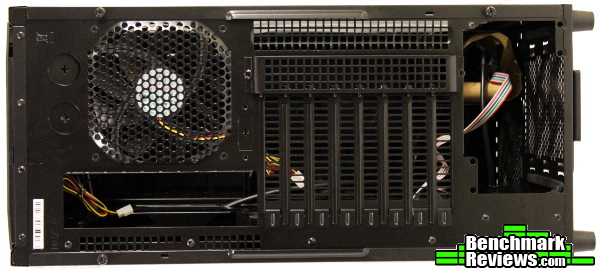
The rear of the KL04 is almost entirely vented with SilverStone’s signature square vents. When you consider the positive-pressure designs that SilverStone is known for, this makes a lot of sense and helps explain the performance of this chassis – more on that later… For now, I’d like to draw your attention to the PCI slots. See that bracket covering them? Anytime you want to swap a card, you’ll need to remove this cover and then use your screwdriver on the cross-tip screws that secure the card. If you swap hardware often, you’ll probably find yourself leaving this cover off (and replacing those screws with thumbscrews…). Features like this make me cringe when I think about how often I’m swapping out video cards or trying different hardware – but not everyone does this often enough to be bothered by an extra step. I’ve tried to think of a reason SilverStone opts for this specific method – I suppose it allows them to not recess the I/O plate, allowing for easier installation of GPUs/sound cards/etc.?

The top includes a recessed tray for accessing the two USB 3.0 ports (along with the expected headphone/mic jacks) in front of a plastic honeycombed air filter. Including a removable air filter on the top of a case might seem a little strange, until you look closely at the fan and realize it is mounted as an intake. While contrary to most cases, this is a configuration SilverStone employs in many of their cases (positive pressure, remember) so the dust filter is a nice feature here.

The bottom of the KL04 contains mesh filters for both the power supply and an optional fan. This optional 120mm fan mount is offset to allow room for the 2.5″ tray that we’ll see in a moment. Notice the four small screws above that offset fan mount in this picture, that’ll clue you in to a way of circumventing some possible installation issues we might see later…
Already we’ve seen some interesting decisions from SilverStone – perhaps taking a closer look will help explain why SilverStone approached this mid-tower a little differently than the competition.
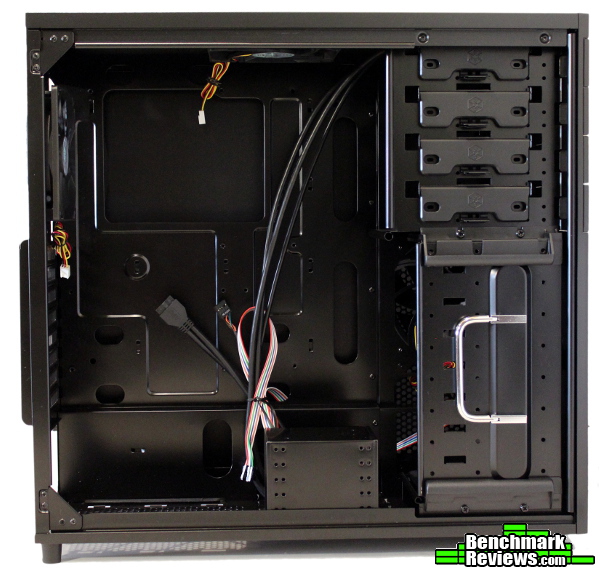
Pulling off the side panel doesn’t tell us anything we didn’t know before, as the clear window showcased the interior pretty well – except we find out the KL04 uses hinged side panels. While some cases employ the notched panels to decent effect, I almost universally prefer cases that use hinged panels – they are so much easier to work with. It also looks like the HDD cage is removable – there’s a handle anyway, more on that later…

Pulling off the back panel sheds a little more light on the interior, highlighting the front fan mounts, cable routing holes and CPU backplate cutout in the motherboard tray. Notice the intake fan(s) have a clear path to interior components – there aren’t any steel brackets that get in the way of airflow.

The “back” side of the chassis has an offset lower channel for routing bundles of cables and enough tie down points everywhere to assist in making sure those cables stay where you put them. Coupled with the hinged side panel, I didn’t have any trouble putting the side panel back on when the build was complete – there’s enough room back here to stash cables for any build you could put in an ATX case. Of course, if you plan on filling that HDD tray up with drives, it’ll take a little more finesse…and most of those cables won’t be back here anyway.

The top of the KL04 arrives with one 120mm fan in an intake orientation, with room for an additional 120mm or 140mm fan (presumably to be mounted as an intake as well). The mounting holes are arranged to fit a 240mm radiator and fans as well, and they’re offset enough to hopefully prevent any clearance issues with the motherboard.
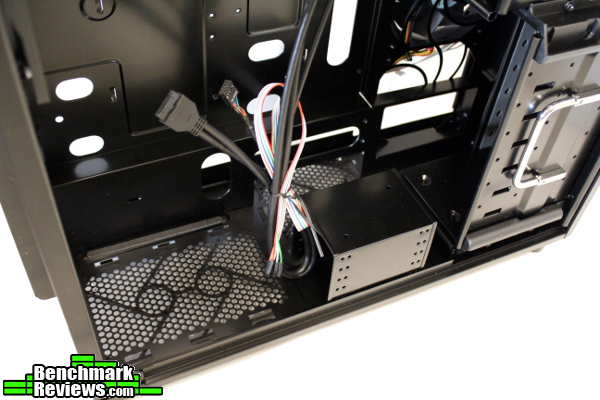
The “floor” of the KL04 is a little cramped, but there’s still room for almost every power supply on the market if you remove that 2.5″ drive cage. You can also see the ledge behind the power supply that allows some extra room for cables.
Actually installing components in a chassis like the SilverStone Kublai KL04 is one of the best ways to find out any eccentricities or compatibility issues, so let’s get to the fun part!
Right away, a potential issue is identified – although there’s ways around it. The PSU pictured is 160mm in depth, and most of the connectors are modular. There’s enough room between the PSU and that 2.5″ drive cage, but it’s a pretty tight fit. Remember those four screws on the bottom of the case?

If you take out those four screws, you can relocate the 2.5″ cage to the bottom of the front HDD cage. It’s a little difficult to see them in the bottom of this photo, but if you don’t want to wire up your SSDs in the default location they can go here as well (I’d recommend it, it would make routing cables to an SSD/HDD build much easier!). You’ll sacrifice some HDD space though, and will need to remove the 2.5″ cage every time you needed to replace a drive… All that being said, this is a pretty complicated solution to mounting drives.
And by the way, bring your screwdriver! It works, and is effective in the KL04, but after building systems into cases like the Corsair Air 540 (where installing drives is a “snap in” and you’re finished type of deal) a system like this seems a little tedious. If you aren’t much of a tinkerer, this won’t be an issue – and to be fair, that’s pretty common of SilverStone’s cases (they seem to have a reputation as “not for inexperienced builders” – the SG09 and FT03 I’ve owned even came with warnings stating something similar!). I’m not sure if that excuses them, but it at least offers an explanation (or a heads-up!) of what you’re getting into.

Since the TD02 and H220 will be hogging the top fan mounts, I relocated the stock fan to the intake. There aren’t any fan controls included and these are 3-pin fans, so hopefully they aren’t too loud… I definitely made use of the extra space in the channel at the bottom for cables, so those without a modular PSU should be glad to see some extra space here.

SilverStone recommends installing their watercoolers with the fans as intakes, and the KL04 is set up to do just that…but I still can’t bring myself to do it! These top mounts are for exhausts! Everyone including “Laws-Of-Physics” guy knows that!! Right…? I mean…that’s what everyone else does, so…it has to be right? I just recently tested the TD02 in a NZXT H630 as both an intake (in the floor) and exhaust (“ceiling”), and discovered there was an approximate 2.5 degree Celsius difference (in favor of the intake/floor orientation) between the two. What I DIDN’T test however, was the TD02 in the “ceiling” of the case as an intake. I could probably spend another article’s worth of time investigating the different orientations…but all I’ll say is after seeing the performance of the KL04 I’d be inclined to trust SilverStone’s engineering on this one. Remember the extensively-vented rear of the case? A chassis set up for positive pressure will just exhaust through those holes anyway. I’ll touch on this more in the conclusion, but just know that the orientation of the H220 and TD02 will be the same for comparison purposes.

Finally, the Swiftech H220 gets installed as well. Swiftech’s cooler installed a little easier than SilverStone’s TD02 since it isn’t as thick, but in both situations the offset mounting of those twin 120mm fan mounts of the KL04 were essential in clearing the 8-pin AUX CPU header other components along the top edge of the motherboard.
The testing methodology for this review follows the basic outline of most of my CPU reviews, so I’d recommend taking a look at those for some great background information on some of the things that factor into testing a CPU cooler. The idea here is to see how each 240mm water cooler performs in the same orientation in the KL04. For this comparison, each cooler will be tested in an exhaust configuration without any fan controls (fans at 100% RPM). Using AIDA64 Extreme Edition’s System Stability test on the CPU and after a “burn in” initial run, the stability test will be allowed to run until temperatures plateau. After recording the ambient temperature, I’ll begin recording CPU temps for one minute, then use the maximum temperature reached on any core as the result (after subtracting the ambient temperature to get the change over ambient/delta T temperature).
-
Motherboard: Asus M5A99FX PRO 2.0 R2
-
System Memory: 8 GB GSkill Ares DDR3
-
Processor: AMD FX-8320 @ 4.6GHz 1.428V(LLC)
-
Audio: On-Board
-
Video: Sapphire Radeon HD 7950
-
Disk Drive 1: OCZ Vertex 2 240GB
-
Enclosure: SilverStone KL04
-
PSU: Rosewill Hybrid 750W
-
Monitor: Acer GD235HZbid LCD 1920×1080 120Hz
-
Operating System: Windows 7 Ultimate SP1

First up: the Swiftech H220. Temperatures hit a max of 25.6 C over ambient in the KL04, which was very similar to the test bench result of 25.7 C as a “floor intake” in the NZXT H630. Note that the two are not directly comparable, as the H220 was used as an exhaust in the KL04 and intake in the H630. The TD02 was tested in both cases as an exhaust though…

…where it hit a max of 21.8 C in the KL04 and 26.4 C in the H630. That’s pretty significant, especially considering the H630 is a full-tower enclosure with much more volume and a 200mm intake fan (the top mounted 200mm exhaust fan I use for testing coolers is removed when a 240mm rad is mounted up top). Overall, it looks like the KL04 should allow for some excellent temperatures! Kudos to SilverStone’s engineers for managing to cram this much performance into a mid-tower.
One of these days I’ll figure out it’s a bad idea to judge a case by it’s…err…panels? I knew the KL04 had a previous reputation of being able to cool a performance build, but it doesn’t look like it. I mean, no side fan, only 120mm fans included stock, and there aren’t any fans in the front!! Until I saw for myself that it managed better CPU temps than a full-tower case (that uses 200mm intake/exhaust fans, by the way) I didn’t expect much from the lone case in the Kublai series. The dust filters are always appreciated, and the materials, workmanship and engineering evident in the KL04 are a testament to SilverStone’s approach to chassis engineering.
Of course, they refuse to give up on their notorious “ease of assembly” – or lack thereof. Given the performance benefit, it’s a trade off many are willing to make – especially if you’re a “set it and forget it” type of builder. There aren’t any glaring issues with assembly, it’s just a case that requires tools (except for the 5.25″ bays) where others have gone completely tool-less. I’m not sure if this is a bad thing…but I know I’d appreciate some more thumbscrews at a minimum. Be prepared if you switch hardware often.

If I had to sum up my experience with the Kublai KL04 in one phrase, it’d be “…but consider the end result.” If someone were to ask me about the KL04, I’d have an initial moment of hesitation due to some of the quirks I encountered on my initial build…but then I’d tell them to consider the end result. That end result is a surprising (and impressive!) amount of performance in a mid-tower enclosure. While I don’t have nine hard drives on hand to test, I’m willing to bet twin 120mm fans blowing directly on a HDD array would keep temps in check without an issue. Overall, the KL04 delivers typical SilverStone quality and performance and offers a unique approach to cooling and storage.

I have to give SilverStone a lot of credit for the amount of performance they’ve packed in to the mid-tower KL04. With just three 120mm fans (and the 240mm water-cooler), this thing managed to put up impressive CPU temperatures – and that’s compared to a full-tower case that uses 200mm and 140mm fans. There’s obviously some engineering at work here, and the result is impressive.
SilverStone cases have always had their own unique aesthetic. I’m not sure I was a fan of the KL04 when looking at product photos before the case arrived to review, but it grew on me as I worked with it. The design is subtle enough to blend in, but it’s still too “OEM” to me. It’s better in person, I’ll give it that, but the design feels unfinished somehow. The black monolith approach can be really attractive, but I’m not sure the design is all the way there yet. If you’ve seen some of the mock-ups of changes that resulted in the SG09’s facelift to the SG10, you can probably see what I’m referring to. Anyway, there’s always the Temijin TJ04 if you prefer a different aesthetic…
While discussion of appearance changes according to taste, the overall construction is much less subjective. The KL04 is put together well, and hinged panels and sturdy SilverStone steel contribute to a solid chassis. The snap-on dust filters fit securely and clip in with a satisfying click. I didn’t have any problems with paint obstructing screw threads like in some other chassis, and the overall feel reflects a premium product as is typical of most SilverStone cases.
I think the KL04 provides for a large amount of functionality for a mid-tower – it just isn’t as accessible as others. Once you have it configured the way you want it though, you can fit a surprising amount of performance hardware in there. All intakes are filtered, and 2.5″/3.5″/5.25″ devices are all accommodated along with 240mm water coolers and the cables required to connect them all.
As of October 2013, the SST-KL04B-W (windowed version) was selling for 99.99 (Newegg / Amazon), which places it directly in a highly competitive section of the market. SilverStone’s KL04 is a great value for the price, especially considering the overall quality and performance, but there are so many options in this category. I think discussing value for this case is difficult, because it primarily depends on what YOU value in a case. Whatever that is, you can probably find it in this price bracket.
Whether or not you find it in the KL04, well, that’s up to you. If you want to pack as many drives as possible into a fairly traditional ATX mid-tower and keep everything cool; if you don’t mind an enclosure that’s more complex than average and like your cases subtle, you just might be a candidate for the KL04. I can’t recommend it for those enthusiasts that are constantly tearing open their case and switching hardware – unless you really enjoy using a screwdriver as a part of that process. For builds that are designed to just “work” though, I think the KL04 is a compelling choice.
+ SilverStone quality
+ Same features as more expensive Temijin series
+ Excellent air and water cooling performance
+ Lots of hardware capacity in a mid-tower size
+ All intakes covered with removable dust filters
+ Hinged panels
+ Excellent cable management for this size of enclosure
+ Efficient airflow helps keep noise down
– Bring your screwdriver – or don’t plan on tinkering!
– Default location of 2.5″ drive cage might cause problems
– No built-in fan speed controls
– Removing 5.25″ bay covers feels like it ruins aesthetic
-
Performance: 9.50
-
Appearance: 7.25
-
Construction: 9.00
-
Functionality: 8.25
-
Value: 7.00
COMMENT QUESTION: What size of computer enclosure to you prefer most?


