By David Ramsey
Manufacturer: Cooler Master
Product Name: HAF Stacker
Model Number: HAF-935-KWN1, HAF-915F-KKN1
UPC: 884102025228 (935), 884102025266 (915)
Price As Tested: HAF 935 $152.45 (Amazon / Newegg) / HAF 915 (Newegg)
Full Disclosure: Cooler Master provided the product samples used in this article.
Cooler Master’s HAF Stacker 935 modular case system is an innovative new entry in the computer case market. Enthusiasts can configure the multiple, stackable “modules” of this system to build the ideal enclosure for their system (or systems). Whether it’s providing storage for water cooling or extra drives, or just housing multiple systems in a compact space, the HAF Stacker system is versatile enough to handle pretty much anything you can throw at it.
Cooler Master calls these new cases a mod tower expandable system and says they’re a better case ecosystem.
Old-timers might remember that this isn’t Cooler Master’s first “Stacker” case; the name has previously graced the Stacker 810 and more recent Stacker 832. Both of these giant aluminum cases had some degree of modularity in their internal components, but neither was “stackable”.
So how is this new Stacker 935 system better than more ordinary cases? I’ll get into that in this review.

Since the HAF Stacker system comprises several components, there are multiple specifications.
| Color | Black/black |
| Materials | Bezel: Mesh/Polymer; Case body: Steel SGCC-t0.7 |
| Dimensions (WxHxD) | 9.25″ x 28.8″ x 22.75″ (235mm x 719mm x 578mm) |
| Net Weight | 15.6kg / 34.5 lbs |
| MB Type | EATX, ATX, micro-ATX, mini-ITX |
| 5.25″ Drive Bays | 3 + 1 (915R) |
| 3.5″ Drive Bays | 9 (3×3 modular cages) |
| SSD Bays | 9 (converted) + 1 (MB tray) + 3 (915R) |
| I/O Panel | USB 3.0 x 2, USB 2.0 X 2, audio |
| Expansion Slots | 8 + 1 and 2 (915R) |
| Cooling Support (varies by stacking setup) | Top: 120mm x 2 Front: 120mm x 2 / 92mm x 1 Rear: 140mm (included) Side: 120mm x 6, 140mm x 4 (915R) Radiators: 360mm x 2 / 280mm x 2 (side) 140mm/120mm x 1 (rear) |
| Color | Black/black |
| Materials | Bezel: Mesh/Polymer; Case body: Steel SGCC-t0.7 |
| Dimensions (WxHxD) | 9.25″ x 9.76″ x 22.27″ (228mm x 248mm x 578mm) |
| Net Weight | 5.5kg / 12.12 lbs |
| MB Type | mini-ITX |
| 5.25″ Drive Bays | 1 |
| 3.5″ Drive Bays | 3 |
| SSD Bays | 3 (converted) |
| I/O Panel | USB 3.0 x 2, audio |
| Expansion Slots | 2 |
| Cooling Support (varies by stacking setup) | Rear: 120mm (included, 915F only) Front: 80mm (included, 915R only) Side: 120mm x 6, 140mm x 4 Radiators: 360mm x 2 / 280mm x 2 (side) |
As you can see from the “Cooling Support” sections, you have a variety of options for the placement of fans and radiators. One surprise is that each case comes with only a single fan: a 120mm exhaust fan for the tower and 915F cases, and an 80mm intake fan in the front of the 915R.
The HAF Stacker system currently comprises three components: the Stacker 935, the Stacker 915F, and the Stacker 915R. The Stacker 935 consists of a mid-tower case and the Stacker 915R. The mid-tower component is not available separately, but only as part of the Stacker 935.

While the mid-tower component can hold anything up to an E-ATX motherboard, the two 915 cases are mini-ITX only. The difference between the 915 models is that the 915R mounts the power supply at the rear, over the motherboard, while the 915F mounts the power supply at the front, under the single 5.25″ drive bay. Although the separately-purchased 915R has a front panel with a power button and USB ports, the version included with the 935 has no front panel.
The 915s are very large for mini-ITX cases. Compare the size of the 915F to Cooler Master’s own Elite 120 mini-ITX case:

The mid-tower component is a little smaller than the current Cooler Master HAF 932 case.

I’ll examine these cases in more detail in the next section
The mid-tower component of the Cooler Master Stacker HAF 935 is a typical mid-tower case. There are three external 5.25″ bays, 8 slots, and a very large smoked Plexiglas window in the left side panel.

Inside the case are two 3-bay cages for 3.5″ or 2.5″ devices. These can be removed, but doing so requires removing six screws: four screws secure each cage to the chassis, with two additional screws connecting the inside edge of the cage to the rest of the case. The motherboard area has a large cutout for access to a CPU cooler backing plate, and two pre-installed standoffs with chamfers help position the motherboard during installation. There are numerous grommeted cable pass-throughs and tie-down points. The 120mm exhaust fan is the only fan included.

The power supply area has four slightly-elevated rubber supports and a bracing ridge to help keep the power supply in place.

There’s a single SSD mount on the back of the motherboard tray, just below the CPU cooler backplate cutout.

I measured just over 5/8″ space between the back of the motherboard tray and the side of the case. However, embossed areas such as the one to the left of the ruler provide addition clearance for bundles of cables.

At the rear of the case we can see three grommeted holes for water cooling hoses, the exhaust fan and I/O panel cutout, the 8 card slots– with a handy “9th slot” for fan controllers, light switches, and the like– and the power supply opening.

With the front panel (and upper drive cage) removed, we have a straight shot into the case interior. If you remove both drive cages, a 240mm radiator will fit at the lower front of the case.

The front panel has a power switch, microphone and headphone jacks, two USB 2.0 ports, and two USB 3.0 ports. Disappointingly, there is no reset switch or drive activity light.

Let’s look at the mini-ITX 915 series cases in the next section.
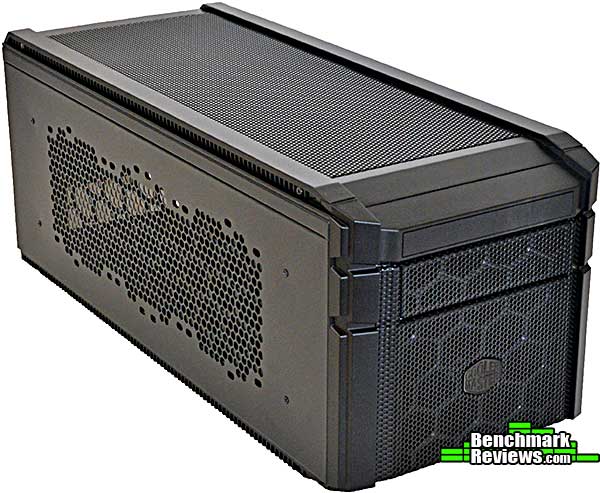
There are two versions of the Cooler Master HAF Stacker 915 case. Each one accommodates an ATX power supply: the 915F mounts the power supply at the front of the case, underneath the 5.25″ bay, while the 915R mounts the power supply in the rear, above the motherboard. Cooler Master says the 915F prioritizes CPU cooling, with room for large coolers, while the 915R prioritizes GPU cooling.

Both 915 cases are visually similar externally. The image above is the 915F.
This is the 915R that was included as part of the 935. As you can see it doesn’t have a front panel, but a separately-purchased 915R would have the same front panel as the 915F above. An 80mm fan is behind the front grille, below the 5.25″ drive bay.
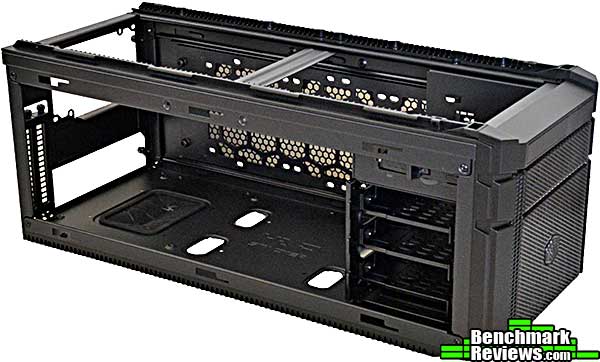
The interior of the 915R has a standard mini-ITX layout, except that there’s a lot of extra space between the motherboard mounting area at the rear and the drive bays at the front. The power supply mounts above the motherboard, while three removable 2.5″/3.5″ bays occupy the space below the single 5.25″ bay.
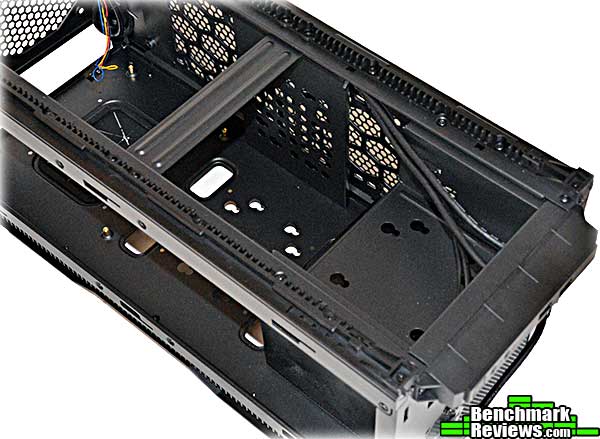
The 915F, on the other hand, has a 120mm exhaust fan above the motherboard area and mounts the power supply under the 5.25″ bay. Although there are no removable drive bays, you can mount 2.5″ or 3.5″ drives in three places: on the bottom of the 5.25″ bay, on the middle bottom of the case, and on a riser brace on the middle right side of the case. In the image above, note the slotted holes in each of these areas: rubber-isolated mounting screws attach to the drives which are then slid into these holes.

Cooler Master says the HAF Stacker cases are modular, and they are: for example, you can remove a drive cage from the mid-tower component and mount it in the center of either 915 case. (This would, however, block many graphics cards.) Even the 5.25″ bay in both 915 cases can be unscrewed and removed entirely from the case, which you would need to do to use a 360mm radiator in either side panel.
Let’s take a look at what you can do with the Cooler Master HAF Stacker system in the next section.
So, why would you want to stack cases? In my particular situation, I have a mini-ITX Hackintosh I use day to day, and a larger PC system for gaming. What with various review and other systems, my desk space is at a premium, so being able to combine the two systems into one would be a big win for me.
However, that’s just the obvious use. Perhaps a look at some other features of the cases will give some hints to what else you can do.
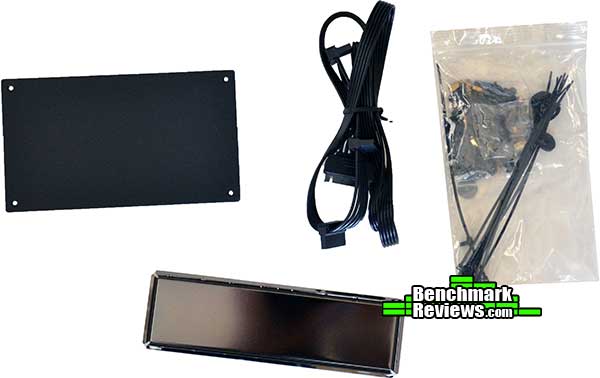
Here are the accessories delivered with the 935. There are blocking plates for the power supply and I/O panel openings in the rear of the 915R, a SATA power extension cable, and the usual bag of screws and zip ties. The idea here is that you’d use the 915R not for a mini-ITX system, but to hold additional components for your main system…components like water cooling equipment or extra drives.
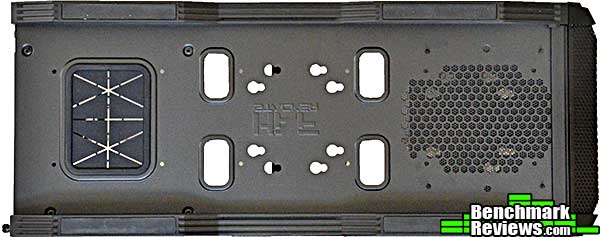
Here’s the bottom of the 915F (the 915R is similar), with the rear of the case to the left. The large rubber grommeted hole under the motherboard area is large enough to pass the pump of an all-in-one water cooling system, so you could mount the radiator and fans outside the tower component of the system. The four larger holes in the middle will fit 1″ diameter water hoses, or just SATA power and data cables.

The bottom of the tower component of the 935 has a pull-out filter for the power supply intake, as well as two of the large grommeted holes.
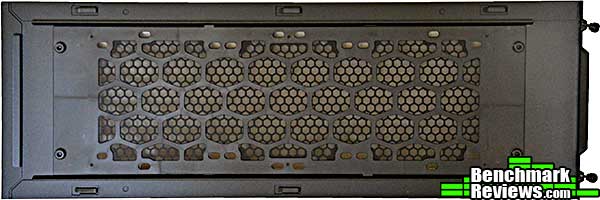
The side panels of each 915 are identical (really identical– there’s no “left panel” and “right panel”), and provide mounting points for up to a 3x120mm radiator. You can also mount a 3x120mm radiator in the top of the tower component.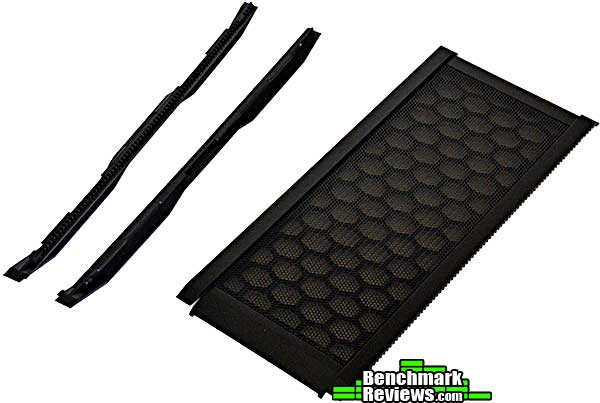
Each member of the Cooler Master HAF Stacker modular case system uses the same removable feet and top panel. You remove the feet to stack the case on top of another, and you remove the top panel to stack another case on top.
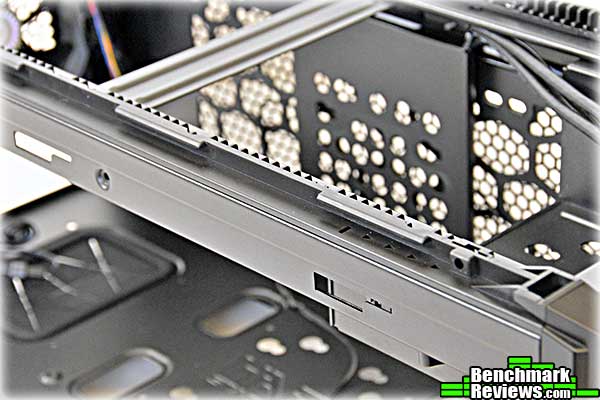
The bottom and top rails of each case have these protruding ledges, which secure the case components when interlocked with the ledges on another case, the feet, or the mesh case top.

To attach the cases, remove the feet from the case that will be on top and the top from the case that will be on the bottom. Line up the first vertical ridge on the top case to the slot behind the arrows in the bottom case. Set the top case down and slide it forwards until it stops. At this point the screw holes– boxed in red in the image above– will line up and you can secure the cases with two screws on each side. The screws thread into metal taps for durability.

The bottom of each case component has a hinged flap that will block air flow between the components.
This is a two-part build: I’m putting my mini-ITX Hackintosh system into the 915F, and a standard ATX PC into the tower component of the 935, which will be the “top” system.

Mounting the motherboard, drives, and power supply is quick and easy. Note the three drives: one on the floor of the case, one on a vertical riser to the side, and one under the 5.25″ bay.
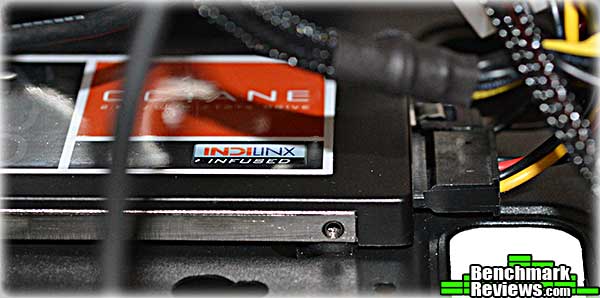
The drive mounting in this case does present some problems. The drives mounted on the floor of the case and under the 5.25″ bay are so close to the metal that you can’t use a SATA power cable in the “middle” of a cable run, since the wires coming out both sides of the connecter would prevent it from plugging in. You’ll need to use “straight” power connectors such as the one shown above.

This view is from the top rear of the case, looking across the water cooler I used. The middle part of the case is mostly empty except for the inevitable snarls of cables. With the drives mounted the way they are, it’s almost impossible to have neat cabling.

Still, the overall build was much easier than it is in most mini-ITX cases. There’s even plenty of room for an NZXT internal USB hub, visible at the lower right.

The mid-tower component provides plenty of room for a build. I’m using a standard ATX motherboard here, but as you can see there’s ample space for an EATX board. I’ve removed the upper 3.5″ drive bay to open up the airflow across the dual NVIDIA GTX580s I’ll be using. Although Cooler Master includes only a single fan with this case, you can mount two 120mm fans in the front, between the steel case frame and the snap-off front bezel.

Yes, this case does have a cutout in the motherboard tray for the EPS-12V cable. You’d think all such cases would. You’d be wrong.
Most tool-less drive caddies require you to push in rubber-mounted pins, or flex the entire caddy to snap a drive in. The HAF Stacker caddies are very rigid and will not bend at all, but pressing a small release allows them to snap open about 10mm as shown on the left. Drop the drive in, push the caddy closed (as shown on the right), and the drive’s secured.
Let’s continue this build in the next section.
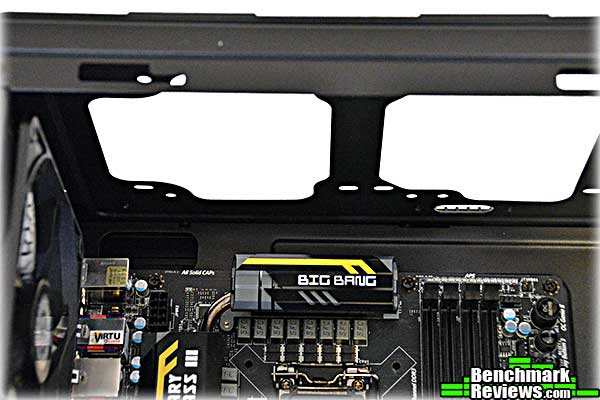
The top of the tower case has mounts for up to 3 120mm fans, but there’s not enough clearance between the motherboard and the top of the case for a radiator. Cooler Master is aware of this and says that’s what the 915R is for.

With two hard drives and an optical drive, cabling at the rear isn’t bad at all.

Add the CPU, power supply and SATA cables, and we’re done! Another very easy build. And here’s the final result:

My desktop space problem is solved! The system has a nice integrated appearance, especially with the side panels on:

I can see that I’ll be wanting to add some interior lighting to the mid-tower component…in the meantime, I’ll present my conclusions in the next section.
The concept of modular, expandable cases isn’t new, as long as your definition of “modular” includes “hope you’re handy with that hex wrench” and “pricey”. The Cooler Master HAF Stacker modular case system isn’t as versatile as, say, the very expensive case components from companies like Mountain Mods, but it’s much easier to deal with than a huge flat pack of aluminum panels and dozens of screws.
“Less expensive” doesn’t mean that quality is compromised, either. As you might expect, the way the HAF Stacker case components fit together is perfect, with no detectable slop or looseness when case components are locked together. The design of the components, with the large pass-through holes, movable internal parts, and plenty of cooling options, shows that the designers at Cooler Master put some serious thought into how these products would be used by enthusiasts.
That said, I do have some criticisms:
- The mid-tower unit is only available as part of the HAF-935-KWN1 with an accompanying 915R unit; you can’t buy it separately. Cooler Master was quite emphatic on this point that they will never offer the mid-tower unit as a separate product. I think this makes the price of getting started with the system unnecessarily high.
- The front panels seem oddly sparse. There are no USB 2.0 ports on the 915 front panels, and none of the panels have reset buttons or drive activity lights. I think most people who build their own systems would like to have these.
- You can’t fit a radiator and fan in the top of the tower component. Granted, the idea is that such hardware should be placed in a 915 on top of the tower, but it would still be nice to have a 2x120mm all-in-one cooler in the tower case without a 915 on top.
- There’s a pull-out filter for the power supply in the tower case, but that’s it as far as easily removable filters goes. If you want to clean the power supply intake filter in the 915F, for example, you’ll have to remove the entire power supply.
That said, some of the problems are addressable. Cooler Master plans to offer a number of accessories and expansion options for the HAF Stacker line:
|
Accessory / Kit |
What’s Included |
|
Storage Kit |
Quick Detach Pins |
|
HAF Stacker Series HDD Cage |
|
|
SATA Power Cable Extender |
|
|
Stack-It Kit |
Quick Detach Pins |
|
HAF Stacker Series Top Rail |
|
|
HAF Stacker Series Bottom Rail |
|
|
HAF Stacker Series Feet |
|
|
Quick Detach Pins |
Pins to quickly and easily secure / remove rails |
|
CPU Power Cable Extender (Black) |
An extended CPU power cable for when your PSU is located in an expansion chassis |
|
1.5m (4.92 ft) SATA Data Cable (Black) |
An extended SATA data cable to connect to your massive hard drive / SSD collection in your upper or lower 915 unit(s) |
|
Main Unit Window + 200mm Fan Combo Side Panel |
A replacement for your full window side panel that is a window + large 200mm cooling fan combo. |
One thing to keep in mind: these cases have rugged steel frames and are not light. When two or more are stacked, the system can be very heavy.
With ongoing support from Cooler Master, the HAF Stacker system should be a viable long-term case system which you can expand and configure as your needs change. I do wish, though, that they’d offer a separate micro-ATX tower chassis. Maybe they will in the future.
Cooler Master’s new HAF Stacker modular case system represents a new direction for mass-market computer cases.
These cases perform every bit as well as you’d expect a case from Cooler Master to perform. They’re easy to build in and provide ample space for your components.
The appearance of the cases is a little bland for my tastes, although I understand that functionality is the main thing they’re aiming for. The new, dark “Cooler Master” logo is all but invisible on the front of the case.
Construction quality was faultless. It would have been easy to screw up the rail system that latches the cases together, but it operated smoothly and reliably, without even a hint of slack or slop once the cases were secured. The heavy steel construction makes the cases weigh more, but consider that the bottom 915 unit in the image above could easily be supporting 40 pounds or more with loaded cases above it.

These are probably the most functional cases I’ve ever tested (and I’ve tested a lot of cases). The fact that so many parts are movable and interchangeable makes them tremendously versatile.
The $152.45 (Amazon / Newegg) price for the HAF Stacker 935 system, comprising the mid-tower unit and a 915R mini-ITX case, is at the higher end of the case market. Newegg also seels the HAF 915F for $69.99. Functionally, HAF 935 is similar to the showing-its-age-but-still-solid HAF 932, which has plenty of room for a thick, triple-fan radiator at the top of the case. Granted, the 935 is more versatile, but you’ll be paying about $35 more for that.
This is an excellent and innovative case system that will be of value if you can really use its modular nature.
+ Modular design makes the system very versatile
+ Excellent construction quality
+ Large pass-through ports make it easy to extend water cooling system parts, power supply cables, and such between cases
+ Forthcoming parts and accessories will add features and functions
– Can’t buy tower unit separately
– No drive activity light or reset switch on front panels
– Only one fan per case
-
Performance: 9.50
-
Appearance: 8.25
-
Construction: 9.75
-
Functionality: 9.90
-
Value: 8.75
Excellence Achievement: Benchmark Reviews Golden Tachometer Award.
COMMENT QUESTION: What do/don’t you like most about the Cooler Master HAF Stacker series?


