By Hank Tolman
Today marks the release of the latest in a long line of AMD Accelerated Processing Units. Benchmark Reviews has been there for each one of the previous APU releases, and we would be remiss if we didn’t provide you with the latest news regarding this release. It has been a long road since Llano, the very first generation of AMD APUs, was announced just three short years ago at CES 2011. That processor brought together AMD’s long held vision of putting a discrete level GPU on the same die as the CPU; a vision that started back with the Fusion project and AMD’s acquisition of ATI.

Llano put K10 CPU cores and a Radeon HD 6000 series GPU on the same die and introduced us to the FM1 socket. The Fusion project was then reformed as the Heterogeneous Systems Architecture (HSA). After Llano came Trinity, the second generation of APUs featuring Piledriver CPU cores and a Radeon HD 7000 series GPU. Trinity also introduced the FM2 socket. The third generation of AMD APUs, codenamed Richland, was more of a revamping of Trinity, and stuck with Piledriver CPU cores (turbocharged) and upgraded the GPU to a Radeon HD 8000 series.
That brings us up to speed and leads us into the huge press conference held just prior to CES 2014 by AMD to announce and explain the fourth generation of AMD APUs, codenamed Kaveri. During the AMD Tech Day presentations held in early January 2014, I must have heard the word “excited” about ten thousand times from AMD presenters showcasing the new performance and advancements of the Kaveri APU. Kaveri, it seems, is the embodiment of HSA that AMD has been working towards since Llano. Built on AMD’s new Steamroller CPU cores and combined with an R7 series GPU, the Kaveri APU brings the two together like no processor before it. The key to “excitement” surrounding the Kaveri launch actually lies in the way CPU and the GPU can work together to provide the best APU performance we have seen from AMD.
The idea is that current processes are too heavily CPU biased and don’t properly utilize the compute capabilities of the graphics cores lying dormant on the die. Current processes are inefficient at jumping back and forth between CPU and GPU cores, often requiring heavy coding changes and time-consuming efforts to call back to the CPU from the GPU. The Kaveri APUs are optimized to balance out this problem. AMD admits that the effort to better utilize both processing units didn’t come without compromise. CPU frequencies at high TDPs took a hit, but AMD says that those losses are offset by the up to 20% IPC boost with the new Steamroller cores.

The Kaveri APU introduces a new way of looking at the CPU and the GPU cores. All cores on the die are now called Compute Cores. A compute core is a programmable hardware block that can independently run processes in its own context and virtual memory space. In the A10-7850K, we see four, multi-threaded Steamroller CPU cores and eight GCN-based GPU cores that combine to make twelve Compute Cores. Kaveri and HSA use two technologies to make this combining possible; hUMA (heterogeneous Uniform Memory Access) and hQ (heterogeneous Queuing).
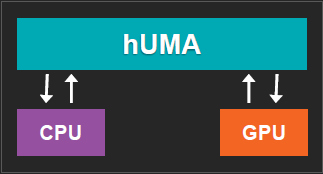
In Kaveri, hUMA means that the GPU and the CPU share virtual memory and both processing units have uniform visibility into the entire memory space. This way, the CPU and GPU can share data without having to repackage it and send it off to the GPU memory. This change should reasonable enhance the usability of the GPU cores even when using current programming languages, since the GPU can access the same memory as the CPU. On the other side, hQ makes the GPU an equal partner to the CPU. In the past, the GPU has always had its processes routed to the CPU for approval first, like a micro-managing administrator. The GPU, being the good little worker, couldn’t take on any new tasks or dispatch tasks on its own. With hQ, the GPU can now interact directly with applications and even send tasks to the queue where they can be dispatched to the CPU or the GPU. This new process eliminates a big bottleneck and lowers latency in processing. Beyond making applications run faster and more efficiently, AMD also says that hQ leads to huge power savings. Additionally, since this is all done in the architecture, programmers no longer have to write specifically for the GPU cores, as they can now act just like CPU cores and create and dispatch tasks.
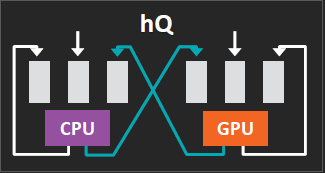
Because these HSA features (hUMA and hQ) fill feature gaps expected in the OpenCL 2.0 standard, AMD is calling Kaveri the first OpenCL 2.0 capable chip and has laid out scenarios showing just how HSA can aid in certain cases.
– Data pointers in Binary Tree Searches: Traditionally, the Binary Tree would have to be flattened and written to the GPU, then saved in the GPU’s memory, then the results can be written to the CPU. With Kaveri, the Binary Tree can be accessed in place by the GPU and the search results can be written directly to the CPU. With this, code complexity can be greatly reduced.
– Platform atomics in Binary Tree Updates: Currently, the CPU and the GPU cannot be used simultaneously and, again, the tree must be flattened and written to the GPU memory for use. With Kaveri, both the CPU and the GPU can access the tree in place and work simultaneously.
– Large data sets: Historically, since the information accessed by the GPU must be written to GPU memory, only part of the data set could be accessed. If the desired information is found in a lower level, the GPU memory must be cleared and request that the lower levels be written into GPU memory for access. Because this costs a lot, the GPU isn’t often used in large data sets. With Kaveri, the data sets can be accessed in place and the higher performance of the GPU can be utilized.
– CPU Callbacks: Legacy programming methods must run multiple kernels to check for potential callbacks because the GPU cannot call directly to the CPU. With Kaveri, these kernels are eliminated by allowing the GPU to call directly to the CPU.

AMD touts HSA as the method of choice to increase performance in applications across the spectrum that have a lot of parallel workloads. These application areas include Natural UI and Gestures, Biometrics, Augmented Reality, AV Content Management, Content Everywhere, and Beyond HD.
In addition to its HSA implementations, Kaveri improves performance through the use of hardware acceleration in areas that would normally require the CPU or the GPU to handle the load. The first of these accelerators is AMD’s TrueAudio Technology Architecture. We first saw TrueAudio implemented on a couple of the R-series GPUs and the architecture has also been included in the Kaveri APUs.

TrueAudio uses a processor within the APU separate from the compute cores to take care of audio processing such as convolution reverb and GenAudio spatialization. AMD estimates that convolution reverb can take up to 20% of the CPU and GenAudio can use up another 6%. TrueAudio takes care of those processes so that the CPU can focus on other features. AMD played a demo of GenAudio Astound Sound Technology used to provide spatial audio and virtual surround from typical 2.1 speaker headsets. The demo was very convincing of TrueAudio’s capability to provide immersive spatial audio. I could very clearly locate the sounds without the use of a 5.1 or 7.1 solution.

TrueAudio is fully programmable, dedicated audio that is compatible with existing hardware. Some newer game titles, such as Lichdom, Thief, and Murdered Soul: Suspect, are already taking advantage of TrueAudio to enhance spatial computing. TrueAudio further allows for Natural UI speech interfaces to be used in a wider variety of environments. A demo of TrueAudio cleaning up a messy recording to enable clear audio recognition was pretty impressive. According the a representative from Nuance, Kaveri will allow for much better speech recognition for consumer products, where they are now relegated only to the commercial realm.

Another accelerator used by Kaveri is the Video Coding Engine (VCE 2). The Trinity and Richland APUs both utilized VCE 1 for H.264 YUV420 (I and P frames), H.264 SVC Temperal Encode, and VCE Display Encode Mode. VCE 2 in Kaveri includes all of those, but also adds B frames to the YUV420 and H.264 YUV444 (I Frames) for 60Hz Wireless Display.

The Unified Video Decoder (UVD 4) is another accelerator used by the Kaveri platform. We saw UVD 3 implementations in Trinity and Richland, including decoding for H.264 / AVCHD, VC-1 / WMV profile D, MPEG-2, Multi-View Codec (MVC), and MPEG-4 / DivX. The UVD 4 accelerator maintains each of those video formats and adds improved error resiliency to the H.264 / AVCHD decode.
The final piece of technology that I want to explore with regards to its integration into Kaveri is AMD’s Mantle API. This will by no means constitute an in-depth explanation of Mantle, but I feel like the demonstrations that AMD showed during the Kaveri tech day conference warranted the inclusion of Mantle as a feature fully exploited by Kaveri.

Mantle is a low level application programming interface designed by AMD to more fully utilize their GPU hardware and to improve performance over higher-level APIs like DirectX and OpenGL. Mantle allows developers to write code that takes advantage of AMD’s GCN architecture by utilizing the GPU more efficiently. This allows the application to have much faster draw calls, which AMD says are the biggest bottleneck in the DirectX API.

Being a low-level API, Mantle gives developers more fine-tuned control over the use of hardware, and specifically the GPU by allowing direct GPU memory access. Mantle also supports parallel rendering for up to at least eight CPU cores. Because it almost completely eliminates hardware abstraction, Mantle can overcome problems you might have in other games like texture corruption, frame dropping, or stuttering. Mantle should also alleviate the need to wait for performance increases from new driver versions. Games written using Mantle will already benefit from higher performance with only minor fixes needed through drivers.

During the Tech Day, we saw a demonstration of Starswarm using the Nitrous engine (used in games like Star Citizen and Thief) running on the same hardware (a Kaveri APU with an R9-290X) and written for DirectX and Mantle. The DirectX implementation had a rough time reaching above 10 FPS because of the thousands of individual objects being simultaneously rendered on screen. The Mantle implementation, on the other hand, ran at over 40 FPS consistently. The best proof of whether or not Mantle is going to be as big a deal as AMD claims should come fairly soon, when Battlefield 4’s Mantle implementation is released. AMD is shipping a copy of BF4 with each Kaveri A10-7850K processor with the intent of proving Mantle’s superiority. I’ll be testing the DirectX version of BF4 with the A10-7850K for now, and I’ll be sure to let you know the results when the Mantle update hits.
The Kaveri APUs sit on a 245mm squared die and have 2.41 billion transistors. They are built on the same 28nm process we are used to seeing. The biggest difference you are likely to notice about the Kaveri architecture is the much more massive GPU on the die. The GPU in Kaveri now takes up around 47% of the die. The GPU is paired with two Dual Core x86 CPU modules to make up the up to 12 compute cores available on Kaveri APUs. With the emphasis on the GPU cores, Kaveri can experience an astounding theoretical performance of up to 856GFLOPS.The Kaveri architecture fully supports the HSA features we discussed earlier, as well as AMD TrueAudio Technology and PCI Express Gen 3.

The Kaveri APUs keep a lot of the architecture we found in previous APUs, such as the shared L2 cache per module (one module = two cores) as well as support for the latest ISA instructions (FMA4, AVX, AES, XOP). One thing you’ll probably notice about Kaveri is the lower clock speeds when compared to Richland. The AMD A10-7850K, the flagship Kaveri APU, runs at 3.7GHz with a max turbo clock of 4GHz. The A10-7700K runs at 3.4GHz with turbo up to 3.8GHz, and the A8-7600 runs at 3.3GHz and turbos up to 3.8GHz. AMD admitted that the lower clocks at high TDPs were in compromise for the better GPU performance.

Even though they are clocked slower, the new Steamroller cores do experience up to a 20% increase in instructions per cycle (IPC) over the Piledriver cores, according to AMD. The 20% increase is not typical itself, with most IPC increases landing around 10% for the Steamroller cores. Those IPC increases come due to a 30% reduction in i-Cache misses, a 20% reduction in mispredicted branches, an increase in schedulers (from 40 to 48), two integer schedulers, a 25% increase in max-width dispatches per thread, and improvements in store handling.
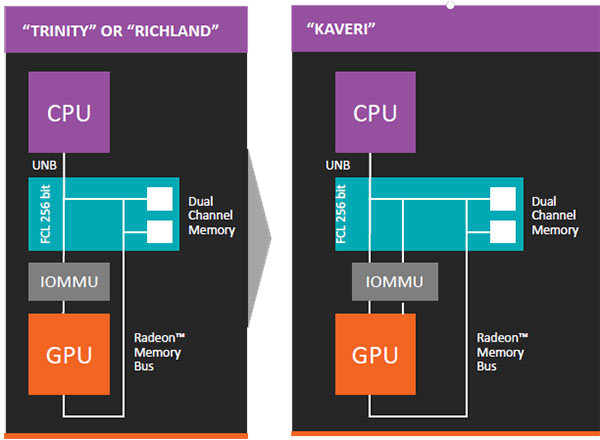
The up to 8 GCN-based GPU cores on the Kaveri GPUs support the latest graphics technologies found in Hawaii, including TrueAudio, Eyefinity, UVD 4, and VCE 2. The GPU cores have up to 512 shaders, support for system and device flat addressing, and the new MQSAD instruction with 32b accumulation and saturation. The Kaveri GPU also increases performance by allowing the local data store to buffer data rather than going off GPU for it, reducing off chip bandwidth usage. Kaveri’s up to 8 asynchronous compute engines can work independently or simultaneously for faster context switching. Kaveri further adds a second bus through the IOMMU (input/output memory management unit) for a total of one coherent and one non-coherent bus. The Kaveri GPU enhances support for H.265 4K accelerated playback, accelerated video and image editing, and realism in gaming with physics and AI co-processing.

The Kaveri APUs use the socket FM2+ architecture, rather than the socket FM2 used by the Trinity and Richland APUs. This means that you will need to upgrade your motherboard if you upgrade to a Kaveri APU. The new motherboard chipsets, however, are fully backwards compatible. That means that a Trinity or Richland APU will work in an A88X, A78, or A68 motherboard.
To conclude the Kaveri Architecture summary, here is a list of the new Kaveri APUs.
|
A10-7850K |
A10-7700K |
A8-7600 |
|
| Compute Cores |
12 (4 CPU + 8 GPU) |
10 (4 CPU + 6 GPU) |
10 (4 CPU + 6 GPU) |
| Max Turbo / CPU Frequency |
4 / 3.7 GHz |
3.8 / 3.4 GHz |
3.8 / 3.3 GHz |
| L2 Cache |
4 MB |
4 MB |
4 MB |
| GPU Frequency |
720 MHz |
720 MHz |
720 MHz |
| HSA Features |
Yes |
Yes |
Yes |
| AMD TrueAudio Technology |
Yes |
Yes |
Yes |
| Mantle Support |
Yes |
Yes |
Yes |
| AMD Configurable TDP |
Yes |
Yes |
Yes – Optimized |
So there you have it. Kaveri is the next step in AMD’s HSA revolution and it is so “exciting” for AMD’s engineers because it represents the culmination of their efforts in heterogeneous compute over the last eight years. To be completely honest, Kaveri represents a new generation of computing, where GPU and CPU cores work simultaneously and nearly indistinguishably from one another. They each still have their strong suits, but the ability to harness the IOPS producing power of the GCN-based GPU cores without specifically programming for their use makes things much easier on developers while still allowing that performance boost.

It is interesting, also, that Kaveri and HSA have started benefiting AMD in areas that were previously not even thought of. The increased IOPS available through Kaveri’s GPU cores has an astounding effect on the mining of cryptocurrencies. Integer operations are key to quickly being able to unravel the cryptographic puzzles hiding wealth in the form of bitcoins, litecoins, or other cryptocurrencies. I think AMD was just as surprised as anyone to find that Kaveri (and any GCN-based GPU) is extraordinarily adept at this.
Kaveri doesn’t just bring performance increases, however. AMD was also able to better optimize for power consumption with the new APUs. In fact, although the high-end Kaveri APUs come with a 95W TDP, you can downclock that to 65W or even 45W if you want to. You’ll lose some of the processing power by having to downclock your cores, but if you are interested in saving power, it is possible here. The same Kaveri cores used in the A10-7850K can be clocked accordingly and utilized in lower power-consuming products with TDPs all the way down to just 15W. In previous iterations, we’d be looking at a completely different architecture to operate at the low-power end of the spectrum.
When developing Kaveri, AMD looked to accomplish five things; application acceleration, hi-res gaming, ultra-HD resolutions, new user experiences, and smaller form factors. If all that I saw during the Kaveri Tech Day press conference was true, they have accomplished all of those goals, making Kaveri a truly revolutionary platform.
Unfortunately, because I ran out early to attend a wedding, I didn’t get my hands on Kaveri until the day before launch. As I type I am vigorously testing the A10-7850K against the i5-4670, Richland, and a host of other hardware configurations to either prove or disprove the claims I heard. Stay tuned to find out whether or not Kaveri lives up to the hype.


