By David Ramsey
Manufacturer: Lenovo
Product Name: Yoga Tablet 10 HD+
Model Number: B8080-F
UPC: 888440762548 EAN: 0888440762548
Price As Tested: $348.99 (Amazon | Newegg)
Full Disclosure: Lenovo provided the product sample used in this article. But we had to send it back after the review was completed.
Last fall Benchmark Reviews examined the predecessor to the Lenovo Yoga 10 HD+ tablet, and found that it represented an excellent value for the money. This time around, Lenovo ups the ante with a dramatically improved screen, faster quad-core Snapdragon processor, and double the memory of the earlier model. Add its unique design and construction and the Lenovo Yoga tablet becomes on of the more intriguing Android devices available.
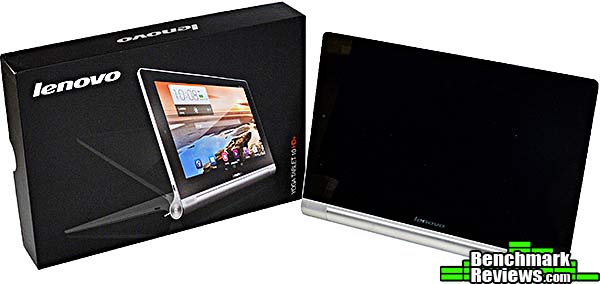
A tablet computer, by definition, must be a flat “slate” form factor. Or must it? If you haven’t seen a Yoga tablet before, you may be in for a surprise. Like the experienced yoga practitioner, Lenovo’s Yoga tablets have the ability to assume different forms depending on what you’re doing with them.
| Yoga Tablet 10 HD+ | |
| CPU | Qualcomm Snapdragon, 1.6gHz quad-core |
| Screen | 10.1″ HD (1920×1200) IPS |
| Size & Weight | 1.38 lbs, 10.27″ x 7.08″ x (0.36 – 0.12″) |
| Cameras | 8.0M Auto Focus rear camera, 1.6M front camera |
| Storage | 16GB eMMC storage, expandable to 64GB with MicroSD |
| Memory | 2GB LP DDR2 |
| Battery | Li-ion polymer, 9000mAh |
| Operating System | Jelly Bean Android 4.3 (OTA upgrade to 4.4 in Fall 2014) |
| Ports | Micro USB (OTG), 3.5mm audio jack |
| Sensors | E-compass, Accelerometer (G-sensor), GPS, Brightness (Ambient Light), Vibration Function |
| Connectivity | 802.11 b/g/n WiFi, Bluetooth 3.0/4.0 |
| Touch | 10 point multi-touch |
| Power adapter | 2.0V |
| Case Materials | Polycarbonate back and aluminum kick stand |
| Audio | Dual Speakers , 3.5mm Audio & mic jack, Microphone with noise reduction, Dolby Digital Plus DS1 |
So, what makes the Lenovo Yoga tablets different? Let’s take a look in the next section.
The Lenovo Yoga Tablet 10 HD+ is physically almost identical to the non-HD version we reviewed previously. In fact, unless you examine the model number on the back of the unit, there’s almost no way to tell them apart.

If you haven’t previously seen a Yoga tablet, you’ll notice the difference right away: while other tablets are symmetrical slabs, the Lenovo Yogas have a very thin screen with a thick, rounded edge. This is where the battery lives. And it’s a big battery, too: Levovo says the 9000mAh battery good for up to 18 hours. The battery hump also serves to prop the edge of the tablet up a little bit, making it more convenient to use laying flat on a table or other surface.

If you want more “angle”, you can fold down the aluminum foot built into the case. Now the rear is propped up about 1.5″.

The same foot also lets you use the tablet this way, handy for watching movies on your desk.

The stiffer hinge on the HD+ model will support the tablet even at a fairly extreme lean angle.

Under the stowage area of the aluminum foot is a slot for a MicroSD card; Lenovo says the Yoga 10 HD+ tablet will accommodate cards up the 64MB.

There’s one very minor design change that is nonetheless annoying: as you can see in the image above, the previous Yoga 10 tablet had a small cutout in the case, above the center of the aluminum foot, that let you use a fingernail to start extending the foot from the back of the tablet. The HD 10+ omits this cutout as you can see below.

The label on the foot suggests grabbing the rounded base and opening it with a twisting motion. The problem with this is that the new hinge is quite stiff, and it takes a fair amount of effort to get the foot out from the case. My wife was almost unable to to do it and I found it difficult and clumsy. Some texturing on the smooth aluminum surface would help; perhaps something similar to the very fine diamond pattern used on the polycarbonate back plastic part of the case.
I’ll continue my overview of the Yoga 10 HD+ tablet in the next section.
The unusual design of the Lenovo Yoga 10 HD+ tablet has real advantages in day to day use. The battery bulge makes the tablet easy to hold in portrait orientation, as shown below (this image is actually of the smaller Yoga 8 tablet, but the Yoga 10 HD+ is the same…just larger):

This works really well. The reason: weight distribution. The fact that the mass of the batteries has been moved from behind the screen to the side has two advantages: one, the screen portion of the tablet can be very thin:

Apple brags about how thin the iPad Air is. And it is thin, at a mere 7.5 millimeters. But as you can see, the screen section of the Yoga Tablet 10 it’s on top of is even thinner at 3.0mm at the thin edge and thickening only to 8mm right next to the battery bulge.
Two, most of the weight of the tablet is in your hand. When you hold a “regular” tablet, most of the weight is beyond your hand, and the force exerted by gravity tries to “lever” the tablet down. The Yoga tablets concentrate the weight in the part you’re holding, and you don’t have to exert any effort to support the featherweight screen portion.

One one side of the tablet it the large, easy to press power button, which I find a relief after dealing with the tiny, barely protruding micro-switches of other tablets. The power icon in the button will pulse with white light when you have notifications. Also on this side of the tablet is the micro USB port used for charging as well as transferring data to a desktop computer.

On the other side of the tablet is the 3.5mm audio jack, volume control, and a hole for the microphone.

As with the earlier Yoga tablets, the Yoga 10 HD+ has a pair of front-facing speakers on either side of the hinge for the stand. Although they’re tiny, they’re Dolby™-certified, and if their performance is limited by their size (and it is), they still are probably the best-sounding speakers available on any tablet today.

The rear camera has been upgraded from a 5MP to an 8MP unit (the front camera remains at 1.6MP). The camera on the previous Yoga tablet produced mediocre photos: color and saturation were good, but the images suffered from readily visible compression artifacts. The new camera produces noticeably higher-quality images, although they’re still short of the images you can get from higher-end Android phones and iPhones. The image below is an enlarged crop representing about 20% of the original image area.

Join me in the next section as I examine the software included with this tablet.
The Lenovo Yoga 10 HD+ tablet comes equipped with Android 4.3 “Jelly Bean”, but Lenovo promises an over-the-air upgrade to version 4.4 “Kit Kat”, although they haven’t announced a schedule for this.
As with the previous generation Yoga tablets, Lenovo resisted the urge– all too common among vendors of Android devices– to impose their own skin or user interface on top of the standard Android interface. Aside from a pre-configured home screen and some utility software, it’s pure standard Android 4.3:

The new high-definition screen, at 1920 by 1200 pixels as opposed to the previous-generation’s 1280 by 720 pixel display, makes a dramatic difference in how things look on the screen. With the older version of the tablet, Lenovo configured large on-screen fonts to avoid the “jaggy” look, but in doing so cut off the names of some included applications, such as “Amazon Kindle” and “News & Weather” as shown below.

This is no longer a problem. However, competing 10″ tablets such as the iPad Air (2048 by 1536) and the Samsung Galaxy Tab Pro and Google Nexus 10 (2560 by 1600) still surpass it in resolution, although you’ll pay more (in the case of the iPad Air, much more) for those extra pixels.
The Lenovo Yoga tablets come with Dolby-certified sound systems controlled with a special application. Using this app, you can define customized sound profiles, and even set the tablet to automatically select a profile based on its position and whether or not the aluminum foot is extended. For example, if the tablet is in landscape orientation with the foot out, you could set it to use the “Movie” sound profile. The sound produced by the Dolby-enhanced front-facing speakers is (to my ears) noticeably better than the sound produced by the iPad Air’s speakers, which fire to the side, but remember that these are still very small speakers that are limited by the physics of their size; a common, no-name brand of cheap unpowered desktop speakers will probably sound better overall.

Lenovo’s “Smart Slide Bar” can be invoked with a swipe from the right side of the screen when the tablet is in landscape mode…

Or the left side of the screen when the tablet is in portrait mode:

As with the older version of the Yoga 10, when in landscape mode, the large upper icon will invoke your Movies, while when in portrait mode the large upper icon is for the Kindle application.

Swiping down from the top right portion of the screen opens this quick-access control panel. The “Sound & Visual” icon lets you invoke customized settings you’ve configured for each of the three given orientations.

You can make very fine adjustments to the tablet’s power usage with the Lenovo Power Control application. You can set timers (sleep, auto-power off and on), enable and disable various subsystems (WiFi, Bluetooth, audio…), and even display a chart showing the historical power usage of various applications and hardware bits, so you can see what’s using the most power. This is all cool, but in real life I found the power capacity of the tablets so large that I pretty much ignored this stuff. Additionally, you can select between Normal or Power Saving modes, and even “freeze” specified background applications to help conserve power.
More Yoga 10 HD+ software and features in the following section…
Although it goes oddly unmentioned in Lenovo’s marketing materials and reviewer’s guide, the Yoga 10 HD+ tablet offers split-screen functionality: you can run multiple apps on screen simultaneously. By dragging a running application up from the application list, you can position it on-screen to the left or right (in landscape mode) or top or bottom (portrait mode) of an existing app. In this image I’m running the Chrome browser on the left side of the screen and Google Earth on the right.

A movable divider lets you apportion screen space between the running apps. It’s functionally similar to the “tiled windows” of Microsoft Windows 1.0, if you’re old enough to remember that. Depending on the apps involved (not all apps work well in this mode), you can have up to 4 applications on-screen at once.
With the Yoga 10 HD+, Lenovo includes several Lenovo DOit applications. The first is SHAREit, a cross-platform file sharing tool that Lenovo brags is “up to 40 times faster” than other file transfer methods. Free versions of this application are available for both Android and iOS, so you can easily (for example) move photos and other files between the Yoga tablet and, say, an iPhone:

8 seconds to move a 1.2 megabyte file doesn’t actually strike me as particularly fast, but it was easy. The iOS app caught the photo and placed it in my iPhone’s photo library. However, it looks as if the translation of the app’s user interface wasn’t quite finished:

(As best I can tell, the Chinese characters at the bottom of this dialog mean “Done”.)

Next up is the SECUREit application, which according to Lenovo offers protection against malware and viruses. I couldn’t actually find anything that looked like virus or malware protection feature in the user interface, although the application does offer an interesting look into the power and memory use of running software, and allow you to set permissions for specific applications and monitor how applications are using your personal information. You can see another localization error in the misspelled “Vedio” at the bottom of this image.

Last is SYNCit, a tool that synchronizes your contacts, SMS messages, and call logs to the cloud, with “the cloud” being a free account you can open by creating a LenovoID. Although the idea is to keep this data synchronized to “any Android device”, I couldn’t find SYNCit in the Android Play store, although SHAREit and SECUREit were both available. Of course, SYNCit is still useful as a backup for your tablet data.

Join me in the next section as I give my final thoughts and conclusion on this tablet.
In my previous review of the first-generation Lenovo Yoga tablets, I noted that they were budget tablets, whose relatively low-spec CPUs, memory, and screens were offset by very aggressive pricing. While they represented an excellent value for the money, they are outclassed here by the Yoga 10 HD+, which offers better performance with a quad-core Snapdragon CPU, twice the memory, and a much better screen for only $50 more.
Still, there are a few rough edges: the high-definition screen presents over-saturated colors, which makes things like the default lock screen (shown below) look great, but throws off skin tones and other subtle colors. There are minor localization errors, such as a weather application that only presents temperature in degrees Celsius. And the new 8-megapixel camera’s images still aren’t anything to write home about.

That said, I found using the tablet to be very satisfying: performance was quick and crisp (aside from an oddly laggy auto-rotation, where several seconds can pass before the tablet orients the image on its screen correctly), sound from the front-facing Dolby-certified speakers was much better than I’ve heard from any tablet and indeed most laptops, and the unique form factor makes the tablet much more comfortable to hold and use than “flat” tablets.
The included extra software, while nice, doesn’t offer that much extra functionality, but I think the split-screen feature, mysterious though it might be, could be something I could really get used to.
In my previous review of the earlier Yoga tablets, I said:
I do look forward to seeing a “Yoga HD” from Lenovo in the future.
Well, it’s here now, and it was worth the wait.
Lenovo’s Yoga tablets seem to be almost a secret in the Android tablet world, which is dominated by various flavors of Google’s Nexus and Samsung’s family of Galaxy tablets. That’s a shame, since the Yoga tablets offer a tremendous bang-for-the-buck as well as unique features unavailable in other tablets. The Yoga tablet design, with its battery location, folding support foot, and front-facing speakers, makes a dramatic difference in the usability of the product.
The Yoga 10 HD+ improves on the performance, memory, and screen of the earlier iteration of the product for relatively little more money,
Tablets aren’t something most people will consider from an aesthetic point of view, but the appearance of the Yoga products is different enough to be striking.
Constructed of polycarbonate plastic for the main body and matte-finish aluminum for the battery casing and foot, the physical quality of the tablet was excellent. The feel of the hinge used for the aluminum foot is very solid and stable, without even a hit of slop.
Functionally, the Yoga 10 HD+ tablet is superior in almost every way to its predecessor, offering excellent performance and screen quality. And you can transfer files simply by connecting the USB port to your computer, without the irritation of having to put the tablet into a semi-secret “developer mode.”
As before, value is the big story here. As of July 2014, the Lenovo Yoga 10 HD+ sold online for $348.99 (Amazon | Newegg). At ths price, Lenovo has raised the bar for its competitors.
+ Unique design brings significant operational benefits
+ May have the best tablet audio yet
+ MicroSD card slot for storage expansion
+ Very long battery life
+ Improved performance and screen
+ Excellent value
– Over-saturated screen colors
– Minor localization issues
– Mediocre image quality from 8MP camera
– Aluminum foot can be difficult to deploy initially
-
Performance: 9.50
-
Appearance: 9.25
-
Construction: 9.75
-
Functionality: 9.25
-
Value: 9.75
Excellence Achievement: Benchmark Reviews Golden Tachometer Award.
COMMENT QUESTION: Do you prefer a tablet device or notebook computer?

