By Bruce Normann
Manufacturer: QNAP Systems, Inc.
Product Name: QNAP TS-451 Turbo NAS Server
Model Number: TS-451
UPC: 885022006212
Price As Tested: $456.99 (B&H | Newegg)
Full Disclosure: The product sample used in this article has been provided by QNAP Systems, Inc.
The QNAP TS-451 Turbo NAS is part of a new hardware platform for QNAP that brings a high level of performance to the small tower-based format, at a lower cost than was possible before. The four new TS-x51 towers are being promoted as home-based NAS servers, based on their high performance, low cost, and a bunch of new software functionality that is ideal for the modern home. While recent QNAP launches have leveraged the tremendous potential of 10GbE networking for the business user, the home and the SOHO market aren’t there yet. The home market is very sensitive to pricing, so the best thing to do is to re-engineer the daylights out of the surrounding infrastructure and pump a little more juice into the system controller. More power, new features – lower price? That works for me, usually….
With four 3.5″ drive bays available, there is a potential for 16TB of storage, using readily available NAS-specific drives, plus the ability to link up an expansion chassis through the USB 3.0 ports. If both capacity and redundancy are needed, RAID 5 is usually the minimum configuration. If you want to go to RAID 6 or RAID 10, you need a minimum of four disks, with two spindles completely occupied by providing multiple levels of redundancy for your data. A four-bay device is really the bare minimum for a high availability NAS appliance, and that’s why I think the 4-bay TS-451unit in this series makes a lot of sense for a large majority of users.

Benchmark Reviews has tested a wide array of QNAP NAS products, ranging from the QNAP TS-119 NAS single-disk unit made for home users, to the Goliath QNAP TS-870U-RP 8-Bay NAS for the storage needs of large businesses. Most recently we tested the 4-bay TS-470 powerhouse. Let’s see how this latest Turbo NAS compares to those corporate animals, and to a variety of other siblings and competitors.

Virtualization has taken the IT universe by storm in the last 5-7 years. I can vouch for the fact that there are even virtual servers in Antarctica. While the concept has spread somewhat to other devices, it’s primary application is in large, multi CPU, multi-core servers. When you look below the surface of a NAS, you might be tempted to think that the natural evolution of the device is to become a Storage Area Network (SAN). That’s certainly a valid growth pattern, but QNAP also recognized that the basic architecture of a NAS is not that far off from a typical server. With that info in mind, they made the leap to bring the same virtualization concepts and techniques that are in wide spread use on servers to a NAS platform. Ultimately, it’s largely a function of software, more than anything else. Let’s take a closer look at what virtualization brings to the NAS ecosystem.
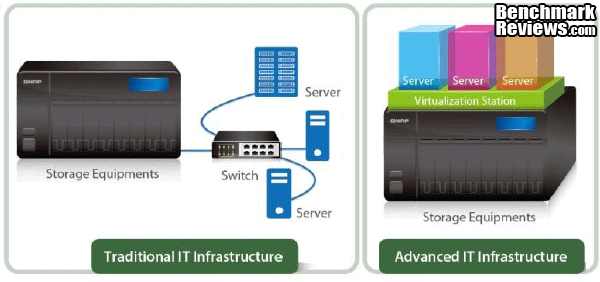
The old IT infrastructure used the NAS strictly as a storage device, connected to the rest of the network devices through a switch. Just as virtualization was driven by Moore’s law and the fact that 16 CPU cores now fit easily into a 2U rack slot, the use of multi-core CPUs in a NAS server opens up brand new opportunities for expanding the functional footprint of the device. I’m a whole lot more excited about the new QNAP TS-x53 series, with quad core CPUs inside, than I am for the TS-x51 series that is under test here, but the home user may be able to get by with only one VM running the operating system of their choice. Just like VMware in the data center eight years ago, you have to start somewhere. Let’s take a look at where that might be.
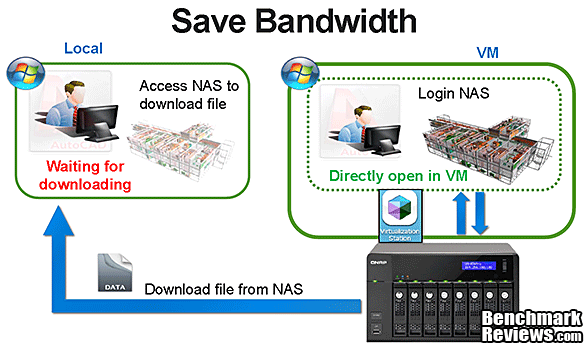
The illustration above uses CADD data as an example, but it could easily be any kind of data. Let’s say you are a professional photographer or a graphics designer, and you are working out in the field or interfacing with a client. Instead of downloading a 24 Megapixel image to your 10” tablet, and using the local application to open it and display it, why not let the NAS server do all the hard work, and just download the 1080p image to your HD screen. It will happen a whole lot faster, especially if you are relying on a 4G network for access. The same will be true if you’re sitting at home browsing any kind of hi-res media – music, video, photos over 802.11n Wi-Fi.

One other advantage in the scenario we just discussed is that the source data for the file you are accessing never gets transmitted to your mobile device or remote PC. Data tapping is becoming more prevalent, especially outside the US, and it’s not unrealistic to be worried that your proprietary or secret information might be intercepted by the person with the notebook computer sitting in the corner of the café. Maybe there’s a permanently installed antenna in the coffee shop that just sucks everything into a big storage array in the apartment two floors up. The fact is, data protection has evolved since the early days of BYOD and keeping the ‘real’ data behind the firewall instead of sending byte-perfect copies of it all over the world is a strategy you need to embrace. Once again, you might ask why the average home user should care about this, and I can only say that more and more people are carrying around and accessing more of their personal, legal, and financial data than we could have imagined ten years ago. Why would I carry around a copy of my tax returns on a notebook HDD or flash drive that is easily lost or stolen, when I can simply display it in a browser window, without leaving a trace of the original data on a network that I don’t really trust?

Building on the idea that your NAS is really a server in disguise, and it can and should be, processing data instead of just serving it up to the user base; video transcoding shoots to the top of the list of things I think it should be capable of. Unfortunately, the CPU component of almost all the consumer-focused NAS units sold in the last few years has been completely incapable of performing this task in any meaningful way. This is not so much a question of software availability, but an issue with the hardware. Part of the blame has to be assigned to the NAS manufacturers, who all said to themselves, “Hey, our NAS runs perfectly well with this new Intel Atom CPU.” That was a good line, back in the days of wired networks, and low-res media. Throw a few tablets and notebooks onto a crowded Wi-Fi network, and watch the lag times pile up as everyone is streaming 1080p video in real-time access mode. That’s still based on the assumption that all the NAS users are located in the house, and not surfing their multimedia files from a remote location. At least the typical gaming PC is still sitting on a GbE connection, over Cat5. Everybody else is lucky if they’re on a multi-stream 802.11n connection.

The QNAP TS-451, combined with the QTS v4.1 and higher operating system, allows on-the-fly video transcoding and background transcoding as another option. This lets you convert video that’s stored on the NAS and content that’s streaming from the net into any of the myriad of screen resolutions that your portable devices support natively. It will be a long time before every screen gets upgrades to 1080p, and by then 4k video will be more common. That’s something you don’t want to try and send over the typical 802.11n channel of your two year old Wi-Fi router. While Intel’s Celeron is hardly the ne plus ultra of CPUs, at least if you look at desktops, the simple comparison in the image above should be enough to convince you that the Intel Atom was a major stumbling block to implementing this technology on earlier platforms. For the record, those results for translating the same 1080p video file are 2069 seconds for the TS-469 Pro and 145 seconds for the TS-451. Juggling resolutions is one thing, in many cases the file format needs to be converted as well. That’s where the power of the Intel HD Graphics subsystem, based on Ivy Bridge, really comes into play. With 4 execution units, and support for DirectX 11, OpenGL 4.0, OpenGL ES 3.0 and OpenCL 1.1 (on Windows), converting hi res video from one format to another is routine work.

QvPC is an offshoot from the introduction of virtualization to the NAS platform. Bringing together several recently implemented technologies, such as virtualization, hardware-accelerated transcoding, cloud integration, unified & tiered storage, RAID protection, SSD cache acceleration, video output, and peripheral integration provides synergies that go beyond the basic functions that each of these technologies deliver on their own. Let’s walk through a couple capabilities that are part of QvPC.
- QVM Desk directly accesses multiple virtual machines, along with data storage on the NAS. You switch VMs as if using multiple PCs connected to the same keyboard, mouse, and monitor. Compared with remote desktop access through a web browser, QVM improves efficiency and minimizes network issues.
- QvPC Technology makes it possible to run an Android-based VM, play Android games on a big screen, and if you have a touchscreen, use them like an Android-based PC. In a mixed mode world, you can use Google Chrome to access the Internet, plus download and directly save online content.
- QvPC Technology also allows you to create virtual household PC for each member of the family. With independent VMs, you have complete control over file access and user permissions. Functions like Snapshot can restore files and data if any of the VMs crash. Screen sharing allows parents to seamlessly monitor their children’s Internet usage.
That’s the newest set of features available in QTS 4.1. Now, let’s look at the Turbo NAS Server that hosts all those new capabilities.
Before we dig into the real innards of the QNAP TS-451, here’s the “drives eye” view of the NAS. All power for the drives comes through the PCIe connection on the main controller board and makes its way towards the power portion of the four SATA connectors. The signal portion of the SATA interfaces are located right below them, and although the backplane looks like it’s just a passive connector board, there are two Asmedia SATA controller chips located on the backplane. The cooling fan is partially visible from here, and there is plenty of wide open space in the chassis framework for the fan to pull air through. Of course, the hard drives will fill up most of that space, but it’s good that they are the only thing holding back the airflow.

The top cover is easily removed once four small screws on the back panel are removed. From this point on, it’s evident that QNAP has done a wholesale redesign on the chassis. Previous QNAP models with the small tower format had a complex and rugged inner frame that looked like it could stand up to mobile deployment in an industrial environment. Whether it was a 2, 4, or 6-bay device, the basic mechanical infrastructure was always the same. At some point, value engineering always beats out economy of scale, and QNAP has created a new, less expensive platform that meets all the needs of a typical home or office user and costs a whole lot less to produce. Given the increased competition in the NAS market, I think it makes perfect sense to spend more on the electronics and software, if you can save a few bucks on the case. This still a good, modern, sophisticated, mechanical design package; QNAP has not sunk to the lowest common denominator here. To reiterate, it meets all the needs of a typical home or office user, looks good doing it, and weighs a couple pounds less than the previous generation. Sounds like a millennial…..just kidding. The modular layout is quite evident; the main board takes up the whole left side of the unit, and the drive bay takes up the lion’s share of the remainder. You can see that there’s a lot of spare real estate on top of the drive cage. That will no doubt be put to use in other higher-end models for a display, and perhaps a CPU cooler. You can see why I say this is a whole new platform, right?

Once you take a few more screws out, the whole plot is exposed and you can see how the new design is very straightforward and simple. Once I got to this point several things struck me. The electronics package has also been simplified and more integrated. There is only one wire harness needed, for the cooling fan, and all the indicators and interconnect jacks are soldered directly to the main controller card. Once again – simpler, cheaper, and more reliable, too. Secondly, the fan is really large, and I suspect that’s not because this particular model generates a lot of heat. It’s a full 120mm, because the quietest fan you can use is almost always going to be the largest diameter fan that will fit. But, there may also be models down the road that have a beefier CPU that needs the cooling. Hmmmm…, did I hear that there’s a quad-core version coming out soon? With the new virtualization capability that QNAP has released, that makes a lot of sense. Lastly, it looks like you have to remove the drive cage at least, in order to access the second SODIMM slot, in case you need to upgrade the memory. I looked at it all different ways when the drive cage was still attached, and couldn’t figure out a way to get the memory module in or out of its socket. That’s a bit more work than I’m used to seeing on QNAP units, but it’s not harder than before, just more work. QNAP has a web tutorial available to spell it all out for you.

Once the drive cage is removed, the main controller board is fully exposed, and you can see from this view that it is pretty densely packed. Not quite to the level of a graphics card, but close. We’ll get into more details in the next section, but it’s plain to see that this main controller board is pretty much a one-chip show. The Celeron J1800 sitting under the modest heatsink has almost all of the necessary functions built in already. It’s built on a very efficient and low-power 22nm Bay Trail core, and its architecture is aimed directly at systems just like this. There are two SODIMM slots located at right angles to each other, and one of them is partially covered by the sheet metal tray that the board is mounted to.

If you could crawl inside the drive bay, and had X-ray vision, this is the view you would get of the main controller board for the QNAP TS-451. Typical for low power systems that feature a SOC solution, the CPU cooler is an insignificant part of the overall landscape. The large rectangular hole on the left side is where outside air enters the left chamber of the chassis, and it passes right through the jagged channels of the heatsink atop the CPU as it makes its way to the 120mm fan on the rear panel. The CPU is the only thing that really needs any cooling on this board, as even the power supply circuits are optimized for low power dissipation. Along the left edge of the board are all the switches and LED indicators for the front panel, along with the front panel SuperSpeed USB 3.0 port. Similarly, all of the rear panel interfaces are lined up along the right edge of the board. The only additional PCB that’s required is the SATA backplane which plugs into the short 4x PCIe connector on the lower right. All the power for the installed HDDs comes through this PCIe connection, so there are some dedicated power supply and regulation components located along side it. Along the bottom edge of the board is the 512MB DOM that contains the operating system and all the hardware configuration settings.

Speaking of the SATA backplane, here it is, in its entirety. The edge connector transfers the PCIe signals to this vertical board that serves as the backplane for all the SATA HDD connectors. It’s not just a passive board, as there are two drive controller ICs located on the backplane. This is consistent with how QNAP builds their larger tower models, putting the controllers closer to the drives they are responsible for. Each Asmedia ASM1061 controller chip handles two drives, so the board isn’t littered with active ICs, but they are easy enough to spot. One is kitty-corner to the LH mounting hole, and the other is right below the bar code label on the upper right. All the other larger components mounted on the board are power supply and monitoring chips.

The memory controller is integrated on the Intel J1800 Celeron CPU, and it’s designed to handle up to 8GB of DDR3L-1333 memory modules in its native configuration. The specs for the TS-451 call out two retail versions; one with a memory capacity of 1GB installed, and another with 4GB. In both cases, I believe only one of the SODIMM slots are loaded with a memory module. The maximum memory capacity is 8GB, which is the limit of what the CPU can handle. Based on my testing, straight data transfers use very little of the NAS memory capacity. There are dozens of more challenging apps that you can run on a QNAP NAS though, and the extra memory will have a bigger impact on some of those. Certainly, the new virtualization option that is available with the latest operating system will benefit from the extra memory.
So far we’ve had a good look at what there is to observe as far as hardware goes, but let’s dig down one more layer, down to the chip level where the technology really starts to get interesting. I love my hardware just as much as the next person, but it’s only half the story…..
The biggest chip on the board is the Intel Celeron J1800 CPU, a dual-core member of the 22nm Silvermont family. It’s architected as a System-On-A-Chip (SOC) in this iteration, so most of the peripheral interfaces like USB, SATA, Video, Audio, etc. are built right into the die from the start. As a result, this section of the review is shorter than many recent articles. NAS devices are a perfect application for this sort of chip, as smaller, lighter, cheaper, easy to integrate are what every NAS designer wants. It consumes very little power, with a max TDP of only 10W. Honestly, I know I’ve been waiting for what seems a very long time for Intel to field a worthy replacement for the Atom. It’s been the bottleneck for so many consumer tech items that were all just being strangled by the performance limitations of the Atom. Even the dual core models seemed stuck in low gear, as they never really outpaced the competition. I’m guessing we have the tablet wars to thank for Intel bringing their low power line up to scratch. The last NAS I reviewed needed a heatpipe style CPU cooler in order to keep the 32nm Celeron CPU temps in check. The performance of that unit was great, but it was a trick squeezing a heatpipe cooling solution into the typical 4-bay tower format. The Celeron J1800 is the only chip on the main board that needs a heatsink, and the low, finned aluminum block is held in place by two weak springs, and plastic push-pins. The difference in power dissipation couldn’t be more obvious.

As much work as the CPU does in its usual role of counting digits, it also has to communicate and control most of the subsystems that would normally be handled by an Intel Platform Controller Hub (PCH) in a normal PC or laptop. The PCH is usually the second hardest working chip on the main board, and integrating all those interfaces into the Celeron SOC increases the TDP of the overall package somewhat. The Celeron CPU in the TS-451 does not have native CPU support for the Advanced Encryption Standard New Instructions (AES-NI) set. These new instructions speed up the encryption/decryption process by anywhere from 3x to 10x, depending on the implementation. As slow as the Atom-based and Marvell-based models are with encryption enabled, the latest Celeron-based models from QNAP are the minimum level that can realistically support AES 256-bit volume-based data encryption. Even with the enhanced computing power offered by a modern CPU, the extra load of data encryption is just too much to handle without a major performance hit. The GPU section of the Celeron J1800 is based on Ivy Bridge Intel HD Graphics, with 4 execution units, and it supports DirectX 11, OpenGL 4.0, OpenGL ES 3.0 and OpenCL 1.1 (on Windows). This isn’t exactly a gaming-ready GPU, but it’s perfectly suitable for handling hi-res streaming video.

Asmedia supplies the SATA interface ICs for this new generation of QNAP towers. The ASM1061 uses one PCI Express v2.0 lane to create the interface for two SATA 6Gb/s ports. In the TS-451, two of the chips are used, and both are located on the SATA backplane. The backplane itself plugs into the x4 PCIe connector on the main controller board, providing a direct connection between the x4 PCIe port on the J1800 Celeron and the SATA controllers. It’s all very modern; the x1 PCI Express lane allows for 2.5 and 5GHz signaling at both ends of the connection. On the SATA side, the ASM1061 provides 2 Serial ATA PHY connections for 1.5, 3.0 and 6.0 Gb/s signaling. The primary usage of the TS-451 is with traditional 3.5″ HDDs in all the bays, none of which operate anywhere near the full capabilities of the SATA 6Gb/s interface. The second Asmedia chip on the TS-451 main board is an ASM1442 high speed TMDS level shift ICs for High Definition Multimedia Interface (HDMI) and Digital Video Interface (DVI) video. In the old analog video days, this would be called a driver chip. In the digital world, you can amplify signals by just adding a few bits across the board and voila, the signal level is higher, AKA “level shift”. The magic of digital math is pretty awesome sometimes.

USB 3.0 is final supported natively by the Intel CPU/SOC, so no extra chips are needed for that function. The two USB 3.0, plus the additional two USB 2.0 ports are all connected directly to the Celeron J1800. The same goes for Ethernet; no additional silicon is needed for the networking function, either. Gone are the usual high-end Intel Ethernet controllers that I’m used to seeing on QNAP products. The SOC does it all…. Ditto for audio. Every PC (…errrrr, NAS) needs a Super I/O + Hardware Monitor. In this case, those duties are handled by the Fintek F71869AD. It’s unlikely that QNAP needed the IEEE 1284 Parallel Port, Keyboard Controller, or Floppy Drive Controller that are included here, but they no doubt used the auto-controlling fans and temperature sensor pins for the CPU thermal diode. This same Fintek IC showed up on the TS-x70 series, about a year ago. This set of functions is a very mature and low-tech application space, so Fintek are probably winning the spot on price. The PIC16 chip is a simple (only 33 single-word instructions) FLASH-based 8-bit microcontroller that is well suited for controlling the low-level functions of industrial and consumer-level products. It’s a lot easier to use a dedicated MCU like this to control the lights and buttons, than to code those requirements into the main CPU/SOC. Plus, the code is consistent across the entire product line, instead of unique for every model that has a different CPU.

To measure isolated NAS power consumption, Benchmark Reviews uses the Kill-A-Watt EZ (model P4460) power meter made by P3 International. Obviously, power consumption is going to depend heavily on the number and type of drives that are installed. The power draw also depends on the fan speed that’s required to keep the unit cool. When the device first started up it pulled a max of 57W when all four drives were spinning up. Once the system completed its boot process, it then went into idle standby mode, where it consumed 34W. This is slightly higher than the 31W specified by QNAP, but this unit had 4TB drives installed and 8GB of memory, which is pretty much a maxed out system. With all drive bays filled and during heavy file transfer operations, it drew just 40W. I had the power settings configured to allow the drives to spin down after a preset time period, and the power consumption dropped to 14W in that state. When the unit is turned off, it still consumes 1-2W in Vampire mode; be aware that even when it’s turned off, the 90W external switch-mode power supply still pulls a small amount of power.
We’ve seen the ins and outs of the hardware, the new software, and the technology under the hood; now let’s take a detailed look through the extensive list of features that you get with most every QNAP Turbo NAS. I know the next couple of sections are overly long, but it’s critical to understand just how much these units can do. You don’t want to be fooled into thinking it’s just a big box full of drives. It’s capable of so much more than that.
As the volume of personal digital data continue to rise, individuals and families need higher-capacity storage solutions which are secure, reliable, and easy to manage. Most households have several different tiers of data that they need to manage. Financial records need the highest level of redundancy and security. Less critical personal data, like the family recipe archive, and the kid’s homework from last year, can get by with slightly lower redundancy and a whole lot less security controls. The combined family archive of multimedia files, videos and music for the most part probably warrants the lowest priority, as it is the easiest data to replace if it’s lost due to failure of a storage system. I’m not saying that you don’t want to back up your music library, but you may not want to pay a yearly or monthly fee to store it in the cloud.
NAS + iSCSI/IP-SAN Solution for Server Virtualization
The QNAP® TS-451, which serves as both IP-SAN (iSCSI) and NAS, can also be easily utilized in different business and enterprise applications such as backup center, disaster recovery, file sharing, virtualization, and video editing storage. The TS-451 offers class-leading system architecture matched with a wide range of configuration options and native apps. There is precious little that the modern NAS box cannot do, in either the home or business environment. The ability to run an independent virtual machine on the second core of the CPU also brings new capability and performance options to the table.
The Feature-rich and Integrated Applications for Business
The NAS supports file sharing across Windows, Mac, Linux, and UNIX platforms. Versatile business applications such as file server, FTP server, printer server, web server, and Windows AD support are provided. The dominant features, such as WebDAV, Share Folder Aggregation (also known as DFS), IPv6 and IPv4 dual-stack, Wake on LAN, schedule power on/ off, HDD S.M.A.R.T, comprehensive log systems, and policy-based unauthorized IP blocking are all included features of a QNAP NAS server.
Secure – Data might seem insecure being open in a network, but the QNAP® TS-451 offers a variety of security options such as encrypted access, IP filtering, policy-based automatic IP blocking, and more. In addition, full control of the NAS is offered down to the user and folder access rights to determine who can access the NAS and what can or cannot be accessed. The TS-451 is packed with security features to stop all unauthorized data access such as AES-256 volume-based encryption. The AES-256 volume-based encryption prevents sensitive data from unauthorized access and data-breach even if the hard drives or the device is stolen.
Reliable – The TS-451 is reliable with built-in safety precautions to safeguard all data from any unforeseen problems. With multiple built-in features to guarantee no interruptions to the work flow of a business, the TS-451 is an efficient asset. The advanced RAID configurations and hot-swap capabilities are included to give RAID performance, protection and reduced rebuilding time. Moreover, the dual OS embedded on the DOM architecture ensures the system will boot up. If one of the two operating systems fails, the healthy operating system will boot up and operate normally while repairing the failed operating system. The two Gigabit LAN ports can also be configured for failover which allows the NAS server to sustain the failure of one network ports and still provide continuous services.
Simple – Setting up local or remote access with the TS-451 is painless and does not require any IT skills in order to get the basics right. All setup processes have been simplified so that most of the process is either automatic or can be completed by an installation wizard. The user-friendly web GUI allows administrators to easily manage the NAS so there is no need for an extensive knowledge of complex commands. Simple management tools such as instant SMS/Email alert, the hard drive S.M.A.R.T. (Self-Monitoring, Analysis and Reporting Technology) feature, and system resource monitor are provided to keep administrators up-to-date on their NAS at all times.
High Network Bandwidth – The TS-451 does not offer a network expansion option, but it includes dual-port 1 GbE network ports, which can be aggregated to boost network performance.
Blazing Fast Data Backup via USB 3.0 – The TS-451 features USB 3.0 ports for high speed backup to external hard drives. EXT3, EXT4, NTFS, and HFS+ file systems are supported to ensure compatibility with Windows, Mac® OS X, and Linux operating systems.
Cross-platform Sharing with Antivirus – The TS-451 supports SMB/CIFS, NFS, and AFP protocols for file sharing across Windows, Mac, Linux/UNIX networks. User accounts and shared folders can be created via the user-friendly web-based interface without IT expertise. The integrated antivirus solution for the Turbo NAS ensures business continuity by offering detection against the latest viruses, malware, worms, and Trojan horses.
iSCSI for Virtualization Deployments The Turbo NAS provides flexible and secure storage server deployment with the following enhanced iSCSI features:
NAS + iSCSI storage solution The Turbo NAS can serve as a NAS for file sharing and iSCSI storage concurrently.
Flexible multiple LUNs management The NAS supports multiple LUNs (Logical Unit Numbers) and iSCSI targets. The LUNs can be flexibly mapped to, unmapped from, and switched among different iSCSI targets.
Secure IP SAN environment deployment Designed with CHAP authentication and LUN masking, the advanced ACL (Access Control List) offers you the capability to block unauthorized access from the initiators.
Advanced RAID Management with Hot-swap Design The TS-451 NAS offers advanced RAID 0, 1, 5, 6, 10, Single, and JBOD disk configurations. It also supports hot-swap design that a failed drive can be replaced by hot swapping without turning off the server.
Online RAID Capacity Expansion The storage capacity of a RAID configuration can be expanded by replacing the hard drives with larger ones. All the data will be kept and seamlessly moved to the newly installed hard drives. There is no need to turn off the server during the process.
Online RAID Level Migration You can upgrade the disk configuration to higher RAID level with the data retained. There is no need to turn off the server during the process.
Virtual Disk Drive (VDD) adds flexibility to storage expansion along with ease of management The unique “Virtual Disk Drive” adds flexibility to expand the capacity of NAS. By using the built-in iSCSI initiator, the NAS can connect to other iSCSI targets on the network and turn them into virtual disks, which become multiple single volumes on the NAS. The NAS serves as the storage stack chaining master. The user only needs to connect to this single entry (QNAP NAS) and is able to reach and use all the iSCSI target storages on the network.
S.M.A.R.T & Advanced HDD Health Scanning (HHS) The NAS supports Hard Disk Drive S.M.A.R.T (Self-Monitoring Analysis and Reporting Technology) for monitoring the hard drive status. Moreover, the NAS is embedded with HHS Technology which supports disk checking and bad blocks scanning.
UPS Support The NAS supports the majority of USB UPS devices which enables the users to store the data in time and avoid critical data loss when power outage occurs during data transfer.
QNAP Backup Software – NetBak Replicator The backup software, NetBak Replicator, is provided for the NAS users to perform real-time synchronization or schedule backup from multiple PCs to the NAS.
3rd Party Backup Software Ready The NAS works well with other backup software, e.g. Acronis True Image, CA BrightStor ARCserve Backup, EMC Retrospect, Symantec Backup Exec, and LaCie Silverkeeper.
Encrypted Remote Replication The data on the NAS can be backed up to or from another Turbo NAS over the network securely.
Sharing Files across Windows, Mac, Linux, and UNIX The NAS is designed for users to share the files across Windows, Mac, Linux, and UNIX environment.
Windows Active Directory (AD) and LDAP Directory Service The Windows AD and LDAP (Lightweight Directory Access Protocol) directory service features enable the system administrator to retrieve user accounts from Windows AD or Linux LDAP server to the TS-451 reducing time and effort in account setup. Users can use the same login name and password to access the TS-451.
Web File Manager The NAS provides Web File Manager for you to easily download, upload, and manage the files on the server by web browser.
Ease of User and Share Folder Management The NAS supports batch creation of users and share folders to save the time and effort of the server manager in account and folder creation. For the security of Windows network environment, server managers can hide or show network share folders.
Hard Disk Standby You can configure the hard disks to enter standby mode if there is no disk access within the specified period.
Schedule Power on/ off The flexible schedule power on/off feature is now provided on the NAS for IT administrators to manage the NAS server’s up time according to the working hours. You can set the time for automatic system power on, power off, or restart on any days of the week.
Secure data storage, access, and sharing
- Comprehensive event logs: Detailed logs of file-level data access to the NAS via samba, FTP, AFP, HTTP, HTTPS, Telnet, and SSH, and networking services accessed by online users are all recorded.
- SSL security (HTTPS): The NAS can be accessed and configured by web browser securely.
- Remote login to the NAS by SSH (secure shell) or Telnet connection is supported.
- Secure FTP: The data can be transmitted with SSL/TLS (explicit) encryption. Passive FTP port range setup is also supported.
- Write-only access right on FTP server: The third party partners are allowed to upload data to the NAS but not able to read or edit the data on FTP server.
Policy-based Automatic IP Blocking To prevent the NAS from malicious attacks, the server manager can create an IP filter policy to allow, deny, or auto-block the IP address or network domain which attempts to connect to the NAS via SSH/ Telnet/ HTTP(S)/ FTP/ samba/ AFP.
The most comprehensive support for numerous brands of IP cameras The Surveillance Station of QNAP NAS supports over 1400 models from all the leading network camera brands such as AXIS, D-Link, IPUX, LevelOne, Linksys, Panasonic and Vivotek etc. Each of the supported cameras has been put through stringent tests with the NAS series in QNAP’s laboratory to guarantee 100% compatibility and reliability with all these camera brands.
The first thing you need to do with most NAS devices is discover them on your network and set them up. Most NAS vendors bundle a small, lightweight “finder” application with their products that has some system utilities included. Most of these functions are very similar to what has been available since v4.0 became available last year. The QNAP Qfinder 4.2.2 application provides device discovery, login to the main admin app, access to the folders on the NAS, multiple connection choices, device configuration, a report of device details, a resource monitor widget, a bookmark command, drive mapping, firmware update utility, and Startup/Shutdown functions, all before you log in to the full monitoring & control applications via the web browser. There are a number of sub-menus that you go through during initial setup; once you do that, the same setup wizard is still available, from the Configuration button, in case you get forget your password or need to reconfigure the NAS. Otherwise, just use your browser and login to the IP address that the NAS is configured to; the factory default is 169.254.100.100.

The setup process is flexible, in that there are several ways to do it: online at https://start.qnap.com and click “Start Now”, a “Cloud” version of the online setup, which is easily accessed with a QR code that is printed on a label attached to the Quick Installation Guide contained in the accessory box, and the full manual setup, which is easy enough, once you know which files to download from the QNAP support website. No matter which way you choose, it’s going to be a series of screens that guide you through the basics. The first three are easy; name of the NAS server, choose an Admin password, and set the clock. Then you need to establish the basic network settings of IP address, subnet, default gateway, and DNS server. The default settings are mostly designed around simple network structures, but the LAN techs will have no problem setting them to match a more complex corporate environment. Then comes network services, which offer the choices of Microsoft, Apple, NFS Service, FTP Service, Telnet/SSH, SNMP, Web Server, and Network Service Discovery. Again, the defaults will work for novices and the extensive options will keep the tyros happy. Finally, the disk or disks are initialized. You can start with one disk and migrate to the desired configuration later, or you can fill all four drive bays at once and configure the array from the start. Synchronizing a large array can take several hours, so if you want to do all the setup work at the beginning and then let the NAS server build the array overnight, that’s not a bad strategy.

Once you log in to the NAS the first time, you’ll have one more opportunity to set up some of the more advanced capabilities of the TS-451. After the Welcome screen, you get the following:
- First is the Multimedia setup
- Second is the HTPC configuration
- Third is the Personal Cloud setup
- Fourth is the File Sync application
- Fifth is the APP Center
- Sixth is a link to the mobile apps and PC utilities

Once the initial setup is complete, you need to log in to the main admin application, which QNAP calls QTS 4.1. The default main screen presents you with several large icons:
- Control Panel
- Video Station
- HD Station
- Download Station
- File Station
- Backup Station
- myQNAPcloud
- Qsync
- Surveillance Station Pro
- Antivirus
- APP Center
Each of these icons spawns a new window, much like any app would do. The old Administration icon has been renamed to “Control Panel”, and that is where experienced users will probably head first, in order to complete the customization process.

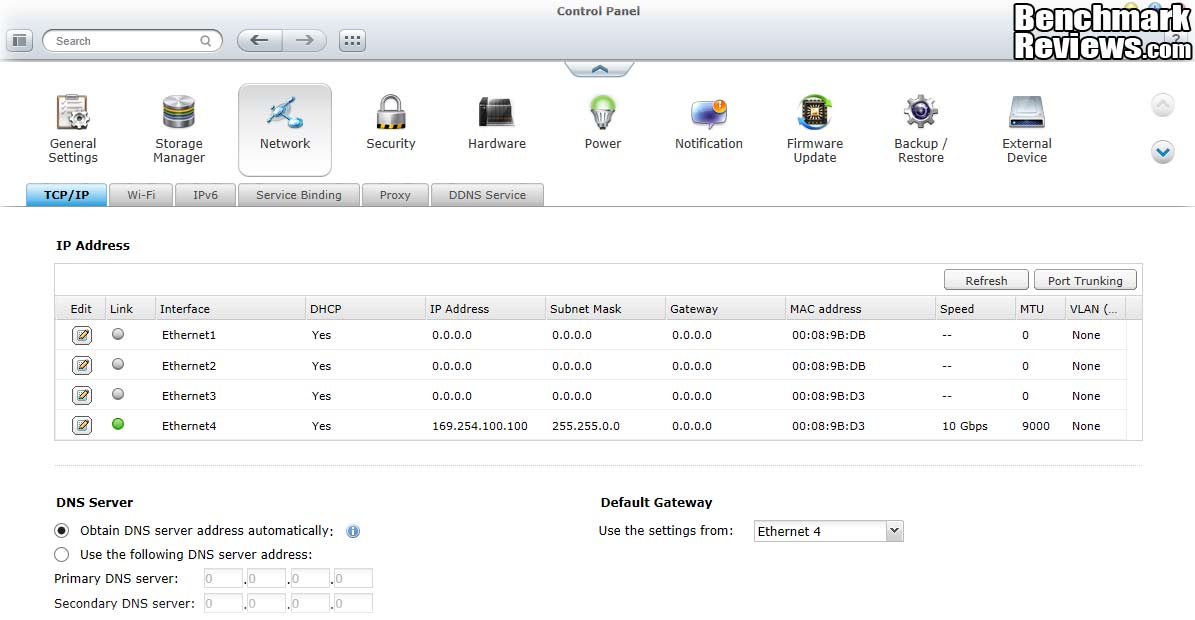
One of the critical aspects of setting up a NAS is the networking configuration. It’s so easy to get it wrong and accidentally shut down access, that QNAP includes tools in their setup wizard application, which you can still access after you inadvertently locked yourself out. If you get it completely out of whack, it’s still possible to recover by using the system reset button, which can be accessed through a small hole in the rear panel. Once you’re inside, this screen lets you change global settings and individual settings for each of the four Ethernet ports available on the system. IPv4 and IPv6 are both accommodated and a Port Trunking is also available as an option. The two integral ports on the TS-451 are labeled “Ethernet 1” and “Ethernet 2” in the software; and I’m happy to say that the ports on the back panel are physically labeled as well. The markings are stamped into the metal and aren’t that easy to read, but they are there. Once the ports are configured, you can make changes on the fly from this screen, just click the “Edit” button on the far left, for the adapter you want to update.
Let’s look at the RAID expansion and Migration process a little. The Storage Manager screen is used to configure the individual disk volumes, storage pools, and the disk arrays. Storage Pools are a new addition to the QNAP range, and they increase storage capacity allocation flexibility quite a lot. This is the first time I’ve seen them on a Linux-based NAS server, but they’re a mainstay in the Solaris operating system, with its ZFS file system. Our testing protocol at Benchmark Reviews normally uses both single disk and RAID 5 storage configurations. Besides the raw test scores we get from those setups, it also allows us to go through the RAID Migration process to see how well that works. Plenty of people start small when they get a new NAS, and expand the capacity later. After adding the next three disks to the system, choose RAID 5 from the pick list and the new volume only takes a couple of minutes to initialize. The TS-451 migrates from no RAID to RAID 5 in one easy step. However, the system then starts ‘synchronizing’ the disks. This process took the normal 2-3 hours to complete. I’ve definitely gotten spoiled by the Solaris systems I’ve tested recently, that used pools to manage disk configurations. On those systems, I was able to make this same transition in a few minutes. Maybe the synchronization was still going on in the background, but I never noticed any impact on performance immediately after a volume migration.

Ok, if you’ve been following along this far, there’s not much more I can show you except how fast it is. So let’s get down to some benchmarking, and compare it to a variety of other NAS products that we’ve looked at recently.
Benchmark Reviews primarily uses metric data measurement for testing storage products, for anyone who is interested in learning the relevant history of this sore spot in the industry, I’ve included a small explanation below:
The basic unit data measurement is called a bit (one single binary digit). Computers use these bits, which are composed of ones and zeros, to communicate their contents. All files are stored as binary files, and translated into working files by the Operating System. This two number system is called a “binary number system”. In comparison, the decimal number system has ten unique digits consisting of zero through nine. Essentially it boils down to differences between binary and metric measurements, because testing is deeply impacted without carefully separating the two. For example, the difference between the transfer time of a one-Gigabyte (1000 Megabytes) file is going to be significantly better than a true binary Gigabyte (referred to as a Gibibyte) that contains 1024 Megabytes. The larger the file used for data transfer, the bigger the difference will be.
Have you ever wondered why your 500 GB hard drive only has about 488 GB once it has been formatted? Most Operating Systems utilize the binary number system to express file data size, however the prefixes for the multiples are based on the metric system. So even though a metric “Kilo” equals 1,000, a binary “Kilo” equals 1,024. Are you confused yet? Don’t be surprised, because even the most tech savvy people often mistake the two. Plainly put, the Kilobyte is expressed as 1000 bytes, but it is really comprised of 1,024 bytes.
Most network engineers are not fully aware that the IEC changed the way we calculate and name data chunks when they published the new International Standards back in December 1998. The International Electrotechnical Commission (IEC) removed the old metric prefixes for multiples in binary code with new prefixes for binary multiples made up of only the first two letters of the metric prefixes and adding the first two letters of the word “binary”. For example, instead of Megabyte (MB) or Gigabyte (GB), the new terms would be Mebibyte (MiB) or Gibibyte (GiB). While this is the new official IEC International Standard, it has not been widely adopted yet because it is either still unknown by institutions or not commonly used.
All the NAS devices we test cannot accommodate all the different disk configurations, so our current test protocol has been based on two of the most popular setups: a basic (single) disk and RAID-5 configurations. Most NAS products that can support RAID 5 go beyond the minimum number of drive bays, to a total of four, so that is the number of drives that I typically use to test with, even though I could get by with only three. During initial setup, I checked the NAS firmware by looking at the binary files from QNAP’s website. The installed firmware was only about one version behind the latest, and the release notes indicated very minor changes between the two versions, so I decided to leave well enough alone. QNAP makes the firmware update process quite painless and foolproof, and they have always provided honest and comprehensive release notes. If something was wrong or is wrong, they list it. I connected the TS-451 NAS directly to an Intel X520-T2 10Gbps Ethernet NIC in the test-bench system, with a ten-foot CAT6 patch cable. I set up a static IP address on the host PC, consistent with the default address of the Turbo NAS unit, and we were in business.
With the networking taken care of, the next potential bottleneck that needed attention is the disk system on the host PC. In previous tests, I relied on the third generation OCZ Agility SSD, which is good for at least 500 MB/s, input or output, on the appropriate Intel Platform Controller Hub. I decided it was time to bypass the SSD on the test rig and install a RAM Disk. There are at least a dozen products on the market that will create and manage a RAM Disk on Windows systems; I chose RAMDisk v3.5.1 from Dataram based on performance tests in several reviews (we read ’em, too….) and its reasonable cost structure. I assigned 10GB of space to the RAM Disk, in order to replicate the test protocol I’ve been using for all my NAS testing. One other trick was necessary to get the RAM Disk to transfer files larger than 2GB. I had to use the “Convert” utility in Windows to make the RAM Disk into an NTFS volume. Then I was able to perform the file transfers with 10GB files, no problem. If you want to avoid this extra step, be sure to look for a RAM Disk product that directly supports the NTFS file system.

For basic throughput evaluation, the NAS product received one test transfer followed by at least three timed transfers. Each test file was sent to the Seagate 4TB NAS HDD (ST4000VN000) hard drives installed in the NAS for a timed NAS write test, and that same file was sent back to the RAM Disk in the test system to perform a NAS read test. Each test was repeated several times, the high and low values were discarded and the average of the remaining results was recorded and charted. Please note that I used different hard drives for this test session, as they were supplied and installed by the manufacturer. I plan to do a comparison test with different HDD classes in NAS use, at some point in the future. Knowing that the limiting factor for the Read/Write performance of the TS-451 Turbo NAS was going to be its two GbE network interfaces, I decided to use the drives that were supplied.
The Read and Write transfer tests were conducted on each NAS appliance using the 1 GB file and then a 10 GB file. A second set of tests are conducted with Jumbo Frame enabled, i.e. the MTU value for all the Ethernet controllers is increased from 1500 to 9000. Most of the NAS products tested to date in the Windows 7 environment have supported the Jumbo Frame configuration. Only the NETGEAR ReadyNAS NV+ v2 uses the 1500 MTU setting by default, and has no user-accessible controls to change that; you’ll see that reflected in the charts. I used a single Ethernet connection for all tests; I have not been able to achieve consistent results with various units using the IEEE 802.3ad Link Aggregation Control Protocol (LACP) mode, and I didn’t need the fail-over redundant connection for my testing. The TS-451 comes standard with two GbE ports, which is useful for a typical SMB LAN and servers with a real server-type O/S. My test bench PCs use consumer operating systems (Win7), which lacks full support for LACP, but they all run 10GbE like a champ.
I also ran the Intel NAS Performance Toolkit (NASPT) version 1.7.1, which was originally designed to run on a Windows XP client. People smarter than me have figured out how to run it under Windows 7, including the 64-bit version that is used more often than the 32-bit version these days. NASPT brings an important perspective to our test protocol, as it is designed to measure the performance of a NAS system as viewed from the end user’s perspective. Benchmarks like ATTO use Direct I/O Access to accurately measure disk performance with minimal influence from the OS and the host platform. This provides important, objective data that can be used to measure raw, physical performance. While it’s critical to measure the base performance, it’s also important to quantify what you can expect using real-world applications, and that’s exactly what NASPT does. One of the disadvantages of NASPT is that it is influenced by the amount of memory installed on the client, and it was designed for systems that had 2-4 GB of RAM. Consequently, two of the tests give unrealistic results, because they are measuring the speed of the buffer on the client, instead of the actual NAS performance. For that reason, we will ignore the results for “HD Video Record” and “File Copy to NAS”. I’m also not going to pay too much attention to the “Content Creation” test, as it is too heavily focused on computing tasks that aren’t typically handled by the NAS.

Benchmark Reviews also measures NAS performance using some throughput tests that are traditionally used for internal drives. The ATTO Disk Benchmark program is widely recognized and offers a comprehensive set of test variables to work with. In terms of disk performance, it measures transfer rates at various intervals for a user-specified length and then reports read and write speeds for these spot-tests. CrystalDiskMark 3.0 is another file transfer and operational bandwidth benchmark tool from Crystal Dew World that offers performance transfer speed results using sequential, 512KB random, and 4KB random samples. Benchmark Reviews uses CrystalDiskMark to illustrate operational IOPS performance with multiple threads, which allows us to determine operational bandwidth under heavy load. The sequential file transfer test is the most relevant on for NAS products, and that’s the one we report on, although I tend to run the full test suite just in case I need the data at a later date.
We are continuing our NAS testing with the exclusive use of Windows 7 as the testing platform for the host system. The performance differences between Win7 and XP are huge, as we documented early on in our QNAP TS-259 Pro review. The adoption rate for Win 7 has been very high, and Benchmark Reviews has been using Win 7 in all of our other testing for some time now. I know there are some XP holdouts, and I admit to using it for select applications, but the modern household has caught up with the 21st century, and any PC connected to the network will be running Win7 at a minimum.
NAS Comparison Products
- QNAP TS-470 Gigabit 4-Bay SATA NAS Server
- QNAP TS-870U-RP Gigabit 8-bay SATA NAS Server
- EonNAS 1100 NAS Network Storage Server
- ASUSTOR AS-604T NAS Network Storage Server
- EonNAS 850X NAS Network Storage Server
- Thecus N5550 4-Bay SATA NAS Server
- Netgear ReadyNAS NV+ v2 Gigabit 4-bay SATA NAS Server
- QNAP TS-879U-RP Gigabit 8-bay SATA NAS Server
- QNAP TS-659 Pro II Gigabit 6-Bay SATA NAS server
- QNAP TS-419P II Gigabit 4-bay SATA NAS Server
Support Equipment
- (4) Seagate NAS HDD, ST4000VN000, 4 TB, 5900 RPM, 64MB Cache, SATA 6.0Gb/s, 3.5″
- (4) Western Digital Caviar Black WD7502AAEX 750GB 7200 RPM 64MB Cache SATA 6.0Gb/s 3.5″
- Intel E10G42BT, X520-T2, 10Gbps Ethernet NIC, PCIe 2.0 x8, 2x CAT6a
- QNAP LAN-10GT2-U, 10Gbps Ethernet NIC, PCIe 2.0 x8, 2x CAT6a
- Dataram RAMDisk v3.5.1.130R22
- Intel NAS Performance Toolkit (NASPT) version 1.7.1
- ATTO Disk Benchmark v2.47
- CrystalDiskMark 3.0
- 10-Foot Category-6 Solid Copper Shielded Twisted Pair Patch Cable
- 1 metric Gigabyte Test File (1 GB = 1,000,000,000 bytes)
- 10 metric Gigabyte Test File (10 GB = 10,000,000,000 bytes
Test System
- Motherboard: MSI Z68-Express Z68A-GD80 (1.23.1108 BIOS)
- System Memory: 4x 4GB Corsair Vengeance LP DDR3 1600MHz (9-9-9-24)
- Processor: Intel Core i5-2500K Sandy Bridge 3.3GHz (BX80623I52500K)
- CPU Cooler: Thermalright Venomous-X (Delta AFB1212SHE PWM Fan)
- Video: Intel HD Graphics 3000
- Drive 1: OCZ Agility3 SSD 120GB (AGT3-25SAT3-120G)
- Drive 2: OCZ Agility3 SSD 120GB (AGT3-25SAT3-120G)
- Optical Drive: Sony NEC Optiarc DVD (AD-7190A-OB 20X)
- Enclosure: Lian Li Armorsuit PC-P50R
- PSU: Corsair CMPSU-750TX ATX12V V2.2 750Watt
- Monitor: SOYO 24″; Widescreen LCD Monitor (DYLM24E6) 1920X1200
- Operating System: Windows 7 Ultimate Version 6.1 (Build 7600)
If you’ve got more than three HDD spindle to put in play, it makes sense to use one of the more advanced RAID configurations. RAID 5 is one of the most popular setups, primarily due to the balance it exhibits between capacity and redundancy. Not surprisingly, most NAS units that can support more than three HDDs also support RAID 5, so it makes sense to use it for test purposes. Most NAS products that can support RAID 5 go beyond the minimum number of drive bays, to a total of four, so that is the number of drives that I typically use to test with, even though I could get by with only three.
The unit that’s the subject of this review is the first set of results, right on top where they’re easier to find. All these results are based on a single workstation interfacing with the NAS, and the larger models in this group are designed to handle data requests from multiple servers at one time. That doesn’t invalidate these results, because it’s still important to know what level of performance is available for a single user, as well as the overall aggregate. Before we look at the benchmark results, I want to show you the typical NAS CPU and Memory loading that occurred during these timed file transfer tests. As you can see, they are both quite low, and they stayed that way throughout the whole test. This chart is from a new widget that’s been included since the QTS 4.0 application, which you can put on your desktop to monitor system resources, network activity, etc. The old resource monitor screens are still available in the main software, and offer run charts instead of real-time “meters”.
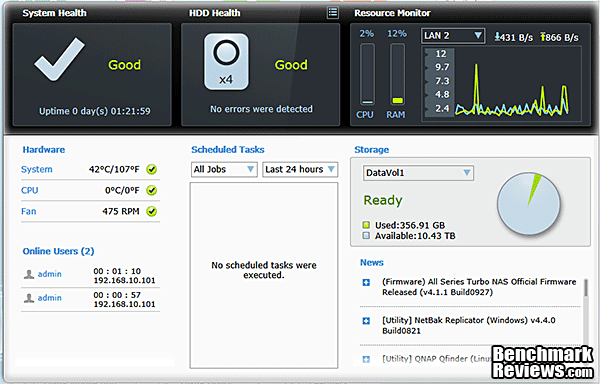
Given all the behind-the-scenes processing that goes on to calculate parity bits for RAID 5, these results show that the QNAP TS-451 Turbo NAS has more than enough power under the hood to keep the drives performing at their potential during read and write operations. With all the NAS devices in this comparison, the real trick is trying to get as much throughput past the 1 GbE network interface. Any of the NAS models I’ve tested with a 10GbE interface had results that easily tripled the performance available with the GbE interface. CPU and memory utilization on the TS-451 were always quite low during READ tests. Read performance is strong with this system, which is a real bonus if you plan to use it as frontline storage. You won’t have network storage performance that’s on par with the local SSD in a high-end PC, but 117.6 MB/s is still very fast. If you’re going to use it primarily as a backup system, you also want top-notch write performance, which we’ll test next.

The 1 GB RAID 5 disk write test shows very strong results, as well. The TS-451 puts in a chart-topping result at 116.3 MB/s. It’s well known that RAID 5 write performance can be a weak point, with all the computation overhead involved and the extra parity bits that need to be calculated and written to each of the drives. The only way to overcome that is with raw computational horsepower, and there may have been concerns that the low-power Bay Trail-D CPU in the TS-451 wouldn’t be up to the task. These results clearly show that Intel has finally designed a powerful replacement for the Atom in its low-power lineup. You only have to look at the old TS-419P II model to see how the stronger CPU in the TS-451 provides twice the performance at the system level.

Next up is 10 GB (1000 metric megabytes / 10,000,000,000 bytes) file transfer testing. Using the 4-disk RAID 5 configuration in each NAS, and a single Gigabit connection, network throughput will be put to the test, and the effect of any system or hardware caches will be minimized. This is almost pure sequential disk access testing, combined with a real-world application that gets repeated millions of times a day – file transfer.
Looking at Read tests with a single 10GB file, the TS-451 nudges ahead of the ASUSTOR AS-604T and wins top place in Read performance with an average Read speed of 121.7 MB/s. No worries about the new low-power CPU in the TS-x51 series not having enough performance, that’s for sure. The performance of all these NAS products is still constrained by their GbE connections. This chart looks a whole lot different when some of the devices are equipped with better network interfaces. For 99% of home scenarios though, Gigabit Ethernet is the top transfer speed that will be supported by the rest of the networking equipment.

Looking at write tests with a single 10GB file, the TS-451 comes out on top again by a small margin, with an average Write speed of 119.0 MB/s. I used to say that if you’re writing large files to a NAS running RAID 5, you can’t afford to scrimp on system hardware; you need the biggest, baddest CPU you can afford. This Celeron-based NAS has made me re-think that a bit, in favor of a more optimized systems approach. In this case, the SOC approach eliminates the Platform Controller Hub from the mix, and the direct connection of the CPU/SOC to the Asmedia SATA 6Gb/s controllers works very well. The TS-451 has just the right blend of internal components to maximize the performance v. cost equation. The lower cost of the tower configuration hardware, compared to a rack mount form factor, helps improve the cost-benefit ration even further. This definitely helps if you need the additional capacity of one of the larger models in the TS-x51 lineup, with six or even eight bays.

All in all, after these series of file transfer benchmarks, I have to give a lot of credit to QNAP for delivering almost all of the performance of their high-end business class tower models, in a lower cost format. Yes, the chassis is cheaper, and the CPU is less powerful, and you’re only ever going to get GbE transfer speeds to it or from it, but that’s still a decent recipe for NAS success. If you’re going to remain in a GbE network environment for the next five years, and most homes are, it’s OK not to over-engineer your storage servers to provide more throughput than they can effectively deliver to the rest of the network.
Next, let’s take a look at test results from a benchmark suite that’s specifically designed to measure NAS performance, using test scenarios that cover a wide range of use cases. I’m talking about the NASPT tool from Intel.
NAS Comparison Products
- QNAP TS-470 Gigabit 4-Bay SATA NAS Server
- QNAP TS-870U-RP Gigabit 8-bay SATA NAS Server
- EonNAS 1100 NAS Network Storage Server
- ASUSTOR AS-604T NAS Network Storage Server
- EonNAS 850X NAS Network Storage Server
- Thecus N5550 4-Bay SATA NAS Server
- Netgear ReadyNAS NV+ v2 Gigabit 4-bay SATA NAS Server
- QNAP TS-879U-RP Gigabit 8-bay SATA NAS Server
- QNAP TS-659 Pro II Gigabit 6-Bay SATA NAS server
- QNAP TS-419P II Gigabit 4-bay SATA NAS Server
NASPT brings an important perspective to our test protocol, as it is designed to measure the performance of a NAS system, as viewed from the end user’s perspective. Benchmarks like ATTO use Direct I/O Access to accurately measure disk performance with minimal influence from the OS and the host platform. This provides important, objective data that can be used to measure raw, physical performance. While it’s critical to measure the base performance, it’s also important to quantify what you can expect using real-world applications, and that’s exactly what NASPT does. In keeping with the real-world scenario, I only run these tests on the RAID 5 configurations, since that is what most users with a large or mid-size NAS are going to use. It just doesn’t make sense to run realistic test scenarios on unrealistic hardware configurations.
One of the disadvantages of NASPT is that it is influenced by the amount of memory installed on the client, and it was designed for systems that had 2-4 GB of RAM. Consequently, two of the tests give unrealistic results with modern systems, because they are measuring the speed of the buffer on the client, instead of the actual NAS performance. For that reason, we will completely ignore the results for “HD Video Record” and “File Copy to NAS”. Shown here is a batch run of 5 cycles through the tests, which turned out to be a bit slower than the individual runs. There seemed to be some wrinkles in the batch testing that don’t show up on individual test runs, which is a bit of a pain, to be honest. The numbers in the chart below are an average of five separate runs, which I believe are more accurate than results from a consolidated batch run.
With a single, 1 GbE interface in place, the results for the tests that are more sequential in nature are capped at somewhere south of 120 MB/s. Some of the tests have very low transfer rates, and that’s due to the nature of the data being transferred during the test. The Content Creation test for example, simulates a user creating a web page, accessing multiple sources for the content. The Directory Copy tests use several hundred directories and several thousand files to test a typical backup and restore scenario. That’s one of the most real-world types of test, and it’s useful for all of us to have a standard set of test data to use, because my directory of 1,000 random small files is never going to be the same as your directory of 1,000 random small files.

To summarize things, here are consolidated charts of the “Fast” NASPT tests, the “Medium-Speed” tests, and finally the two “Slow” ones. I’ve regrouped these into four charts this time, in order to make them more legible. As the number of entries grows, the text gets too small to read, at some point. I’ve highlighted the text for the QNAP TS-451 by using red italic text for those test results. I did not include the marks for models with the faster 10GbE connection, because they make the chart harder to read when looking at the GbE results. First, let’s look at the two tests with the highest transfer rates. The TS-451 comes out on top for both the HD Video Playback trials and the 4X playback test. It’s not a big margin between first through fourth, but a win is a win. With 1X Video Playback, the TS-451 hits an average rate of 107.5 MB/s, and in 4x Video Playback, the TS-451 hits a high of 121.7 MB/s. These results with the GbE connection are at the very high end of the pack, compared to other NAS servers, and are really pushing the GbE interface to the limit.

The Medium-Speed tests show the QNAP TS-451 Turbo NAS putting in another very strong performance, relative to several comparable units. The HD Playback & Record test is an outright win with a result of 113.2 MB/s. The QNAP TS-470 nabs first place in the File Copy From NAS test, but the TS-451 hangs on with second place and a result of 89.8 MB/s. The mixture of Reads and Writes makes this set of charts a little topsy-turvy, but the TS-451 continues its very competitive performance. This is stellar performance from an unassuming 4-bay NAS device that is meant to be a low-cost solution in the product line.

The “Slow” tests generally are slow because the file transfers are done with data sets that contain a bunch of small files of irregular size. In addition, the Directory Copy tests are accessing the file system index much more heavily than in the other tests. This adds a unique component that could be critically important for some users. The Directory Copy To NAS results show up one weak spot for the QNAP TS-451, where it falls to fourth place, albeit against some pretty stiff competition. The DIR Copy to NAS result is only 22.0 MB/s, while the TS-470 manages to pull far ahead with a result of 42.3 MB/s. The TS-451 redeems itself in the Directory Copy From NAS benchmark, where it ekes out another victory over more powerful and more expensive machines with a result of 30.2 MB/s against the next closest finisher at 29.4 MB/s.
The Office Productivity and Content Creation are my least favorite tests in the NASPT suite for two reasons. One, I don’t see most NAS products being used in this fashion. Maybe I’m behind the times, and desktop virtualization will make this a very important benchmark in the near future. Second, the results never seemed to scale very well with the system performance that I was seeing on other tests. The Content Creation results, in particular make no sense to me, so I’ve stopped reporting them. This time, the TS-451 takes the third spot in the Office Productivity test, in a close fought battle where the top four performers are only 4% apart. The TS-451 doesn’t put in a very strong performance in the Photo Album benchmark, where six other NAS devices outperform it. There’s a fairly tight field here though, as the TS-451 is only 26% off the pace of the leader, even though it’s ranked seventh out of nine contestants. This test is a bunch of small files again, of varying sizes, arranged in a complex directory structure. This is a very common type of data set, and these results have always seemed more relevant than the Content Creation benchmark.

The NASPT benchmark has showed some real world anomalies over time, some of which I wasn’t expecting. Beyond the simple sequential results that are easy to measure and very consistent, is a world of data that is immeasurably complex in its variations. The Intel NASPT suite is one of the few that challenges NAS devices with realistic data sets. The results can be a bit messy to interpret, like they were in this case, but they’ve also provided the greatest potential insight into NAS performance of any commonly used benchmark. Stay tuned to see if we have similar challenges on some non-traditional NAS tests, in the next section.
NAS Comparison Products
- QNAP TS-470 Gigabit 4-Bay SATA NAS Server
- QNAP TS-870U-RP Gigabit 8-bay SATA NAS Server
- EonNAS 1100 NAS Network Storage Server
- ASUSTOR AS-604T NAS Network Storage Server
- EonNAS 850X NAS Network Storage Server
- Thecus N5550 4-Bay SATA NAS Server
- Netgear ReadyNAS NV+ v2 Gigabit 4-bay SATA NAS Server
- QNAP TS-879U-RP Gigabit 8-bay SATA NAS Server
- QNAP TS-659 Pro II Gigabit 6-Bay SATA NAS server
- QNAP TS-419P II Gigabit 4-bay SATA NAS Server
In addition to measuring simple timed transfers, to determine how fast it will read and write contiguous blocks of data, Benchmark Reviews was also able to measures NAS performance using some tests that are traditionally used for internal drives. By mapping the QNAP TS-451 as a local drive, some of our favorite HDD/SSD benchmarking tools worked just fine. Just like the NASPT test suite, I only run these tests on the RAID 5 configuration, as that is the most realistic scenario for a system like this. Some NAS products don’t work too well with this type of test program; even though they may have the ability to map the NAS device to a drive letter, they’re still not treated like local drives by the Operating System. I didn’t have that problem with the TS-451 or any of the QNAP units I’ve tested, so let’s look at some results….
ATTO Disk Benchmark Results
The ATTO Disk Benchmark program is free, and offers a comprehensive set of test variables to work with. In terms of disk performance, it measures interface transfer rates at various intervals for a user-specified length and then reports read and write speeds for these spot-tests. There are some minor improvements made to the 2.46 version of the program that allow for test lengths up to 2GB, but all of our benchmarks are conducted with 256MB total length. ATTO Disk Benchmark requires that an active partition be set on the drive being tested. Please consider the results displayed by this benchmark to be basic bandwidth speed performance indicators.

The QNAP TS-451 turned in a solid performance on ATTO, reaching an average peak Read speed of 552.9 MB/s with four disks in RAID 5. These results are in the very top tier of NAS performance, and despite the fact that it came in third place behind the QNAP TS-870U-RP and the EonNAS 850X, the results were still amazing for a NAS device using a single GBE network interface. Every one of the other top-tier results was achieved with 10GbE network hardware. All the rest of the 4-disk GbE models have benchmark results that are mostly in the 115-120 MB/s range. I honestly don’t know how to explain these exceptional results, unless there has been a change in the QNAP software that allows the ATTO benchmark to run this test scenario asynchronously from the network interface. If true, that’s great news for performance across the whole product line. The reality is that there is almost three times more performance available from the TS-870U-RP if you fill it with all eight HDDs and bang on it with multiple high-performance servers. QNAP pulled more than 1800 MB/s in their Read tests, with multiple clients and IOMeter benchmarking software. While I can appreciate the importance of those results, the benchmarks we are presenting here show the typical performance that will be delivered to a single client. Those are equally important results, and depending on how you deploy it, one or the other will be more important to you. Let’s take a look at Write performance next.
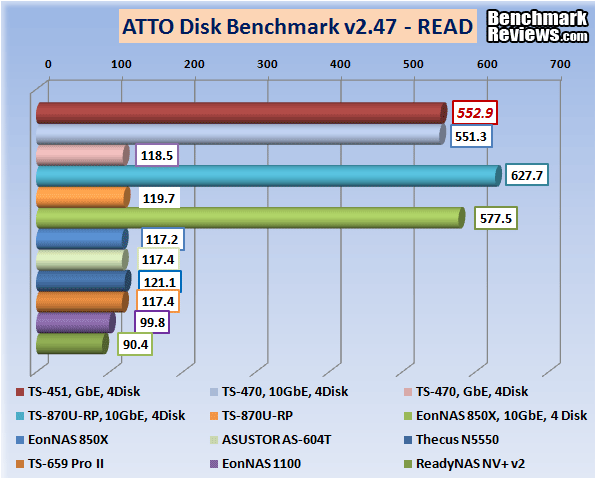
The TS-451 pulls WAY ahead of the pack again in the ATTO Write benchmark, without the help of a 10GbE network interface. The TS-451 basically equaled the performance of the TS-470, and the pair are more than 50% faster than the closest competitor. Once again, all the competing units with the old standard GbE network connection are in a close group centered around 120 MB/s. With maximum Read and Write speeds both well over 500 MB/s for the TS-451, I think we’ve entered a new realm for 4-bay NAS servers. This is the sort of performance that used to only be available on large rack mount NAS systems, designed for enterprise use.
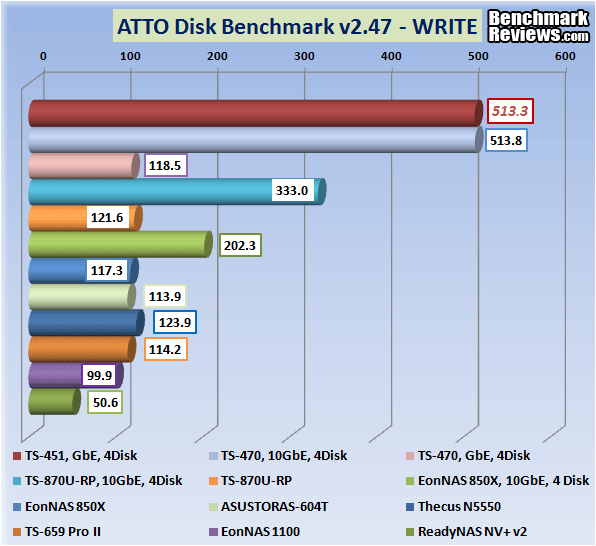
It’s good to keep in mind that these ATTO tests are not always indicative of real-world performance, due to the sequential access mode used. In most cases, the results are going to be close to the numbers achieved in timed Read and Write tests, but these TS-451 benchmark results were a surprise. Let’s take another look at that in our next benchmark, CrystalDiskMark 3.0.
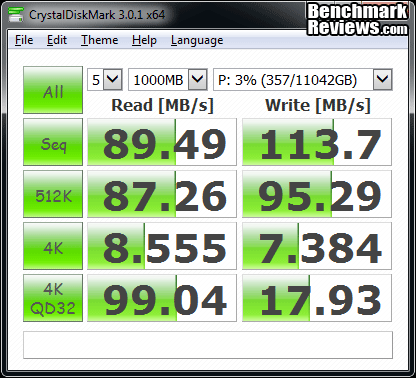
CrystalDiskMark 3.0 is a file transfer and operational bandwidth benchmark tool from Crystal Dew World that offers performance transfer speed results using sequential, 512KB random, and 4KB random samples. For our test results chart below, the 4KB 32-Queue Depth read and write performance was measured using a 1000MB space. CrystalDiskMark requires that an active partition be set on the drive being tested. Benchmark Reviews uses CrystalDiskMark to illustrate operational IOPS performance with multiple threads. In addition to our other tests, this benchmark allows us to determine operational bandwidth under heavy load. In this case, the TS-451 pulls excellent numbers for the 512k random tests and low numbers for the 4k random tests, which is not uncommon. Some of the high-end NAS models redeem themselves nicely on the 4k random test with a high queue depth, and the Celeron-based TS-451 does the same here.

The results in the chart below are for the first test, which is Sequential Read. Once again, the 4-disk RAID 5 configuration of the QNAP TS-451 comes out well ahead of the pack, getting beat only by its big brother, the TS-470. The single GbE result for the TS-451, 89.5 MB/s for Sequential Read, is still a great result for four bays and just a single GbE connection.

The results in the chart below are for the second CrystalDiskMark 3.0 test, which is Sequential Write. This time, the 4-disk configurations are much closer together. The TS-451 still comes out close to the top, with an average Sequential Write result of 113.6 MB/s. That’s good for second place, only losing by a margin of less than 1%. It’s not the QNAP TS-470 that beats it this time; it’s the TS-870U-RP by less than one MB/s.
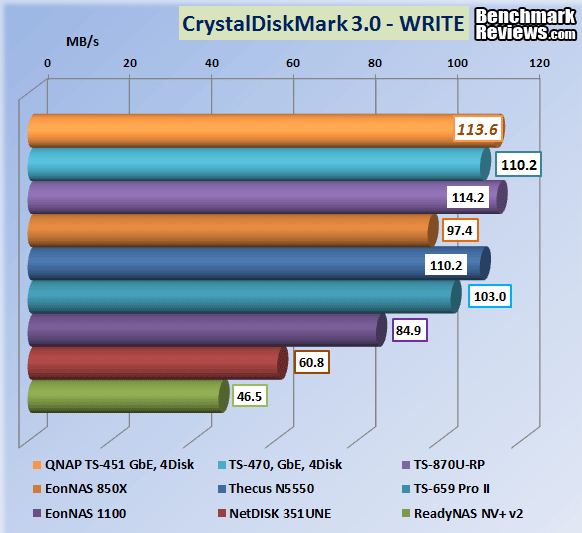
All in all, these are an incredible set of results for Network Attached Storage. In some cases they can pump data to and from a workstation as fast, or faster than a local SSD, driven directly from the SATA controller on the motherboard. This is much better performance than we’ve been getting from mainstream hardware in the recent past. I’m so glad the Atom is finally retired from service, and that the replacement CPU is better in every way. The level of NAS performance that a home or small business can afford just jumped up several steps with the release of the QNAP TS-x51 series.
NAS Comparison Products
- QNAP TS-470 Gigabit 4-Bay SATA NAS Server
- QNAP TS-870U-RP Gigabit 8-bay SATA NAS Server
- EonNAS 1100 NAS Network Storage Server
- ASUSTOR AS-604T NAS Network Storage Server
- EonNAS 850X NAS Network Storage Server
- Thecus N5550 4-Bay SATA NAS Server
- Netgear ReadyNAS NV+ v2 Gigabit 4-bay SATA NAS Server
- QNAP TS-879U-RP Gigabit 8-bay SATA NAS Server
- QNAP TS-659 Pro II Gigabit 6-Bay SATA NAS server
- QNAP TS-419P II Gigabit 4-bay SATA NAS Server
My first and solemn duty is to remind everyone that relying on a collection of drives in any RAID configuration for data backup purposes is a huge and potentially costly error. RAID systems provide protection against loss of services, not loss of data. Several examples will illustrate the problem, I hope:
- the drive controller goes bad and corrupts the data on all the drives in the array
- the entire storage device is physically or electrically damaged by external forces
- the entire storage device is lost, stolen, or destroyed
- a single drive in a RAID 5 cluster dies and during the rebuild process, which puts higher stress on the remaining drives, a second drive fails
- floods, earthquakes, tornadoes, etc. (AKA El Niño)
All these points lead to the inescapable conclusion that multiple drives in a common system, in a single location do not provide effective and reliable data backup. Occasionally throughout this review I’ve talked about high-availability systems, and the QNAP TS-451 fits into that category, especially when employed in a RAID 6 configuration. Even with two concurrent drive failures, your data is still available and accessible. The NAS device stays online the entire time while the failed drives are replaced and the array is rebuilt. That’s what RAID systems are designed to do. The inherent redundancy is not meant to serve as a backup file set. Remember, we’re not talking about losing data here, we’re only talking about the ability to keep working uninterrupted, if one or two drives should fail, and Time is Money; always. The side benefit is that you never have to do a recovery from one of your backup sets. OTOH, I recommend you try that process every now and then, just so you can see for yourself how many potholes and pitfalls there are in the typical data restoration plan.

The QNAP TS-451 is definitely a product that readers of Benchmark Reviews could contemplate purchasing. Maybe you don’t have a real justification for spending the kind of money that it takes to put eight HDD spindles in play, but four bays and a stronger CPU makes for an interesting proposition. As hi-res audio and video become the norm, it might make sense to invest in this level of performance. Also, if you’ve gone “network happy” in your house, have structured wiring to most every room, and have everything running through a 24 port business class switch, then this might be the NAS for you. At the moment, it looks like 10GBASE-T is taking the dominant position in the 10GbE business-class market, but it’s still several years away for the typical home or SOHO user.
So, what conclusions can we draw, particularly about this high performance, four-bay TS-451 Turbo NAS server? Click NEXT to find out, and discuss…
Although the rating and final score mentioned in this conclusion are made to be as objective as possible, please be advised that every author perceives these factors differently at various points in time. As Albert Einstein said, “Not everything that can be counted counts, and not everything that counts can be counted.” While we each do our best to ensure that all aspects of the product are considered, there are often times unforeseen market conditions and manufacturer changes which occur after publication that could render our rating obsolete. Please do not base any purchase solely on our conclusions, as they represent our product rating for the sample received which may differ from retail versions.
The performance of the QNAP TS-451 Turbo NAS server was very impressive, especially when the GbE networking bottleneck was bypassed, like in the ATTO Disk Benchmark. The results of 553 MB/s in Read mode and 514 MB/s in Write mode are a first for any NAS without a 10GbE interface to light up the test bench. Those are disk access speeds that are in line with the best SSD products out there, and the TS-451 did it with 5900 RPM NAS drives that are a tad slower than the latest generation of high performance HDDs. Timed file transfers were network-limited, but still at the very top of the pack at 122 MB/s Read and 116 MB/s Write in RAID 5, with all four disks in service. The Intel Celeron J1800 CPU makes a huge difference here. The Celeron dual-core member of the 22nm Silvermont family, architected as a System-On-A-Chip (SOC) with the peripheral interfaces like USB and SATA built right into the die, leapfrogs the performance of any device built on the old Intel Atom platform. This really puts the TS-451 Turbo NAS on solid footing that can hold its own in almost any home or SOHO environment.
The small, four-bay form factor of the QNAP TS-451 is not the sort of thing you would expect to see in a data center, but many SMBs operate out of more mundane environments. Remote or branch offices are also a likely application for a smaller device like this. Remember that there are six and eight bay versions in this series, that have the same features and performance, but with more capacity. The front panel has a new face, bright and modern, and very easy on the eyes if you have it out in the open. Status LEDs for System Status, USB, LAN, and activity on each HDD are located on a silver strip along the left side. The USB 3.0 port, quick backup button and the power switch are also there, at the bottom. There is no front door, or cover on the front of the unit, but the exposed drive trays are nicely finished and blend well with the remainder of the front panel. There are no ventilation grill patterns to disrupt the front surface, and all the plastic parts are well matched in terms of color and texture.

The construction quality of the QNAP TS-451 Turbo NAS is a case study in how to maintain performance and cut costs by taking advantage of modern production methods and practices. The new chassis design uses all the well-proven tricks and techniques for reducing cost and complexity, that are the stock and trade of the mechanical engineering profession. The old chassis design was good, and it served its purpose well, but time moves on and so does the competition. This is still a device that is designed to run 24/7/365 with NO issues, ever. QNAP has an enviable reputation for quality and reliability, both very important qualities for a NAS server, and the TS-451 design and construction show no sign of backing away from that objective.
The QNAP TS-451 Turbo NAS network storage server is clearly aimed at family and SOHO applications. There are dozens of models in the QNAP storage product line, and this one has been tailored for a specific application. The new virtualization features built into the QTS 4.1 operating system and the refinement of the transcoding capabilities go a long way towards focusing on the video content that is such a big part of family life today. The addition of an IR receiver on the front panel makes the multimedia features easier to access, in case you want to hook the TS-451 directly up to a hi-res screen. The breakout move, of putting the new Celeron-class 22nm CPU in a small NAS benefits all users, and it’s a welcome relief from all the Atom-based models. The large number of apps that are available and the cloud services that extend the reach of NAS storage, all contribute to a versatile system that does more than you could ever imagine a NAS server was intended to do. Some of the high-end routers are attempting to edge their way into this solution space, but for the moment the prize for the most functionality in one small net-centric box goes to the QNAP Turbo NAS server family.
The TS-451 is aimed at the home user, and pricing is more of an issue for this customer base than it is for the business customer. The good news is that the TS-451 is available now for $456.99 (B&H | Newegg), which is a whole lot cheaper than a comparably equipped TS-470. In a home environment, these two are likely to perform about the same, so the savings are real and substantial. I’m not immune to sticker shock and I know there are cheaper devices out there, but QNAP offers some of the best software and support available in this market, and they are not in a race to the bottom. If you think enterprise storage is the right place to shave a few dollars, more power to you. I know a home user isn’t going to suffer the same consequences from having a lax data management system in place as a typical business would, but nobody wants to lose all their financial records, let’s say three weeks before their taxes are due. Six and eight bay models are available for those that need additional capacity, but I’m guessing the 4-bay version is just right for most home users and SOHO applications, what with 3 and 4TB NAS-spec drives readily available at reasonable prices.
Benchmark Reviews has enjoyed testing all of these network storage solutions, and with the wide range of products on offer from them, anyone in need of a NAS server can find one to fit their current and future needs. The biggest problem is choosing one; that’s why we go into so much detail in our reviews, to help you figure out what level of performance and features is right for you. The TS-451 Turbo NAS Server is just about perfect for the enthusiast at home, and it looks like a decent fit for the SOHO market as well. If you’re planning on a major upgrade to the networking infrastructure in the near future, you may want to step up to the QNAP TS-470 in order to maximize the overall performance over the lifecycle of the system. If not, the TS-451 is the better choice.
+ 553 / 513 MBps best read/write performance with ATTO
+ Consistently achieves max performance for GbE interface
+ System software is SOTA and continually updated
+ Virtualization and transcoding services on NAS server
+ Support Apps available for multiple cloud services
+ Lower price, better performance with new platform
+ iSCSI certified for several virtualization platforms
+ Storage pools in a Linux environment
+ 2x Gigabit Ethernet ports with teaming and failover
+ Two USB 3.0 ports – one in front and one on rear panel
+ High quality construction
– I wish all GbE interfaces could be replaced overnight with 10GbE
– Only one CPU core available for virtualization tasks
– Non-business users will compare to low-end consumer devices (<<$$$)
– Substantial disassembly required to upgrade RAM capacity
-
Performance: 9.50
-
Appearance: 9.25
-
Construction: 9.50
-
Functionality: 9.50
-
Value: 9.25
Excellence Achievement: Benchmark Reviews Golden Tachometer Award.
COMMENT QUESTION: What environment would use use a network storage server in?


3 thoughts on “QNAP TS-451 Turbo NAS Server Review”
If I’ve read the screenshot of ATTO correcty, you’ve just measured your C drive on SSD 🙂 1Gbit interface is exactly that – 1Gbit = theoretical 125MB/s. With the overhead it will max out on 110-180MB/s which you got in other softwares. I would suggest fixing that part of otherwise great review 😀
Well, that might explain the very strange results I got….. Thank you so much for pointing that out. I will redo that test and post the true results.
QNAP suggest 3 possible usb tv tuners for use with this model….namely UPMOST DVB192A HD; Hauppauge Win TV Nova_T Stick (Device: 70019;HW rev DiF4) or Asus My Cinema U3100 Mini. I mistakenly bought a QNAP USB tv Stick when I originally acquired the above unit, thinking that it would naturally be compatible. Some of the above sticks are difficult to either isolate or acquire in UK and I was wondering if anyone else with similar NAS has had any luck with any other usb stick.
Comments are closed.