By Meng Vang
Manufacturer: NZXT, Inc.
Product Name: S340 Elite Matte Black ATX PC Gaming Case
Model Number: CA-S340W-B3
UPC: 815671012890
Price As Tested: $99.99 (Amazon | Newegg)Full Disclosure: The product sample used in this article has been provided by NZXT.
The NZXT S340 Elite computer case expands from the original S340 with its improved cable management system, VR capabilities, and a large tempered glass side panel. Because the Elite is geared towards VR, extra USB ports with an HDMI port are located on the front. Included with the S340 Elite is a magnetic cable management puck to store VR or audio headsets for easy access. A side mounted bracket for a 2.5″ SSD is located on the side of the power supply housing and the tempered glass side panel can show off the internal components. Benchmark Reviews will be taking a look at the NZXT S340 Elite in Matte Black.
Let’s go ahead and take a look at an overview of this case.

- Steel chassis and tempered glass construction
- Cable management optimized for a simple and hassle-free build
- Streamlined VR access with HDMI and USB 3.0 from the top IO
- Easy-to-use headset and VR cable management puck
- Full Kraken Series cooler support up to 280mm
- Integrated PSU shroud with three SSD mounts
- Fully filtered, easy-to-remove intake
| Dimensions | W: 203mm H: 474mm D: 432mm |
| Material | Tempered glass side panel, Steel, ABS plastic |
| Weight | 8.13kg |
| Motherboard Support | mini-ITX, MicroATX, ATX |
| I/O Ports | 1x Audio/Mic 2x USB 3.0 2x USB 2.0 HDMI with VR Support |
| Filters | Front (Included) Bottom Rear(Included) |
| Drive Bays | Internal 3.5″: 2+1 Internal 2.5″: 3+1 |
| Expansion Slots | 7 |
| Fan Support | Front: 2x 140/2x120mm Top: 1x 140/120mm (1 x 120mm FN V2 Fans Included) Rear: 1x 120mm (1 x 120mm FN V2 Fan Included) |
| Radiator Support | Front 2 x 140 or 2 x 120mm Rear 1 x 120mm |
| Clearance | GPU Clearance With Radiator: 334mm GPU Clearance Without Radiator: 364mm CPU Cooler: 161mm Cable Management: Lowest Point – 17mm; Highest Point 168mm |
| Warranty | 2 years |
| Model Number | CA-S340W-B3 |
The NZXT S340 Elite is expecting to hit the market at a price of $99.99 (Amazon | Newegg). Inside of the accessory box, we find plenty of mounting screws for the motherboard, storage devices, and the power supply unit. A few zip ties, a SATA extension power cable, and an installation guide are also included. The S340 Elite does come with a magnetic cable management puck for VR and audio headsets.

The front of the S430 Elite has not changed from the original S340. Instead of a glossy finish, the S340 Elite has a matte black finish similar to what is on the S340 Razer edition.

The side panel did change from a standard windowed side panel to a highly reflective tempered glass side panel. It is held in place by four screws near the four corners.

On the rear, there is a pre-installed 120mm exhaust fan, seven motherboard expansion slots, and room to mount a power supply at the bottom. The rear fan mount can support a 120mm radiator with a fan.

The top of the S340 Elite looks identical to its predecessor except for the front panel ports. A 120mm exhaust fan is pre-installed, but the mount does support a 140mm fan as well. Unfortunately, there is no room for a 120/140mm radiator with a fan as there is not enough clearance between the motherboard and the cooling device.

One thing that does stick out from the S340 Elite compared to the original S340 is the power supply dust filter at the bottom of the case. There is room to install a bottom mounted 2.5″ or 3.5″ drive closer towards the front of the case.

Now that we have seen a quick look, let’s go ahead to show more about the features the S340 Elite has to offer.
The S340 Elite maintains a similar interior layout as the original S340. It still has the cable bar and the two SSD mounts on the power supply shroud. There is also an extra SSD mount on the side of the power supply shroud making it easy to show off an SSD.
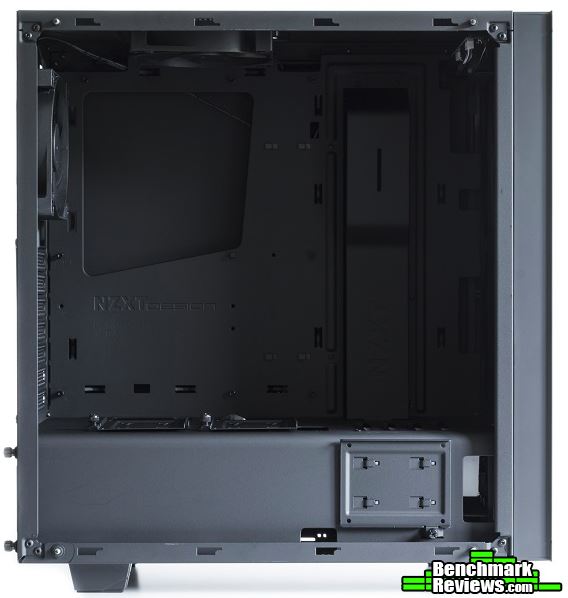
Plenty of cable tie-down points are available on the other side of the motherboard tray. The S340 Elite does come with a new cable clamping system. Cable clamps are located on the cable bar and along the rear of the motherboard tray to help with cable management.

Underneath the front panel, a dust filter is present to filter dust particles from entering the system. The filter is magnetic and can be easily removed for cleaning. Two 120mm fans, two 140mm fans, one 240mm radiator, or one 280mm radiator can be installed here at the front.
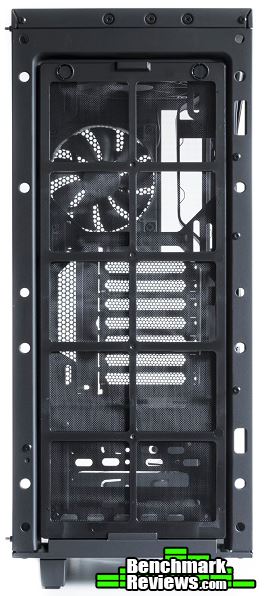
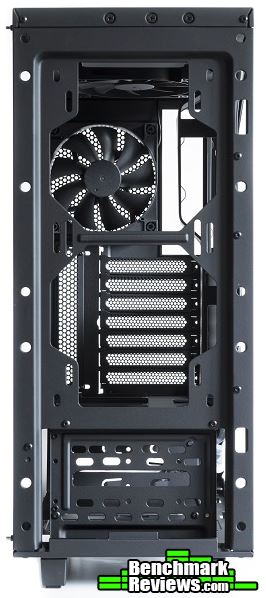
In the next section, let’s go over a few more details about the S340 Elite.
Front panel ports include a standard headphone and microphone jack, an HDMI port, two USB 3.0 ports, two USB 2.0 ports, and a power button. The S340 Elite is geared towards VR, so having a dedicated HDMI and USB 3.0 ports at the front does make sense.

The cable clamps can be opened and closed without any effort. It is capable of holding quite a few cables underneath.

There is an SSD mounting bracket on the side of the power supply shroud. Cables can be fed to the SSD through the cutout near the front of the case.

Located at the bottom of the case is an easy to remove dust filter for the power supply. This is an improvement from the flimsy dust filter sheet seen on the original S340.

Since the cable management puck is magnetic, it can stick onto any metal surface. A VR or audio headset can hang onto it when not being used.

Before we move on to the system build, let’s take a look at the Internal USB Hub in the next section.
Manufacturer: NZXT, Inc.
Product Name: Internal USB Hub
Model Number: AC-IUSBH-M1
UPC: 815671012913
Price As Tested: $24.99 (eBay)Full Disclosure: The product sample used in this article has been provided by NZXT.
The folks at NZXT were kind enough to send us one of these Internal USB Hubs with the S340 Elite. This item is sold separately from the case, but it does make a good complement to any computer case that requires additional USB ports. Mini-ITX cases may benefit from this hub as most of them do not have that many front USB ports. The Internal USB Hub can be used for liquid coolers, fan controllers, lighting accessories, and wireless adapters. It has a magnetic base so it can stick onto the steel surface of a computer case. Let’s take a closer look at the NZXT Internal USB Hub.

- Expands 5 USB 2.0 ports: 3 internal and 2 external connectors
- Sleek and multifunctional design works with any build
- Magnetic body quickly affix to steel chassis
- Molex connection provides additional power via PC’s power supply
- Plug and play—no drivers needed
- EXPAND WITHOUT FEAR
- Never run out of USB ports. The Internal USB Hub brings connectivity to your system allowing you to add more devices and eliminate your system’s handicap.
- NO DEVICES LEFT BEHIND
- Tested and guaranteed to work with CAM Powered devices, including Kraken, GRID+, and HUE+, the Internal USB Hub ensure you have ample ports needed to get all your devices up and running
- DISCREET AND SIMPLE
- Magnetic body and cable management straps provide a quick and easy installation. Just tuck the Internal USB Hub into a suitable location, connect your peripherals, and wind the cables up with the included straps.
| Dimensions | W: 105mm H: 36mm D: 24.5mm |
| Material | Plastic, PCB, Magnets |
| Mounting | Magnets |
| Connections | 1 x USB 2.0 Header, 1 x Molex |
| Input Channel Voltage | 5V DC |
| System Requirements | Requires a USB 2.0 internal connector. |
| Model Number | AC-IUSBH-M1 |
There are quite a few accessories that come with the Internal USB Hub. Inside, we find an installation guide, an internal USB 2.0 cable, and a four pin Molex to 5V DC power cable. A Velcro strap is included along with a bag of silica gel you can use to prevent fog buildup on your car windshield.

Here is a close look at how the power cable looks like.

The Internal USB Hub allows for an additional three internal USB 2.0 headers and two standard USB 2.0 ports. Its two standard USB ports are good for wireless receivers, wireless Wi-Fi adapters, and bluetooth adapters.

The included four pin Molex to 5V DC power cable can be plugged into the port at the top of the hub.

Like the magnetic cable management puck included with the S340 Elite, the Internal USB Hub is also magnetic. This allows it to stick onto any steel surface inside a computer case.
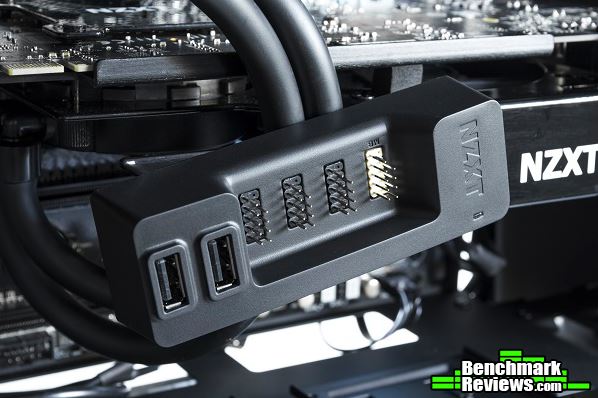
Now that we have seen the Internal USB Hub, let’s go ahead and take a look at the build.
-
Motherboard: ASRock X99 Extreme4
-
System Memory: 4x8GB 2666MHz DDR4
-
Processor: Intel Core i7 5820K @ 4.5GHz
-
Audio: Realtek ALC1150
-
Video: MSI GeForce 780 Ti
-
Disk Drive 1: Crucial MX100 256GB SSD
-
Disk Drive 2: WD Blue 3TB HDD
-
Enclosure: NZXT S340 Elite Matte Black
-
PSU: EVGA 850P2 850W Modular
-
Monitor: HP 23bw 23″ IPS display
-
Operating System: Windows 10 Professional 64-Bit
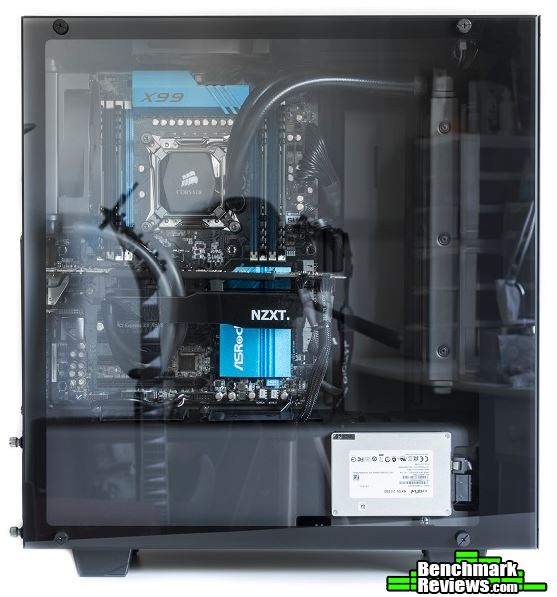
The overall build turned out well since there was a lot of work room in the case. I installed the radiator to the Corsair H100i at the front of the case so it can intake cool air from the front. The radiator to the Corsair H55 water cooling unit on the MSI 780 Ti graphics card was installed at the rear of the case. I kept the stock pre-installed 120mm fan at the top of the case to help exhaust hot air out the case. I also took advantage of the SSD mounting bracket on the side of the power supply shroud. My particular SSD had the texts facing upside down, but something like a Samsung series SSD would be perfect to showcase here.

Cable management was a breeze thanks to the cable clamping system that came with the S340 Elite. Cable tie-down points were also present at almost every corner of the rear motherboard tray. Two cable clamps were located behind the cable bar. This helped a lot with managing the CPU power cable and the 24-pin motherboard cable. The clamps worked well for the most part, but they could pop back open if they held too many cables.

I was unable to do a push/pull configuration since the cable bar was in the way. I thought about removing it from the case entirely, but that would have exposed the cables behind the motherboard tray. Unfortunately, fans could not be installed outside of the case as the dust filter was in the way. With the cable bar installed, you could only install two sets of fans.

I ran the SATA data and power cables underneath the internal HDD so they can reach the side mounted SSD on the power supply shroud. The only problem with this was there may not be clearance to install a second internal HDD or SSD. There was a mount for a 2.5″ or 3.5″ drive on the bottom of the case. This could be used for a second internal drive if you absolutely needed to utilize the side mounted SSD mount.

The magnetic cable puck could be extremely handy for most users. It had a rubberized material and a very simple look to complement just about any type of VR or audio headset.

Of course for larger VR or audio headsets, the puck could be split in half to accommodate larger headsets and their longer wires. It also had enough strength to hold even some of the heaviest headset devices.

The separately sold Internal USB Hub accessory installed nicely into our build. When powered on, a white LED power indicator would light up next to the NZXT logo. As for my use case, I had a bluetooth adapter and a wireless receiver for the Microsoft Xbox One controller plugged into the unit. This hub could come in handy especially for mini-ITX cases where not many front USB ports are present.

I was hoping the hub was not powered by a four pin Molex connector. A standard SATA power connector would had been better as I had to install a bulky four pin power cable to my PSU just to get the hub to work.
The build turned out very well overall. It had the same features as the previous S340 but with a few extras to make it somewhat different. Located at the front were one HDMI and two USB 3.0 ports for VR purposes. The additional magnetic cable management puck allowed easy storage and access to any VR and audio headsets. This case would still make a great case even if VR is not your thing. The tempered glass side panel really enhanced the looks of this case making it suitable for showing off your expensive gear.

Let’s go into my final thoughts and end this review with my conclusion in the next section.
The NZXT S340 is one of the best mid-tower computer cases for the price. With the S340 Elite, it brings over the same features along with VR capabilities and a beautiful tempered glass side panel. Smaller features, like the removable dust filter for the power supply, the cable clamping system, and the side mounted SSD bracket, are great features to have as well. A few things I would like to see improved on the next version are a dust filter for the top fan, room for a 240mm radiator at the top, and an adjustable fan mounting system. This way, the user can adjust how high or how low they want their fans to be. I am impressed with the S340 Elite overall and look forward to seeing what NZXT has to offer in their next version of the S340.
The Internal USB Hub is a great additional accessory for any computer case that lacks external USB ports. It has three internal USB 2.0 headers along with two external USB 2.0 ports. This is great for liquid coolers, fan controllers, and lighting solutions like the NZXT HUE+. A SATA power cable would have been a better choice to power the hub instead of a four pin Molex. If you are in the market for more internal USB ports, the NZXT Internal USB Hub may be your solution.

When it comes to performance, the S340 Elite does well in this category. The rear and the top of the case include two pre-installed 120mm fans. The top does support up to a 140mm fan and the front supports up to a 280mm radiator. I personally would have liked to see support for a 240mm radiator at the top along with a dust filter. If there was support for a 280mm radiator at the top, that would be even better. Do keep in mind that large CPU coolers, like the Noctua NH-D15 and the Phanteks PH-TC14PE, will not fit. The S340 series only support CPU coolers up to 161mm in height. However, I do like the easily removable dust filter for the power supply when compared to the previous S340.
Appearance is nothing more than personal preference. Even with its simple and elegant design, the S340 Elite looks great with its matte black finish and the large tempered glass side panel. The tempered glass side panel makes the S340 Elite a great case to show off all of your expensive gear. Since the finish is no longer glossy, the matte finish will not attract dust and finger prints as easily.
The S340 Elite feels solid all around. This is because it maintains the same steel construction as the previous S340. The tempered glass side panel does enhance durability when attached to the case. I enjoy having the cable clamps as they are easy to work with. They do feel somewhat flimsy, so I am not sure how long they will last. Even if they do fail, there are plenty of cable tie-down points throughout the rear of the motherboard tray for cabling.
In terms of functionality, the S340 Elite does well in this category. I like the improved power supply dust filter and the side mounted SSD bracket. With the large tempered glass side panel, it makes sense to have a side mounted SSD. The extra HDMI port, USB ports, and the magnetic cable puck makes this case perfect for VR. It does not necessarily have to be for VR, but you can purchase the S340 Elite just for its extra features. The separately sold Internal USB Hub does exactly what it should as well. Computer users finding the need for more internal USB ports may find the Internal USB Hub useful as it allows for more expansion, which is especially useful for mini-ITX cases.
As of October 2016, the NZXT S340 Elite is priced online for $99.99 (Amazon | Newegg). The NZXT Internal USB Hub is currently available online for $24.99 (eBay). At this price, the S340 Elite is one of the cheapest computer cases with a tempered glass side panel. If tempered glass and VR is something you are looking forward to, the S340 Elite is a great option to look at. The NZXT S340 series is a very successful line of computer cases, so I believe the Elite can take this series another step forward.
+ Tempered glass side panel
+ Great cable management system
+ Simple and elegant exterior design
+ Captive thumbscrews on side panels
+ Removable dust filters for easy cleaning
+ Front HDMI and additional USB ports for VR
– No tool-less mounting mechanism for HDD/SSD
– Cable clamps could be improved for better durability
– Cannot support CPU air coolers over 161mm in height
-
Performance: 8.25
-
Appearance: 9.50
-
Construction: 9.00
-
Functionality: 8.75
-
Value: 9.00


