By Meng Vang
Manufacturer: Raijintek Company Ltd.
Product Name: Triton / Triton Core
Model Number: 0R100018 / 0R100023
UPC: 849939000503 EAN: 4715109920505
Price As Tested: $99.90 (Newegg | Amazon)
Full Disclosure: The product sample used in this article has been provided by Raijintek.
The Triton is Raijintek’s first AIO liquid CPU cooler. Like most high-end 240mm liquid cooling units, the Triton includes a copper water block, two powerful 120mm static pressure optimized radiator fans, and solid mounting hardware. In terms of mounting hardware, the Triton supports all modern AMD and Intel sockets, including Intel LGA 2011.
What makes this liquid cooling unit unique is the room for expansion. Users can either use this cooling unit as it is, or expand on it with additional radiators and GPU blocks. The 240mm radiator uses a high fin density design, which results in better cooling potential overall. To top it off, three color coolant dyes are included in the packaging for further customization (only available for Triton / Triton Core editions). Benchmark Reviews is excited to receive a sample of the Raijintek Triton for this review. Let’s take a look at what this AIO liquid cooling unit has to offer against the competition.

Features
- Best performing, expandable and most user friendly AIO liquid cooling system at market
- All-In-One liquid CPU cooler with new PUMP, Water block and Tank design
- New design and exclusive PUMP with high Q-max (120 L/H) and Low noise level (20 dBA)
- Durable and reliable PUMP Bearing type – Graphite Pipe and Ceramic axis and 50K hours life expectancy
- New design of Copper water block by micro channel, extra large contact fin area with 2 channels to provide best flow of liquid
- 3 solo parts but best combined together to one set: PUMP, Water block & Tank
- High density fin radiator (240mm)
- 2pcs performing 12025 wide PWM RPM range fans with fan controller
- 350ml high capacity coolants pre-filled and re-fill design
- 3 bottles of different color coolant attached for user choosing
- 2pcs LED lights inside the tank
- Solid mounting kits to provide sturdy installation
- Multiple mounting kits for modern sockets of INTEL & AMD CPU
Specifications
| Product Name | TRITON / TRITON CORE | ||||||||||||||||||||||
| Product Number | 0R100018 / 0R100023 | ||||||||||||||||||||||
| Radiator Dimension [W×D×H] | 275×120×32 mm | ||||||||||||||||||||||
| Tubing Dimension | ID – 9.5 mm – / OD – 12.5mm | ||||||||||||||||||||||
| Thermal Resistance | 0.1 °C/W | ||||||||||||||||||||||
| Weight | 1500 g | ||||||||||||||||||||||
|
|||||||||||||||||||||||
| Liquid capacity | 350ml ±5% | ||||||||||||||||||||||
| Material | Alu. Radiator / Copper Water Block | ||||||||||||||||||||||
|
|||||||||||||||||||||||
|
APPLICATION
|
|
| Intel® | All Socket LGA 775/115x/1366/201x CPU (Core™ i3 / i5 / i7 CPU) |
| AMD® | All FM2+/FM2/FM1/AM3+/AM3/AM2+/AM2 CPU |
The Raijintek Triton comes in a nice package which includes a handle for better portability. An illustration of the product along with its features and specifications are listed around the box.

Inside the package, we find the Triton radiator inside a plastic wrap and a large foam cushion over the massive CPU block. The two 120mm fans are also nicely packed ready to be installed.

In terms of accessories, we have the Raijintek Triton AIO device, two Triton 120mm fans, back plate and bracket for mounting, four plastic mylas, a plastic thermal paste spreader, one thermal grease packet, eight M3x6mm screws, eight M3x30mm screws, four M4x6mm screws, four M4x13mm screws, four metal mounting nuts, one installation guide, and three color coolant bottles in red, yellow, and blue.

The Triton AIO cooling device looks great with the transparent tubes and the large CPU water block. The tube dimensions are 9.5mm for inner diameter and 12.5mm for outer diameter and are attached using standard compressed fittings.
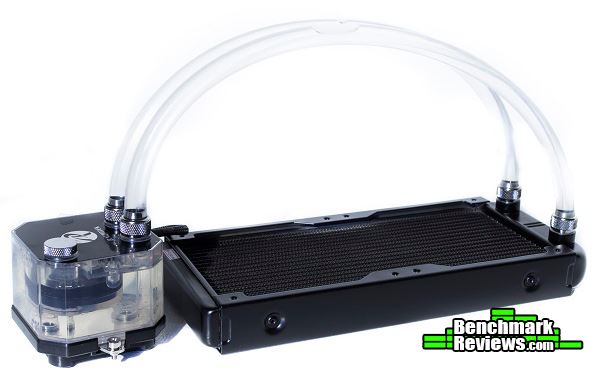
The Raijintek Triton looks great with its transparent tubing and the large water block. Let’s go over the detailed features to see what this water cooling unit has to offer.
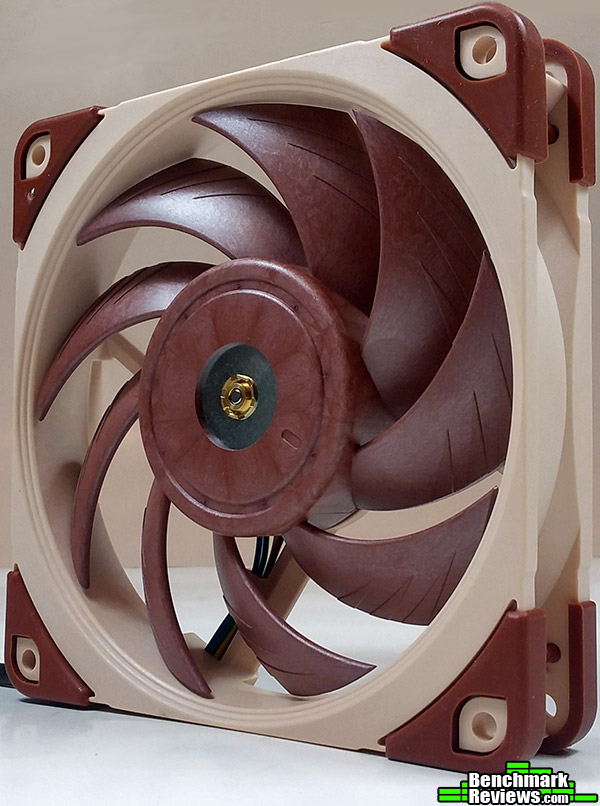
The Triton comes with two powerful 120mm fans. These fans are capable of pushing 38.89CFM in quiet mode (21.6 dBA) or 100.46CFM at the maximum speed (36.6 dBA). They can also be manually controlled through the built-in fan controller.

The 120mm Triton fans are both attached to a standard 3-pin power connector. The fan controller can be used to adjust the speed of the fans.

The CPU block is larger than most standard blocks. It measures in at 38×56×39 mm. The reason for it to be bigger is because it includes the pump and a reservoir. This type of design is not seen in most pre-sealed liquid cooling units. A fill port with a removable cap is also available for maintenance or for dyeing the water color using the included color dyes. Our test unit did not come with a sticker over the fill port, but removing it can void the standard warranty.

Two large white LED’s are included inside the block to add additional illumination. The pump can pump 120 L of water every hour at only 20 dBA and pumps at 3000 RPM at 12VDC.

The pump also uses a standard 3-pin connector, which can be plugged into the motherboard or the power supply with an additional adapter. The cable is fairly short, roughly about six inches long.

The nickel-plated copper contact plate has a very reflective mirror finish with almost no visible machine marks. Having a contact plate with a smooth reflective finish can result in a better spread of the thermal interface material across the surface of the CPU. This can ultimately result in cooler temperatures.

We can see the Triton has many features that are available on the more expensive liquid cooling units along with a few unique features of its own. These features include the powerful 120mm fans, the smooth and reflective contact plate, and the unique CPU block design with an integrated reservoir. Let’s go into more details about the radiator and the mounting mechanism.
The Triton radiator measures in at 275×120×32 mm (W×D×H). We can see there is a lot of surface area for heat dissipation. The fin density is higher than the Cooler Master Nepton 240M and even the Corsair H100i, but this results in more noise from the fans as they must run at a higher RPM just to push enough air through the radiator.

For a radiator with a higher fin density, it is important to use static pressure optimized fans for the best possible cooling performance. The 120mm Triton fans are perfect for this, but they can be quite loud at maximum speed. A push and pull configuration will be great for keeping the noise level down.

Here we have a closer look at the compression fittings. These fittings can be taken off in order to expand the water cooling system. Additional radiators and even GPU blocks can be added into the loop. The pump has enough power to push the water through a few added radiators and water blocks. Keep in mind that doing this will also void the standard warranty.

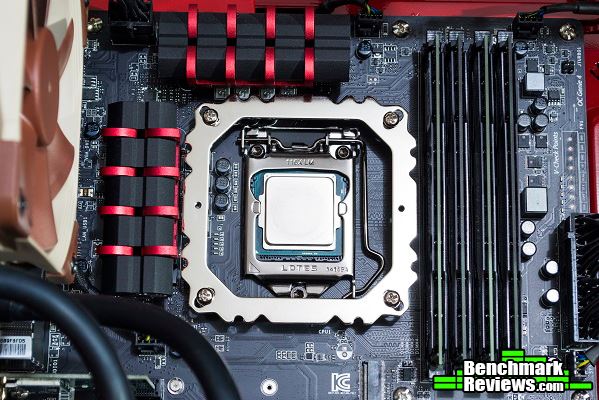
The back plate and mounting bracket are both made of metal materials. The mounting mechanism is one of the easiest to put together. Here we have it mounted onto an AMD AM3+ socket.

Mounting it onto an Intel LGA 1150 socket only requires us to move four M4x13mm screws around. On both motherboards, the mounting bracket does come close to touching the system RAM and the VRM’s, but there is actually no physical contact between them and the mounting bracket.
Now let’s go ahead and look at the testing methodology and results.
CPU coolers in this test were tested in a case at its upright position with the case side panel closed. The case used in this test was the Cooler Master Silencio 652S with two Silencio FP-120 fans at the front intake and one Silencio FP-120 at the rear exhaust. These fans were set to 100% and a GTX 780 Ti was left installed in order to create a real-world scenario. Coolers with 240mm radiators were mounted at the top of the case with the fans blowing out of the system. 120mm coolers are mounted in the rear exhaust with two 140mm fans at the top of the case for exhaust. To make things more interesting, I threw in the older Cooler Master V8 (non GTS) high performance heat sink into this test just to see how this older air cooler stacks up with modern liquid coolers. Air coolers were oriented so the hot air blows directly out through the rear exhaust.
All coolers were tested using AIDA64 Engineering Edition with an AMD FX-8350 CPU at 4.6Ghz (1.392v/1.440v) with an ambient room temperature of 20C. The stress test ran for 30 minutes on all coolers. Each cooler ran the test three times and the average of the three tests were recorded. The stock fans that come with most liquid cooling units are sometimes too loud or not adequate enough for the job. To test the cooling capacity of just the liquid cooling devices, two powerful Cougar CF-V12HPB fans were used to replace all of the stock fans to generate another set of results. These fans were plugged directly into the power supply to have them run at 100%. This was done to obtain the most consistent data across all coolers. The same amount of thermal interface material was used for each cooler. IC Diamond was used in this test and was cleaned off using 91% isopropyl when a different CPU cooler was tested. Let’s jump into the testing results.

-
Motherboard: Gigabyte GA-970A-UD3
-
System Memory: 4x4GB 1600MHz DDR3
-
Processor: AMD FX-8350 @ 4.6GHz
-
Audio: Creative Labs SB X-Fi
-
Video: MSI GeForce GTX 780 Ti Twin Frozr
-
Disk Drive 1: Crucial MX100 256GB SSD
-
Disk Drive 2: Seagate Barracuda 500GB HDD
-
Enclosure: Cooler Master Silencio 652S
-
PSU: Corsair CX750M 750W Modular
-
Monitor: HP 23bw 23″ IPS display
-
Operating System: Windows 8.1 Professional 64-Bit
The Raijintek Triton performed very well against the more expensive Corsair H100i liquid CPU cooling unit. The noise generated from both the Triton 120mm fans and Corsair SP120L fans were loud at maximum speed, but I would not consider this a realistic scenario. Putting on the Cougar fans did lower the noise level to a more comfortable zone. Even if the temperatures were just a little higher compared to the stock fans, the FX-8350 was nowhere close to throttling.

The Triton has really impressed me so far with these results. At a more affordable price, it competes well against the more expensive Corsair H100i. With the ability to expand with more radiators, the Triton can easily perform just as well if not better than a custom water cooling system. Also keep in mind, the Triton radiator uses a higher fin density design compared to the Corsair H100i. It may be very likely that the Triton can outperform the H100i when both coolers are in a push and pull configuration, but for now the results are incredible for how much it is worth.
The Raijintek Triton easily stands out from standard liquid cooling units with its transparent tubes and large CPU water block. The block contains the pump as well as a reservoir, which is not something you would normally see in most traditional pre-sealed liquid cooling system. The performance is excellent for the price and the ability to expand allows for even greater cooling potential. The block contains two LED’s which lights up when the pump is running, giving some additional illumination inside the case. This liquid cooling unit looks great when installed in many different systems. With the Triton and Triton Core editions, three color coolant bottles are available for coloring the water to match a specific scheme. The Triton is ready to cool right out of the box, but the choice is yours to customize it to meet your own needs.

For what it is, the Triton does very well when it comes to cooling one of the hottest CPU’s. I was not expecting this type of performance with this liquid cooler. The stock fans are good, but they can be very loud at maximum speed. Luckily, a built-in fan controller is included in order to control cooling performance and noise level. Slower RPM fans can be used in a push and pull configuration in order to increase airflow while running at lower RPM’s. Adding additional radiators can increase cooling capacity, but doing so will void the standard warranty. Even if you do not choose to add additional fans or expand the loop, the Triton is still ready to cool right out from the box.
The Triton looks amazing with its transparent tubes and its large CPU water block. There are two white LED’s inside the block to add additional illumination. The unit looks very nice in white, but adding the color dyes to the unit is another great feature to have. Users may not only expand to the loop, but they may also color the water within the cooling unit to match a specific scheme. A downside from doing this is it will also void the standard warranty. Another downside is if the user wants to change to a different color, they will have to empty the entire loop and purchase a clear coolant to dye it again. But having these features to change the appearance is better than not having them at all.
The entire unit is well built all around. There was no leakage anywhere on the unit even while moving and flexing the unit during installation. The only concern I have is the fact that the tubing is not kink proof. Users with smaller cases may encounter problems with the long tubes causing kinks, but the ones with larger cases may be very thankful for the longer tubes. The reason why I chose the Cooler Master Silencio 652S case for the tests was because my previous case was too small and caused the tubes to kink easily. Of course, shorter tubes may be used to replace the longer tubes eventually.
When it comes to functionality, the Triton does everything it should. The radiator can be mounted on the top or the front intake of most cases and provide great cooling performance with adequate airflow. Installing the water block on the CPU was very easy to do in a larger case, but can be more difficult with smaller cases. With support for all modern AMD and Intel sockets, system builders can become confident knowing the Triton is compatible with their systems.
As of April 2015, the Triton sells online for $99.90 (Newegg | Amazon). At this competitive price range, you can still expect about the same performance offered from the more expensive liquid cooling units. So what can you do with the extra money you saved from purchasing the Triton over its competitors? You can use that money for an extra radiator, better radiator fans, or maybe a nice authentic dinner. If you are looking for a good upgrade from an air cooler or even a low-end liquid cooler, the Raijintek Triton may be right up your alley.
+ Performs well against more expensive liquid coolers
+ Looks great in any system
+ Compatible with modern AMD and Intel Sockets
+ Solid mounting hardware
+ Great flexibility for customization and expansion
+ Ready to cool right out of the box
+ Built-in fan controller
+ Includes a reservoir in the water block
– Long preinstalled tubes will kink in tight space
– Customization and expansion will void the standard warranty
– Fans are very loud at maximum speed
-
Performance: 9.25
-
Appearance: 9.00
-
Construction: 8.75
-
Functionality: 9.00
-
Value: 9.00
Excellence Achievement: Benchmark Reviews Golden Tachometer Award.
COMMENT QUESTION: What expansion/customization ideas do you have in mind for the Raijintek Triton?


5 thoughts on “Raijintek Triton CPU Water Cooler Review”
Good review as always and that’s a hell of a good looking cooler when installed. I personally would add another “con”. The cooler is designed in a manner that allows for expansion as well as coolant color customization (including the addition of what looks like simple food coloring), yet doing either voids the warranty? As I said, that’s a bit of a negative to me.
I do agree with you. From what I have heard, the sticker is there to prevent novice users from opening and potentially causing damage to the cooler. Raijintek may still honor their warranty even if the user has dyed the coolant, but excessive modifications to the unit can easily void it.
Couple of things worth addressing that I think users would be interested in….apologize if I missed covered items but perhaps these items could be addressed in more detail.
1. How is this affected by Asetek patent thing ? If Swiftech for example couldn’t sell a block mounted pump, how does Raijintek get by ?
2. Given the presence of the Swiftech H220-X, H240-X and H140-X, and the (3) Fractal Kelvin models, is “this liquid cooling unit [really] unique” ? …. I’m guessing you intended “unique for a 2 x 120mm @ $99” ?
3. Could you comment on the fan grommets ?…at the corners, there appear to be rubber grommets for vibration isolation. Nice addition.
4. I was expecting more …. besides noise 🙂 …. out of the high fpi rads. One would think given previous comments about the proper SP and high fpi that they would have done better in the testing. Perhaps held back by the pump ? See item 8.
5. Nice touch on the compression fittings, even Swiftech uses cheaper barbs and hose clamps.
6. What does it mean “voids the standard warranty” …. does that mean there is a “non-standard” warranty left in place ? How does that compare to the Swiftech / Fractal warrantees ?
7. The radiator material (Aluminum) is an important piece of information that I didn’t see mentioned. The relevance of mixed metals in the loop and how this is mitigated “as supplied” with installed coolant along with what is necessary of coolant replaced would be of value to readers. This no doubt accounts to the expense of the Fractal / Swiftech units.
8. The 32 gph (0.53 gpm) pump is better than the 0.32 gpm or so of typical CLCs and the Kelvin but far short of the 1.0 gpm threshold typically sought by custom loop water coolers (and as provided by Swiftech H220-X). How do you think this impacts the test results ? In loop testing w/ 6 temp sensors, I saw Delta T’s of just 0.4C across 5 x 140mm of radiator (inlet temp minus outlet temp) at 0.75 gpm … from 1.05 gpm on up is was pretty much stable at 2.2 to 2.4 Delta T.
Thank you for addressing these details. The Raijintek Triton is a cheaper alternative if users want a 240mm liquid cooling unit. At just under $100, this gives users a cheaper alternative in getting an expandable AIO liquid cooling unit rather than spending more on something that will offer similar performance and features.
There are no rubber grommets for vibration isolation, but that’s something I would have liked to see. The fans do get loud at maximum speed and can cause vibration, but I did not notice any during the testing period. I hope in a later version they will include rubber grommets on the fans.
The radiator is made of aluminum while the block is made of copper. I would not consider this ideal for a water cooling system, but the user can replace the coolant or radiator at any time they choose. This does become a problem for a novice user since they just want to put the cooler into their computer and forget about it.
Removing the sticker on the fill port does void the standard 2-year warranty. But from what I have heard, Raijintek may still replace the unit even if the sticker has been removed only if the user has not done excessive modifications or physical damage to the unit.
All AIO’s should come with compression fittings like this and the CPU block should be available separately.
If they were, then the pump could be replaced if it failed, or the hoses or radiator upgraded at any time without the massive cost of a custom loop.
Comments are closed.