By Aidan Moore
Manufacturer: Corsair Components, Inc.
Product Name: Hydro Series H100i GTX
Model Number: CW-9060021-WW
UPC: 843591056496
Price As Tested: $119.99 (Amazon | B&H | Newegg)
Full Disclosure: The product sample used in this article has been provided by Corsair.
Corsair’s new H100i GTX all-in-one water cooling system is the latest evolution of the H100 series of dual 120 mm cooling systems. This version adds Corsair link capability, improved cold plate and pump performance for better thermal efficiency and throws in a cosmetic update as well.
In this article, Benchmark Reviews takes the new Corsair H100i GTX out for a test drive and compares its performance against a few other popular all-in-one cooling solutions.

The Corsair Hydro Series H100i GTX is described by the manufacturer as an extreme performance, all-in-one liquid CPU cooler. A 240mm radiator with two SP120L PWM fans supply the heat dissipation, and Corsair Link is built-in to provide system monitoring and customization functions.
- Extreme performance, all-in-one liquid CPU cooler
- High Efficient 240mm Radiator
- Advanced SP120L PWM fans
- Built-in Corsair Link
Corsair published specifications for the Hydro H100i GTX are shown below:
| Hydro H100i GTX | |
| CPU Socket | Intel LGA 2011(-3) / 1366 / 1150 / 1156 / 1155 / 775AMD Socket FM2+ / FM2 / FM1 / AM3+ / AM3 / AM2+ |
| Pump Dimensions | 75 x 69.8 x 49.1 mm ( 3 x 2.7 x 1.9 inch ) |
| Cold Plate Material | Copper |
| Radiator Material | Aluminum |
| Fan Dimensions | 120mm x 120mm x 25mm |
| Fan Speed | 2435 +/- 10% RPM |
| Fan Airflow | 70.69 CFM |
| Fan Air Pressure | 4.65 mmH2O |
| Tubing | Large-diameter, low permeability |
| Fan Noise Level | 37.7 dB(A) |
| Warranty | 5 Years |
| Corsair Link | Yes |
Packaging for the H100i GTX highlights the new Corsair Link capability of the cooler.

The major components of the H100i GTX, including dual fans and radiator assembly are individually wrapped and sealed to prevent damage during shipping.

Smaller items such as CPU adapters and mounting hardware are sealed in a separate plastic bag.

The CPU adapters, standoffs and mounting hardware are included in the package.
There is no thermal paste included in the package as the copper cooling surface has pre-applied thermal compound.
The mounting surface of the CPU cooler is protected against any scratches during shipping by a removable plastic shell. The surface is pretreated with thermal compound.

Installation for the Intel 2011 type of CPU socket it extremely easy, only requiring to first mount 4 small standoffs for attachment to the cooler pump.

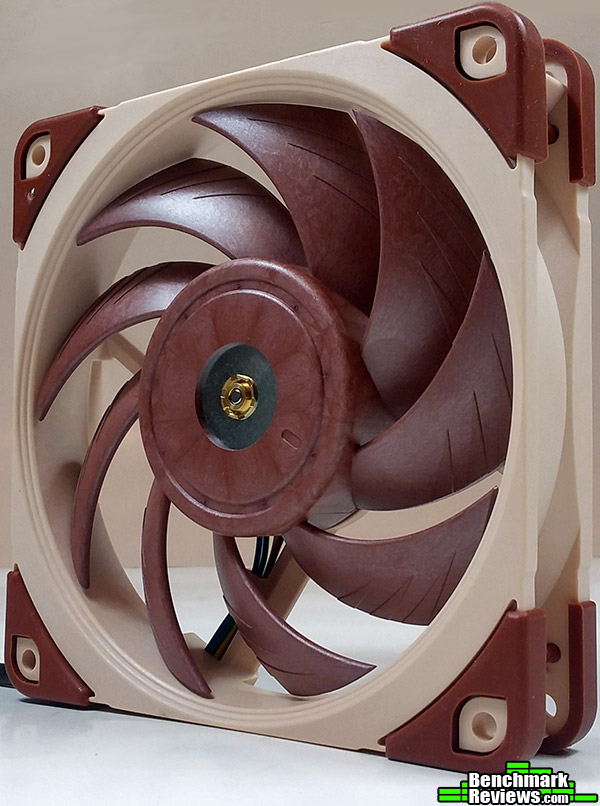
Corsair claims the SP120L fans differ from standard case fans with a custom design intended to provide high static pressure for mounting directly against radiators. The fan blades of the SP120L fans have been custom shaped to allow maximum air delivery with minimal noise.
The fan and radiator assembly can be easily pre-assembled and then attached to the case with the small screws included in the kit. Power for the fans is supplied by connectors on the pump assembly to allow the Corsair Link software to adjust the fan speed.
After the hardware has been installed and the Corsair link cable connected to an available USB 2.0 connector, the Corsair Link software can be installed. No disk is included with the Corsair package as it is assumed that the latest version of the program will be downloaded from the website.
Once installed, the Corsair Link is available with a right-click on the hidden icons selector on the Windows toolbar.

The Corsair link user interface allows the cooling system to be operated in three different modes: Quiet, Balanced and Performance.
The H100i GTX performance was evaluated against two other similar liquid cooling systems. Published specifications for the three systems are shown below.
| Corsair Hydro H100i GTX | Cooler Master Nepton 240 | Corsair H80iGT | |
| Length | 276 | 240mm | 154mm |
| Width | 125 | 120mm | 123mm |
| Rad. Thickness | 30 | 27mm | 49 mm |
| Cooling Fans | 2 x 120mm | 2 x 120 mm | 2 x 120 mm |
| Total Thickness | 30mm | 52mm | 49mm |
| Control Type | Corsair Link | none | Corsair Link |
| Noise Level | 37.7dB(A) | 6.5-27 dB(A) | 37.7dB(A) |
| Fan Speed | 2435+/-10% | 1200-2400 | 2435+/-10% |
| Fan Airflow | 70.69 CFM | 16-76 CFM | 70.69 CFM |
| AMD Sockets | All AM2,AM3,FM1,FM2 | All AM2,AM3,FM1,FM2 | 775,AM2,AM3 |
| Intel Sockets | 1150, 1156/1155,1156, 1366, 2011(-3) | 1150, 1156/1155,1156, 1366, 2011(-3) | 1150, 1156/1155, 1366, 2011(-2) |
| Warranty | 5 Years | 5 Years | 5 Years |
| MSRP | $119.99 (MSRP) | $129.99 | $99.99 (MSRP) |
To be consistent, the same thermal paste was applied to each of the cooling blocks. The Arctic Silver Ceramique 2 paste was used for all three cooler installations.
In order to test the full range of options in the Corsair Link GUI, separate stress tests were run for each of the different modes available. The Nepton 240M used for comparison does not have different modes, so it was run at it full operating speed.
Each product was measured for CPU temperature after running a 20 minute Aida 64 stress test. Because the test computer system has six CPU cores, the average value of all individual cores was used for the final comparison. A digital thermometer and a FLIR camera were used to capture the ambient temperature during each test.
Noise measurements were also taken using a Galaxy Audio CM–240 SPL audio meter. Where possible, measurements were taken 1 meter from the center of the computer case. The CM–240 audio meter has a minimum SPL sensitivity of 32 dB(A) SPL. For measured values below 32 dB(A), the galaxy meter was moved to 500 cm from the source and the reading was divided by two.
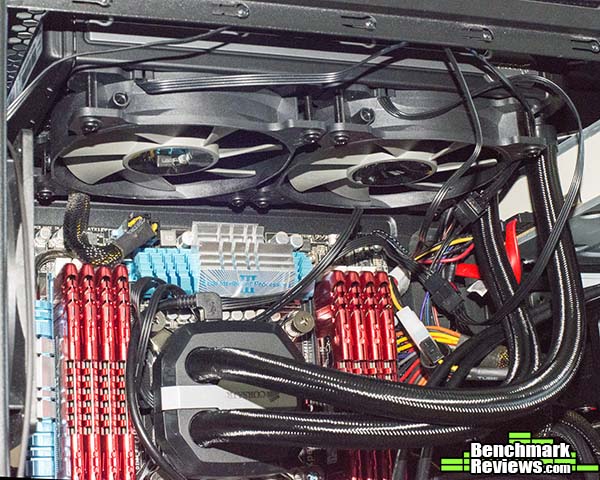
Each of the three cooling systems was installed in the same test system as shown below.
The test computer system is a Intel i7-3930K based content creation machine with a modest 24/7 overclock of 4.2 GHz.

The Antek P100 enclosure provides room for top mounted installation of the cooling system, and has good ventilation with 240 mm front fans and one 120 mm rear exhaust fan.
| Processor: | Intel Core i7-3930X @ 4.2 GHz OC |
| (Haswell) | |
| Motherboard: | Asus P9X79 |
| Intel X79 | |
| Memory: | 64 GB 1600 |
| 10-10-10-30 | |
| Video Card: | Zotac GeForce Titan Black 980MHz |
| Harddisk: | Samsung 840 EVO 500GB |
| Power Supply: | Corsair 850 |
| Case: | Antek P100 |
| Software: | Windows 8.1 Pro |
| TIM: | Arctic Ceramique 2 |
The Asus P9X79 motherboard provides numerous fan headers for attachment to the liquid cooling system water block and fans. The BIOS allows setting the fans to 100%, or to be controlled through a Windows utility to an arbitrary percentage of the maximum speed.
Because the Corsair Link provides the control over cooler performance, the power supply of the cooler under test was connected to 3 or 4 pin motherboard fan terminals that were configured in the BIOS to operate at 100% speed.
The table below shows the relative temperatures of each of the test systems at an ambient temperature of 25.4 C.The Corsair Hydro H100i GTX shows the best performance in all modes. Note that the Corsair H80iGT was tested with the dual push/pull fan installed and the Nepton 240M was compared to the Corsair Balanced mode where the temperatures were most similar.

The image below is an FLIR infrared camera image showing the Corsair H100i GTX cooler operating in Balanced mode. Despite the overclock and 100% load, maximum temperature shown by the temperature bar on the far right of the image shows a maximum temperature of only 40.1°C.

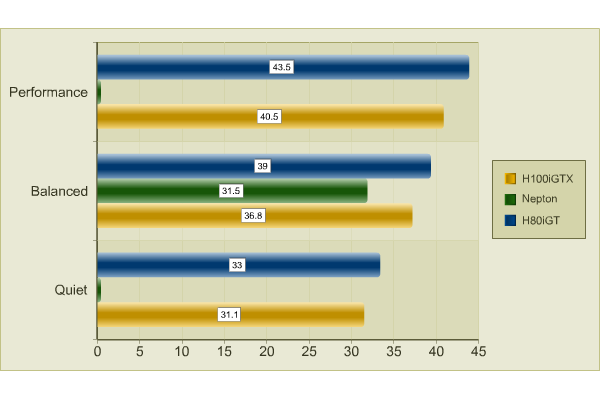
Noise measurements for the three systems are shown below. For similar cooling performance, the Nepton 240M takes the lead in silent operation.
With the addition of the Corsair Link capability, the new H100i GTX cooler is an excellent choice for an all in one cooling system that provides easy access to cooling performance options. In addition to the functional update, the radiator styling has been upgraded as well and sports a new silver strip with the Corsair brand name.
This would be an excellent choice for a small system with a limited number of fan connectors. By using the Corsair link system, only one fan header is needed to connect the pump and two fans.
In Balanced mode, the H100i GTX outperforms the H80iGT and Nepton 240M. Although the noise level is noticeably higher that the Nepton 240M in Balanced mode, it can be easily switched to Quiet mode and still deliver very good cooling performance with near silent operation.
The H100i GTX is an easy to install cooling system that delivers on its promise of improved cooling performance and silent operation.
At full speed operation in Performance mode, the H100i GTX is capable of cooling a 4.2GHz overclocked six core processor to less than 25C over ambient. The fan noise at this high setting is noticeable, however the Corsair Link utility gives the ability to trade off fan noise for cooling performance
The H100i GTX has excellent construction features, with very solid mounting bolts and an easy attachment procedure to the CPU. The addition of Corsair Link functionality has the added benefit of reducing the number of required fan headers for a full installation.
As of April (2015), the Corsair Hydro H100i GTX was available online for $119.99 (Amazon | B&H | Newegg).
The Corsair Hydro H100i GTX installation was very straightforward, and it’s ability to balance cooling performance and silent operation make it a very good choice for any new liquid cooling installation.
+ Corsair Link provides selection of cooling performance and fan noise
+ Excellent cooling performance
+ Easy assembly and mounting
+ Pre-applied thermal paste
+ Only one fan header needed for full system
– CPU block attachment requires attaching standoffs to motherboard
– A bit loud in Performance mode
-
Performance: 9.00
-
Appearance: 9.50
-
Construction: 9.00
-
Functionality: 9.00
-
Value: 8.50