By Julian Duque
Manufacturer: NZXT Corporation
Product Name: Kraken X61 280mm All-In-One Liquid Cooling Solution
Model Number: RL-KRX61-01
UPC: 815671011954
Price As Tested: $114.99 (B&H | Amazon| Newegg)
Full Disclosure: The product sample used in this article has been provided by NZXT.
Last week we took a look at the NZXT Kraken X41, and we were impressed. Today NZXT, a company that we most commonly associate with cases, has allowed Benchmark Reviews to test the X41’s bigger brother, the X61. The Kraken X61 features Asetek’s newest Gen 4.5 design which brings support for variable speed pumps through software, a feature which NZXT claimed as one of a kind in the All-In-One cooler market back in 2014 when they first showcased both of these coolers.
Aside from the inclusion of a variable speed pump, the NZXT Kraken X61 improves from it’s predecessor by including a massive 280 mm radiator with a denser fin array which accounts for 36% more surface area. NZXT has also given the Kraken X61 extended tubing to ensure compatibility with all installation environments. Included with the Kraken X61 are two FX140 V2 PWM fans which according to NZXT are more powerful, quite, and durable than the inclusions of it’s predecessor. Most importantly, the Kraken X61 has a 6 year warranty, which just goes to prove how confident NZXT is of the Kraken line.

There are several misconceptions when it comes to the ordeal of choosing a cooler for your processor. It is true that Water-Cooling may yield better cooling results, mostly due to water’s higher thermal conductivity when compared to the ethanol and ammonia mixture found in most heat-pipes based coolers. But that does not mean that air coolers should not be considered as an option for enthusiasts. Unlike water-coolers, air-coolers do not need a pump, and can be “Passively Cooled” for quieter operation. Although pumps have become more silent and reliable, they should still be considered as another moving part inside your system that may be subject to failure, as well as being a source of noise. Another important factor to take into consideration when choosing the right CPU cooler is compatibility, Most heatsinks require certain parameters to be met including the CPU cooler height limit of your case, and motherboard clearance compatibility. In contrast, water-coolers only require a place to mount the radiator inside your case, as most CPU blocks are small enough to not interfere with important components near the CPU socket.
Courtesy of NZXT.com
| Model Number | RL-KRX61-01 |
| Fan Air Flow | 42.4-106.1 CFM |
| Dimensions | 140 (W) x 280 (H) x 27mm (D) |
| Fan Air Pressure | 0.36-1.97mmH2O |
| Fan Bearing | Nano Bearing |
| Motor Speed | 2400-3600 ± 150 RPM |
| Fan Connector | 4 Pin PWM |
| Motor Voltage | 12V DC |
| Motor Connector | 3 Pin |
| Compatibility | Intel LGA 2011-3, 1366, 1156, 1155, 1150 CPUs AMD FM2, FM1, AM3+, AM3, AM2+, AM2 CPUs |
| Fan Dimensions | 140 x 140 x 25mm |
| Motor Current | 325mA |
| Fan Current | 12V DC |
| Fan Model | NZXT FX V2 140mm Performance PWM Fan |
| Material | Copper Aluminum Rubber Plastic |
| Tube Length | 400mm |
| LED Color | Hue Controlled Color Changing Lights |
The packaging of the NZXT Kraken X61 is far from exciting, mostly made from cardboard which not only protects the heatsink, but keeps the accessories well organized. In a measure to keep the review interesting we always omit boring stuff, so without further due lets get into detail of what came inside the box. In this section I will give my first impressions of the Kraken X61 as well as go over the exterior details that Cooler Master has added to this cooler.

NZXT provides virtually all the necessary hardware to install the Kraken X61 in any recent enthusiast motherboard from Intel and AMD. Each different mounting system is separated by plastic bags, with the AMD bag clearly labeled. The included manual is again, far from exciting and prompts users to follow a link to access the full version of the manual. There is two included brackets, one for AMD systems, and one for Intel systems which comes already installed.
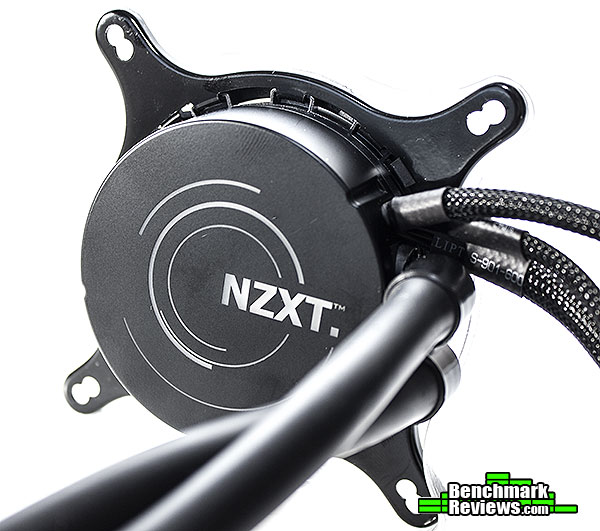
Enclosed by a plastic outer shell, the new Asetek Gen 4.5 design has support for RGB LEDs that illuminate the engraved NZXT logo at the top of the core. The Kraken X61 also supports full software control through USB using NZXT’s own CAM software. Aside from the USB 2.0 header cable, there is also a 3-pin connector to provide power for the pump, an improvement over the X40’s sata connector, and a cable with four 4-pin headers to provide power a maximum of four fans, without using splitters, for a push-pull configuration.
0
I usually rant a lot about not perfectly machined base plates on high-end CPU coolers, specially at the price point the NZXT Kraken line is aiming for. Although our sample of the NZXT Kraken X61 came with pre-applied thermal paste, there were no notorious mistakes on the overall finish of it’s copper base plate. Having a perfectly machined base plate with no errors should yield better performance as there will be no place for air pockets to form between the TIM and the base of the cooler.
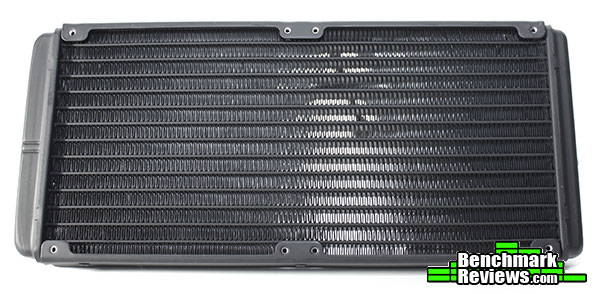
One of the biggest improvements of the NZXT Kraken x61 over the Kraken X60 is the inclusion of a thicker and denser radiator and larger tubing to give install the radiator at the top, back and even front of cases that support 140 mm radiators. The rubber tubing extends for 406 mm, and most importantly is really hard to kink which should allow it to be bent in really tight spaces. The tubing enters the radiator midway between the middle and the top / bottom of the radiator to allow for better clearance. There is also appropriate spacing between the mounting holes and the radiator fins to prevent fins and channels from being damaged during installation.
Before we inspect each member of our new CPU cooler collection, let’s establish that our tests consist of methods we have determined to be the best for our one singular purpose. Our methodology isn’t written in stone, and could very likely be changed or modified as we receive justification (and feedback from the community). Our scope is limited to stand-alone products only, meaning those products which can be installed and operated without additional critical components needed or kit construction. This is the reason for this first test, in which the mounting system for each cooler is tested. Since this is not an apple to apples comparison, but rather a subjective description of each of the kits available without any form of quantitative data, it does not affect the numerical scores we give to each product. The purpose of this test is to inform our readers on how the mounting system of each processor cooler can affect the buying experience.
Because the NZXT Kraken X61 does not have LGA 775 compatibility out of the box, this time we will test it using our AMD platform . For this test we will be using a Gigabyte GA-M68M-S2P AM3 motherboard to test the mounting system included with the NZXT Kraken X61, which NZXT lists as one of the supported sockets.
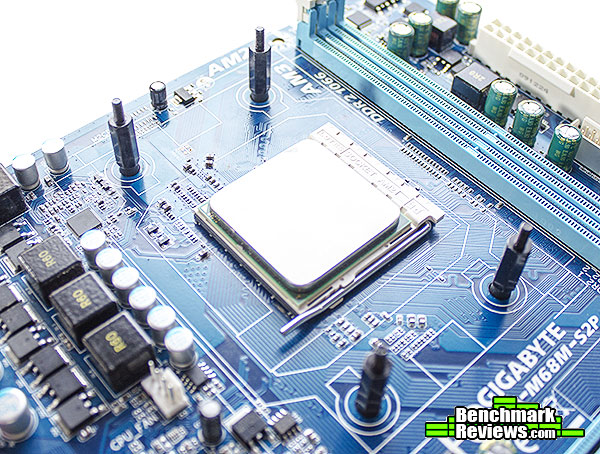
Installing the NZXT Kraken X61 starts with locating the AMD back-plate included with all AMD motherboards which can be removed by unscrewing the top bracket held by four screws. Next you will need to locate the four screws NZXT included with the X61 found on the AMD labeled bag. The process can not get any simpler than this, just screw the thicker thread side of the screws onto the backplate across the motherboard.

Secondly you will need to install the AMD bracket onto the NZXT Kraken’s core, for this you will have to remove the Intel bracket which comes installed by default. This process is a bit tedious if you have never dealt with an Asetek branded cooler before, however NZXT has an excellent visual illustration of this process here. With the bracket in place, just align the screws with the holes of the bracket, and use the included thumb screws to lower the core onto the CPU. Next you will need to mount the radiator inside your case, which is self explanatory. Don’t forget to plug in the pump into a fan header on the motherboard, and the fan onto the included fan plug that comes from the X61’s core. Lastly, plug in the USB header to control the RPM speed of both your fan and pump, this will also allow you to gain access to the different temperature sensors inside the NZXT Kraken X61.
Benchmark Reviews is always looking to improve our testing methodology over the past few years. We have always solicited suggestions from the enthusiast community, and received guidance from the experts in this field. This particular time we will be using a fresh testing methodology. Benchmark Reviews continues to test CPU coolers using the stock included fan and thermal interface material (whenever applicable), and then replace it with a high-output fan and aftermarket TIM.
Manufacturers are not expected to enjoy this sort of comparison, since we level the playing field for all coolers by replacing their included fan and TIM with common units which are then used for every CPU cooler tested. Many manufacturers include fans with their heatsink products, but most ‘stock’ fans are high-RPM units that offer great airflow at the expense of obnoxiously loud noise levels. By using the same model of cooling fan and TIM throughout our second test, we can assure our results are comparable across the board. This is one of the more significant changes we have made to our test methodology, since many of the benchmark tests we have conducted in the past have compared the total package. Ultimately we’re more interested in the discovering the best possible cooler, and we believe that you’ll feel the same way.
-
Motherboard: Asus Gryphon Z87 Motherboard
-
Processor: Intel Core I5 4670k
-
Enclosure: Phanteks Enthoo Mini XL
-
Operating System: Windows 7 Professional.
Testing was conducted in a loosely scientific manner. Ambient room temperature levels were maintained within one degree of fluctuation, and measured at all times throughout testing. The processor received the same amount of thermal paste in every test, which covered the ICH with a thin nearly-transparent layer. The cooler being tested was then laid down flat onto the CPU, and compressed to the motherboard using the supplied retaining mechanism. If the mounting mechanism used only two point of force, they were tightened in alternation; standard clip-style mounting with four securing points were compressed using the cross-over method. Once installed, the system was tested for a baseline reading prior to testing.
At the start of each test, the ambient room temperature was measured to track any fluctuation throughout the testing period using Asus AI Suite and two of the included temperature sensors located at the front intake of our test system. Aida 64 Engineer was utilized to create 100% CPU-core loads and measure each individual processor core temperatures. It’s important to note that software-based temperature reading reflects the thermal output as reported from the CPU to the BIOS. For this reason, it is critically important (for us) to use the exact same software and BIOS versions throughout the entire test cycle, or the results will be incomparable. All of the units compared in our results were tested on the same motherboard using the same BIOS and software, with only the CPU-cooler product changing in each test. These readings are neither absolute nor calibrated, since every BIOS is programmed differently. Nevertheless, all results are still comparable and relative to each products in our test bed (see The Accuracy Myth section below).
All test results utilize Aida 64 Engineer to report core temperature averages (within the statistics panel), which gives us more precise readings. To further compensate for this, our tests were conducted several times after complete power down thermal cycles. Conversely, the ambient room temperature levels were all recorded and accurate to one-tenth of a degree Celsius at the time of data collection.
All modern processors incorporate an internal thermal diode that can be read by the motherboards’ BIOS. While this diode and the motherboard are not calibrated and therefore may not display the actual true temperature, the degree of accuracy is constant. This means that if the diode reports 40°C when it’s actually 43°C, then it will also report 60°C when it’s truly 63°C. Since the design goal of any thermal solution is to keep the CPU core within allowable temperatures, a processor’s internal diode is the most valid means of comparison between different heatsinks, or thermal compounds. The diode and motherboard may be incorrect by a small margin in relation to an actual calibrated temperature sensor, but they will be consistent in their margin of error every time.
Our first CPU Cooler Performance Test takes use of the included TIM and fans included with each CPU cooler. The NZXT Kraken X61 includes two fasn for a push setup and pre-applied thermal paste which can only used once. The purpose of this test is NOT to prove which cooler is better, but rather to give our readers an expectation of what to expect from each cooler using the stock fans and TIM.

Courtesy of NZXT.com
| Dimensions | 140 x 140 x 27 mm (W x H x D) |
| Fan Air Flow | 42.4-106.1 CFM |
| Fan Air Pressure | 0.36-1.97 mm-H2O |
| Fan Bearing | ENB (Everflow Nano Bearing) |
| Fan Connector | 4-Pin |
| Fan Control | Pulse Width Modulation (PWM) |
| Fan Input Power | 7.2 W |
| Fan Current | 0.6 A |
| Fan Noise Level | 20-37 dBA |
| Fan Speed | 800~2000 R.P.M. |
| Fan Voltage | 12 VDC |

The NZXT FX V2 140 mm fans have a measured RPM rating from 800 to 2000, although being limited to the Asus AI suite, our Gryphon Z87 motherboard only managed a minimum of 1100 rpm. Last week, the NZXT Kraken X41 outperformed literally every other cooler in this test at it’s maximum RPM and the Kraken X61 followed by beating everything else again.
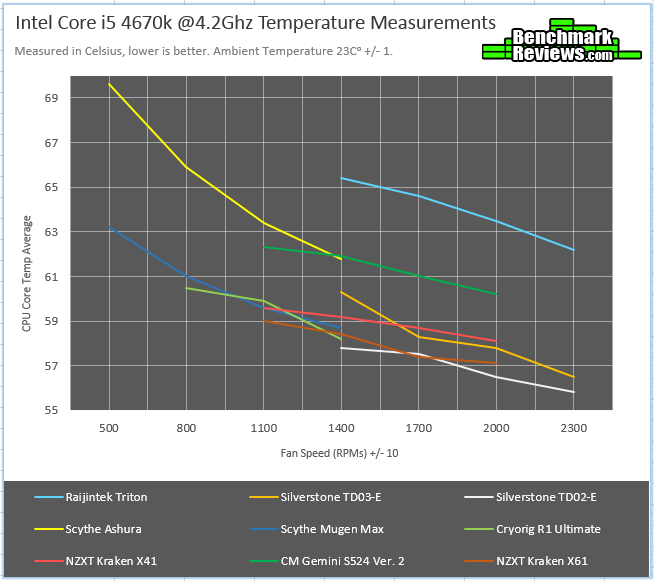
Raising the CPU core of our I5 4670k to 4.2 GHz requires increasing the core voltage to 1.175 V. In our overclocked test the NZXT Kraken X61 still stays at the bottom of the table, with only the loud TD02-E and TD03-E beating it.. These are quiet impressive numbers, specially as acoustically, the Kraken X61 is quieter than most coolers at the bottom of the table.
It’s time for our second and most important test. In this test we look to compare each cooler side by side by eliminating all the variables that may hamper our results. This means using our choice of fans and TIM throughout the entirety of this test. Buyers may benefit from buying custom fans and TIM by gaining performance, as well as by reducing the noise coming from the high RPM fans included with most cooling units. Our choice of TIM is Prolimatech PRO-PK3-5G which is an aluminum based solution that does not require any burn in time to reach peak performance.
Our choice of fans include the Yate-Loon D12SM-12 120 mm and D14SM-12 140 mm fans. Yate-Loons are mostly known for their quiet operation, and very low price. They are also very common among power supply fans, and are frequently found in the market as there are many re branded versions available from different companies.
| Model #: | D12SM-12 | D14SM-12 |
|---|---|---|
| Dimensions: | 120 x 120 x 20 mm | 140 x 140 x 20 mm |
| Air Flow Max.: | 70.5 CFM | 62.0 CFM |
| Noise Level Max.: | 33 dBA | 29 dBA |
| Fan Speed: | 1650 RPM ± 10% | 1400 RPM ± 10% |
| Rated Voltage: | 12 V DC | 12 V DC |
| Input current Max.: | 0.30 Amps | 0.70 Amps |
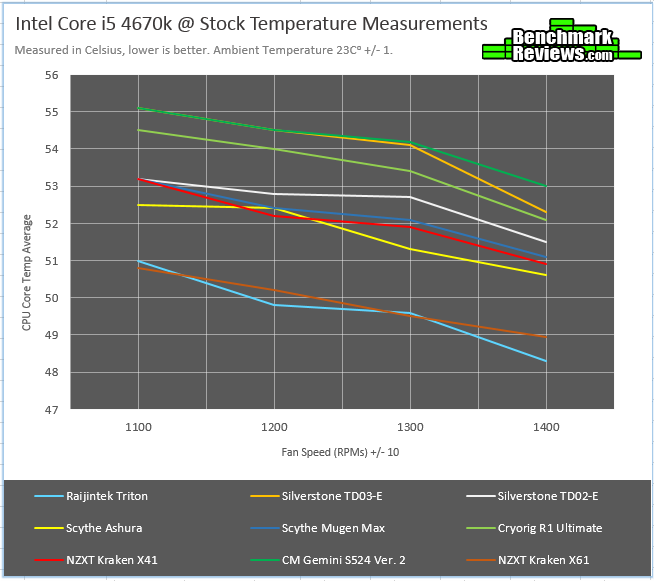
Again, as expected from any other All-In-One cooler, we see that there is no struggles to keep our I5 4670k under temperature. At stock settings we see the Kraken X61 and the Raijintek Triton fight for the throne with the Triton pushing ahead at 1400 rpm by a couple of degrees. Let’s bump up the temperatures to see what happens.
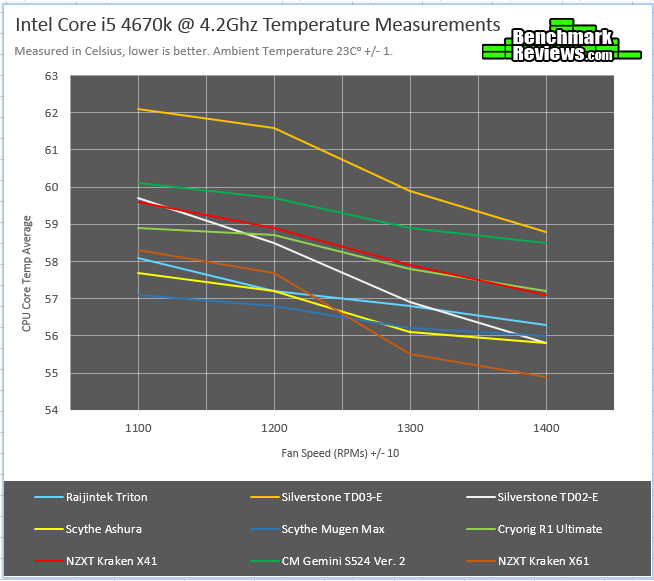
At low RPMs we have seen the Kraken X61 struggle with keeping controllable temperatures, but it is quite the trend that when raising the temps, beefy air coolers, and water coolers with larger radiators will dissipate heat more efficiently. This is clearly evidenced by this last test. Both the NZXT Kraken X41 and the Silverstone TD03-E fall behind other coolers in this category, but the X61 manages to proof it’s worth at higher RPMs.
As per request from many members of the enthusiast community, Benchmark Reviews has added noise measurements to our CPU cooler testing methodology. Each test is conducted in a noise isolated room, during the night time to avoid any minor disturbances caused by normal daytime activities near our location. Our base ambient temperature was measured at 15 dB for each of our tests. Noise was measured using a Brüel & Kjær type 2225 sound level meter located at 1 meter from the fan/fans. Fans were placed so that the axis of rotation of the fan is perpendicular to our line of measurement. For our dual fan noise measurements, fans were placed in series (facing each other) with a 10 cm gap between them. All fans were tested at 12 Volts.

The included NZXT FX V2 140 mm is loud, even louder than the Silverstone APA1225M12 fans included with both the TD03-E and TD02-E. Yet one NZXT FX V2 does a better job than two of our Yate Loon D14SM-12 140 mm quiet fans at keeping our I5 4670k cool. The only fan louder than the NZXT FX V2 140 mm fans is the old CM fan included with our CM Hyper 212 evo.

Adding a second fan into the equation, the NZXT variants are still louder than almost every other 140 mm fan in our tests. NZXT should consider investing into quieter fans, as this can greatly impact the buying decision of many users. However, at the price point the Kraken line is targeting, buying a couple of Yate Loon D14SM-12 140 mm fans shouldn’t be any trouble as they retail for only $3.00.
Asetek designs have always set a standard in the cooling sector of enthusiast systems. This has been constantly proven by the many aftermarket solutions companies like NZXT that develop coolers using Asetek models. This year, the Kraken X61 has already taken the lead ahead of other coolers, not only performance wise but in quality. From every small detail like braided cables and including an RGB LED pump to having an excellent mounting system, the X61 proves it’s worth in each key area our experiments test. The only area were NZXT could improve the X61 is by providing better fans,but at this price point, you probably have the budget to obtain better fans.

In both of our performance tests the NZXT Kraken X61 managed to keep our I5 470k under adequate temperatures, even when overclocked to 4.2 GHz. We wouldn’t be surprised if you managed to get a higher overclock using the X61, as there was plenty of room to take our I5 4670k to even higher clocks. When compared to other coolers, the NZXT excelled in every aspect, by maintaining itself at the bottom of the table on each of our four tests.
Unfortunately, it is impossible for us to test the reliability of most of the products we review. However, the NZXT Kraken X61 shows some very positive signs when it comes to it’s overall construction. The mounting mechanism is sturdy and showed no signs of flex. The fins on the radiator were not easily bent, and the radiator has the appropriate spacing between the screw mounting holes and the fins. NZXT also offers a 6 year warranty, something we have seen trending from many manufacturers using Asetek designs.
To ensure compatibility, NZXT has added extra length to the tubing of the Kraken X61. Measuring 400 mm, you could mount the X61 in almost any case that has space for a 280 mm radiator. Installation is really simple, without any unnecessary small parts that can be easily lost. The flexible tubing is not easily kinked, which should allow you to mount it however you want.
Our last score pertains to the value of the product at hand. The NZXT Kraken X61 is priced online for $114.99 (B&H | Amazon| Newegg) at the time of this review which is a premium over most coolers released in 2015. NZXT justifies this with the many features the Kraken X61 offers which include a 6-year warranty, exceptional looks and customization, and great performance. Is it worth it? That depends on the buyer, it is clear that the Kraken X61 is one of a kind, but if you are a buyer in a budget there may be other options out there.
+ Really simple installation.
+ 6-Year warranty.
+ All cables are adequately braided.
+ RGB Light decorates the CPU block.
+ Long tubing allows for great compatibility.
– Really expensive all-in-one solution.
– Included fans are loud.
-
Performance: 9.50
-
Appearance: 9.50
-
Construction: 10.00
-
Functionality: 9.25
-
Value: 8.00


2 thoughts on “NZXT Kraken X61 CPU Cooler Review”
second paragraph, “desner” should read, “denser”.
Thanks for pointing this out.
Comments are closed.