By Jason Maxfield
Manufacturer: Cooler Master Corporation
Product Name: Hyper D92
Model: RR-HD92-28PK-R1
UPC: 884102026508
Price As Tested: MSRP $44.99
Full Disclosure: The product sample used in this article was provided by Cooler Master
The Cooler Master Hyper D92 is the successor to the Cooler Master Hyper N520 that was introduced back in 2009. The Hyper D92 looks to improve on the Accelerated Cooling System (ACS) design while keeping the price low and compatibility high, with a broad range of cases, RAM, and CPU sockets, including LGA 2011, and FM2+ sockets.
In this article Benchmark Reviews takes a look at the Cooler Master Hyper D92, and we will explore the new features and put it to the test. This article will be geared as more of an upgrade guide than a broad comparison to other CPU coolers currently on the market.

| Model | RR-HD92-28PK-R1 |
| CPU Socket | Intel® LGA 2011-3/2011/1366/1156/1155/1150/775 AMD FM2+/FM2/FM1/AM3+/AM3/AM2+/AM2 |
| Dimensions | 146.4 x 85 x 126.6 mm(5.7 x 3.3 x 4.9 inch) |
| Heat Sink Dimensions | 146.4 x 128.9 x 96.6 mm (5.7 x 5.1 x 3.8 inch) |
| Heat Sink Material | 4 Direct Contact Heatpipes / Aluminum Fins |
| Heat Sink Weight | 448 g / 0.99 lb |
| Heat Pipe Dimensions | Ø6mm |
| Fan Dimensions | 92 x 92 x 25 mm (3.6 x 3.6 x 1 in) |
| Fan Speed | 800~2,800 RPM (PWM) ± 10% |
| Fan Air Flow | 15.7~54.8 CFM ± 10% |
| Fan Air Pressure | 0.35~4.27 mm H2O ± 10% |
| Fan Life Expectancy | 40,000 hours |
| Noise Level | 18~33 dBA |
| Bearing Type | Rifle Bearing |
| Connector | 4-Pin |
| Rated Voltage | 12 VDC |
| Rated Current | 0.24A + 10% max. |
| Power Consumption | 2.88 W (max) |
| Fan Weight | 74 g / 0.16 lb |
| Weight | 636 g / 1.4 lb |
Specifications taken from the manufacturer’s product page.
As mentioned on the previous page, the Hyper D92 is the replacement for the Hyper N520. The Hyper D92 offers more performance and higher compatibility than the Hyper N520, for around the same price. The Hyper D92 comes with two 92mm fans, updated aesthetics, and direct contact heat pipe technology.
The Hyper D92 is compatible with Intel sockets: LGA 2011-3/2011/1366/1156/1155/1150/775. AMD socket compatibility includes: FM2+/FM2/FM1/AM3+/AM3/AM2+/AM2. The Hyper D92 fits a nice gambit of current and older sockets that many will surely find useful when it comes to selecting a new cooler or wanting to upgrade from a stock heatsink unit.

Here is a look at all the parts that come with the Hyper D92. There are backing plates for Intel and AMD sockets, 4-pin PWM Y-cable adapter for your CPU fan headers, as well as all the fittings for various sockets and mounting options. Also included is a tube of Cooler Master TIM (thermal interface material).
There is also an installation guide and warranty information pamphlets included (not pictured). Cooler Master provides a two-year limited warranty for the Hyper D92.
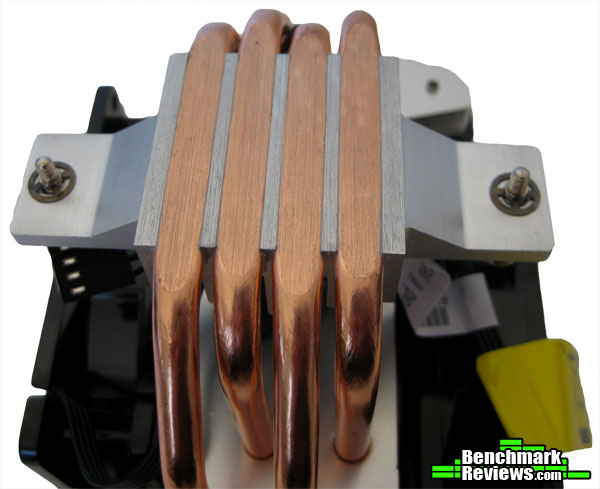
One of the key changes from the Hyper N520 is the 4 direct contact heat pipes in the Hyper D92 that offer higher efficiency and better dissipation than a general metal base. Cooler Master claims a 10% improvement over the Hyper N520 with the new design features in the Hyper D92. This has become a pretty standard feature on Cooler Master coolers.
The mounting design for the Hyper D92 differs from the Hyper N520. The new design allows for more CPU socket compatibility, as well as higher clearance for RAM. The Hyper D92 can be mounted in a vertical or horizontal orientation, which gives you flexibility and helps with compatibility with various computer cases.

The Hyper D92 features two 92mm fans mounted in an offset push-pull configuration. This configuration allows more airflow to pass through the heat sink efficiently, while keeping the fans smaller. The fans are mounted with plastic clips, and the fans themselves are secured to the clips with standard fan mount screws. The clips also have rubber padding adhered to the backside of them to dampen vibration. Both fans come with 4-pin PWM cables that can plug directly into your CPU fan header on your motherboard, or by using the supplied 4-pin Y-cable if you do not have 2 available CPU fan headers on your motherboard.
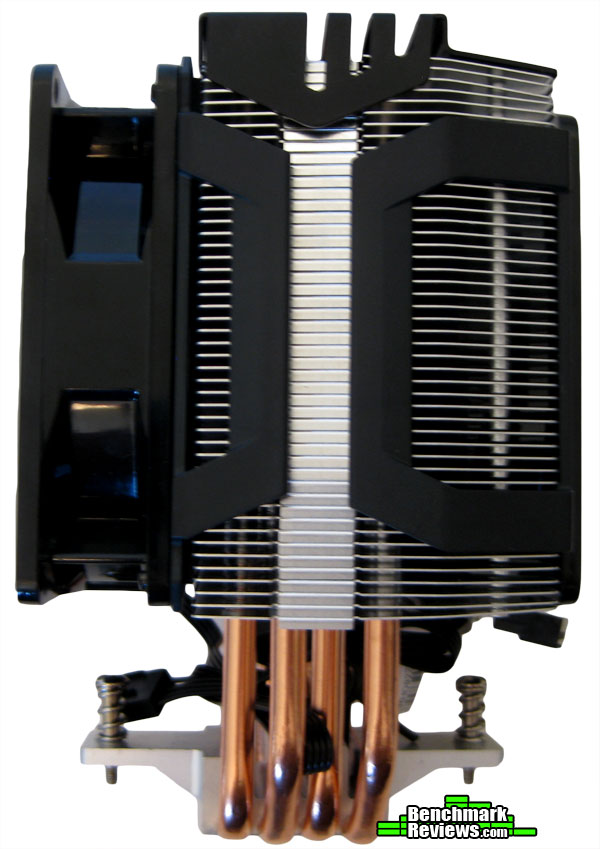
The Hyper D92 features high density aluminum fins for better thermal distribution. I find the design to look very similar to the Hyper N520 and doesn’t appear to have undergone any major changes to the fin arrangement.
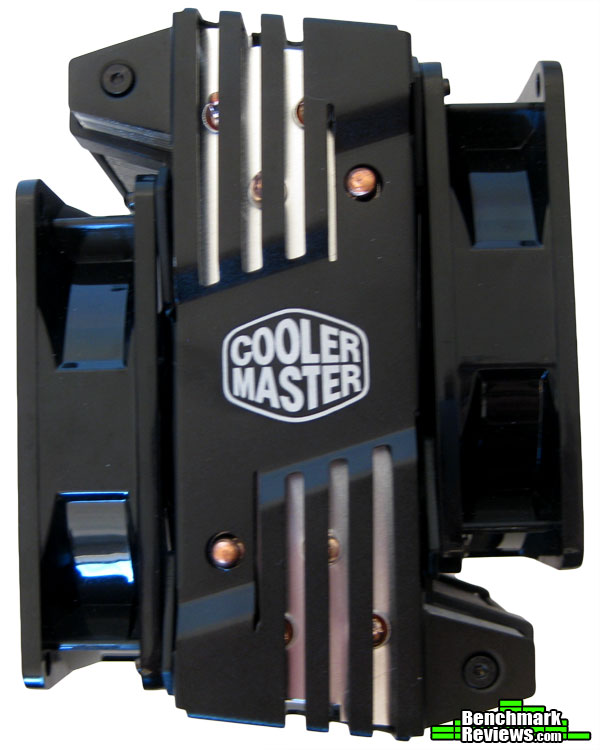
The top of the Hyper D92 gets an aesthetic change with a stylish cage with the Cooler Master logo printed on the top. This cage can be taken off by removing the 2 screws on either corner of the cooler. It also gives the top of the Hyper D92 some protection as the cage is somewhat sturdy and doesn’t flex nearly as easily as the fins on the cooler can.
For those adventurous types that like to customize their PC’s, being able to remove the cage allows for custom mods or paint jobs. Keep in mind modifications might default your warranty!
It bears repeating here that no heat-sink will work effectively unless it transfers heat from the CPU. To do that, it needs to be in contact with the CPU heat spreader or die, with the greater the contact surface the greater the potential for heat transfer. One of our own writers here at Benchmark Reviews has done a lot of work in this area, and it is certainly worth the time it takes to read (and re-read) the discoveries he made during the famous 80+ thermal paste tests (I still see Newegg reviews reference the discoveries made therein).
I mention this because I still see this as a major source of misinformation – most end users will use far too much thermal interface material when switching CPU coolers. Possibly through little fault of their own – I’ve read official repair manuals stating to use the entire tube of thermal paste when replacing a CPU and heat-sink. This is, in almost every case, FAR too much – to the point of being harmful in most cases. So do yourself a favor and get acquainted with CPU Cooler Preparations and Thermal Paste Application.
Processor and CPU cooler surfaces are not perfectly smooth and flat surfaces, and although some surfaces appear polished to the naked eye, under a microscope the imperfections become clearly visible. As a result, when two objects are pressed together, contact is only made between a finite number of points separated by relatively large gaps. Since the actual contact area is reduced by these gaps, they create additional resistance for the transfer of thermal energy (heat). The gasses/fluids filling these gaps may largely influence the total heat flow across the surface, and then have an adverse affect on cooling performance as a result.
The only reason for using Thermal Interface Material is to compensate for flaws in the surface and a lack of high-pressure contact between heat source and cooler, so the sections above are more critical to good performance than the application of TIM itself. This section offers a condensed version of our Best Thermal Paste Application Methods article.
After publishing our Thermal Interface Material articles, many enthusiasts argued that by spreading out the TIM with a latex glove (or finger cover) was not the best way to distribute the interface material. Most answers from both the professional reviewer industry as well as enthusiast community claim that you should use a single drop “about the size of a pea”. If there was ever any real advice that applies to every situation, it would be that thermal paste isn’t meant to separate the two surfaces but rather fill the microscopic pits where metal to metal contact isn’t possible.
After discussing this topic with real industry experts who are much more informed of the process, they offered some specific advice that didn’t appear to be a “one size fits all” answer:
- CPU Cooling products which operate below the ambient room temperature (some Peltier and Thermo-electric coolers for example) should not use silicon-based materials because condensation may occur and accelerate compound separation.
- All “white” style TIM’s exhibit compound breakdown over time due to their thin viscosity and ceramic base (usually beryllium oxide, aluminum nitride and oxide, zinc oxide, and silicon dioxide). These interface materials should not be used from older “stale” stock without first mixing the material very well.
- Thicker carbon and metal-based (usually aluminum-oxide) TIM’s may benefit from several thermal cycles to establish a “cure” period which allows expanding and contracting surfaces to smooth out any inconsistencies and further level the material.
The more we researched this subject, the more we discovered that because there are so many different cooling solutions on the market it becomes impossible to give generalized advice to specific situations. Despite this, there is one single principle that holds true in every condition: Under perfect conditions the contact surfaces between the processor and cooler would be perfectly flat and not contain any microscopic pits, which would allow direct contact of metal on metal without any need for Thermal Interface Material. But since we don’t have perfectly flat surfaces, Thermal Material must fill the tiny imperfections. Still, there’s one rule to recognize: less is more.
CPU coolers primarily depend on two heat transfer methods: conduction and convection. This being the case, we’ll concentrate our attention towards the topic of conduction as it relates to the mating surfaces between a heat source (the processor) and cooler. Because of their density, metals are the best conductors of thermal energy. As density decreases so does conduction, which relegates fluids to be naturally less conductive. So ideally the less fluid between metals, the better heat will transfer between them. Even less conductive than fluid is air, which then also means that you want even less of this between surfaces than fluid. Ultimately, the perfectly flat and well-polished surface is going to be preferred over the rougher and less even surface which required more TIM (fluid) to fill the gaps.
This is important to keep in mind, as the mounting surface of your average processor is relatively flat and smooth but not perfect. Even more important is the surface of your particular CPU cooler, which might range from a polished mirror finish to the absurdly rough or the more complex (such as Heat-Pipe Direct Touch). Surfaces with a mirror finish can always be shined up a little brighter, and rough surfaces can be wet-sanded (lapped) down smooth and later polished, but Heat-pipe Direct Touch coolers require some extra attention.
To sum up this topic of surface finish and its impact on cooling, science teaches us that a smooth flat mating surface is the most ideal for CPU coolers. It is critically important to remove the presence of air from between the surfaces, and that using only enough Thermal Interface Material to fill-in the rough surface pits is going to provide the best results. In a perfect environment, your processor would mate together with the cooler and compress metal on metal with no thermal paste at all; but we don’t live in perfect world and current manufacturing technology cannot provide for this ideal environment.
Probably one of the most overlooked and disregarded factors involved with properly mounting the cooler onto any processor is the amount of contact pressure applied between the mating surfaces. Compression will often times reduce the amount of thermal compound needed between the cooler and processor, and allow a much larger metal to metal contact area which is more efficient than having fluid weaken the thermal conductance. The greater the contact pressure between elements, the better it will conduct thermal (heat) energy.
Unfortunately, it is often times not possible to get optimal pressure onto the CPU simply because of poor mounting designs used by the cooler manufacturers. Most enthusiasts shriek at the thought of using the push-pin style clips found on Intel’s stock thermal cooling solutions. Although this mounting system is acceptable for casually-used computers, there is still plenty of room for improvement when overclocking.
Generally speaking, you do not want an excessive amount of pressure onto the processor as damage may result. In some cases, such as Heat-pipe Direct Touch technology, the exposed copper rod has been pressed into the metal mounting base and then leveled flat by a grinder. Because of the copper rod walls are made considerably thinner by this process, using a bolt-through mounting system could actually cause heat-pipe rod warping. Improper installation not withstanding, it is more ideal to have a very strong mounting system such as those which use a back plate behind the motherboard and a spring-loaded fastening system for tightening.
Heat-pipe technology uses several methods to wick the cooling liquid away from the cold condensing end and return back towards the heated evaporative end. Sintered heatpipe rods help overcome Earth’s gravitational pull and can return most fluid to its source, but the directional orientation of heatpipe rods can make a significant difference to overall cooling performance.
The following is retained word for word from the source article, but note that not every CPU cooler will be or can be tested in a horizontal orientation. Please refer to the testing methodology on the next page or the pictures in the article to see how each specific cooler was tested.
For the purpose of this article, all CPU-coolers have been orientated horizontally so that heatpipes span from front-to-rear with fans exhausting upward and not top-to-bottom with fans blowing towards the rear of the computer case. This removes some of the gravitational climb necessary for heatpipe fluid working to return to the heatsink base. In one example, the horizontally-mounted tower heatsink cooled to a temperature 3° better than when it was positioned vertically. While this difference may not be considered impressive to some, hardcore performance enthusiasts will want to use every technique available to reach the highest overclock possible.
This is where the guide part of the review kicks in as I mentioned before on the introduction page. This installation will cover my experience installing the Hyper D92 with an AM3 socket CPU.
Instructions for Intel sockets vary slightly depending on what socket type you have and the installation instructions are rather simple and easy to follow.
 First, we have to remove the awful AMD stock cooler from the Phenom II x2 555 CPU and clean the top of the CPU in preparation for installing the Hyper D92. I cleaned the CPU with 70% isopropyl alcohol using a cotton tip swab, making sure to keep any paste off of the surrounding socket mount and motherboard.
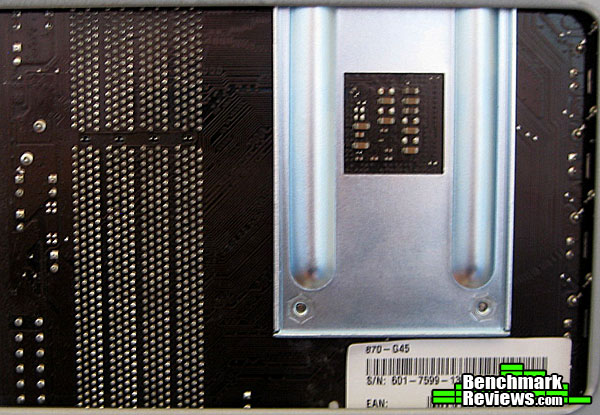
When that was done I proceeded to uninstall the stock mounting brackets and backplate. Once I removed the stock mounting bracket and backplate I was able to install the backplate for the Hyper D92. This process proved to be slightly problematic, as you can see from the above picture the CPU cut-out on the Antec 900 case was not high enough to allow easy removal or installation of the new backplate.
To fix this problem, I simply unscrewed the top two mountings screws on the motherboard, rather than taking the whole motherboard out. This allowed me to flex the board just slightly enough to slide the old backplate out and the new backplate in.
Keep in mind I do not recommend that anyone should install the backplate in this way! Bending the motherboard could possibly crack or break it causing it to malfunction. Use your own discretion in this manner. I simply did this to avoid the hassle of having to painstakingly remove the motherboard from the case!
After I successfully installed the Hyper D92 backplate I replaced the two screws to secure the top of the motherboard.
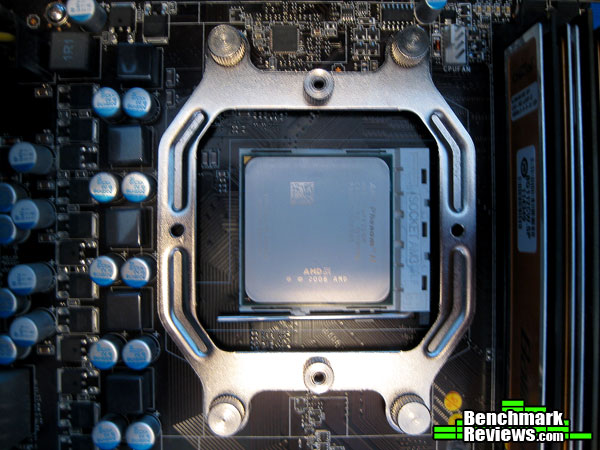
I’ve secured the Hyper D92 mounting plate with the provided thumb screws and aligned the mounting screws so I could install the Hyper D92 in a horizontal configuration. I chose this configuration because of case compatibility reasons. It simply fit best in this orientation, which happens to be the preferred orientation for this type of cooler.
This orientation allowed me to still keep the side fan mounted on the case door while pushing air up and out of the top of the case that has a pre-installed 200mm variable speed fan.
Take note of how close the DIMM slots are to the CPU socket. This was a concern of mine that it might not fit in a horizontal orientation because the heat pipes don’t give as much clearance for RAM in this orientation.
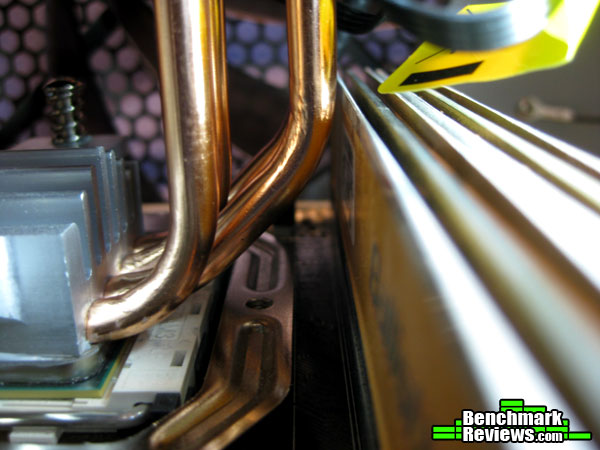
I managed to stuff my camera into the computer to get this shot. As you can see in the above picture, those heat pipes come within millimeters of touching the heatspreaders on the RAM module.
Thankfully there was not an issue with RAM height since the Crucial Ballistix RAM is low profile. Keep in mind that there is 44mm of clearance from the floor of the motherboard to the bottom of the cooler.
If RAM clearance is an issue mounting the Hyper D92 in a vertical orientation will help with clearance. If your DIMM slots are further away from the CPU socket it shouldn’t be an issue with vertical orientation of the Hyper D92.
 And the end result with the Hyper D92 snuggly installed and making the CPU nice and cool!
The CPU tested was mounted in an Antec 900 case. The case was in it’s normal upright orientation and case doors were fully closed during testing. There are two 120mm front intake fans, one side mounted 120mm fan, one 120mm exhaust fan, and one 200mm top fan.
All fan rpms were set to medium on their selector switches, which is roughly 75% power. The only exception is the back exhaust fan set to 50%. BIOS controlled CPU fans were set to 50% minimum speed with a target temp of 60°C. Settings were left the same for both coolers while testing was done. AMD Cool and Quiet was disabled for all testing.
CPU cooler prep included cleaning and preping the CPU coolers with the same TIM that was included with Hyper D92. Even the stock cooler was re-installed with fresh TIM applying roughly the same amount of TIM for both coolers.
Testing was performed with AIDA64 Engineer software using their stability test application, which generates 100% CPU usage during the entire test run. The stability test was run until CPU temperatures had plateaued, then began to record ambient air temperature and CPU temperatures over the next minute. I then shutdown the PC completely and turned it back on after a minute or so and ran the test 3 times in total.
After swapping and running the test 3 times in the exact same way with the Hyper D92, I took the results of the CPU temperatures and discarded the highest and lowest temperature results and subtracted that result from the ambient room temperature.
The Asus HD 4870 was left installed and running with fans set to a static 35% to keep any variance from the GPU out of the equation, but also it is a true measurement of a case and all of it’s components installed in the same manner anyone uses their computer on a daily basis.
Ambient room temperatures where measured in degrees Celsius using a thermometer with decimal point accuracy.
- Processor: AMD Phenom II x2 555 @ 3.5GHz 1.4 vCore
- Motherboard: MSI 870-G45
- RAM: Crucial Ballistix 4GB(2×2) DDR3 1600 CL8
- Audio: Onboard
- Video: Asus HD4870 1GB
- PSU: OCZ ModXstream 700 watt
- Case: Antec 900 gaming
- Operating System: Windows 7 64bit Ultimate Edition SP1
- Disk Drive: WD Black 750GB SATA2
- Monitor: Acer X223W 1680×1050 60Hz

I think this is a rather unfair comparison, but it bares showing just how good aftermarket CPU coolers can be when compared to stock heatsink units. Given that the conditions of the test were the same for both coolers the numbers are as honest as they can get.
The Cooler Master Hyper D92 was a full 16.5°C better than the AMD stock cooler! This is a huge improvement, and it wasn’t entirely expected on my part to see that huge of a difference.
The Hyper D92 is a nice and a very capable performer. I have to wonder how it would fair when cooling a newer CPU, since the Phenom II is a 45nm CPU when compared to the 22nm CPU’s. This is probably why I saw such a huge performance improvement since the Hyper D92 is new and has to be able to cool the hotter, smaller CPU’s of today.
The Hyper D92 is a smaller cooler than the Hyper 212 EVO, which gives the Hyper D92 a nice edge in being compatible with much more variety of cases, motherboards, and RAM modules. After installing the Hyper D92, I realized if I had ever tried to install a 120mm tower cooler, I more than likely would of had to ditch the side case fan and even then probably would barely fit into the Antec 900 case.
The included 92mm fans have a nice look to them and do an adequate job of moving air through the Hyper D92 and exhausting hot air out the top of the case. The fans are not very quiet if they have to spool up past 1800+ rpm’s. Over 2000 RPM they are quite loud, but thankfully in the case they never went that high to keep the CPU below 50°C even at full load.

I think Cooler Master has another winner on their hands. I like the styling and design of the Hyper D92. The black cage with the black fans will go well with most components and cases. The compatibly with a huge variety of sockets is another plus. Installation was a breeze even with the minor hiccup I had with mounting the backplate. In any event that isn’t an issue with the design of the cooler itself, rather a problem with the design of the Antec 900 not giving enough vertical height to the CPU cut out on the back of their motherboard tray.
I would of really like to see at least some ball bearing fans included with this kit. Rifle sleeves are ok, but they just aren’t going to last as long. I get why Cooler Master did it though, this is priced to sit smack dab in the middle of their mainstream pricing range of $29.99 to $59.99. At their MSRP of 44.99, although more expensive than the Hyper 212 Evo, the Hyper D92 is $5 cheaper than it’s successor the Hyper N520’s MSRP, and delivers better performance according to Cooler Master.
The Hyper D92 fan mounting clips are plastic and I could see potential issues if they are not removed from the heatsink carefully. They do mount the fans snuggly and do not give off very much vibration, so they get the job done. One thing that bothered me a bit was the placement of the rubber pads on the back of the fan clips. They covered the holes where you screw the clip onto the fan, and if you wanted to ever remove the fans to replace them, the rubber pads might come off if you were to bend them to the side to get at the screws. It may not be an issue at all, but I thought it was worth noting if anyone had ideas of replacing the stock fans. The rubber pads appear to be glued onto the back of the clip, so even if they did come off, a bit of hot glue would probably fix that in an instant.
The Cooler Master Hyper D92 is set for release on September 30th. At the time of this writing I only have the MSRP of $44.99 to give as a price for this product.
+ Great cooling performance
+ High compatibility
+ Great design and features
+ Ease of installation
+ Easily change out stock fans
– Stock fans can get noisy
– Potential problems with fan clips
-
Performance: 9.0
-
Appearance: 9.5
-
Construction: 8.75
-
Functionality: 9.25
-
Value: 9.0