By David Ramsey
Manufacturer: Intel Corporation
Product Name: Desktop Processor
Model Number: Core i5-4430
Part Number: BX80646I54430
Price As Tested: $185.99 (ATD Computers)
Full Disclosure: The product sample used in this article has been provided by ATD Computers.
When Intel sends out press samples of their new CPUs, they generally provide the top-end desktop products like the Core i7-4470K. And it’s fun to have the latest new super-fast processor to play with. But most people don’t need this level of power, and indeed in many cases even enthusiasts won’t make full use of the capabilities of a high-end part. Given that, might a less expensive, mid-range CPU be a better choice? Benchmark Reviews tests the mid-range Intel Core i5-4430 CPU, desktop processor model BX80646I54430, to find out.
The Core i5-4430 CPU is a member of Intel’s new Haswell line of processors, and as such it shares the improvements in performance and power consumption with its Core i7-4770K stablemate. However, there are some significant differences in performance, as well as price: the 4430 goes for a little over half as much as the 4470K.
The following information is courtesy of Intel
- 4 Cores, 4 Threads
- Intel Turbo Boost Technology 2.0
- Supports LGA1150 socket Intel Z87
- 6 MB shared L3 Intel Smart Cache
- 2 channels of DDR3 1333/1600 MHz
- 16 PCI Express Gen 3 Lanes
- Built-in Visuals
- Intel HD Graphics-Enhanced 3-D performance for immersive mainstream and casual gaming. Can support up to three UltraHD (4k) displays and collage display.
- Intel Wireless Display8-Wirelessly stream HD / 3-D video and games to your TV or projector for presentations and entertainment.
- Intel Quick Sync Video-Delivers fast conversion of video for portable media players, online sharing, and video editing and authoring.
- Intel Clear Video HD-Visual quality and color fidelity enhancements for HD playback and immersive Web browsing.
- Intel InTruTM 3D1-Stereoscopic 3-D Blu-ray* playback in full 1080p resolution over HDmI* 1.4 and premium audio.
- Intel® Advanced Vector Extensions (Intel® AVX)
- Advanced Encryption Standard New Instructions (AES-NI)
- Intel Virtualization Technology (VT-x)
The Core i5-4430 is a member of the second wave of desktop Haswell SKUs. Intel differentiates these CPU by adjusting a number of features. Here’s a chart comparing the Core i5-4430 with the Core i7-4470K.
| Processor | i7-4770K | i5-4430 |
| CPU Base clock (GHz) | 3.5 | 3.0 |
| CPU Turbo clock (GHz) | 3.9 | 3.2 |
| Cores/Threads | 4/8 | 4/4 |
| Cache | 8MB | 6MB |
| Memory Support | Dual-channel DDR3-1600 | Dual-channel DDR3-1600 |
| PCI-E lanes | 16 Gen 3 | 16 Gen 3 |
| Graphics | Intel Graphics HD4600 | Intel Graphics HD4600 |
| Graphics Execution Units | 20 | 20 |
| Graphics Core clock | up to 1250MHz | up to 1100MHz |
| DirectX Version | 11.1 | 11.1 |
| Intel VPro Technology | Yes | Yes |
| TDP | 84 watts | 84 watts |
Looking at these specifications, the major differences are:
- The Core i5-4430 doesn’t have Hyper-Threading.
- The 4430 has 6M of cache as opposed to the 4770K’s 8M of cache.
- The 4430’s base and turbo clocks are lower.
- As a non-“K” part, the 4430 cannot be overclocked. Not even a little.
The only other difference I can see from Intel’s specifications is that while both CPUs have the same Intel Graphics HD4600 integrated GPU, the maximum core clock is slightly lower, 1100MHz as opposed to 1250MHz, on the 4430.
Let’s fire up the testing rig and see how the Core i5-4430 really compares, performance-wise. Since overclocking’s not in the picture, I’ll be using the standard retail cooler that ships with the processor:

While small, the retail Intel cooler has a solid copper core and its pre-applied thermal paste and push-pin mounting system makes installing it the work of seconds. This will provide plenty of cooling for our use.
Since I recently tested the Core i7-4770K against its Ivy Bridge predecessor, the Core i7-3770K, I have lots of recent test data to leverage. The only real change has been in AIDA 64, which has updated a few tests to better optimize them for Haswell. In this case I re-ran the benchmarks with the latest 3.00.2500 version.
Since the Core i5-4430 is a non-“K” CPU, the multiplier is locked. And Intel has removed the alternate overclocking mechanisms that appeared with Ivy Bridge. Although enthusiast motherboards will still let you increase the base clock with non-“K” processors, my bench system crashed if I raised the 100MHz clock to anything above 102MHz. So, no overclocking this time around.
As with Sandy Bridge and Ivy Bridge, the integrated GPU shares pipelines and cache with the CPU cores. For this review I used three different testing configurations:
-
CPU testing: integrated GPU disabled, discrete video card used. This frees up the cache and memory bandwidth to be used only by the CPU. I used the same Radeon HD6850 video card I’ve used previously testing the 4770K.
-
iGPU testing: Discrete video card removed, iGPU enabled. In this case the amount of memory dedicated to the iGPU was set at its maximum of 512MB.
- Game testing. Does a gamer need the 4770K? Or with the 4430 suffice? To answer this question, I ran both processors with a Radeon HD7970 GPU through a series of game benchmarks.
- Motherboard: MSI Z77 MPower
- Processor: 3.5GHz Intel Core i7-3770K, 3.0GHz Intel Core i5-4430
- System Memory: 8GB DDR3-1600 (two 4GB DIMMs) at 9-9-9-27
- Primary Drive: Seagate ST3500 500GB drive
- Graphics Adapter: AMD Radeon HD6850, AMD Radeon HD7970
- Operating System: Windows 7 Home Premium 64-Bit
- Finalwire AIDA64 Extreme Edition v3.00.2500
- Futuremark PCMark 7
- Maxon CINEBENCH R11.5 64-Bit
- x264Bench HD 5.0
- SPECviewperf-11:
- Lightwave 9.6
- Autodesk Maya 2009
- Siemens Teamcenter Visualization Mockup
- SPECapc LightWave 3D v9.6
- Handbrake 0.96 video transcoding
- ArcSoft Video Converter 7 video transcoding
- Blender 3D rendering
- POV-Ray 3D rendering
- Aliens vs. Predator benchmark
- 3DMark 11
- Unigine Heaven 3.0
- Lost Planet 2 Benchmark
- Metro 2033 Benchmark (gaming only)
Let’s start the benchmarking with an AIDA64 run in the next section.
AIDA64 is FinalWire’s full 64-bit benchmark and test suite utilizing MMX, 3DNow! and SSE instruction set extensions, and will scale up to 32 processor cores. An enhanced 64-bit System Stability Test module is also available to stress the whole system to its limits. For legacy processors all benchmarks and the System Stability Test are available in 32-bit versions as well.
All of the benchmarks used in this test- Queen, Photoworxx, ZLib, hash, and AES- rely on basic x86 instructions, and consume very little system memory while also being aware of Hyper-Threading, multi-processors, and multi-core processors. Of all the tests in this review, AIDA64 is the one that best isolates the processor’s performance from the rest of the system. While this is useful in that it more directly compares processor performance, readers should remember that virtually no “real world” programs will mirror these results.

The Queen and Photoworxx tests are synthetic benchmarks that iterate the function many times and over-exaggerate what the real-world performance would be like. The Queen benchmark focuses on the branch prediction capabilities and misprediction penalties of the CPU. It does this by finding possible solutions to the classic queen problem on a chessboard. At the same clock speed theoretically the processor with the shorter pipeline and smaller misprediction penalties will attain higher benchmark scores.
Like the Queen benchmark, the Photoworxx tests for penalties against pipeline architecture. The synthetic Photoworxx benchmark stresses the integer arithmetic and multiplication execution units of the CPU and also the memory subsystem. Due to the fact that this test performs high memory read/write traffic, it cannot effectively scale in situations where more than two processing threads are used, so quad-core processors with Hyper-Threading have no real advantage. The AIDIA64 Photoworxx benchmark performs the following tasks on a very large RGB image:
- Fill
- Flip
- Rotate90R (rotate 90 degrees CW)
- Rotate90L (rotate 90 degrees CCW)
- Random (fill the image with random colored pixels)
- RGB2BW (color to black & white conversion)
- Difference
- Crop
The Core i5-4430’s Queen score is 35% lower than the 4770K’s score. The Photoworxx test score is, oddly, about 8% higher.

We see a 30% drop relative to the 4770K in ZLIB, and a 9% drop in the Hash test.
So far, these results (aside from Photoworxx) are pretty much in line with what I’d expect, given the 4430’s lower clock speeds and amount of cache. Let’s move on to the PCMark 7 benchmark.
PCMark 7 is Futuremark’s successor to PCMark Vantage. The full suite of tests comprises seven different sequences with more than 25 sub-tests that exercise your system’s abilities in storage, computation, image and video manipulation, web browsing and gaming. It was developed with input from the designers, engineers and product managers at AMD, Compal, Dell, Hitachi GST, HP, Intel, NVIDIA, Samsung, Seagate, Western Digital and many other well-known companies.
For this benchmark I chose the PCMark test, which provides a number indicating total system performance, as well as the Productivity, Creativity, and Computation test suites.
The Productivity test is a collection of workloads that measure system performance in typical productivity scenarios. Individual workloads include loading web pages and using home office applications. At the end of the benchmark run the system is given a Productivity test score. The Productivity test consists of:
- Storage
- Windows Defender
- Starting applications
- Web browsing and decrypting
- Productivity
- Data decryption
- Text editing
The Creativity test contains a collection of workloads to measure the system performance in typical creativity scenarios. Individual tests include viewing, editing, transcoding and storing photos and videos. At the end of the benchmark run the system is given a Creativity test score.
- Storage
- importing pictures
- video editing
- Image manipulation
- Video transcoding – high quality
The Computation test contains a collection of workloads that isolate the computation performance of the system. At the end of the benchmark run the system is given a Computation test score.
- Video transcoding – downscaling
- Video transcoding – high quality
- Image manipulation
It’s important to note that since PCMark 7 was designed as a system test, the scores are dependent on the configuration of the entire system being tested, including things like the memory, hard disk, and graphics cards used: it’s not an isolated CPU test like most of the other benchmarks I’m using in this review. However, since all other hardware (motherboard, video card, memory, hard disk, etc.) was identical, with only the CPUs being changed, any performance differences here can be attributed to differences in CPU performance.

Here, the Core i5-4430 makes a better showing against the 4770K. The Creativity score is virtually identical to the faster CPU’s score, and the Productivity and Computation scores are down by only 16% and 12%, respectively, rather than the 30+% deltas we saw earlier.
In the next section I run everyone’s favorite benchmark: CINEBENCH!
Maxon CINEBENCH is a real-world test suite that assesses the computer’s performance capabilities. CINEBENCH is based on Maxon’s award-winning animation software, Cinema 4D, which is used extensively by studios and production houses worldwide for 3D content creation. Maxon software has been used in blockbuster movies such as Spider-Man, Star Wars,The Chronicles of Narnia, and many more. CINEBENCH Release 11.5 includes the ability to more accurately test the industry’s latest hardware, including systems with up to 64 processor threads, and the testing environment better reflects the expectations of today’s production demands. A more streamlined interface makes testing systems and reading results incredibly straightforward.
The CINEBENCH R11.5 test scenario comprises three tests: an OpenGL-based test that models a simple car chase (which I didn’t use for this test), and single-core and multi-core versions of a CPU-bound computation using all of a system’s processing power to render a photo-realistic 3D scene, “No Keyframes”, the viral animation by AixSponza. This scene makes use of various algorithms to stress all available processor cores, and all rendering is performed by the CPU: the graphics card is not involved except as a display device. The multi-core version of the rendering benchmark uses as many cores as the processor has, including the “virtual cores” in processors that support Hyper-Threading. The resulting “CineMark” is a dimensionless number only useful for comparisons with results generated from the same version of CINEBENCH.

Since the CPU cores in the 4770K are the same as those in the 4430, I’d attribute the 20% reduction in the single-core score to both lower clock speed and lower cache levels. And the lack of Hyper-Threading really hurts the Core i5 CPU in the multi core render, with a score just over 44% below its big brother.
I like media encoding benchmarks for several reasons. One, most of them are “real world” benchmarks rather than synthetic benchmarks that are only good for comparison with other scores from the same benchmark. Second, media encoding is one of the very few things that can really use all the threads and horsepower a modern CPU can provide. Unless you’re upgrading from a really old machine, that spiffy new CPU won’t play your games any faster, nor make your web browsing any smoother. But when you’re ripping that DVD to watch on your phone or tablet, then yeah, nobody ever said their transcoding was too fast.
Intel changed this game dramatically with the introduction of the Sandy Bridge CPUs a couple of years ago. Their new “Quick Sync” feature leveraged the parallel cores of the new Intel HD integrated GPUs to dramatically speed transcoding tasks, and several third party programs jumped on the bandwagon.
We’ll start, though, with a program that doesn’t use Quick Sync. For this test I used Handbrake 0.96 to transcode a standard-definition episode of Family Guy to the “iPhone & iPod Touch” presets, and recorded the total time (in seconds) it took to transcode the video.

The lack of Hyper-Threading makes its presence known again, with the 4430’s transcoding taking 33% longer than the 4770K.
With version 5.0, TechArp’s x264HD Benchmark finally integrates AVX instructions into the main code branch. Previously, there were separate versions of this benchmark that used XOP and AVX instructions; now, they’re integrated and will be used if your CPU supports them. Of course this means that the results from the new benchmark can’t be directly compared to results from the old benchmark, but that’s the price of progress. An added benefit is that the new version runs in full 64-bit mode.
x264 HD 5.0 encodes a 1080p video segment into a high quality x264 format.

The pattern is repeated in this test, with the Core i5 CPU turning in scores that are 30% lower in Pass 1 and 24% lower in Pass 2.
Now, let’s try something that uses Quick Sync: Arcsoft’s Media Converter 7. For this fully Quick Sync aware program, I used the same Family Guy episode I used for Handbrake testing, transcoding it to Media Converter’s built-in iPad presets.

Here, the difference is much less pronounced, with the 4430 coming in only 17 seconds (9%) behind the 4770K. Since both CPUs use the same Intel HD4600GPU, this result isn’t too surprising. In fact, it’s almost completely explained by the slight difference in maximum iGPU clock speeds– 1250MHz for the 4770K and 1100MHz for the 4430.
The Standard Performance Evaluation Corporation is “…a non-profit corporation formed to establish, maintain and endorse a standardized set of relevant benchmarks that can be applied to the newest generation of high-performance computers.” Their free SPECviewperf benchmark incorporates code and tests contributed by several other companies and is designed to stress computers in a reproducible way. SPECviewperf 11 was released in June 2010 and incorporates an expanded range of capabilities and tests. Note that results from previous versions of SPECviewperf cannot be compared with results from the latest version, as even benchmarks with the same name have been updated with new code and models.
SPECviewperf comprises test code from several vendors of professional graphics modeling, rendering, and visualization software. Most of the tests emphasize the CPU over the graphics card, and have between 5 and 13 sub-sections. For this review I ran the Lightwave, Maya, and Seimens Teamcenter Visualization tests. Results are reported as abstract scores, with higher being better.
The lightwave-01 viewset was created from traces of the graphics workloads generated by the SPECapc for Lightwave 9.6 benchmark.
The models for this viewset range in size from 2.5 to 6 million vertices, with heavy use of vertex buffer objects (VBOs) mixed with immediate mode. GLSL shaders are used throughout the tests. Applications represented by the viewset include 3D character animation, architectural review, and industrial design.
The maya-03 viewset was created from traces of the graphics workload generated by the SPECapc for Maya 2009 benchmark. The models used in the tests range in size from 6 to 66 million vertices, and are tested with and without vertex and fragment shaders.
State changes such as those executed by the application- including matrix, material, light and line-stipple changes- are included throughout the rendering of the models. All state changes are derived from a trace of the running application.
The tcvis-02 viewset is based on traces of the Siemens Teamcenter Visualization Mockup application (also known as VisMockup) used for visual simulation. Models range from 10 to 22 million vertices and incorporate vertex arrays and fixed-function lighting.
 The SPECviewperf suite is a good example of a real-world test of applications that would normally be the province of a high-end workstation: the individual tests comprise code and models from real applications, running scripts that do real work. While the 4430 can’t keep up with the 4770K, its scores are quite close to those of the Sandy Bridge-based Core i7-3770K.
SPECapc (Application Performance Characterization) tests are fundamentally different from the SPECviewperf tests. While SPECviewperf tests incorporate code from the various test programs directly into the benchmark, the SPECapc tests are separate scripts and datasets that are run against a stand-alone installation of the program being benchmarked. SPECapc group members sponsor applications and work with end-users, user groups, publications and ISVs to select and refine workloads, which consist of data sets and benchmark script files. Workloads are determined by end-users and ISVs, not SPECapc group members. These workloads will evolve over time in conjunction with end-users’ needs and the increasing functionality of PCs and workstations.
For this test, I ran the SPECapc “Lightwave” benchmark against a trial installation of Newtek’s Lightwave 3D product. The benchmark, developed in cooperation with NewTek, provides realistic workloads that simulate a typical LightWave 3D workflow. It contains 11 datasets ranging from 64,000 to 1.75 million polygons and representing such applications as 3D character animation, architectural review, and industrial design. Scores for individual workloads are composited under three categories: interactive, render and multitask.
The benchmark puts special emphasis on processes that benefit from multi-threaded computing, such as animation, OpenGL playback, deformations, and high-end rendering that includes ray tracing, radiosity, complex textures and volumetric lighting. The test reports three scores: Animation (multitasking), Animation (interactive), and Rendering. The numeric scores represent the time it took to complete each section of the benchmark, in seconds, so lower scores are better.
I’ve found the SPECapc Lightwave 3D test to be an excellent indicator of overclock stability. In many cases, overclocked systems that will make it through every other benchmark here will crash in this test. Of course, this time around there’s no overclocking involved…

Bear in mind that what this benchmark does is use scripts to control a stand-alone instance of Lightwave, so arguably it’s more indicative of real-world performance than the embedded Lightwave code in SPECviewperf. Interestingly, the 4430 wins in the Interactive portion of the test– perhaps managing fewer threads is more efficient? However, it drops behind the 4770K by 31% and 49%, respectively, in the Multitasking and Rendering portion of the benchmark…both of which are heavily threaded.
Blender is an open-source, free content creation suite of 3D modeling, rendering, and animation capabilities. Originally released in 2002, it’s available in versions for Mac OS X, Windows, Linux, and several Unix distributions. It supports rigid and soft-body objects and can handle the draping and animation of cloth, as well as the rendering and animation of smoke, water, and general particle handling.
Our Blender test renders multiple frames of an animation of a rotating chunk of ice, with translucency and reflections. Rendering of this model uses ray-tracing algorithms and the program reports the rendering time for each of the animation’s 25 frames. The results are a summation of the rendering times for all frames and the lower the score, the better.

Blender is limited to a maximum of 8 threads, so these four-core Hyper-Threaded CPUs are a good match for it. Hyper-Threading isn’t as good as four more real cores, but it’s still enough to let the 4770K post a score that’s 35% better than the 4430.
The Persistence of Vision ray tracer is a free, open source 3D modeling program that uses ray-tracing algorithms to generate realistic three dimensional images. Ray tracing is very computationally intensive, and the POV-Ray program has a handy built-in benchmark to let you check the performance of your system. 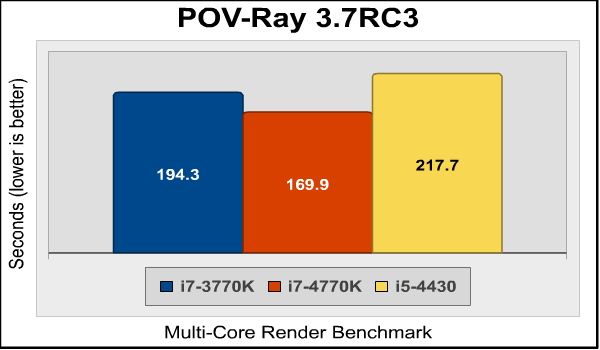
Again, this is what we’re coming to expect, although the 4770K’s lead is a little smaller here than it is elsewhere.
I investigated the performance of the new HD4600 integrated GPU in my original Core i7-4770K review. My conclusion: much better, but still no match for even the cheapest discrete graphics card. Since the Core i7-4770K and Core i5-4430 have the same iGPU, with the only difference being that the maximum clock speed of the former is slightly higher (1250MHz vs. 1100MHz), I thought it would be interesting to compare their performance. Let’s start with Unigine Heaven:
Heaven 3.0 settings: 1680×1050, moderate tessellation, medium shaders, no anti-aliasing, and 4x anisotropic filtering

The 4430 gives up only about 9% to the 4770K. Moving on to Aliens vs. Predator:
AvP Settings: 1680×1050, medium textures, low shadows, advanced shadows off, SSAO off, no anti-aliasing, 8x anisotropic filtering

Here, the difference is even smaller: the 4430 is only about 6% slower than the 4770K.
Last, let’s take a look at 3DMark 11‘s GT1 through GT4 tests. These tests render underwater and jungle scenes with tessellation and multiple light sources, with distance blur and other features added with post-processing passes. For these tests I selected the “Performance” presets and set the resolution to 1680×1050.

The GT1 and GT2 render underwater scenes with lots of cloudy water, moving submarines with light sources, and large structures seen murkily through the haze. The 4430 give up 12.5% in GT1 and 13.5% in GT2.

Again, we see that the 4430 is nipping at the heels of the 4770K.
Last, let’s take a look at the Lost Planet benchmark.

And the 4430 turns in exactly the same performance as the twice-as-costly 4770K. I guess they really are using the same iGPU.
But nobody would actually play any of these games with the iGPU. They’d use a real video card. Let’s consider this in the next section…
In the previous section, we saw that the integrated GPU in the 4430 comes very close to matching the performance of the iGPU in the Core i7-4770K. However, although the performance of this iGPU is much better than that of its predecessors, nobody would really use it for any sort of gaming more demanding than, say, Minecraft. If you’re any sort of gamer, you’re going to have a separate video card.
And if you’re like most gamers, you have to consider the tradeoff between buying a high-end CPU and a high-end video card. As we’ve seen from the previous sections, in terms of performance the 4430 is considerably slower than the 4770K. Running benchmarks can be fun, but the real question is “How will the Core i5-4430 work as a gaming CPU compared to the Core i7-4770K?”
To answer this question, I replaced the Radeon HD6850 card I used in my testing rig with an XFX Radeon HD7970 Black Edition Double Dissipation. This card runs its overclocked GPU at a gigaHertz, just like AMD’s “GigaHertz edition” cards, except that it came out months earlier. With the iGPUs on the 4430 and 4770K disabled, the only difference in the test setups were the CPUs. I ran these tests at the most popular gaming resolution, 1920×1080, and turned most in-game settings up as high as they would go.
Let’s start with the Unigine Heaven 4.0 benchmark:
 Well, there’s our first data point: as far as Unigine Heaven 4.0 is concerned, these CPUs are equal. The 0.3 frames per second advantage the 4430 has is well within the margin of error for this benchmark. Next, let’s try 3dMark 11:
 Again, we see identical performance.
 Identical performance here, too.
In the next section we’ll try some actual game benchmarks to see if the results we found in the synthetic benchmarks hold true there.
The Aliens vs. Predator benchmark is up next:

So far, it’s looking good. How about Lost Planet 2?
 Here is the first hint that you might be giving up some gaming performance with the 4430 CPU: the 2.9 fewer frames per second you get with the 4430 represents about a 5% performance drop. But let’s throw something really tough at the system: Metro 2033!
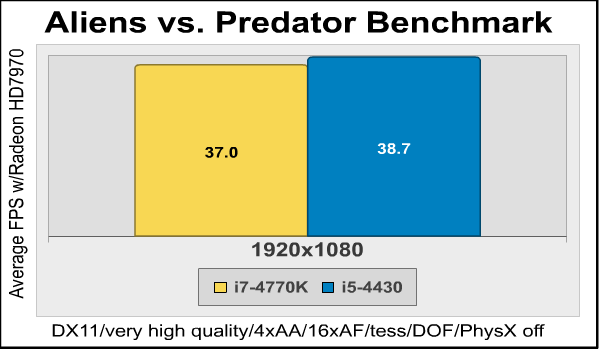 Here, the Core i5-4430 makes up for its slight loss in the Lost Planet 2 test by beating the Core i7-4770K by 1.7 frames per second, or just under 5%.
So based on these tests, if you’re a gamer, there’s little reason to spend almost twice as much money for a Core i7-4770K CPU. I’ll present my final thoughts and conclusion in the next section.
The Core i5-4430 was not in the initial release of Haswell CPUs a few months ago, but it’s out now. As usual, Intel positions their processors by tweaking base and turbo clock speeds, adding or removing Hyper-Threading, and adjusting the cache size. In some cases more obscure features like virtualization support are involved, but in this case the 4430 is simply a slightly cut-down version of the range-topping 4770K. For the enthusiast market, the most important omission is that as a non-“K” series CPU, you cannot overclock the 4430– not even a little bit.
So, what does this mean in terms of benchmark performance? The chart below compares the scores of all the benchmarks I ran, with the 4770K scores normalized to 1.0 and the 4430 scores expressed as a fraction of that.
| 4770K | 4430 | 4770K | 4430 | ||
| AIDA64 Queen | 1.0 | 0.65 | x264HD Pass 1 | 1.0 | 0.70 |
| AIDA64 Photoworxx | 1.0 | 1.08 | x264HD Pass 2 | 1.0 | 0.76 |
| AIDA64 AES | 1.0 | 0.84 | SPECviewperf Lightwave | 1.0 | 0.82 |
| AIDA64 ZLIB | 1.0 | 0.69 | SPECviewperf Maya | 1.0 | 0.90 |
| AIDA64 Hash | 1.0 | 0.90 | SPECviewperf TCVIS | 1.0 | 0.82 |
| CINEBENCH Single Core | 1.0 | 0.80 | SPECapc Lightwave Interactive | 1.0 | 1.12 |
| CINEBENCH Multi Core | 1.0 | 0.56 | SPECapc Lightwave Multitasking | 1.0 | 0.79 |
| Handbrake 0.96 | 1.0 | 0.75 | SPECapc Lightwave Rendering | 1.0 | 0.71 |
| PCMark 7 PCMarks | 1.0 | 0.96 | Blender/Icetest | 1.0 | 0.65 |
| PCMArk 7 Productivity | 1.0 | 0.84 | POV-Ray | 1.0 | 0.78 |
| PCMArk 7 Creativity | 1.0 | 1.01 | Arcsoft Media Converter | 1.0 | 0.91 |
| PCMark 7 Computation | 1.0 | 0.88 | Average Performance Deficit | 18% | |
The single-core performance of the 4430 is actually closed to that of the 4770K than you’d expect. However, the multi-core performance is much worse: the smaller cache and lack of Hyper-Threading really affect the scores in heavily threaded benchmarks like CINEBENCH Multi Core.
But once we add a high-end video card and start testing gaming performance, the performance difference vanishes:
| 4770K | 4430 | |
| Heaven 4.0 | 1.0 | 0.99 |
| 3DMark 11 GT1 | 1.0 | 1.0 |
| 3DMark 11 GT2 | 1.0 | 1.0 |
| 3DMark 11 GT3 | 1.0 | 0.99 |
| 3DMark 11 GT4 | 1.0 | 1.0 |
| Alien vs. Predator | 1.0 | 1.0 |
| Lost Planet | 1.0 | 0.96 |
| Metro 2033 | 1.0 | 1.05 |
| Average Performance Deficit | 1% | |
With only a barely-perceptible 1% average performance drop over these benchmarks, there’s no reason to spend the extra money for a 4770K if gaming is your main activity.
I’ll present my conclusions on the Core i5-4430 in the last section.
Enthusiasts prefer the fastest hardware they can afford, but not all the dollars you spend on your rig have the same proportional effect. If you are a professional video producer, or perhaps just spend a lot of time ripping DVDs and transcoding video, then the extra money for a top-end CPU like the 4770K makes sense.
But the 4430 doesn’t give up as much as you’d expect in that category, especially if you’re using a QuickSync-aware program like Arcsoft’s Media Converter, where the performance of the Core i5 CPU was a full 91% of the performance of the Core i7. Now, it’s certainly true that the 4770K can be overclocked while the 4430 cannot, but as our overclocking tests have shown, there’s not as much headroom in the Haswell architecture as you might expect, where aggressive overclocking achieved only a 13% or so performance increase.
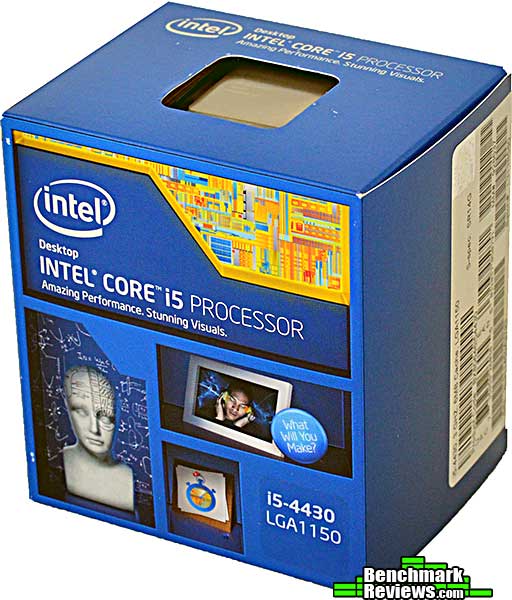
For gamers, the video card is the “gating factor” for performance, as long as your CPU is fast enough– and the Core i5-4430 is plenty fast enough. At $185.99 (ATD Computers), it’s much less expensive than the Core i7-4770K, and that’s money you can put into a higher performance video card or more memory.
For most people, even avid gamers, there’s simply no need to spend more money on a CPU that’s faster than this.
+ Excellent price/performance ratio
+ Same HD4600 iGPU as the top-end Haswell CPUs
– Can’t be overclocked
– Significantly slower than top-end Haswells on heavily threaded workloads
-
Performance: 9.50
- Overclock: N/A
-
Construction: 9.00
-
Functionality: 9.25
-
Value: 9.75


